자율주행 수업
Notice
- 컴터번호
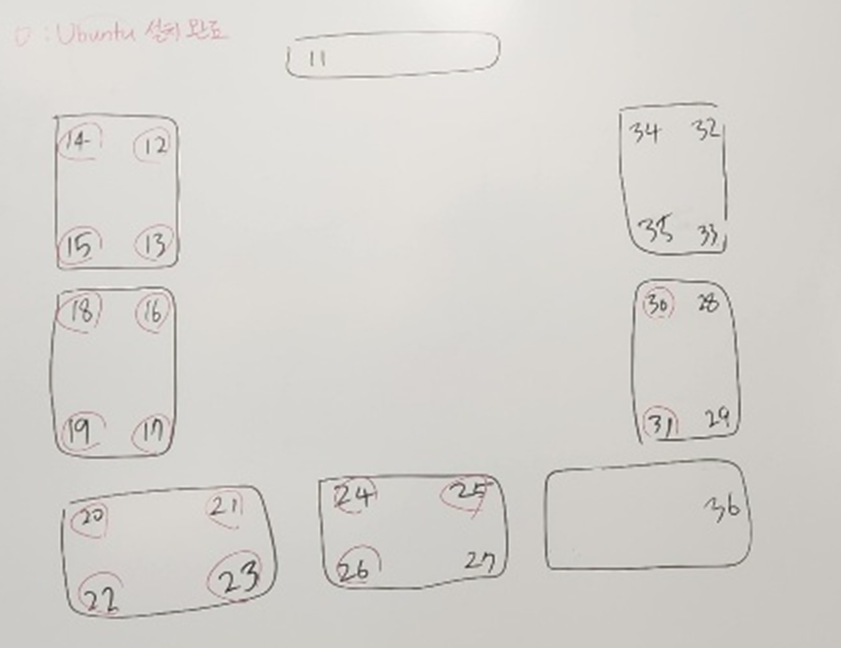
우분투 환경 세팅
-
20.04 LTS
-
Process
-
USB 부팅 (F7)
-
USB 구울 때(RUFUS), 파일시스템: 중앙 컴퓨터→ FAT32 / 나머지 컴퓨터 → NTFS
-
파티션 구성: GPT
-
파티션 메모리는 1000002MB (1TB)로 해줘야 함
-
부트로더 설치할 장치 우분투용 SSD 잘 선택해 줘야함
중앙 컴퓨터:
Your name: user
Your computer’s name: pnu-ai-lab ← 실제 할당된 번호
Pick a username: user
password: pnuailab@@나머지 컴퓨터:
Your name: user
Your computer’s name: user34 ← 실제 할당된 번호
Pick a username: user34
password: user
-
-
wifi setting
Address: 10.125.98.34
Netmask: 255.255.255.0
Gateway: 10.125.98.1
DNS: 164.125.9.2 -
화면 보호기 끄기, favorite에 firefox, folder, terminal 3개만 남기기
-
Terminal 창
sudo apt update -
Ros (Foxy 설치)
Ubuntu (Debian) — ROS 2 Documentation: Foxy documentation
-
Package install은 Desktop install 만 하면 됨
-
Environment setup
파일 → ctrl+H → bashrc에 아래 내용 추가# SDL setting # Replace ".bash" with your shell if you're not using bash # Possible values are: setup.bash, setup.sh, setup.zsh source /opt/ros/foxy/setup.bash -
잘 깔렸는지 확인
ros2 topic list
echo $ROS_DISTRO # <- 버전 FOXY
rqt_graph
rviz2
-
-
Nvidia Driver 설치
[Ubuntu 20.04 LTS]Nvidia드라이버 설치하기
-
버전: 550 설치
-
설치되면 재 부팅 후
nvidia-smisudo apt update # Ros2 foxy ========================================= locale # check for UTF-8 sudo apt update && sudo apt install locales sudo locale-gen en_US en_US.UTF-8 sudo update-locale LC_ALL=en_US.UTF-8 LANG=en_US.UTF-8 export LANG=en_US.UTF-8 locale # verify settings sudo apt install software-properties-common -y sudo add-apt-repository universe # GPG key 주소 바뀌는지 확인 해야함 sudo apt update && sudo apt install curl -y sudo curl -sSL https://raw.githubusercontent.com/ros/rosdistro/master/ros.key -o /usr/share/keyrings/ros-archive-keyring.gpg echo "deb [arch=$(dpkg --print-architecture) signed-by=/usr/share/keyrings/ros-archive-keyring.gpg] http://packages.ros.org/ros2/ubuntu $(. /etc/os-release && echo $UBUNTU_CODENAME) main" | sudo tee /etc/apt/sources.list.d/ros2.list > /dev/null sudo apt update sudo apt upgrade -y sudo apt install ros-foxy-desktop python3-argcomplete -y echo "source /opt/ros/foxy/setup.bash" >> ~/.bashrc # Installation verification ros2 topic list echo $ROS_DISTRO rqt_graph rviz2
-
-
Carla
https://www.notion.so/CARLA-87e0f72c952b41638d03d56b95390f5f?pvs=4
