[섹션4] 쿠버네티스 무게감 있게 설치하기
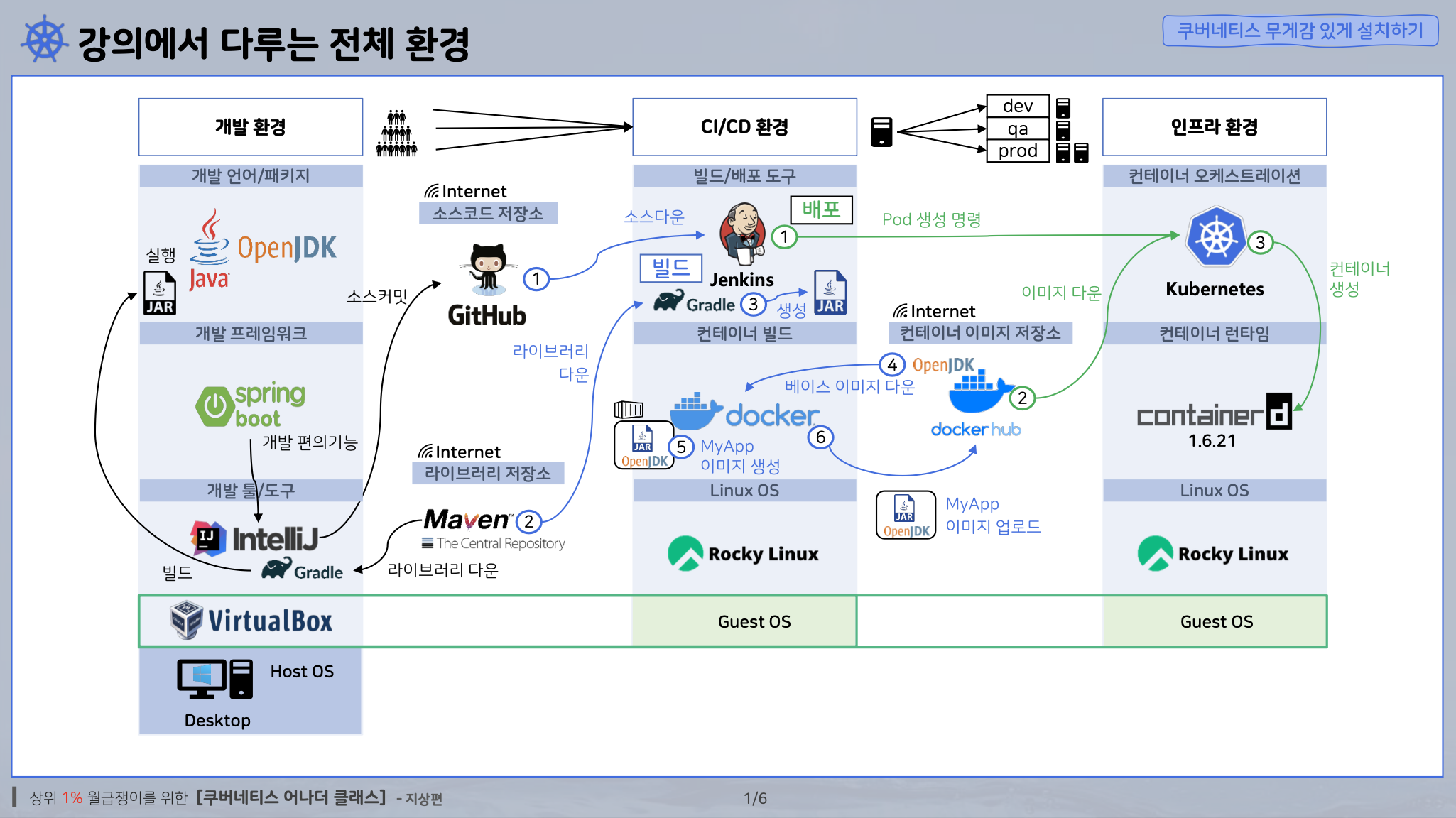
출처 - 인프런:쿠버네티스 어나더 클래스(지상편)
1. JDK란?
JDK는 Java Development Kit의 약자로, 자바로 프로그램을 개발할 때 필요한 개발 도구들의 모음이다.
쉽게 말해, 자바 프로그래밍을 하기 위한 기본 도구 세트이다.
| 구성 요소 | 설명 |
|---|---|
| JRE (Java Runtime Environment) | 자바 프로그램을 실행할 수 있게 해주는 환경 |
| javac | 자바 소스코드(.java)를 바이트코드(.class)로 컴파일해주는 컴파일러 |
| java | 컴파일된 자바 프로그램(.class 파일)을 실행하는 실행기 |
| jar | 자바 애플리케이션을 하나의 압축 파일로 묶는 도구 |
| jdb | 자바 디버거, 디버깅 도구 |
| jshell | 자바 코드 실습을 위한 REPL(Read-Eval-Print Loop) 도구 (Java 9 이상) |
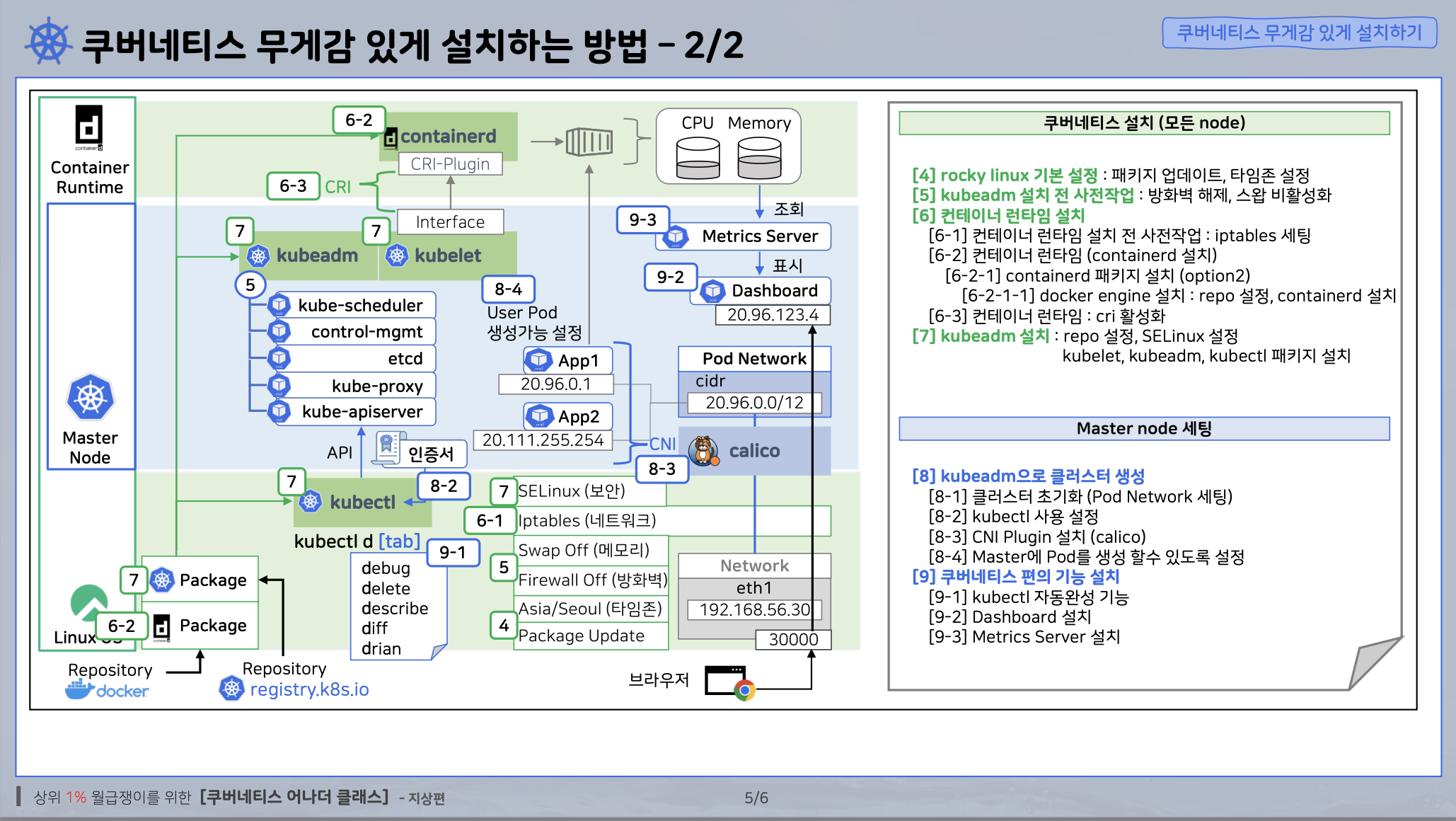
2. Kubectl
Rocky Linux에 설치한 것으로, 쿠버네티스에 CLI 통신으로 명령을 보낼 수 있는 것
3. 쿠버네티스 설치 명령어(arm64 Ver.)
echo '======== [4] Rocky Linux 기본 설정 ========'
echo '======== [4-1] 패키지 업데이트 ========'
# 강의와 동일한 실습 환경을 유지하기 위해 Linux Update 주석 처리
# yum -y update

echo '======== [4-2] 타임존 설정 ========'
timedatectl set-timezone Asia/Seoul
timedatectl set-ntp true
chronyc makestep

echo '======== [4-3] [WARNING FileExisting-tc]: tc not found in system path 로그 관련 업데이트 ========'
yum install -y yum-utils iproute-tc
echo '======== [4-3] [WARNING OpenSSL version mismatch 로그 관련 업데이트 ========'
yum update openssl openssh-server -y

echo '======= [4-4] hosts 설정 =========='
cat << EOF >> /etc/hosts
192.168.56.30 k8s-master
EOF

echo '======== [5] kubeadm 설치 전 사전작업 ========'
echo '======== [5] 방화벽 해제 ========'
systemctl stop firewalld && systemctl disable firewalld

echo '======== [5] Swap 비활성화 ========'
swapoff -a && sed -i '/ swap / s/^/#/' /etc/fstab

echo '======== [6] 컨테이너 런타임 설치 ========'
echo '======== [6-1] 컨테이너 런타임 설치 전 사전작업 ========'
echo '======== [6-1] iptable 세팅 ========'
cat <<EOF |tee /etc/modules-load.d/k8s.conf
overlay
br_netfilter
EOF

modprobe overlay
modprobe br_netfilter

cat <<EOF |tee /etc/sysctl.d/k8s.conf
net.bridge.bridge-nf-call-iptables  = 1
net.bridge.bridge-nf-call-ip6tables = 1
net.ipv4.ip_forward                 = 1
EOF

sysctl --system

echo '======== [6-2] 컨테이너 런타임 (containerd 설치) ========'
echo '======== [6-2-1] containerd 패키지 설치 (option2) ========'
echo '======== [6-2-1-1] docker engine 설치 ========'
echo '======== [6-2-1-1] repo 설정 ========'
yum-config-manager --add-repo https://download.docker.com/linux/centos/docker-ce.repo

echo '======== [6-2-1-1] containerd 설치 ========'
yum install -y containerd.io-1.6.21-3.1.el9.aarch64
systemctl daemon-reload
systemctl enable --now containerd

echo '======== [6-3] 컨테이너 런타임 : cri 활성화 ========'
containerd config default > /etc/containerd/config.toml
sed -i 's/ SystemdCgroup = false/ SystemdCgroup = true/' /etc/containerd/config.toml
systemctl restart containerd

echo '======== [7] kubeadm 설치 ========'
echo '======== [7] repo 설정 ========'
cat <<EOF | sudo tee /etc/yum.repos.d/kubernetes.repo
[kubernetes]
name=Kubernetes
baseurl=https://pkgs.k8s.io/core:/stable:/v1.27/rpm/
enabled=1
gpgcheck=1
gpgkey=https://pkgs.k8s.io/core:/stable:/v1.27/rpm/repodata/repomd.xml.key
exclude=kubelet kubeadm kubectl cri-tools kubernetes-cni
EOF

echo '======== [7] SELinux 설정 ========'
setenforce 0
sed -i 's/^SELINUX=enforcing$/SELINUX=permissive/' /etc/selinux/config

echo '======== [7] kubelet, kubeadm, kubectl 패키지 설치 ========'
yum install -y kubelet-1.27.2-150500.1.1.aarch64 kubeadm-1.27.2-150500.1.1.aarch64 kubectl-1.27.2-150500.1.1.aarch64 --disableexcludes=kubernetes
systemctl enable --now kubelet

echo '======== [8] kubeadm으로 클러스터 생성  ========'
echo '======== [8-1] 클러스터 초기화 (Pod Network 세팅) ========'
kubeadm init --pod-network-cidr=20.96.0.0/16 --apiserver-advertise-address 192.168.56.30

echo '======== [8-2] kubectl 사용 설정 ========'
mkdir -p $HOME/.kube
cp -i /etc/kubernetes/admin.conf $HOME/.kube/config
chown $(id -u):$(id -g) $HOME/.kube/config

echo '======== [8-3] Pod Network 설치 (calico) ========'
kubectl create -f https://raw.githubusercontent.com/k8s-1pro/install/main/ground/k8s-1.27/calico-3.26.4/calico.yaml
kubectl create -f https://raw.githubusercontent.com/k8s-1pro/install/main/ground/k8s-1.27/calico-3.26.4/calico-custom.yaml

echo '======== [8-4] Master에 Pod를 생성 할수 있도록 설정 ========'
kubectl taint nodes k8s-master node-role.kubernetes.io/control-plane-

echo '======== [9] 쿠버네티스 편의기능 설치 ========'
echo '======== [9-1] kubectl 자동완성 기능 ========'
yum -y install bash-completion
echo "source <(kubectl completion bash)" >> ~/.bashrc
echo 'alias k=kubectl' >>~/.bashrc
echo 'complete -o default -F __start_kubectl k' >>~/.bashrc
source ~/.bashrc

echo '======== [9-2] Dashboard 설치 ========'
kubectl create -f https://raw.githubusercontent.com/k8s-1pro/install/main/ground/k8s-1.27/dashboard-2.7.0/dashboard.yaml

echo '======== [9-3] Metrics Server 설치 ========'
kubectl create -f https://raw.githubusercontent.com/k8s-1pro/install/main/ground/k8s-1.27/metrics-server-0.6.3/metrics-server.yaml
4. 버전 Status
LTS로 설치해야함.
장기 지원 버전(Long-Term Support)
5. 쿠버네티스 설치하기 공식문서
6. Master Node

DevOps를 기반으로 한 클라우드, 알고리즘, 백엔드 관심있는 컴공생