Chapter 1: Computer Abstractions and Technology
Classes of Computers
- Personal computers(PCs): General purpose, variety of software, subject to cost/performance tradeoff
- Server computers (Network Based): High capacity, performance, reliability. Range from small servers to building sized.
- Super computers (Types of Server): High-end scientific and engineering calculations. Highest capability but represent a small fraction of the overall computer market.
- Embedded computers: Hidden as components of systems. Stringent power/performance/cost constraints.
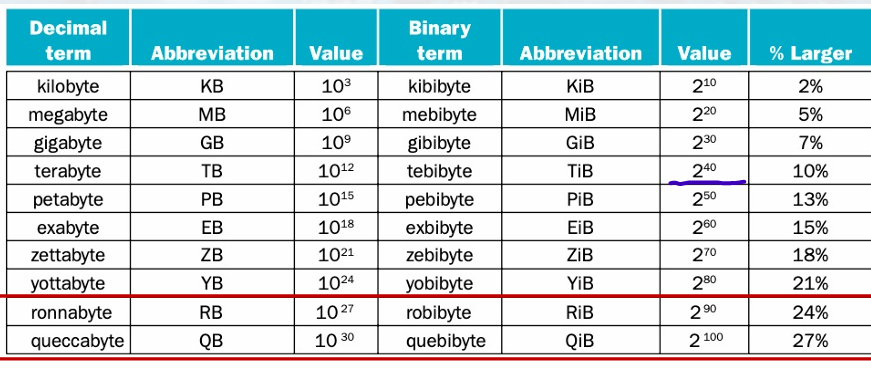
All the Common Size Terms
Understanding Performance
- Algorithm: Determines number of operations exectued.
- Programming language, compiler, architecture: Determine number of machine instructions executed per operation.
- Processor and memory system: Determine how fast instructions are executed.
- I/O system (including OS): Determines how fast I/O operations are executed.
Great Ideas
• Use Abstraction to simplify design.
• Make the Common Case Fast.
• Performance via Parallelism.
• Performance via Pipelining.
• Performance via Prediction.
• Hierarchy of memories.
• Dependability via redundance.
• Design for Moore's Law. (smaller transister)
Below your Program
- Application software:
- Written in High-Level Language (HLL).
- System software:
- Compiler: Translate HLL code to machine code.
- Operation system (OS): service code.
- Handling input/output.
- Managing memory and storage.
- Scheduling tasks & sharing resources.
- Hardware:
- Processor, memory, I/O controllers.
Levels of Program Code
- High-Level Language (HLL): (C, JAVA)
Level of abstraction closer to problem domain.
Provides for productivity and portability. - Assembly language:
Textual representation of instructions. - Hardware representation:
Binary digits (bits).
Encoded instructions and data.
Components of a Computer
Input/output includes:
• User-interface devices: Display, keyboard, mouse.
• Storage devices: Hard disk, CD/DVD, flash.
• Network adapters: For communicating with other computers.
Touch screen
resistive
capacitive allows multiple touches simultaneously (용량성)
Through the looking glass
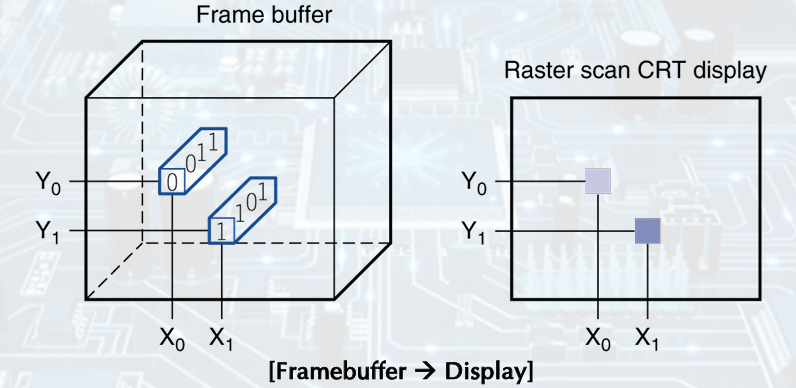
LCD screen: picture elements (Pixels), Mirrors content of frame buffer memory
Inside the Processor (CPU)
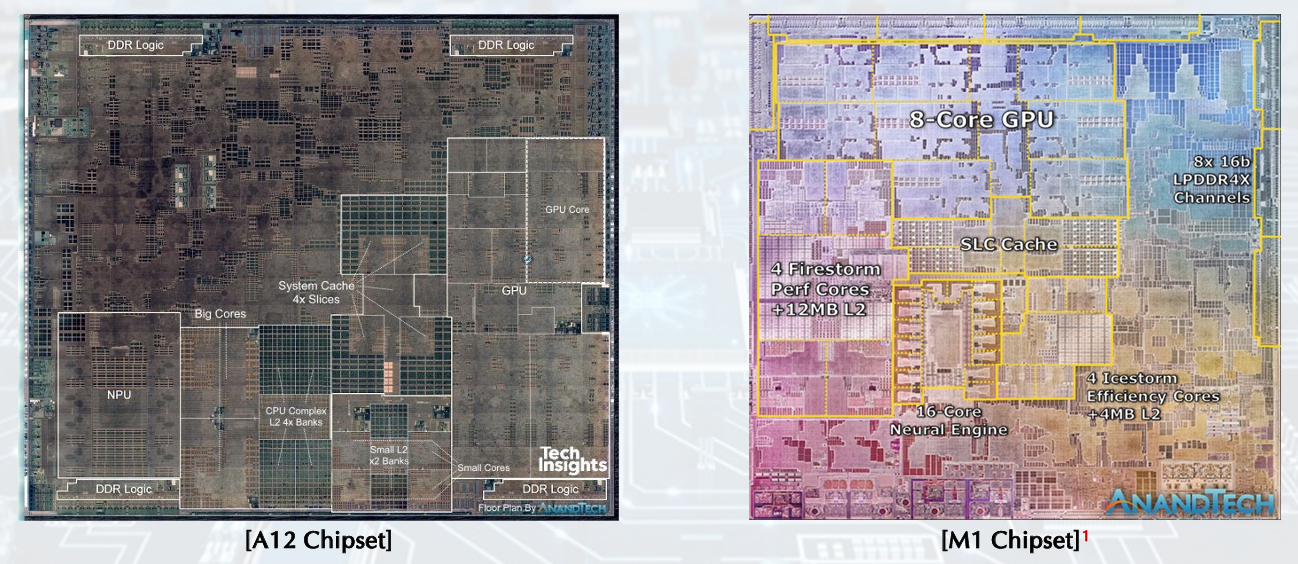
• Datapath: performs operations on data.
• Control: sequences datapath, memory, and more.
• Cache memory: Small fast SRAM memory for immediate access to data.
Abstractions
- Abstraction helps us deal with complexity: Hide lower-level detail (어떻게 작동하는지 모르는데 잘 사용함)
• Instruction Set Architecture (ISA): The hardware/software interface.
• Application Binary Interface (ABI): The ISA plus system software interface.
• Implementation: The details underlying and interface.
A safe place for data
• Volatile main memory: Loses instructions and data when power off.
• Non-volatile secondary memory: Magnetic disk, Flash memory, Optical disk (CDROM, DVD)
Networks
• Communication, resource sharing, nonlocal access.
• Local Area Network (LAN): Ethernet.
• Wide Area Network (WAN): the Internet.
• Wireless network: WiFi, Bluetooth.
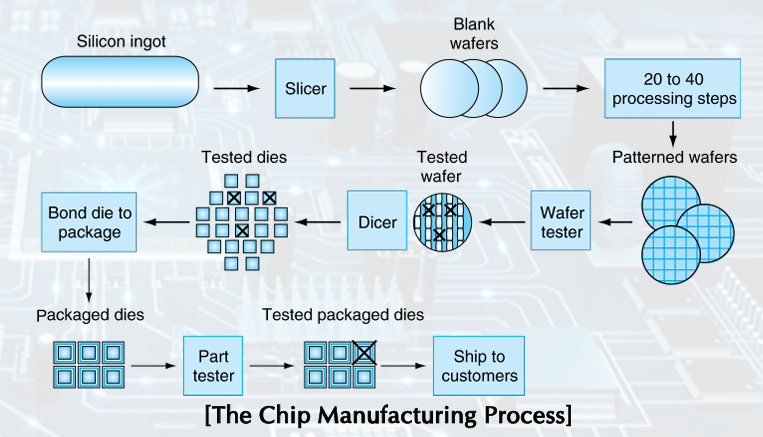
Semiconductor Technology & Manufacturing ICs
Silicon - conductor, insulator, switch
yield: proportion of working dies per wafer
300mm wafer, 506 chips, 10nm technology. chip is 11.4 x 10.7mm (Intel Core 10th Gen)
Integrated Circuit Cost
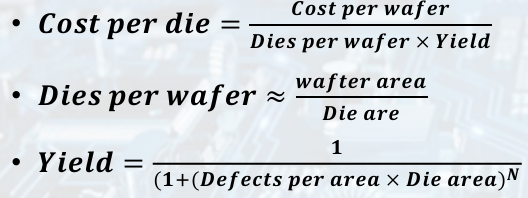
• Wafer cost and area are fixed. (문제 x)
• Defect rate determined by manufacturing process.
• Die area determined by architecture and circuit design.
Performance
Example-airplane
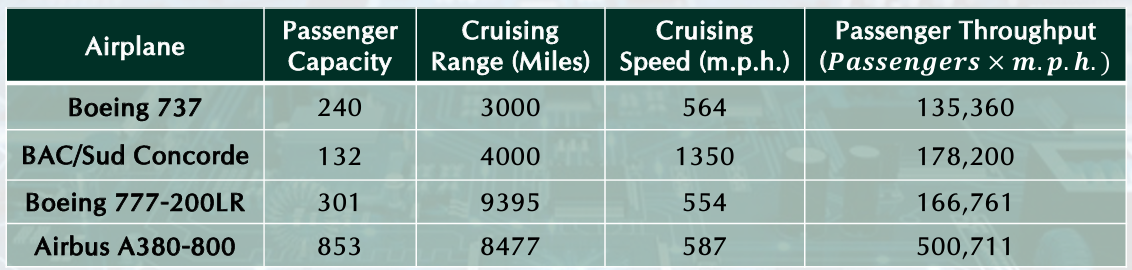
Response Time and Throughput
• Response time: How long it takes to do a task.
• Throughput: Total work done per unit time. Ex) tasks/transactions/… per hour.
We will focus on response time for now
Measuring Execution Time
Elapsed time (normally The response time): Total response time, including all aspects, processing, I/O, OS overhead, idle time.
CPU execution time: Time spent processing a given job, discounts I/O time, other jobs’ shares.
Comprises user CPU time, system CPU time. different program, differently affected
CPU Clocking
-
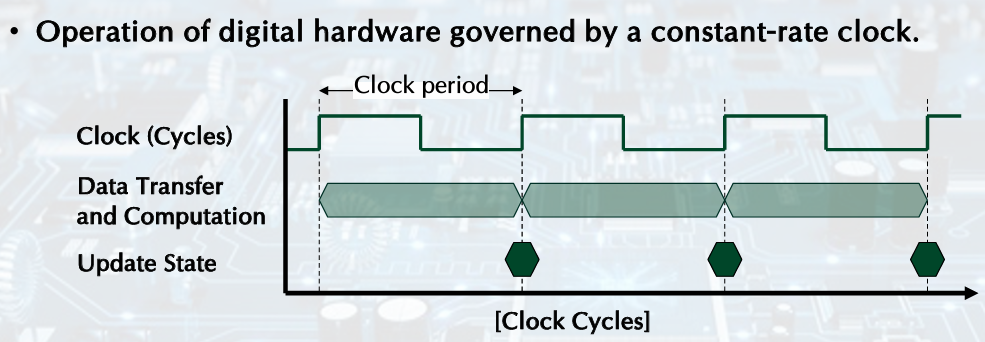
Clock period: duration of a clock cycle. (주기)
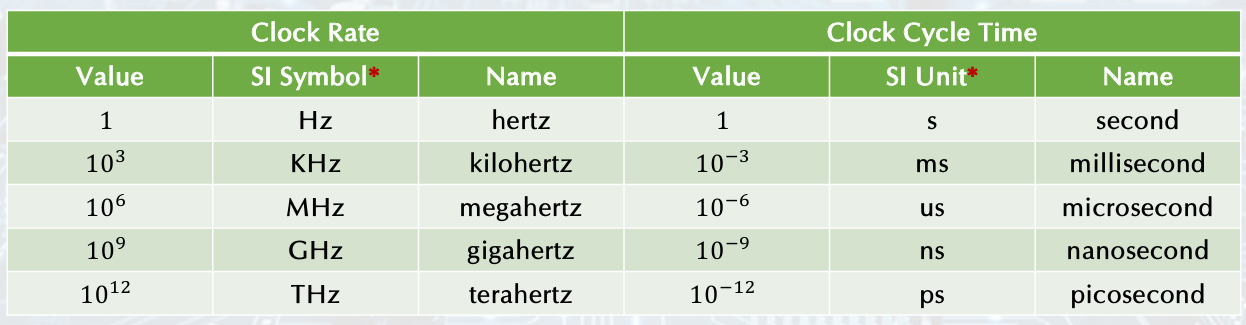
ex) 250ps = 0.25ns = 250s -
Clock cycle time: the amount of time for one clock period to elapse (one clock period의 시간)
-
Clock frequency (rate): cycles per second (일정 시간당 얼마나 움직였는지)
ex) 4.0GHz = 4000MHz = 4.0Hz- Clock cycle time is the inverse of the clock rate
- Clock cycle time is the inverse of the clock rate
-
Clock Signal: oscillates between a high and a low state like a metronome
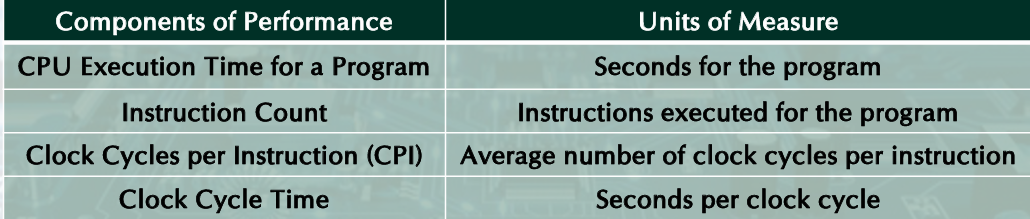
CPU Performance: formula
Relative Performance
Define performance:
X is n time faster than Y
CPU Clocking
Clock cycle time is inverse of clock rate
Clock cycles calculation: one instruction
Clock cycles calculation: different instruction classes
take different number of cycles (clock cycles)
Weighted average CPI:
calculate CPU Time
CPU Performance: Example
Example: Comparing Code Segments
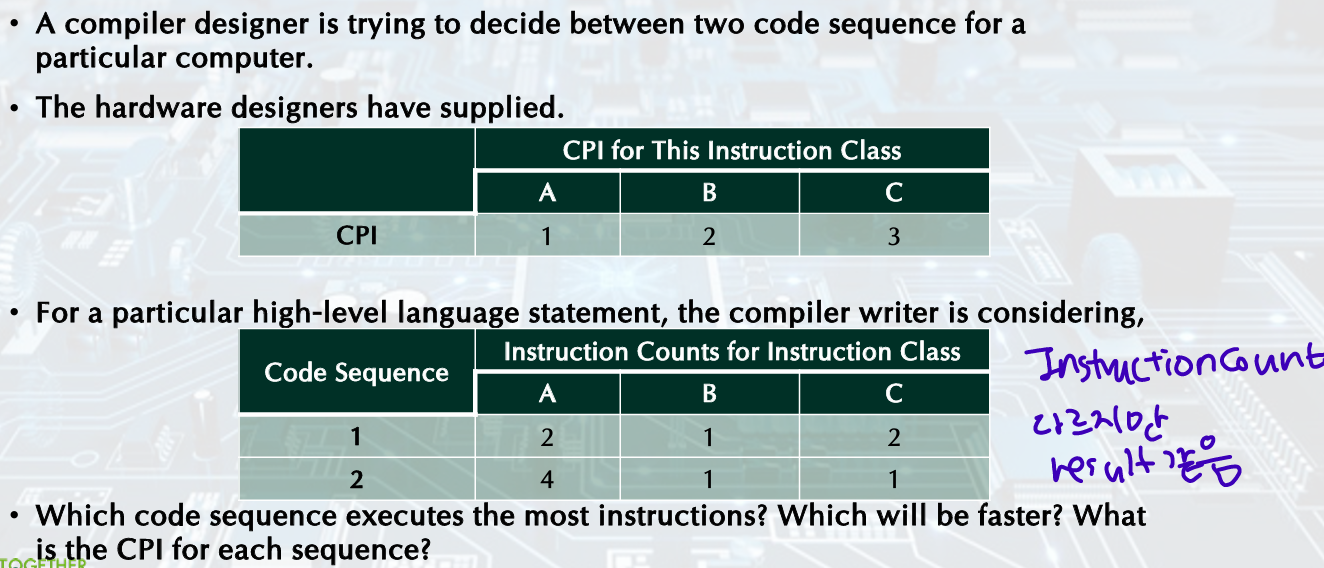
- Instruction
- Cycles
- CPI
Example1??
Computer A: 2GHz clock, 10s CPU time for a program
A new computer B, Target: 6s CPU Time for the program
Impromving clock rate affect the hardware design -> no change in clock rate but change CPU Clock Cycles
First, the number of clock cycles required for the program on A:
Then, CPU time for B:
Therefore, computer B requires 1.2 times more clock cycles than computer A.
Example2-Instruction count and CPI
Which computer is faster? in same ISA
Computer A
Clock cycle time: 250ps, CPI: 2.0 for a program X
Computer B
Clock cycle time: 500ps, CPI 1.2 for a program X
First, find CPU clock cycles (I = The number of instruction for program X)
(clock cycles = instruction count * CPI)
CPU Performance: additional information
Performance improved by
• Reducing number of clock cycles.
• Increasing clock rate.
• Hardware designer must often trade off clock rate against cycle count.
Instruction count: determined by program, ISA and compiler
Average cycles per instruction (CPI): determined by CPU hardware.
If different instructions have different CPI, average CPI affected by instruction mix
Performance Summary
Performance depends on:
• Algorithm: affects Instruction Counts (IC), possibly CPI.
• Programming language: affects IC, CPI.
• Compiler: affects IC, CPI. (이상한거 제거 많이 함)
• ISA: affects IC, CPI, Clock rate.
Power, Processors
In CMOS IC technology,
(암기x)
Processors
- Uniprocessor Performance
Growth in Processor Performance increase and stop because they are constrained by Power, Instruction-level Paralleism, and Memory Latency
Multiprocessors
- Multicore microprocessors: More than one processor per chip.
- Requires explicitly parallel programming:
- Compare with instruction level parallelism.
- Hardware executes multiple instructions at once.
- Hidden from the programmer.
- Hard to do.
- Programming for performance.
- Load balancing.
- Optimizing communication and synchronization.
Pitfall: Amdahl's Law
:Improving an aspect of a computer and expecting a proportional improvement in over all performance.
Ex) multiply accounts for 80s/100s. (affected/total)
• How much improvement in multiply performance to get 5× overall?
:make the common case fast (자주 발생하는 상황을 빠르게)
Fallacy: Low Power at Idle
-
Look back at i7 power benchmark:
• At 100% load: 258W.
• At 50% load: 170W (66%).
• At 10% load: 121W (47%). -
Google data center:
• Mostly operates at 10% 50% load.
• At 100% load less than 1% of the time. (100% load하는 경우는 거다) -
Consider designing processors to make power proportional to load.
Pitfall: MIPS as a Performance Metric
MIPS: Millions of Instructions Per Second (이제 잘 안씀)
Doesn’t account for
• Differences in ISAs between computers.
• Differences in complexity between instructions.
CPI varies between programs on a given CPU.
Conclusion
• Cost/performance is improving:
Due to underlying technology development.
• Hierarchical layers of abstraction:
In both hardware and software.
• Instruction set architecture:
The hardware/software interface.
• Execution time: the best performance measure.
• Power is a limiting factor:
Use parallelism to improve performance.