this는 함수가 호출될 때 결정된다.
전역에서의 this
전역 객체는 런타임에 결정된다
| 브라우저 환경 | Node 환경 |
|---|---|
| window 객체 | global 객체 |
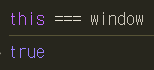 | 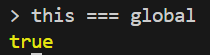 |
함수에서의 this
Obj.func()
'메서드'는 호출의 주체인 Obj가 존재하므로, this는 .앞에 존재하는 obj이다.
const obj = {
  getThis: function () {
    console.log('this:', this);
  },
};

obj.getThis(); // this: obj
func()
독립적인 '함수'라면, 호출의 주체가 없다. (.앞에 존재하는 obj가 없다)
따라서, 이때 this는 전역 객체이다.
const getThis = function () {
  console.log('this:', this)
};

getThis() // this: 전역객체
callback 함수
일반적으로 콜백함수의 this는 전역객체를 가리킨다.
setTimeout(function () {
  console.log(this); // 전역객체
}, 300);
예외적으로 addListener의 콜백함수에서 this는 항상 호출한 element를 가리킨다.
const btn = document.getElementById('button');
btn.addEventListener('click', function () {
  console.log(this); // button
});
생성자 함수
var Person = function (name, age) {
  this.name = name;
  this.age = age;
};

var hanbyeol = new Person('한별', 24); // this : hanbyeol
var gildong = new Person('길동', 10); // this : gildong
this 우회
[참고] 변수를 활용
const obj = {
  func: function () {
    console.log(this); // obj

    var getThis1 = function () {
      console.log(this); // 전역객체
    };
    getThis1();

    /* 변수를 활용하여 this를 obj로 고정 */
    const self = this;
    var getThis2 = function () {
      console.log(self); // obj
    };
    getThis2();
  },
};

obj.func();
하지만 이 방법보다 call, apply, bind를 사용하면 깔끔하게 처리 가능하다!
화살표 함수
ES6에서 처음 도입된 화살표 함수는, this 바인딩을 하지 않는다.
함수 내부에서 this가 전역객체를 바라보는 문제를 없앨 수 있다.
const obj = {
  getThis: () => {
    console.log(this); // undefined
  },
};
obj.getThis();
명시적 바인딩
call, apply, bind
call
call(바인딩할_객체, ...params)
this와 객체를 바인딩해주며 즉시 함수를 실행시킨다.
var getThis = function (a, b) {
  console.log(this, a, b); // 전역객체 1 2
};

getThis(1, 2);
앞에서 배운대로 이 코드를 실행하면 this는 전역객체일 것이다.
call을 사용하여 this를 바인딩해보자!
var getThis = function (a, b) {
  console.log(this, a, b); // { x: 1 } 1 2
};

getThis.call({ x: 1 }, 1, 2);
apply
apply(바인딩할_객체, params)
call과 완전히 같은데, parameter를 배열로 묶어준다.
var getThis = function (a, b) {
  console.log(this, a, b); // { x: 1 } 1 2
};

getThis.apply({ x: 1 }, [1, 2]);
call & apply 활용 1 : 함수 상속
var Person = function (name, age) {
  this.name = name;
  this.age = age;
};

var Developer = function (name, age, language) {
  //   this.name = name;
  //   this.age = age;
  Person.call(this, name, age);
  this.language = language;
};

var gildong = new Person('길동', 10); // { name: '길동', age: 10 }
var hanbyeol = new Developer('한별', 24, 'javascript'); // { name: '한별', age: 24, language: 'javascript' }
중복 코드를 없앨 수 있다.
[참고] call & apply 활용 2 : 메서드 차용
유사배열'객체'는 배열의 함수를 직접 적용할 수 없지만, call 또는 apply를 이용해 배열 메서드를 차용할 수 있다.
🤓 유사배열 객체
- length 속성을 가짐
- index가 0부터 시작해서 1씩 증가
var obj = {
  0: 'a',
  1: 'b',
  length: 2,
};
Array.prototype.push.call(obj, 'c');
console.log(obj); // { '0': 'a', '1': 'b', '2': 'c', length: 3 }
하지만 이는 원래 바인딩의 목적과 많이 벗어난다.
ES6에서 Array.from(obj) 함수를 제공해서 객체를 배열로 쉽게 변환할 수 있다!
마찬가지로 배열은 Math.max나 min 함수를 적용할 수 없지만 apply를 이용하면 된다.
const numbers = [10, 20, 3, 16, 45];

var max = Math.max.apply(null, numbers); // 45
var min = Math.min.apply(null, numbers); // 3
하지만 스프레드 연산자를 쓰는 것이 훨씬 간단하다 ^_^
bind
apply(바인딩할_객체, ...params)
함수에 this 값을 '미리' 바인딩할 때 사용한다.
call, apply와 달리 함수를 즉시 호출하지는 않는다.
미리 매개변수에 값을 지정하고 싶다면 params를 넣으면 된다.
var getThis = function (a, b) {
  console.log(this, a, b);
};

var boundGetThis = function (a, b) {
  console.log(this, a, b);
}.bind({ x: 1 });

var boundGetThisWithParam = getThis.bind({ x: 1 }, 1);

getThis(1, 2); // 전역객체 1 2
boundGetThis(1, 2); // { x: 1 } 1 2
boundGetThisWithParam(2); // { x: 1 } 1 2

console.log(getThis); // [Function: getThis]
console.log(boundGetThisWithParam); // [Function: bound getThis]
bind된 함수는 함수 이름 앞에 'bound'가 붙는다