1. 목표
네이버 블로그 메인 화면에서 볼 수 있는 호버 기능 구현하기
2. 구현 미리보기
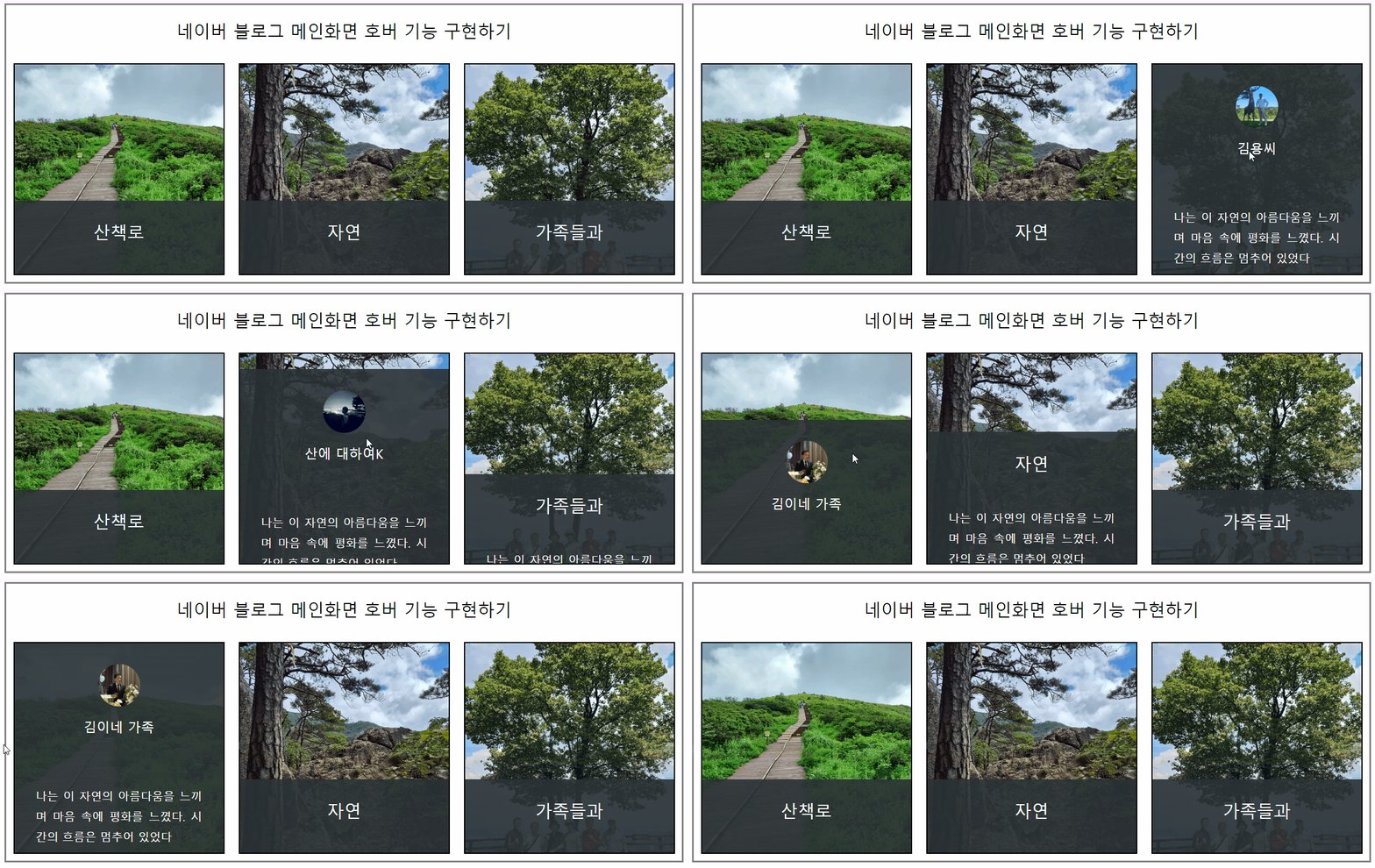
자바스크립트까지 갈 것도 없이 CSS로 간단하게 구현할 수 있는 기능이다.
3. 구현하기
<!DOCTYPE html>
<html lang="en">
<head>
    <meta charset="UTF-8">
    <meta name="viewport" content="width=device-width, initial-scale=1.0">
    <title>네이버 블로그 메인화면 이미지 호버기능 연습</title>
    <style>
        * {margin: 0; padding: 0; box-sizing: border-box;}
        img {display: block; max-width: 100%;}
        #layout {max-width: 960px; margin: auto; border: 3px solid gray;}
        h2,h3 {font-weight: 400; text-align: center;}
        section>h2 {margin: 20px 0;}
        h3 {padding: 15px 0 20px; display: none;}
        p {padding-top: 20px;}
        h2 + div {display: flex;}
        .thumb {
            width: 300px; height: 300px; border: 2px solid black; margin: 10px;
            background-position: left center;
            background-size: cover;
            position: relative;
            overflow: hidden;
        }
        .thumb:hover div {top: 0;}
        .thumb:hover img {display: block;}
        .thumb:hover h3 {display: block;}
        .thumb:hover h2 {display: none;}


        .thumb:nth-child(1) {background-image: url("images/1.jpg");}
        .thumb:nth-child(2) {background-image: url("images/3.jpg");}
        .thumb:nth-child(3) {background-image: url("images/5.jpg");}

        .thumb div {
            background-color: rgba(42, 50, 53, 0.9); height: 100%;
            color: white; padding: 30px; text-align: justify; line-height: 180%;
            background-position: absolute;
            position: absolute;
            top: 65%; transition: top 0.5s;

        }
        .thumb img {
            border-radius: 50%; margin: auto;
            /* box-shadow: 0 0 10px black; */
            width: 60px;
            display: none;
        }
    </style>
</head>
<body>
    <div id="layout">
        <section>
            <h2>네이버 블로그 메인화면 호버 기능 구현하기</h2>
            <div>
                <div class="thumb">
                    <div>
                        <img src="images/2.jpg" alt="김이네 가족">
                        <h3>김이네 가족</h3>
                        <h2>산책로</h2><br>
                        <p>나는 이 자연의 아름다움을 느끼며 마음 속에 평화를 느꼈다. 시간의 흐름은 멈추어 있었다</p>
                    </div>
                </div>
                <div class="thumb">
                     <div>
                        <img src="images/4.jpg" alt="산에 대하여">
                        <h3>산에 대하여K</h3>
                        <h2>자연</h2><br>
                        <p>나는 이 자연의 아름다움을 느끼며 마음 속에 평화를 느꼈다. 시간의 흐름은 멈추어 있었다</p>

                    </div>
                </div>
                <div class="thumb">
                    <div>
                        <img src="images/6.jpg" alt="김용씨">
                        <h3>김용씨</h3>
                        <h2>가족들과</h2><br>
                        <p>나는 이 자연의 아름다움을 느끼며 마음 속에 평화를 느꼈다. 시간의 흐름은 멈추어 있었다</p>
                    </div>
                </div>
                </div>
            </div>
        </section>
    </div>
</body>
</html>
4. 요약
-
.thumb을 호버했을 때display:none;이었던h3과img가block되며 나타난다. 반대로h2는display:none;된다. -
<h2>네이버 블로그 메인화면 호버 기능 구현하기</h2>은 .thumb 내부에 포함되어 있지 않고,<section>안에 직접 위치해 있다. 따라서 .thumb에 호버할 때 해당<h2>은 영향받지 않는다.

문과의 입장에서 바라본 코딩