
-
git hub 주소를 통해 불러옴
-
settings.gradle에서 rootProject 이름 원하는 대로 바꿔주기

-
jsp에 contextPath 변수 선언해주기
<c:set var="cpath" value="${pageContext.request.contextPath}"/>재사용성을 위해 contextPath를 EL식으로 넣어 변수 선언해줌.
원래 ContextPath가 /s01이므로
아래에서 사용해줄 때 ${cpath}로 사용하면 됨
RestController
- restcontroller package 생성 후
- BookRestController 생성
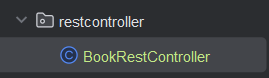
- servelet-context.xml에 scan을 위해 추가해주기

- client가 server의 자원을 가져오기 위해 어떻게 하나?
- server는 자원을 접근할 수 있는 표현(representation)이 있어야 한다.
- client가 server에게 요청하는 방식(get, post, put, delete)에 따라 자원을 가져가는 주소가 달라짐
- 자원의 주소(URL), 2. Client의 요청방식을 RestAPI의 표현식으로 만들어주어야 한다.
🔰 JSON
(JavaScript Object Notation) is a lightweight data-interchange format
- build.gradle에 추가

implementation 'com.fasterxml.jackson.core:jackson-databind:2.13.0'BookRestController
package kr.smhrd.restcontroller;

import kr.smhrd.entity.Book;
import kr.smhrd.service.BookService;
import lombok.RequiredArgsConstructor;
import org.springframework.web.bind.annotation.GetMapping;
import org.springframework.web.bind.annotation.RequestMapping;
import org.springframework.web.bind.annotation.RestController;

import java.util.List;

@RestController // 여기서 R : representation
@RequestMapping("/api")
@RequiredArgsConstructor
public class BookRestController {
    // 1. 자원의 주소(URL), 2. Client의 요청방식을 RestAPI의 표현식으로 만들어주어야 한다.

    private final BookService bookService;

    // 책 목록 보기
    @GetMapping("/book")
    public List<Book> bookList(){
        List<Book> list =  bookService.bookList();
        return list;
    }
}
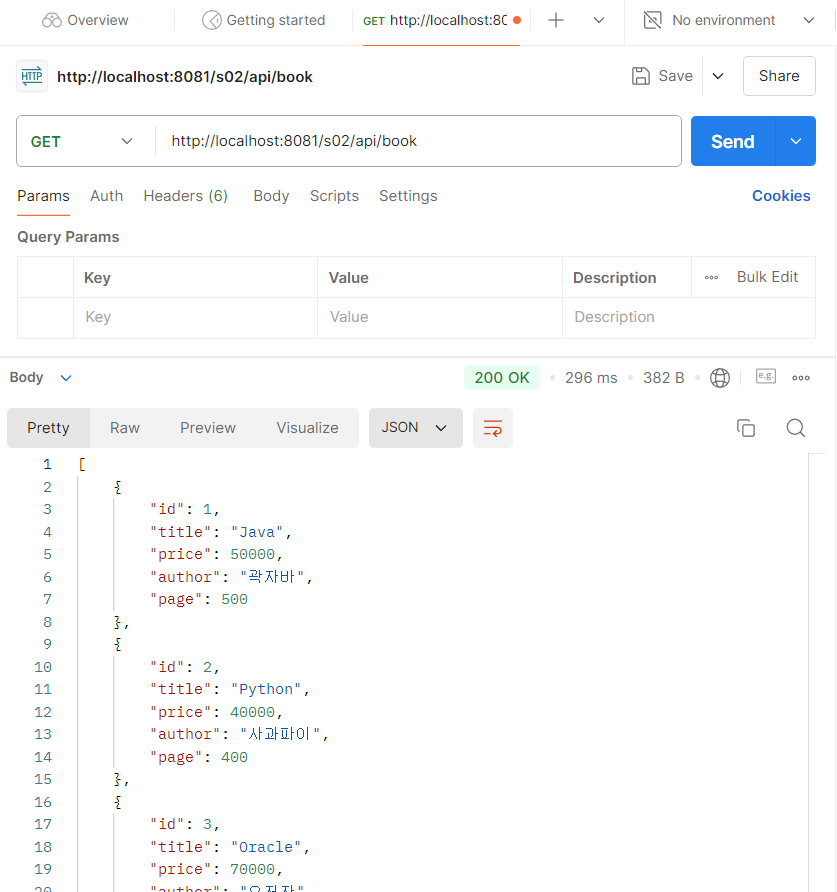
<Rest Api 명세서>
- GET : 'http://localhost:8081/s02/api/book'
- JSON으로 response

🔰 Postman
- https://www.postman.com/downloads/
- API 개발하여 테스트하기 위해 설치
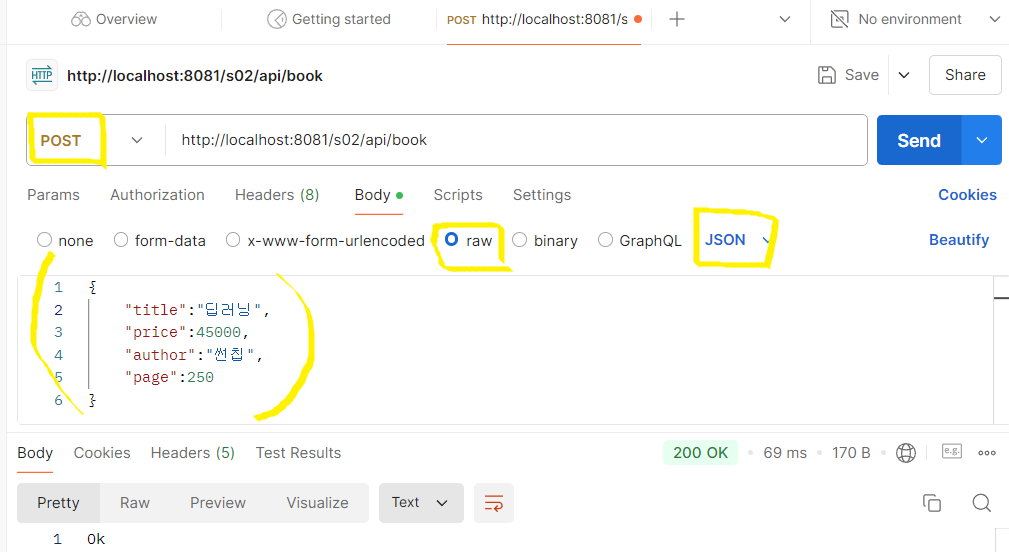
@RequestBody : JSON을 받을 때 쓰는 어노테이션
BookRestController
    // 책 등록
    @PostMapping("/book")
    // {"title":"딥러닝", "price":45000, "author":"썬칩", "page":250}
    public String register(@RequestBody Book book){
        bookService.register(book);
        return "Ok";
    }
RestController에서 어떻게 return(응답)을 통일시킬까? 도 고민해보기
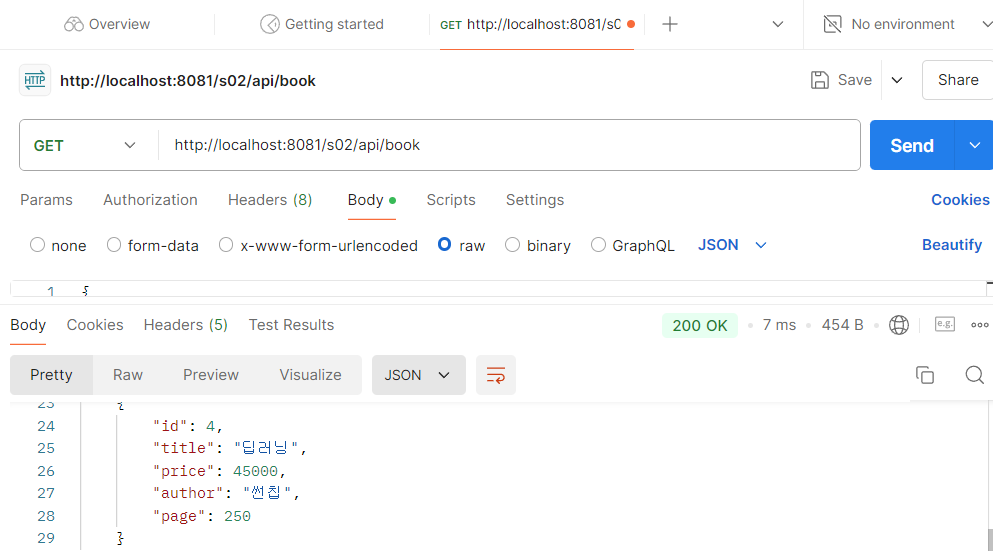
- 제대로 입력됐는데 책 목록 확인
RouteController
package kr.smhrd.restcontroller;

import org.springframework.stereotype.Controller;
import org.springframework.web.bind.annotation.GetMapping;

// React.js, Next.js : Route(r)
// 'http://localhost:8081/s02/list' --> list.jsp 실행
@Controller
public class RouteController {

    @GetMapping("/list")
    public String list(){
        // 책 목록을 DB에서 가져오지 않음.
        return "list"; // list.jsp
    }
}
책 목록
list.jsp
<%@ page language="java" contentType="text/html; charset=UTF-8"
    pageEncoding="UTF-8"%>
<%@ taglib prefix="c" uri="http://java.sun.com/jsp/jstl/core" %>
<%@ taglib prefix="fn" uri="http://java.sun.com/jsp/jstl/functions" %>
<%@ taglib prefix="fmt" uri="http://java.sun.com/jsp/jstl/fmt" %>
<c:set var="cpath" value="${pageContext.request.contextPath}"/>
<!DOCTYPE html>
<html lang="en">
<head>
  <title>list</title>
  <meta charset="utf-8">
  <meta name="viewport" content="width=device-width, initial-scale=1">
  <link rel="stylesheet" href="https://cdn.jsdelivr.net/npm/bootstrap@4.6.2/dist/css/bootstrap.min.css">
  <script src="https://cdn.jsdelivr.net/npm/jquery@3.7.1/dist/jquery.slim.min.js"></script>
  <script src="https://cdn.jsdelivr.net/npm/popper.js@1.16.1/dist/umd/popper.min.js"></script>
  <script src="https://cdn.jsdelivr.net/npm/bootstrap@4.6.2/dist/js/bootstrap.bundle.min.js"></script>
  <script src="${cpath}/resources/js/list.js"></script>
  <script>
    bookListFn(); // 함수
  </script>
</head>
<body>
<div class="container">
  <h2>Restful Service(SOA), Rest API</h2>
  <div class="card">
    <div class="card-header">Book List</div>
    <div class="card-body">
      책목록 출력(Rest API 요청)
    </div>
    <div class="card-footer">AISCHOOL2024 - Fighting :]</div>
  </div>
</div>

</body>
</html>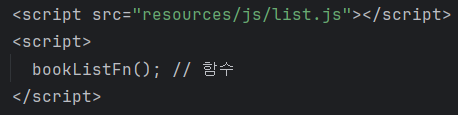
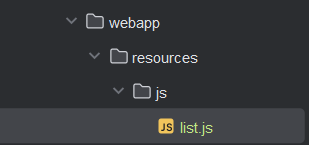
- Ajax, js 실행을 위해
- webapp 폴더에
resources폴더 -js폴더 생성 list.js생성
list.js
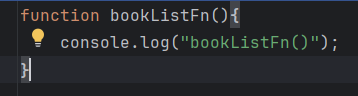
function bookListFn(){
    console.log("bookListFn()");
}-
test용 console log 실행
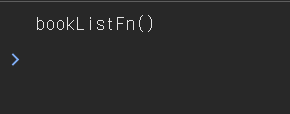
-
console 창 출력
list.jsp
- 책 목록 출력할 table 생성
      <!-- 책목록 출력(Rest API 요청) -->
      <table class="table table-bordered">
        <thead>
          <tr>
            <th>번호</th>
            <th>제목</th>
            <th>가격</th>
            <th>저자</th>
            <th>페이지</th>
          </tr>
        </thead>
        <tbody id="blist">

        </tbody>
      </table>
list.js
- bookListFn() 만들어주기
function bookListFn(){
    // console.log("bookListFn()");
    // Rest API 통신(Ajax)
    // GET : 'http://localhost:8081/s02/api/book'

    // * ajax
    // fetch - 요청.. 접속하는 것,
    // then - call을 요청했을 때 응답을 처리하는 함수를 적음.. 익명함수
    // then - json 바꿔온 데이터를 함수로 처리, 동적으로 view를 만들어서 출력, view 필요없으면 생략
    // catch - 에외처리
    fetch('http://localhost:8081/s02/api/book')
    // .then(function(){})
    // .then((response)=>{return response.json();}) // 람다식 함수 사용법
    // js에서 json으로 바꿔야 object로 취급할 수 있다.
    .then(response=>response.json())
    .then(books=>{
        // 동적으로 View를 만들어서 출력
        let html = "";
        books.forEach(book=>{
            html+="<tr>";
            html+=`<td>${book.id}</td>`;
            html+=`<td>${book.title}</td>`;
            html+=`<td>${book.price}</td>`;
            html+=`<td>${book.author}</td>`;
            html+=`<td>${book.page}</td>`;
            html+="</tr>";
        });
        document.getElementById("blist").innerHTML=html;
    })
    .catch(error=>{
        console.log(error);
    });
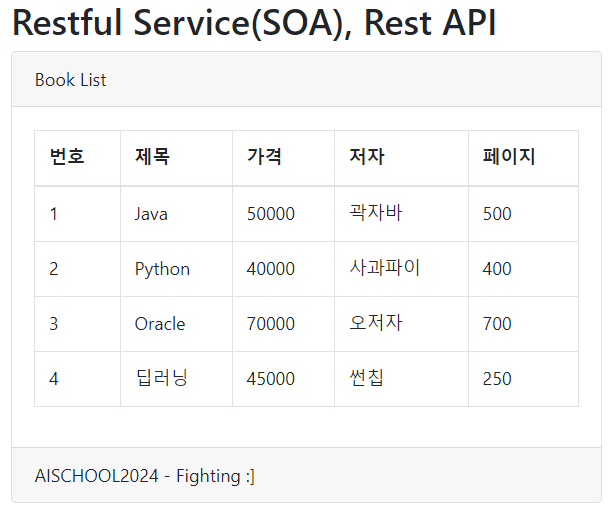
}

Hello, World!