
RestAPI
BookRestController
package com.example.springboot.controller;

import com.example.springboot.entity.Book;
import com.example.springboot.service.BookService;
import lombok.RequiredArgsConstructor;
import org.springframework.web.bind.annotation.GetMapping;
import org.springframework.web.bind.annotation.RequestMapping;
import org.springframework.web.bind.annotation.RestController;

import java.util.List;

@RestController
@RequestMapping("/api")
@RequiredArgsConstructor
public class BookRestController {

    public  final BookService bookService;
    // GET : http://localhost:8081/api/book
    @GetMapping("/book")
    public List<Book> books(){
        return bookService.getAllBooks();
    }
}
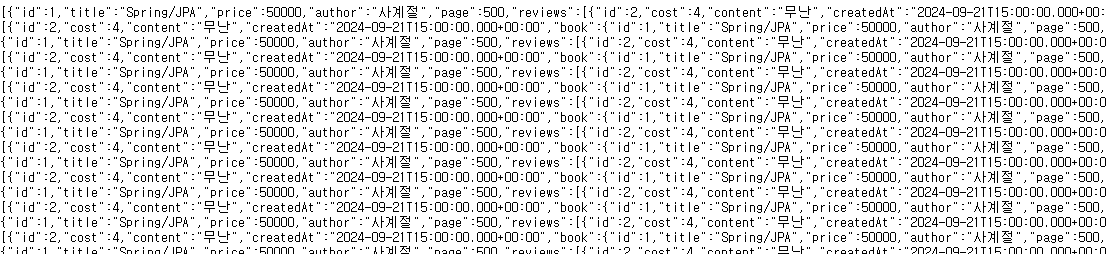
-> 무한반복!!!
-> 순환참조 문제 발생!!!
🚧 순환참조 문제 해결
(1) @JsonIgnore
Review
- Json으로 되지 않게 함
   @JsonIgnore
   private Book book; // book_PK(id)
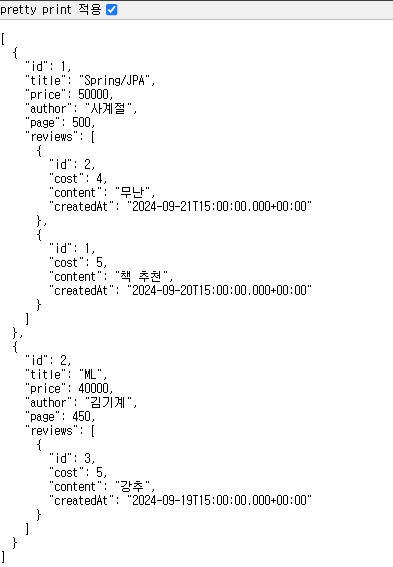
(2) JSON 변환시 Entity를 DTO로 변환
BookDTO
- Entity Data ---(변환작업)---> DTO
package com.example.springboot.entity;

import lombok.AllArgsConstructor;
import lombok.Getter;
import lombok.NoArgsConstructor;
import lombok.Setter;

import java.util.List;

@Setter
@Getter
@NoArgsConstructor
@AllArgsConstructor
// @Entity Data ---(변환작업)---> DTO
public class BookDTO {
    private Long id;
    private String title;
    private int price;
    private String author;
    private int page;
    private List<ReviewDTO> reviews;
}
ReviewDTO
package com.example.springboot.entity;

import lombok.AllArgsConstructor;
import lombok.Getter;
import lombok.NoArgsConstructor;
import lombok.Setter;

import java.util.Date;

@Setter
@Getter
@NoArgsConstructor
@AllArgsConstructor
public class ReviewDTO {
    private Long id;
    private int cost;
    private String content;
    private Date createdAt;
}
BookService
- Book, Review이용하여 BookDTO, ReviewDTO 만들어주기
package com.example.springboot.service;

import com.example.springboot.entity.Book;
import com.example.springboot.entity.BookDTO;
import com.example.springboot.entity.Review;
import com.example.springboot.entity.ReviewDTO;
import com.example.springboot.repository.BookRepository;
import lombok.RequiredArgsConstructor;
import org.hibernate.Hibernate;
import org.springframework.stereotype.Service;
import org.springframework.transaction.annotation.Transactional;

import java.util.Collections;
import java.util.List;
import java.util.stream.Collectors;

@Service
@RequiredArgsConstructor
public class BookService {

    private final BookRepository bookRepository;

    @Transactional(readOnly = true)
    public List<Book> getAllBooks(){
        return bookRepository.findAllWithReviews();
    }
    @Transactional(readOnly = true)
    public List<BookDTO> getAllBookDTO(){
        // ▣2. JSON 변환시 Entity를 DTO로 변환 - 순환참조 문제 해결
        List<Book> books = bookRepository.findAllWithReviews();
        // Book <---순환참조---> Review
        List<BookDTO> bookDTOS = books.stream().map(this::convertToDTO).collect(Collectors.toList());
        return bookDTOS;
    }
    // Book -> BookDTO로 옮기기
    private BookDTO convertToDTO(Book book){
        BookDTO bookDTO = new BookDTO();
        bookDTO.setId(book.getId());
        bookDTO.setTitle(book.getTitle());
        bookDTO.setPrice(book.getPrice());
        bookDTO.setAuthor(book.getAuthor());
        bookDTO.setPage(book.getPage());
        // Review -> ReviewDTO
        List<ReviewDTO> reviews=book.getReviews().stream().map(this::convertToDTO).collect(Collectors.toList());
        bookDTO.setReviews(reviews);
        return bookDTO;
    }

    // Review -> ReviewDTO로 옮기기
    private ReviewDTO convertToDTO(Review review){
        ReviewDTO reviewDTO = new ReviewDTO();
        reviewDTO.setId(review.getId());
        reviewDTO.setCost(review.getCost());
        reviewDTO.setContent(review.getContent());
        reviewDTO.setCreatedAt(review.getCreatedAt());
        return reviewDTO;
    }

}
BookRestController
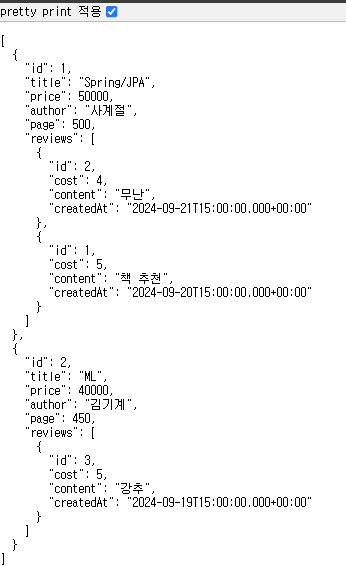
getAllBookDTO로 적용
package com.example.springboot.controller;

import com.example.springboot.entity.Book;
import com.example.springboot.entity.BookDTO;
import com.example.springboot.service.BookService;
import lombok.RequiredArgsConstructor;
import org.springframework.web.bind.annotation.GetMapping;
import org.springframework.web.bind.annotation.RequestMapping;
import org.springframework.web.bind.annotation.RestController;

import java.util.List;

@RestController
@RequestMapping("/api")
@RequiredArgsConstructor
public class BookRestController {

    public final BookService bookService;
    // GET : http://localhost:8081/api/book
    @GetMapping("/book")
    public List<BookDTO> books(){
        List<BookDTO> books = bookService.getAllBookDTO();
        return books; // JSON(MessageConverter: 순환참조문제)
    }
} 
🔰 Swagger UI
Swagger UI
springdoc
- Rest를 서비스할 수 있는 Test Server가 생성됨
- build.gradle dependencies 에 추가해주기!
implementation 'org.springdoc:springdoc-openapi-starter-webmvc-ui:2.3.0'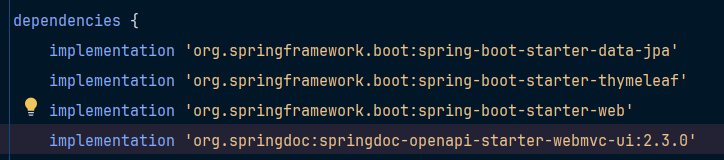
BookRestAPI
@Tag 어노테이션으로 API 이름 설정, 설명 부가

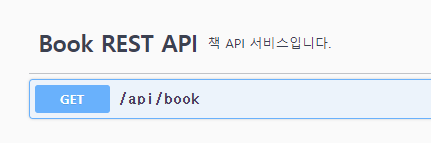

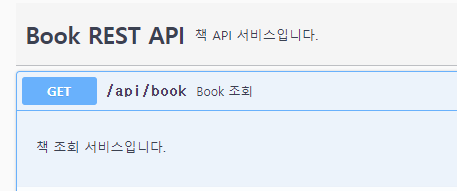
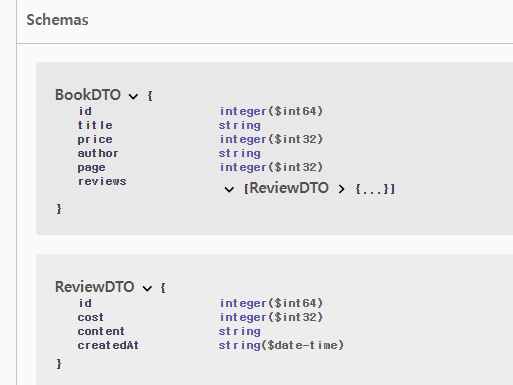
try it out - execute
- 실제 결과값 볼 수 있음
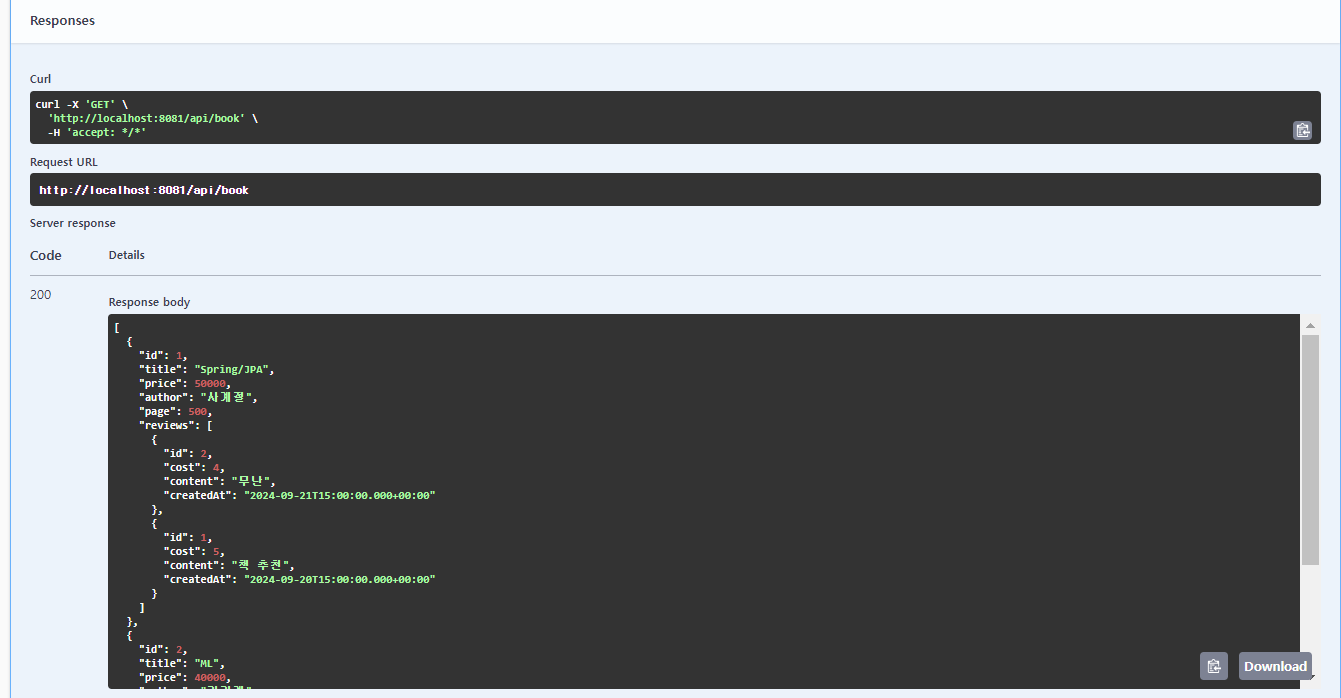
응답용 - 요청용 분리
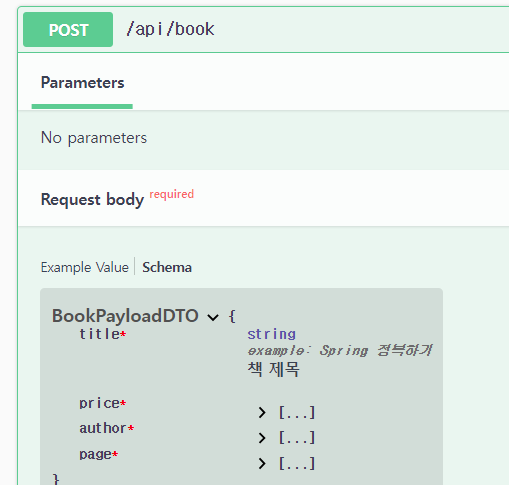
BookPayloadDTO
package com.example.springboot.entity;

import io.swagger.v3.oas.annotations.media.Schema;
import jakarta.validation.constraints.NotBlank;
import lombok.*;

@Setter
@Getter
@NoArgsConstructor
@AllArgsConstructor
@ToString
public class BookPayloadDTO {
    @NotBlank // 유효성 검사 체크
    @Schema(description = "책 제목",
            example = "Spring 정복하기",
            requiredMode = Schema.RequiredMode.REQUIRED) // 필수
    private String title;

    @NotBlank
    private int price;
    @NotBlank
    private String author;
    @NotBlank
    private int page;
}
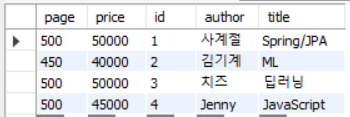
책 등록
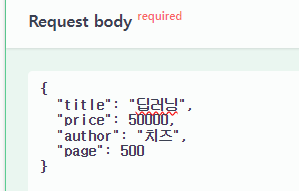
BookRestController
    // 등록
    @PostMapping("/book")
    public Book register(@RequestBody BookPayloadDTO dto){
        Book book = new Book();
        try{
            book.setTitle(dto.getTitle());
            book.setPrice(dto.getPrice());
            book.setAuthor(dto.getAuthor());
            book.setPage(dto.getPage());
            book = bookService.save(book); // 등록
        } catch (Exception e) {
            e.printStackTrace();
        }
        return book;
    }
BookService
    // save
    public Book save(Book book){
        return bookRepository.save(book);
    }
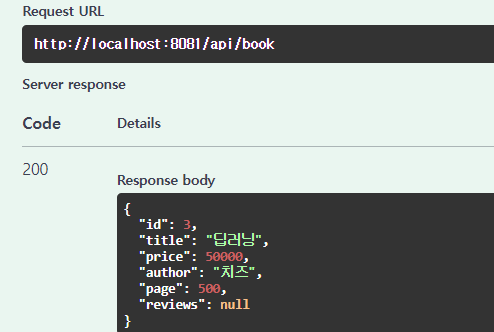
BookRestController
- BookDTO(응답용)를 사용
    // 등록
    @PostMapping("/book")
    public BookDTO register(@RequestBody BookPayloadDTO dto){
        Book book = new Book();
        BookDTO view = new BookDTO();
        try{
            book.setTitle(dto.getTitle());
            book.setPrice(dto.getPrice());
            book.setAuthor(dto.getAuthor());
            book.setPage(dto.getPage());
            book = bookService.save(book); // 등록
            // BookDTO(응답용)를 사용
            view.setId(book.getId());
            view.setTitle(book.getTitle());
            view.setPrice(book.getPrice());
            view.setAuthor(book.getAuthor());
            view.setPage(book.getPage());
        } catch (Exception e) {
            e.printStackTrace();
        }
        return view;
    }
view
RouteController
- view로 경로 바꾸기
package com.example.springboot.controller;

import org.springframework.stereotype.Controller;
import org.springframework.web.bind.annotation.GetMapping;

@Controller
public class RouteController {

    @GetMapping("/restlist")
    public String restlist(){
        return "restlist"; // restlist.html --> JS-fetch() -> REST API?
    }
}
restlist.html
<!DOCTYPE html>
<html lang="en" xmlns:th="http://www.thymeleaf.org">
<head>
    <meta charset="UTF-8">
    <title>restlist</title>
    <script th:src="@{/js/restlist.js}"></script>
    <script>
        loadBookList();
    </script>
</head>
<body>
<h3>Spring Boot, JPA, Thymeleaf, Rest</h3>
<table border="1">
    <tr>
        <th>번호</th>
        <th>제목</th>
        <th>가격</th>
        <th>저자</th>
        <th>페이지</th>
    </tr>
    <tbody id="list">

    </tbody>
</table>
</body>
</html>
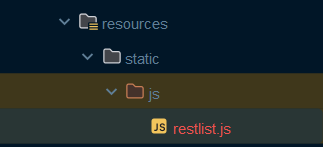
restlist.js
- static에 생성해주기
✅
async/await
- async는 비동기함수, await은 async 안에서 사용하며 상태가 바뀌기 전까지 기다린다.
async function loadBookList(){
    console.log("OK");
    // 1.fetch().then().then().catch()
    // 2.async/await
    // const response(응답)=요청;
    const response = await fetch("http://localhost:8081/api/book");
    if(!response.ok){
        throw new Error("error");
    }
    const books = await response.json();
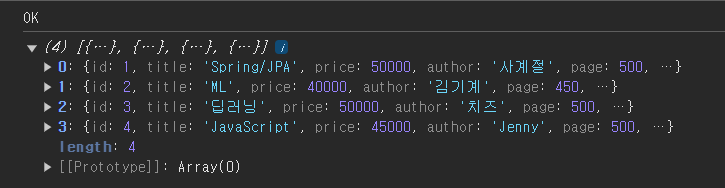
    console.log(books); // [{ [,,,]},{ },{ }]
}
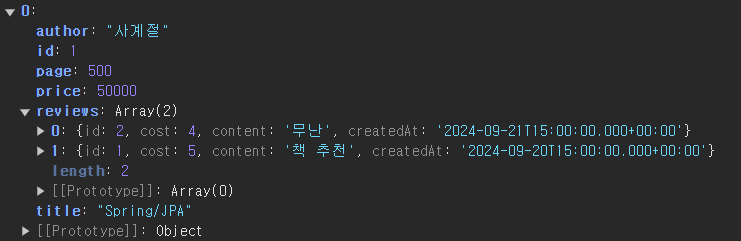
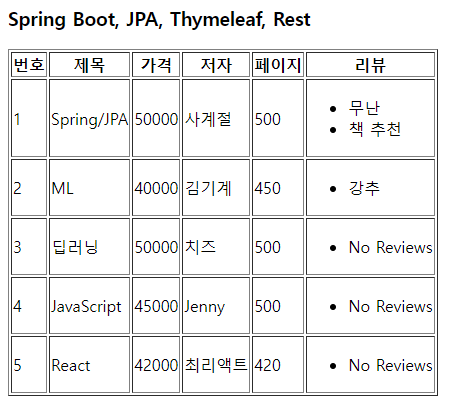
- 리뷰도 잘 출력됨
restlist.html
<!DOCTYPE html>
<html lang="en" xmlns:th="http://www.thymeleaf.org">
<head>
    <meta charset="UTF-8">
    <title>restlist</title>
    <script th:src="@{/js/restlist.js}"></script>
    <script>
        loadBookList();
    </script>
</head>
<body>
<h3>Spring Boot, JPA, Thymeleaf, Rest</h3>
<table border="1">
    <tr>
        <th>번호</th>
        <th>제목</th>
        <th>가격</th>
        <th>저자</th>
        <th>페이지</th>
        <th>리뷰</th>
    </tr>
    <tbody id="list">

    </tbody>
</table>
</body>
</html>
restlist.js
async function loadBookList(){
    console.log("OK");
    // 1.fetch().then().then().catch()
    // 2.async/await
    // const response(응답)=요청;
    const response = await fetch("http://localhost:8081/api/book");
    if(!response.ok){
        throw new Error("error");
    }
    const books = await response.json();
    console.log(books); // [{ [,,,]},{ },{ }]
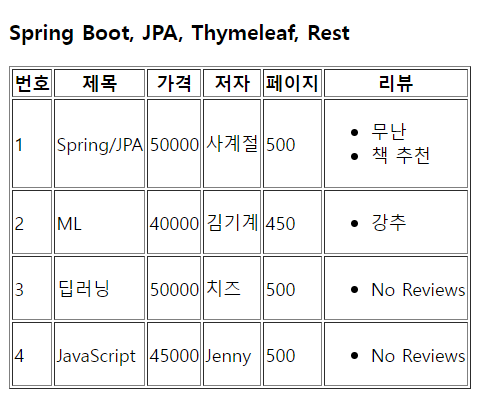
    let html="";
    books.forEach(book=>{
        html+="<tr>";
        html+=`<td>${book.id}</td>`;
        html+=`<td>${book.title}</td>`;
        html+=`<td>${book.price}</td>`;
        html+=`<td>${book.author}</td>`;
        html+=`<td>${book.page}</td>`;
        // 리뷰 출력
        html+="<td><ul>"
        if(book.reviews && book.reviews.length>0){
            book.reviews.forEach(review=>{
                html+=`<li>${review.content}</li>`
            });
        } else {
            html+="<li>No Reviews</li>"
        }
        html+="</ul></td>"
        html+="</tr>";
    });
    document.getElementById("list").innerHTML=html;
}
스프링 시큐리티 추가
build.gradle
- dependencies에 넣기
    // 스프링 시큐리티 추가
   implementation 'org.springframework.boot:spring-boot-starter-security'
   implementation 'org.thymeleaf.extras:thymeleaf-extras-springsecurity6'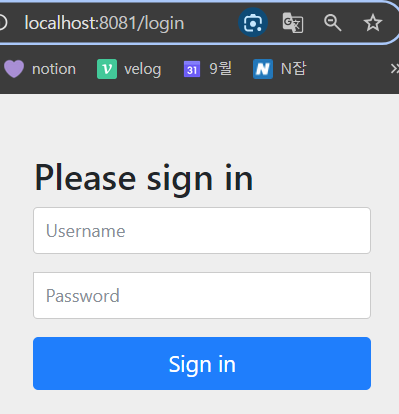
✔ http://localhost:8081/login
-> 보안에 걸려서 자동으로 url 이동됨.
- Id :
user- Pw : 서버 시행시 나오는 pw 입력하면 됨
-> 로그인시 인증 성공하여 시도하려고 했던 url로 redirect됨
-> 로그아웃 하고 싶으면?
✔ http://localhost:8081/logout
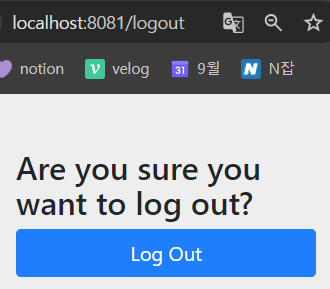
-> 내가 만든 로그인/로그아웃 창으로 이동하고 싶으면 설정을 해주어야 함.

Hello, World!