1) awscli를 사용하여, eks cluster에 접속
aws configure
aws eks --region us-west-2 update-kubeconfig --name <cluster명>
kubectl cluster-info ## 접속한 cluster 조회
2) deployment 배포
kubectl apply -f <yaml 파일> -n

3) 배포된 deployment 확인
kubectl get deployment
kubectl get pod
4) K8S Service 생성
1) Service 매니페스트 파일(.yaml) 작성
* 아래와 같이 'deployment'와 'service'의 yaml 파일 내에, Selector 값을 일치시켜줘야 합니다.
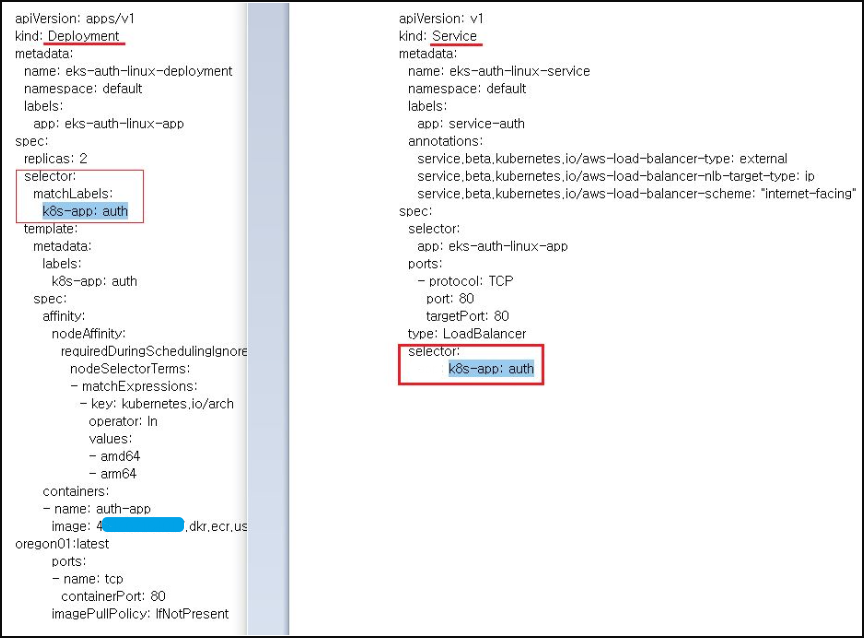
2) Service 배포
kubectl apply -f <yaml 파일> -n

3) Service의 'External-IP' 값을 통해 접속
kubectl get service
Image 강제 pull
-
방법 #1>
-
imagePullPolicy 옵션
* Always		: 항상 이미지를 새로 받아옴
* IfNotPresent	: 만약 존재하는 이미지가 있다면 새로 받아오진 않고, 없다면 새로 받아옴
* Never			: 절대 이미지를 새로 받아오지 않음
-
-
방법 #2>
- Deployment의 Image path 업데이트
kubectl set image deployment eks-auth-linux-deployment -n live auth-app=4xxxxxxxxxxxx.dkr.ecr.us-west-2.amazonaws.com/ecr-ms-auth:0.02
- Deployment의 Image path 업데이트

Cloud Engineer