설치
pip install pywin32설치 확인
import win32compython에서 win32com을 제외하고도 openpyxl, xlwings 등이 있지만,
win32com은 MS에서 제공한 기본 API를 wrapping한 형태라 기존 엑셀 기능들을 사용 할 수 있는 장점(?)이 있음
프로그램 열기 / 닫기
import win32com.client as win32

# 열기
excel = win32.Dispatch('Excel.Application')
excel.Visible = True
# True: excel 창이 켜짐, False: 백그라운드에서 excel이 실행됨

# 닫기
excel.Quit()
엑셀 파일 열기 / 닫기 / 저장하기
import os
import win32com.client as win32

# 엑셀 파일 주소
file_name = '[파일명].xlsx'
xlsx_path = os.getcwd() + rf'\{file_name}'
# => C:\Users\[user_name]\...\[파일명].xlsx

# 열기
file = excel.Workbooks.Open(xlsx_path)

# 저장하기
file.Save()

# 닫기
file.Close(False)- 엑셀 파일 주소는 절대주소로 줘야 에러가 나지 않음
엑셀 시트 열기
import win32com.client as win32

sheet_name = 'Sheet1'
sheet = file.Worksheets(sheet_name)
값 읽기 / 쓰기
def read_data(sheet, y, x):
	return sheet.Cells(y, x).Value

def write_data(sheet, y, x, data):
	sheet.Cells(y, x).Value = data

sheet_name = 'Sheet1'
sheet = file.Worksheets(sheet_name)

# B1에 Hello 쓰기
write_data(sheet, 1, 2, 'Hello')

# B1의 값 읽기
value = read_data(sheet, 1, 2)

print(value)
결과
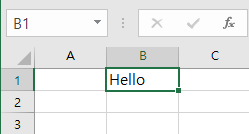
- 위에서 만든 sheet라는 인스턴스를 기반으로 엑셀에 값을 읽고 쓸수 있음
- win32com은 VBA를 기반으로 짜여져 있기 때문에
가장 첫 번째 행과 열은 아래 사진과 같이 0이 아닌 1부터 시작 하게 됨
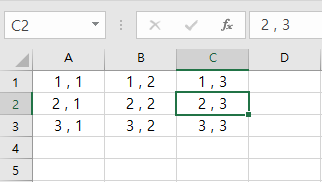
A1, B1, C2... 과 같은 인덱싱 방식을 A1-style 이라고 하고
r1c1, r1c2, r2c3... 과 같은 방식을 R1C1-style 이라고 함
식 쓰기
def write_formula_a1(sheet, y, x, formula):
	sheet.Cells(y, x).Formula = formula

def write_formula_r1c1(sheet, y, x, formula):
	sheet.Cells(y, x).FormulaR1C1 = formula

y = 2
x = 1
excel.write_formula_a1(sheet, 1, 3, '=sum(A1:B1)')
excel.write_formula_r1c1(sheet, 2, 3, f'=sum(r{y}c{x}:r{y}c{x+1})')
결과
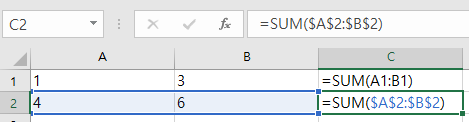
- A1-style의 경우에는 C언어가 아니라서 알파벳 순으로 인덱싱을 하는데 번거로움이 있음
(C언어 였다면 'A'+1 => 'B' 이지만 python에선 에러)
A1-Style 주소
위에서 번거로웠던 부분을 해결하는 방법
def Address(sheet, pos: tuple, row_absolute=False, column_absolute=False):
	if len(pos) == 2:
		return sheet.Cells(pos[0], pos[1])\
						.GetAddress(RowAbsolute=row_absolute,
									ColumnAbsolute=column_absolute)
	elif len(pos) == 4:
		return sheet.Range(sheet.Cells(pos[0], pos[1]),
						sheet.Cells(pos[2], pos[3]))\
						.GetAddress(RowAbsolute=row_absolute,
									ColumnAbsolute=column_absolute)
	else:
		return ''

y = 1
x = 1
addr = Address(sheet, (y,x,y,x+1))
print(addr) # A1:B1

addr = Address(sheet, (y,x,y,x+1), True, True)
print(addr) # $A$1:$B$1- row et column_absolute를 True로 하게되면 $가 앞에 붙는 형태를 띄게된다

개발에 현타온 개발자