계정 연결
git config --global user.name 'kimraeyoung'
git config --global user.email '<깃헙 계정 이메일>'
alias
- alias
- 명령어를 짧게 사용하도록 설정하는 법.
git config --glboal alias.co checkout (checkout 을 co로 변경)
git config --global alias.br branch (branch를 br로 변경)
git config --global alias.ci commit (commit을 ci로 변경)
git config --global alias.st status (status를 st로 변경)
git config --global alias.lg "log --graph --abbrev-commit --decorate --format=format:'%C(bold blue)%h%C(reset) - %C(bold green)(%ar)%C(reset) %C(white)%s%C(reset) %C(dim white)- %an%C(reset)%C(bold yellow)%d%C(reset)' --all"- alias 및 현재 Git 설정 상태 보기:
git config --list
GitHub
- 온라인 코드 저장소로 무료로 사용할 수 있다. 단 비공개 저장소의 경우 3명 이상이 사용할 경우 유료이다.
cd ~
mkdir git-exer
cd git-exer
echo "파일 생성" >> README.md
git init
git add README.md
git commit -m "initial commit"
git remote add origin <원격 저장소>
git push -u origin master
clone
- 아래 명령어로 원격 저장소에 있는 코드를 내려받는다.
git clone <원격 저장소>git Lifecycle
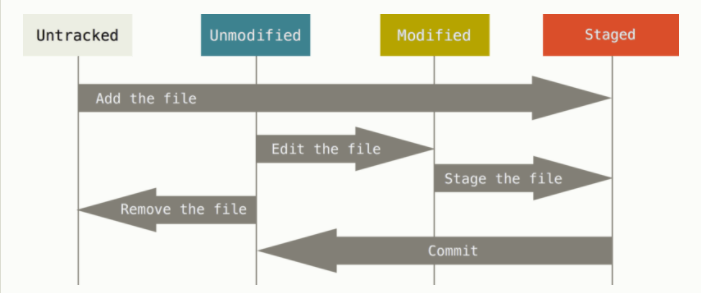
Untracked
- git이 대상 파일일 추적하지 않는 상태이다.
- git
add<파일명> 명령어를 사용했을 때 git의 관리 대상으로 파일을 추적한다. - git이 관리하는 파일을 삭제하면
Untracked가 된다.
Staged
- 코드를 저장해도 좋은 상태로
commit이 가능한 상태이다. - Untracked, Modified 상태인 파일을
add하면Staged상태가 된다.
Unmodified
- git에 코드 저장이 완료된 상태이다.
- Staged상태에서
commit을 하면 Unmodified가 된다.
Modified
- Git으로 관리되고 있던 코드를 수정하여 변경이 일어난 상태로 Unmodified 상태인 파일을 수정하면 Modified가 된다.
- 수정된 파일은 다시
Stage(add)상태가 되어야commit을 할 수 있다.
기본
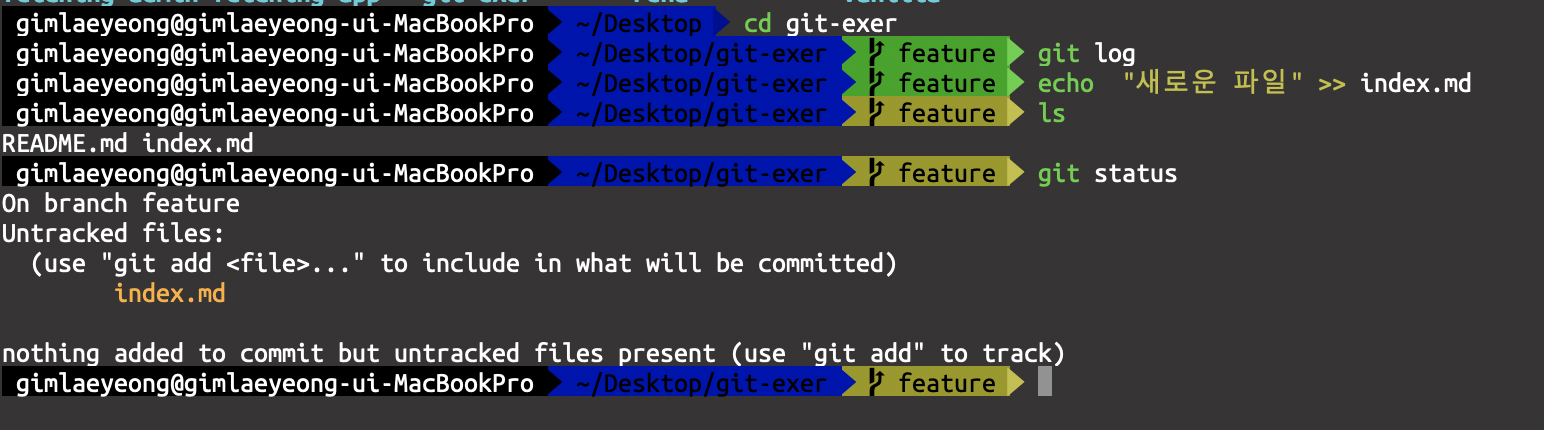
- git status
-
파일들의 상태를 확인할 수 있다. git이 추적하는 파일과 아닌 파일들을 확인할 수 있다.
-
git add
- 추적되지 않은 파일들을 commit 할 수 있는 Stage 상태로 만들어준다.
git add .추적되지 않는 모든 파일을Staged상태로 변경한다.git add <파일명>해당 파일만Staged상태로 변경한다.
-
git commit
Staged상태의 파일을 저장한다.Staged상태가Unmodified상태로 변경된다.- SHA-1 알고리즘을 적용한
해시값을 키로 생성한다. - 커밋 단위로 히스토리가 쌓인다.
- 실무에서 한 작업 (기능, 피처) 단위로 한 커밋을 권장한다.
git commit -m "메모 .."메모와 함께 파일을 저장한다.git commit -aadd를 같이한다.git commit -am-a와 -m을 합친 것이다.git commit —amend만약 Stage에 아무것도 없다면- 마지막 커밋을 수정한다.
- Stage 상태의 파일들과 같이 커밋 된다. 만약 commit 이후 작없을 하지 않은 상태에서는 커밋 메세지만 수정된다.
-
git log
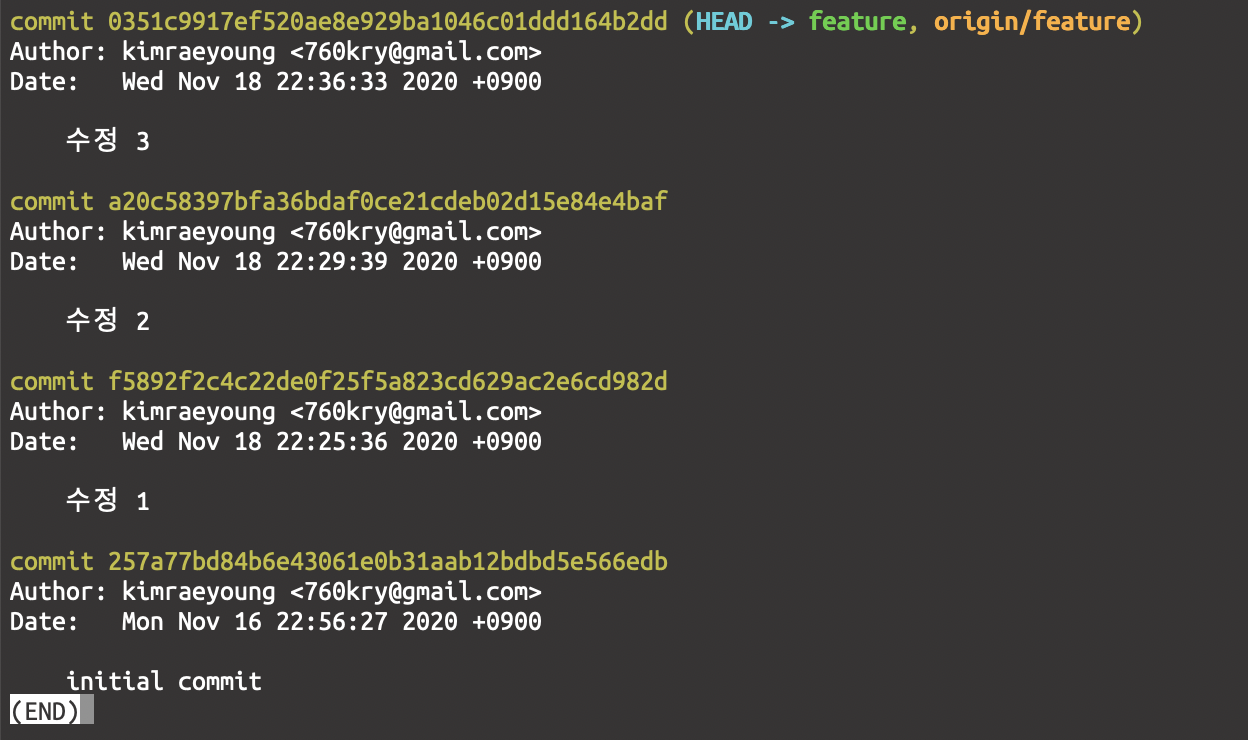
- 히스토리를 조회할 수 있는 명령어로 해당 브랜치의 커밋 한 로그를 확인할 수 있다.
- log를 볼 줄 알아야 develop, release, hotfix 브랜치가 난무할 때 merge 방향이나 순서를 이해할 수 있다.
-
git branch
- 커밋 사이를 이동할 수 있는 어떤 포인터 같은 것. 하나의 작업 공간 단위이다.
- branch들을 확인할 수 있다.
- 브랜치 생성 :
git branch <브랜치 네임> - 브랜치 삭제 :
git branch -D <브랜치 네임> - 리모트의 브랜치 삭제 :
git push origin —delete <브랜치 네임> - 삭제된 리모트 브랜치를 로컬에도 반영할 때 :
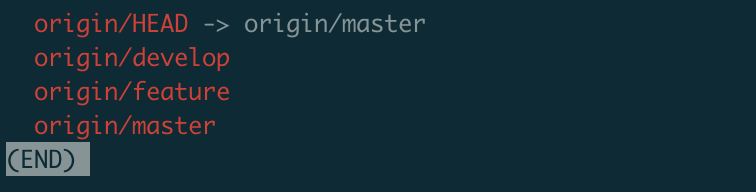
git fetch -p - 리모트 브랜치 확인할 때 :
git branch -r
-
git checkout <브랜치 네임> or <해시 키 값>
- <브랜치 네임>은 해당 브랜치로 이동한다.
- <해시 키값>은 원하는 커밋 상태로 이동할 수 있다.
- 브랜치 생성과 이동 동시에 할 때 git checkout -b <브랜치 네임> 을 사용한다.
-
git push
-
원격 저장소에 저장할 수 있다.
-
clone 한 리모트 저장소에 쓰기 권한이 있어야 한다.
-
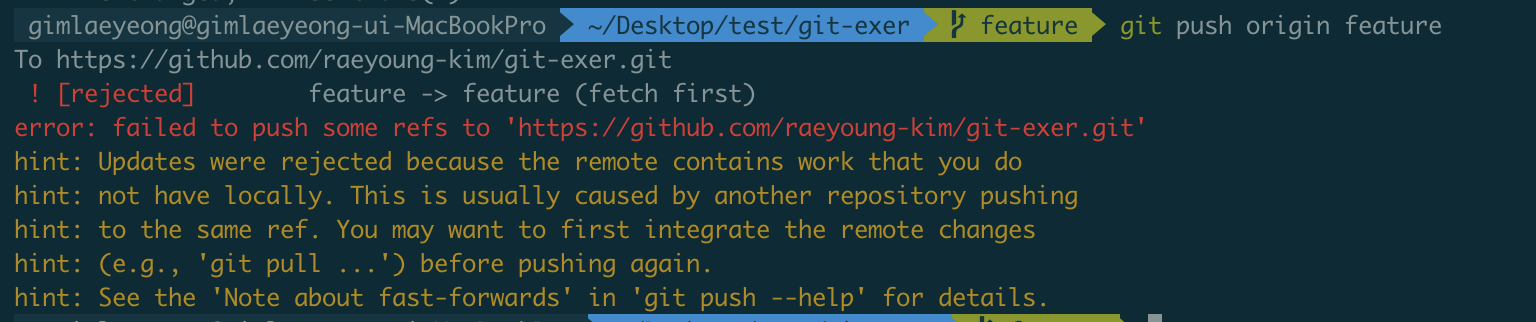
같은 브랜치로 여러 명이 받아서 작업 후 누군가 push를 했다면 다른 사람은 push가 되지 않는다.
-
다른 사람이 작한 것 을 가져와서 합친 후 (merge or rebase) 후 push 할 수 있다.
-
push가 거절당했을 때 로컬 브랜치의 파일들을 원격 저장소에 덮어씌우려고 한다면?
- git push origin master —force
- 위험한 명령어로 혼자 작업하던 feature 브랜치에서만 사용해야 한다.
- git push origin master —force
-
-
git pull
-
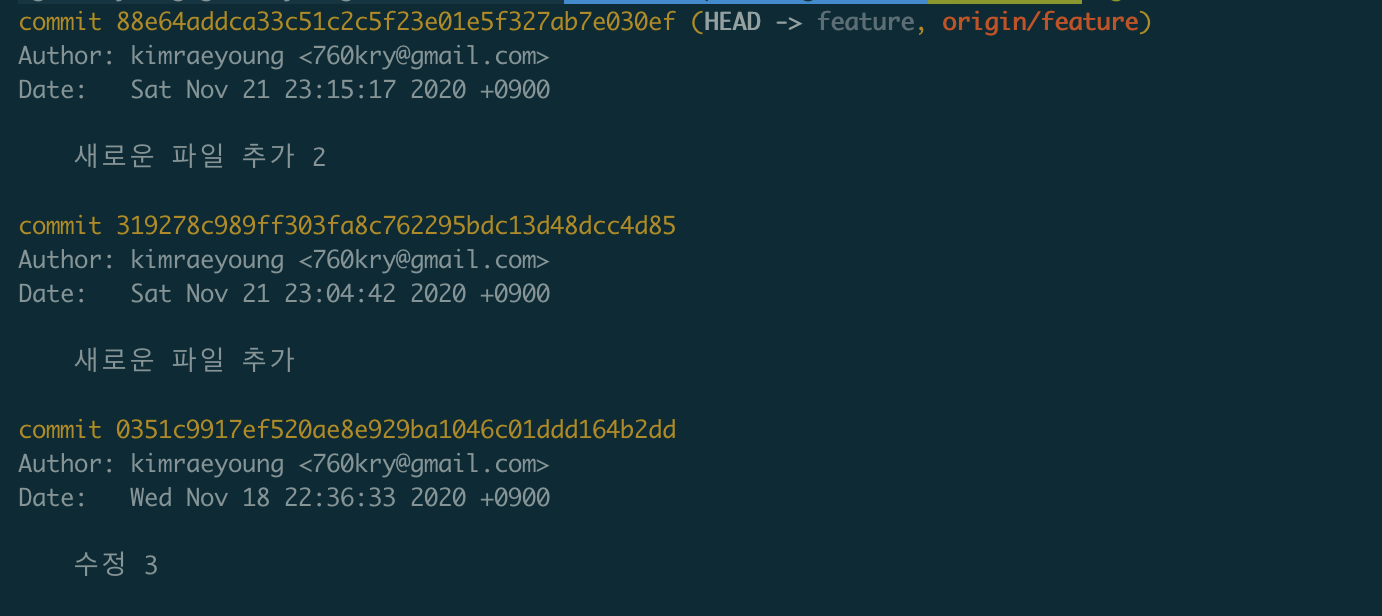
clone한 서버에서 데이터를 가져와 자동으로 현재 잡헙하는 코드와 merge한다.
-
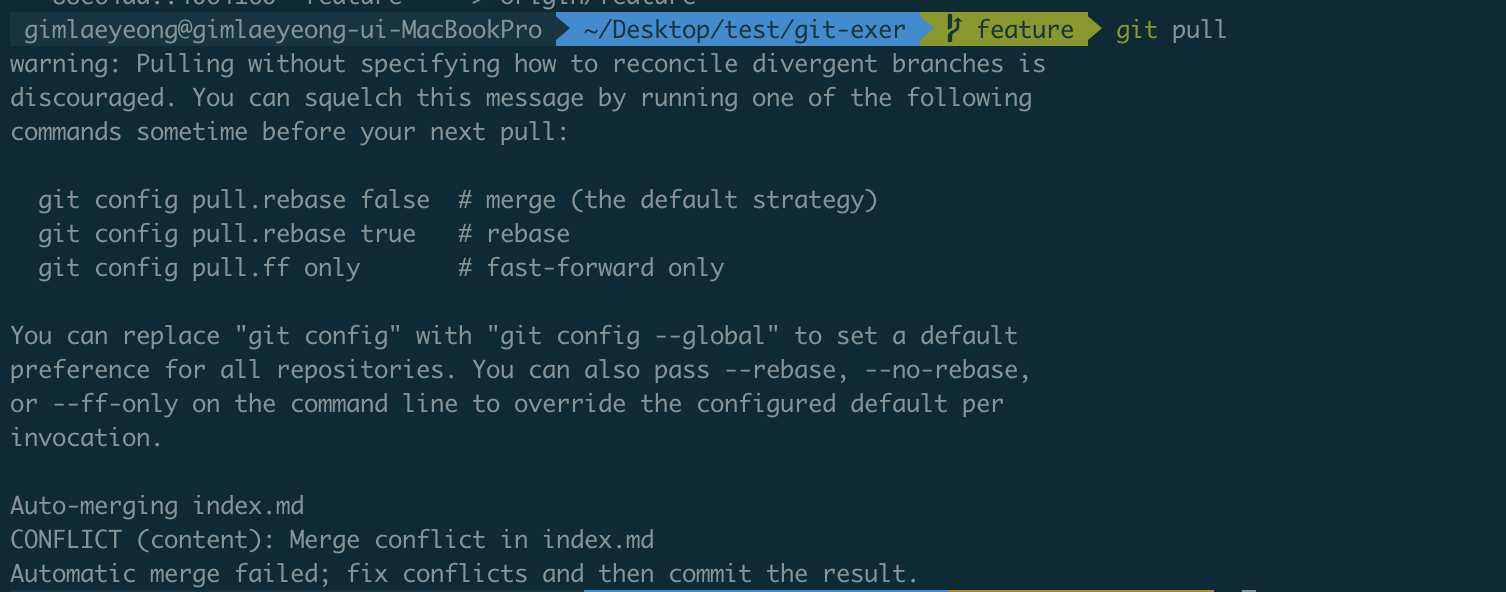
충돌이 났을 때 아래와 같이 merge가 되지 않는다.
-
cat <파일명>으로 변경된 파일을 확인할 수 있다.

이렇게 충돌이 날 경우 변경된 부분을 수정 후 다시 커밋 후 push 해야 한다.
-
git merge —abort
- 이전에 하려던 git pull이 취소된다.
-
-
git fetch
-
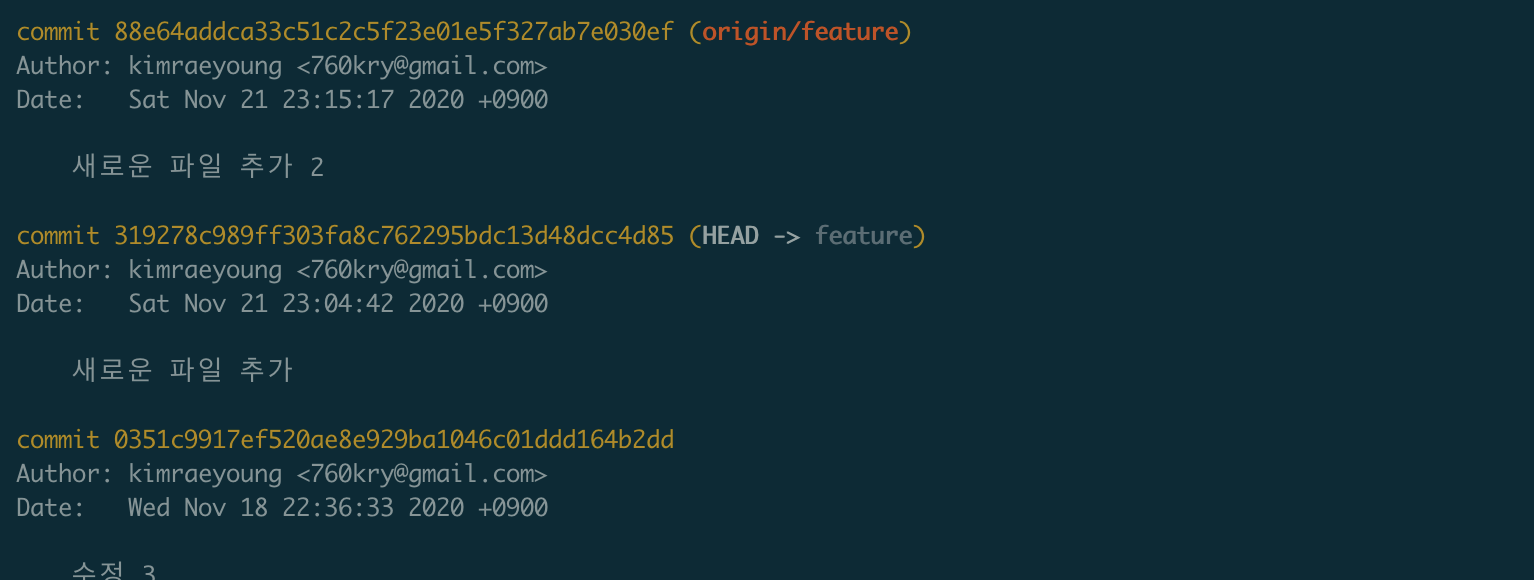
clone 한 서버에서 데이터를 가져오지만 merge하지 않는다.
git log —all확인하면 아래와 같이 데이터는 가져오지만 merge 되어있지 않다.
-
-
stash
- 작업 중 다른 브랜치로 변경해야 할 때 커밋은 하고 싶지 않은 경우 잡업 하던 파일을 임시로 저장할 수 있다.
- stack처럼 작동한다. (마지막에 작업하던것이 가장 먼저 나오는 구조)
git stashgit stash listgit popgit drop
-
merge
- 현재 브랜치와 다른 브랜치를 합쳐서 코드를 합친다.
- 두 갈래로 나온 변경 커밋들이 합쳐서 새로운 커밋을 만든다.
- 다른 브랜치에서 같은 파일을 변경했을 경우 confilct가 난다.
-
reabase
-
merge와 같이 코드를 합치지만 rebase 한 브랜치의 커밋이 이전 상태로 생성된다.
-
git rebase --abort원래 상태로 되돌아간다.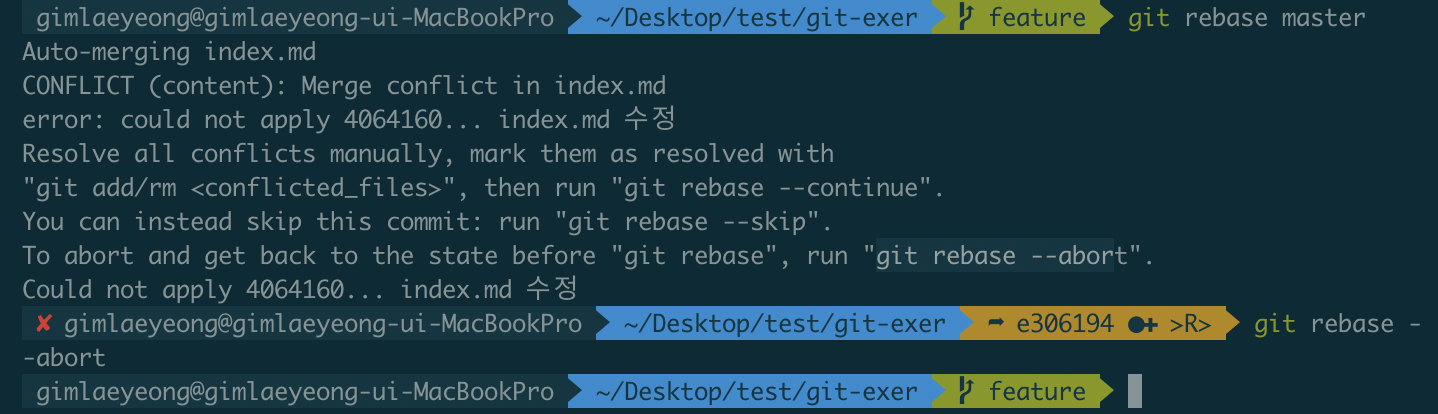
-
git rebase -i @~3( @는 HEAD 이고 3은 최근 커밋 한 3개를 말한다. ) 최근 3개의 커밋을 하나로 합칠 수 있다. -
conflict가 날 경우 충돌이 나는 파일을 변경한 뒤
add만 한 후git rebase —continue를 실행한다.
-
-
reset
- 이전 커밋 상태로 되돌아간다.
show커밋 상태를 보여준다.- 한 커밋 이전 ex) HEAD~, HEAD^, @~, @^ (
HEAD === @) - @~2 (2 커밋 이전)
- 한 커밋 이전 ex) HEAD~, HEAD^, @~, @^ (
git reset --soft <commit hash or @~3>- commit 명령어만 되돌리고 Stage 상태가 된다.
git reset --mixed <commit hash>- commit 명령어로 되돌리고 Modified 상태가 된다.
git reset --hard <commit hash>- commit 명령도 되돌리고 UnModified 상태가 된다.
- 디렉토리 상태도 되돌려버리기 때문에 복구가 불가능한다.
git branch 전략
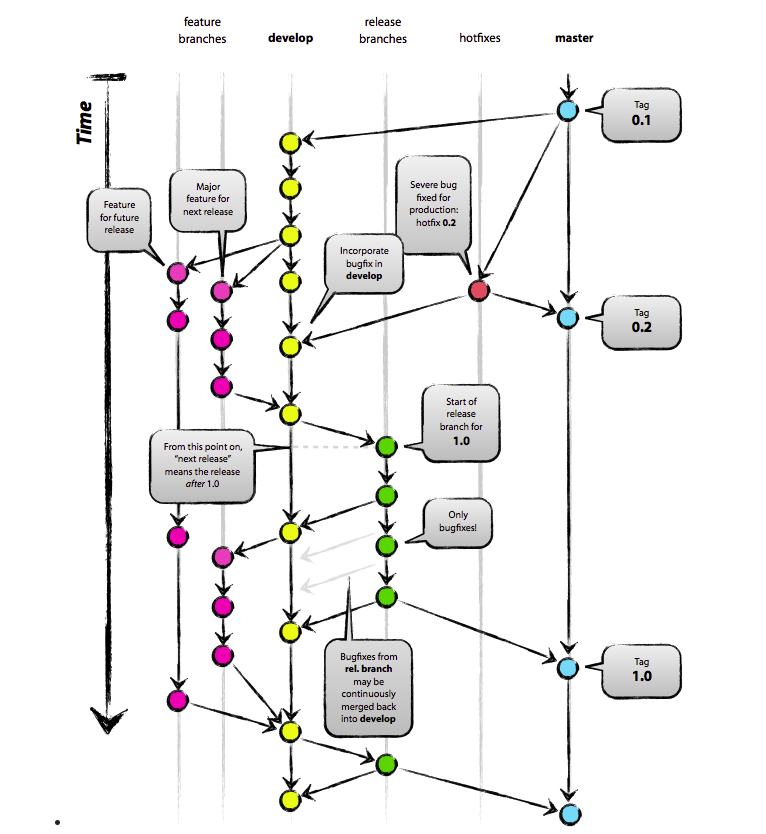
git flow
master
- git init을 하면 생기는 태초의 브랜치이다.
- 배포 브랜치이다.
develop
- 보통 작업할 때 기준이 되는 브랜치이다.
- develop 기준으로 배포하며 테스트 한다.
- 생성 위치는 mater이다.
hotfix
- 서비스에 문제가 생기거나 버그를 고쳐 배포해야할 때 사용한다.
- master브랜치와 develop브랜치 두 곳 다 merge해 준다.
- 생성위치 mater이다.
feature
- 기능을 만드는 브랜치이다.
- 현업에서는 develop 브랜치에서 따온 freature 브랜치 특정 기능을 개발한 후 풀리퀘스트를 보내서 코드리뷰를 받은 후 develop 브랜치에 merge 한다.
- 생성위치 develop이다.
release
- 새로운 기능들을 추가하여 배포하기 위한 브랜치이다.
- master 와 develop 브랜치에 merge한다.
- 생성위치 develop이다.