학습계획
- Spring-Vault 설정하기
- JDK 다이나믹 프록시
- 트랜잭션 개념
Today I Learned
Spring-Vault
어플리케이션의 민감정보를 한 곳에서 관리하는 spring에서 제공하는 모듈
homebrew를 통해 설치
brew install vaultvault 서버를 아래 명령어로 시작하자(토큰 id 00~은 기본 default 비밀번호이다)
$ vault server --dev --dev-root-token-id="00000000-0000-0000-0000-000000000000"아래 문자열이 보이면 vault 서버가 정상적으로 시작된것이다.

위의 명령어로 vault 서버 시작 시, 개발 모드로 인메모리를 사용 하여 암호화 되지 않은 민감정보를 전달한다. 이 방식은 vault 서버를 로컬에서 테스트 용으로 사용하기 적절하다. 만약 운영에서 사용 시 SSL인증서나 해당 IP만 접근하도록 설정이 필요하다.
동적 프록시
배경
프록시 객체를 통해 기존 객체를 수정하지 않고 타겟 객체에 대한 접근을 제어하며, 프록시 객체에 부가 기능을 추가할 수 있었다. 하지만 타겟 클래스의 수만큼 프록시 객체를 만드는 번거로움이 있었다.
이러한 번거로움은 동적 프록시 기술로 해결할 수 있다. JDK에서 제공하는 JDK동적 프록시 기술이나 오픈 소스인 CGLIB를 활용하면 프록시를 적용할 코드만 생성 후 필요한 곳에 적용할 수 있다.
💡 리플랙션동적 프록시 기술에 적용되었으며, 리플랙션을 통해 클래스나 메서드의 메타정보를 읽어 코드를 조작할 수 있다.
정의 및 종류
- 원하는 실행 로직을 지정하여 런타임 시 프록시 객체가 지정된 곳에 주입 되도록 수행한다.
JDK Dynamic Proxy
- 인터페이스 기반으로 프록시가 만들어진다.
- InvocationHandler 인터페이스를 구현하여 JDK Proxy를 구현한다.
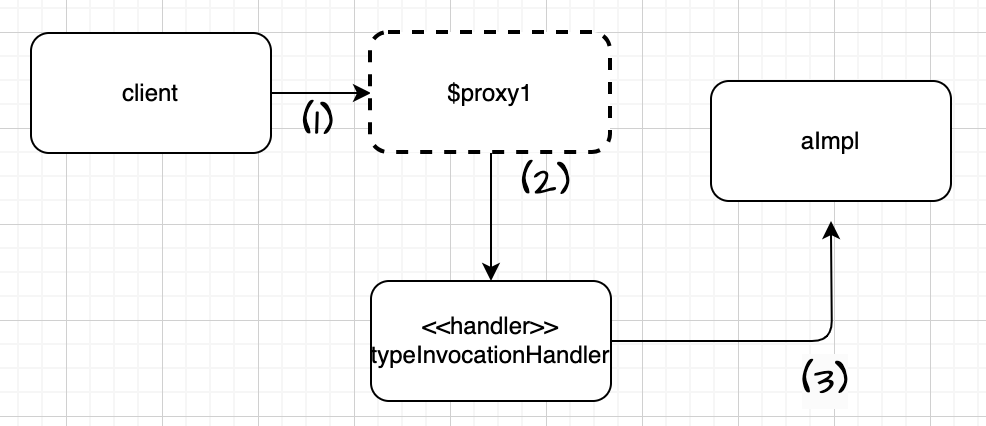
-
프록시 객체를 호출한다.
call()public class JdkDynamicProxyTest { public static void main(String[] args) { AInterface target = new AImpl(); TypeInvocationHandler handler = new TypeInvocationHandler(target); AInterface proxy = (AInterface) Proxy.newProxyInstance(AInterface.class.getClassLoader(), new Class[]{ AInterface.class},handler); **proxy.call();** System.out.println("target.getClass() = " + target.getClass()); System.out.println("proxy.getClass() = " + proxy.getClass()); } } -
JDK동적 프록시가 InvocationHandler.invoke()를 호출한다.
InvocationHandler는 JDK 동적 프록시 규약이므로 구현해야한다.
-
proxy : 프록시 자기 자신
-
method : 호출한 메서드
-
Object[] args : 메서드 호출할 때 전달할 인수
public class TypeInvocationHandler implements InvocationHandler {

    private final Object target;//프록시 적용 대상

    public TypeInvocationHandler(Object target) {
        this.target = target;
    }

    @Override
    public Object invoke(Object proxy, Method method, Object[] args) throws Throwable {
        System.out.println("TypeInvocation Handler 실행");
        long startTime = System.currentTimeMillis();

        Object result = **method.invoke(target, args);**

        long resultTime = System.currentTimeMillis() - startTime;
        System.out.println("resultTime = " + resultTime);
        return result;
    }
}
-
TypeInvocationHandler 에 정의된 프록시의 부가적인 로직을 수행하고, method.invoke()를 호출하여 target(AImpl)을 호출한다. invoke 메서드의 파라미터로 AInterface에 명시된 call()가 넘겨진다.
public interface AInterface {
    String call();
}
CGLIB(Code Generator Library)
-
- 바이트 코드를 조작해서 동적으로 클래스를 생성하는 기술 제공
- JDK Proxy와 달리 구체클래스로만 동적 프록시 생성 가능
- 스프링 프레임워크에 포함되어있으므로 라이브러리를 별도로 추가하지 않아도 된다.
트랜잭션
- 트랜잭션이란? 더 이상 나눌수없는 작업 단위, 논리적 작업 단위,상호 독립적인 시스템
- 트랜잭션의 양식
Begin Transaction Execute several queries Commit the transaction - 트랜잭션 사용이유 논리적 작업 단위의 데이터 일관성을 보장하기 위해 더 이상 나눌수없는 작업 단위 = 원자성
- ACID - 트랜잭션이 안전하게 수행된다는것을 보장하는 성질
- Atomicity(원자성)
- Consistency(일관성)
- Isolation(독립성)
- 지속성(Durability)
- 트랜잭션 장단점
- 트랜잭션 ACID 속성을 보장하기 위해 추가적인 처리를 하므로 복잡한 트랜잭션 작업이 반복될 경우 DB 성능이 저하 될 수 있다.
- 트랜잭션이 DB리소스에 lock을 얻고 기다리면 다른 트랜잭션과 상호 작용 시 데드락이 발생할 수 있다.
- 트랜잭션 경계설정
- 트랜잭션 시작을 설정하고 종료 작업(commit, rollback)까지의 경계를 지정하는 것
- 주로 비즈니스 로직에서 설정 됨
- Transaction Commit 성공했다고 트랜잭션 작업을 확정하는 작업
- Transaction Rollback 트랜잭션 으로 묶인 작업 이 실패한 경우 취소하는 작업
- Transaction Commit 성공했다고 트랜잭션 작업을 확정하는 작업
- 트랜잭션 작업은 내구성을 보장받기 때문에 일단 커밋되고 나면 DB서버가 다운되더라도 그 결과는 DB에 남는다. → 트랜잭션이 종료되는 시점에 DB에 결과를 반영하면 바로 row에 적용되는게 아닌 어떠한 공간에 저장되었다가 DB 서버가 다운되도 트랜잭션 결과를 반영할 수 있다?!
[참고]
https://spring.io/guides/gs/vault-config/