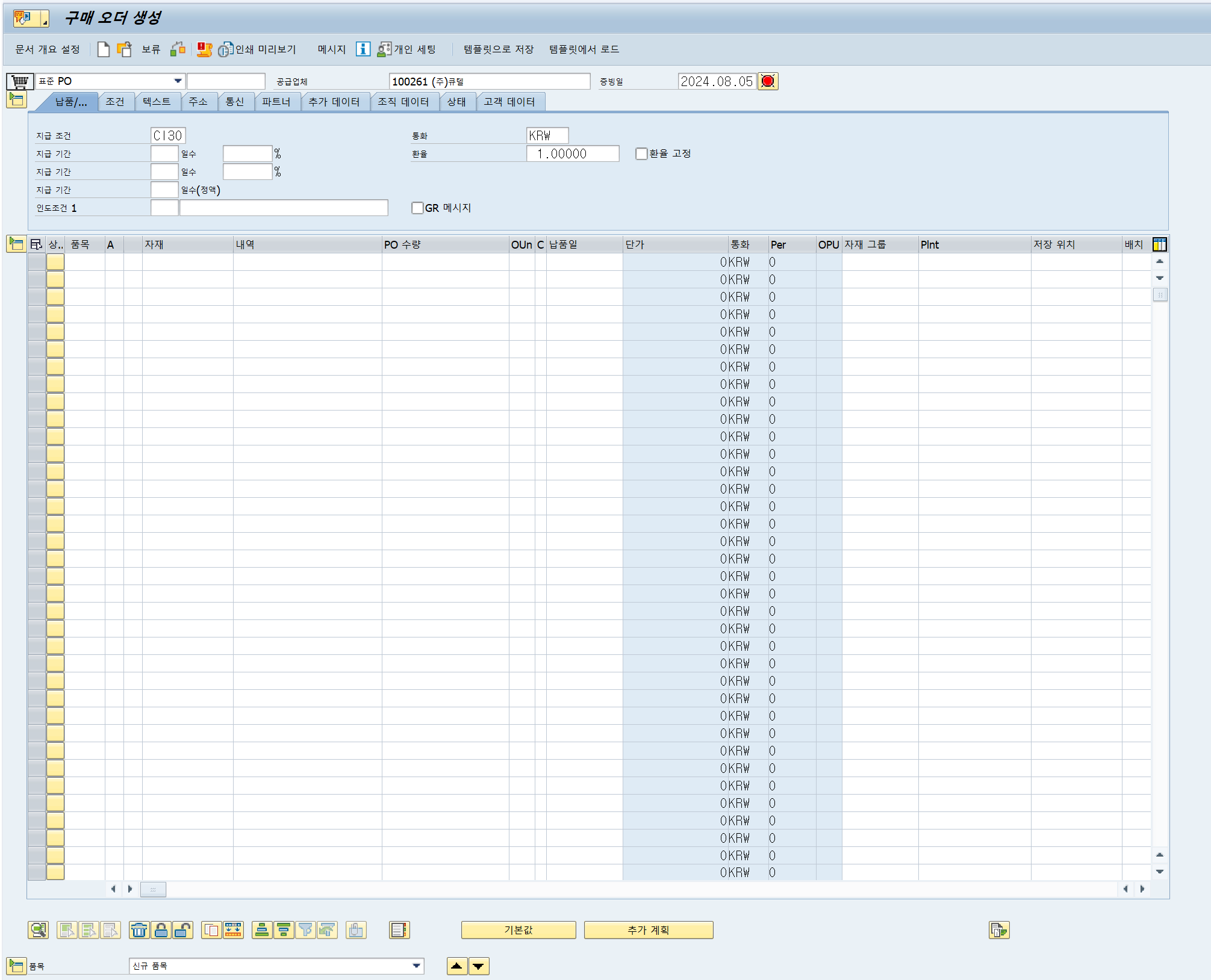
구매오더 :Purchase Order
자재납품을 공급업체에게 요청하는 구매발주 문서로 어떠한 업체(Vendor)에게 어떠한 물품을 구매할 것인가에 대한 내용이다. 즉, 구매오더는 업체에게 어떤 상품이나 서비스를 언급된 가격에 공급해 주길 요구하는 공식적인 문서인 것이다. 구매오더는 기본적으로 구매담당자가 직접 작성하거나 구매요청서나 견적의뢰서 등을 참고하여 작성할 수 있다. 이때 구매오더는 마스터 데이터를 참조하여 생성된다.
구매오더 생성
T-code : ME21N
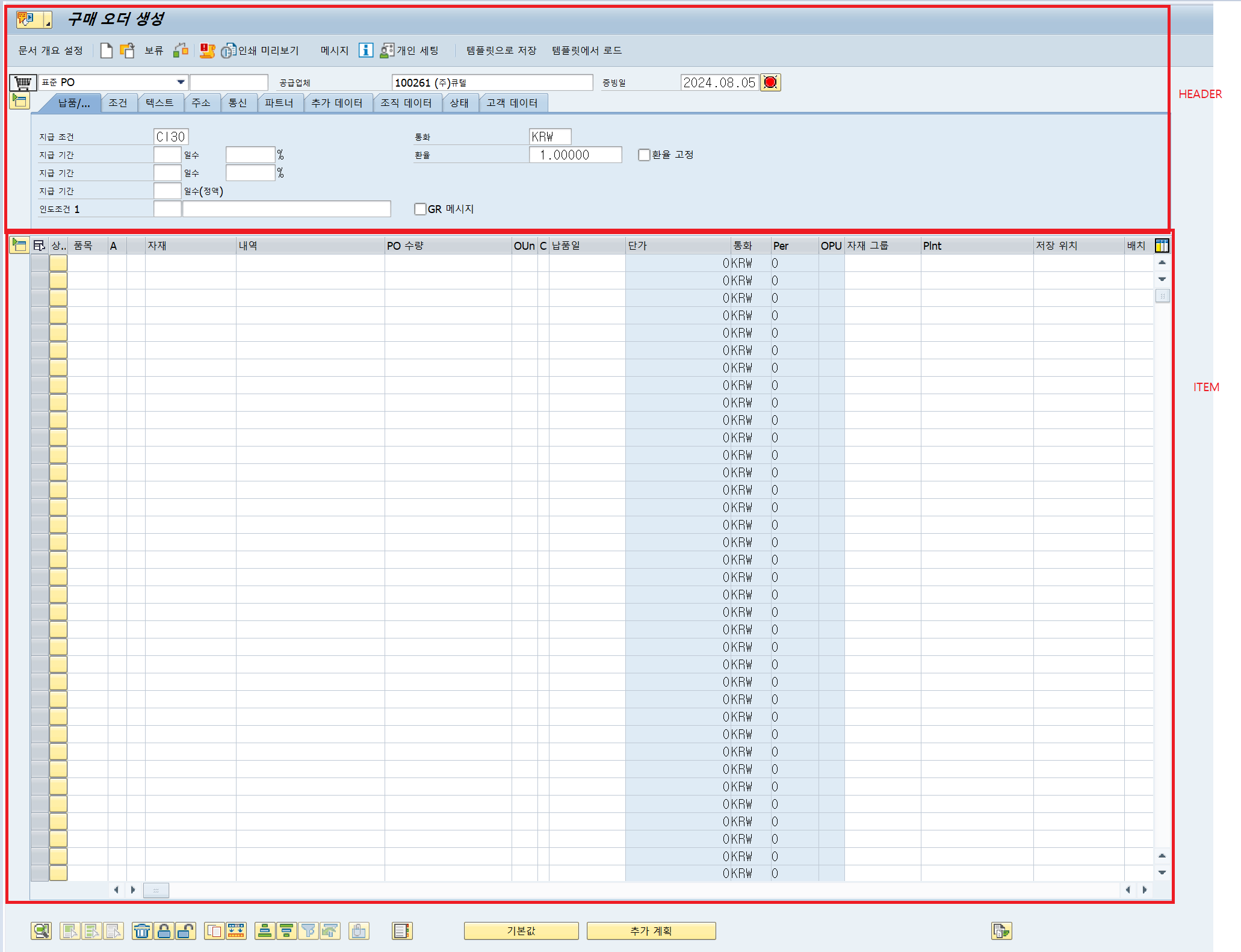
Header :
발주번호(Document Numver), Payment Term, 업체(Vendor code), 화폐단위(Currency), 환율(Exchange Rate) 등의 정보를 가지고 있다.
Item :
자재코드, 발주수량, 구매단가(Net price), 플랜트 등의 정보를 가지고 있다.
문서개요설정( Doc.Overview Off & On):
담당자가 생성한 PO, Quotation, Contract 등을 오른쪽 Doc. Overview 부분에 띄워볼 수 있다.
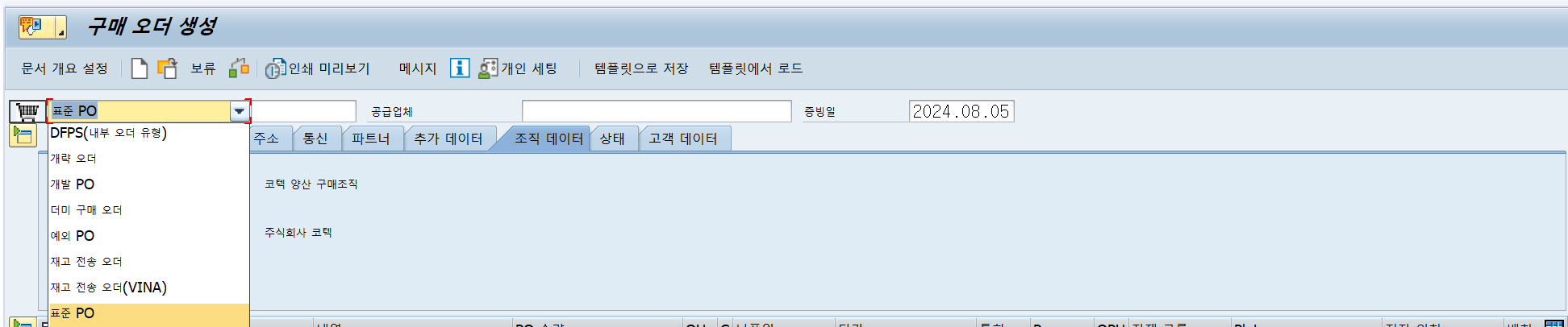
- Standard PO등의 PO의 Document Type 선택하기
-
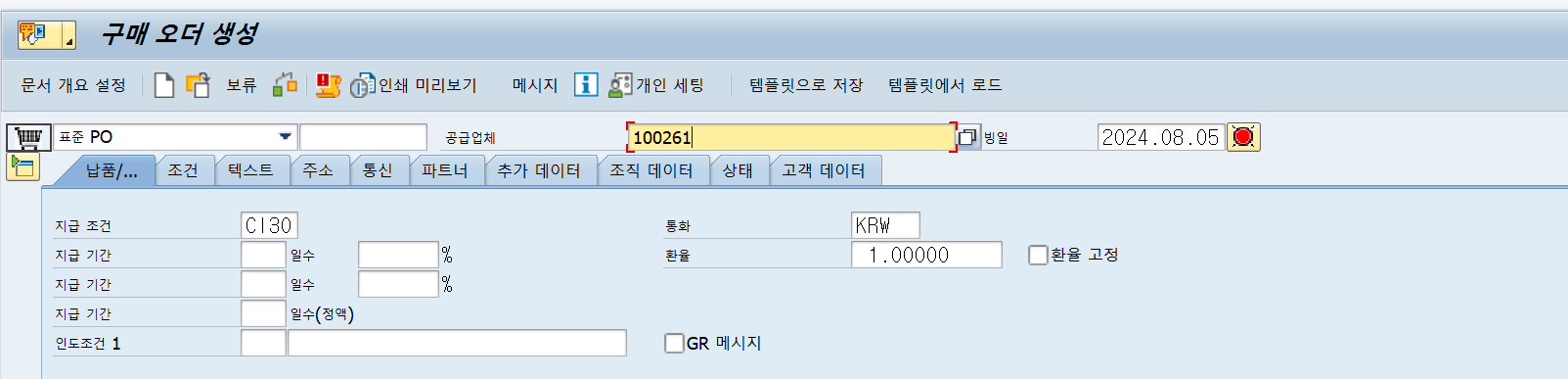
업체(Vendor) 입력
-
조직데이터 입력

-
품목입력 후 저장

관련 TABLE
EKKO - PO헤더
EKPO - PO아이템
EKKN - 계정지정
EKBE - PO히스토리
PO생성 BAPI - BAPI_PO_CREATE1
DATA : ls_poheader      TYPE bapimepoheader,
            ls_poheaderx    TYPE bapimepoheaderx,
            lt_poitem           TYPE TABLE OF bapimepoitem WITH HEADER LINE,
            lt_poitemx         TYPE TABLE OF bapimepoitemx WITH HEADER LINE,
            lt_poschedule   TYPE TABLE OF bapimeposchedule WITH HEADER LINE,
            lt_poschedulex TYPE TABLE OF bapimeposchedulx WITH HEADER LINE,
            lv_po_number  TYPE bapimepoheader-po_number,
            lt_return            TYPE TABLE OF bapiret2 WITH HEADER LINE.

***<<< 헤더 세팅
ls_poheader-comp_code = '회사 코드'. " 회사 코드
ls_poheader-doc_type = 'UB'. " 오더 유형
ls_poheader-purch_org = '구매 조직'. " 구매 조직
ls_poheader-pur_group = '구매 그룹'. " 구매 그룹
ls_poheader-doc_date = sy-datum. " 구매 증빙일
ls_poheader-suppl_plnt = '플랜트'. " 공급 플랜트
ls_poheader-our_ref = '저장 위치'. " 출고 저장 위치

ls_poheaderx-comp_code = 'X'.
ls_poheaderx-doc_type = 'X'.
ls_poheaderx-purch_org = 'X'.
ls_poheaderx-pur_group = 'X'.
ls_poheaderx-doc_date = 'X'.
ls_poheaderx-suppl_plnt = 'X'.
ls_poheaderx-our_ref = 'X'.
***>>> 헤더 세팅

***<<< 아이템 세팅
lt_poitem-po_item = '10'. " 품목 번호
lt_poitem-material = '자재 번호'. " 자재 번호
lt_poitem-plant = '플랜트'. " 플랜트
*lt_poitem-batch = ''. " 배치 번호
lt_poitem-stge_loc = '저장 위치'. " 저장 위치
lt_poitem-quantity = '22'. " 수량
lt_poitem-po_unit = 'KG'. " 단위
lt_poitem-suppl_stloc = '저장 위치'. " 출고 저장 위치
APPEND lt_poitem.

lt_poitemx-po_item = '10'. " 품목 번호
lt_poitemx-material = 'X'. " 자재 번호
lt_poitemx-plant = 'X'. " 플랜트
*lt_poitemx-batch = 'X'. " 배치 번호
lt_poitemx-stge_loc = 'X'. " 저장 위치
lt_poitemx-quantity = 'X'. " 수량
lt_poitemx-po_unit = 'X'. " 단위
lt_poitemx-suppl_stloc = 'X'. " 출고 저장 위치
APPEND lt_poitemx.
***>>> 아이템 세팅

***<<< 납품 세팅
lt_poschedule-po_item = '10'.
lt_poschedule-sched_line = '0001'.
lt_poschedule-delivery_date = sy-datum. " 계획 출고일
APPEND lt_poschedule.

lt_poschedulex-po_item = '10'.
lt_poschedulex-sched_line = '0001'.
lt_poschedulex-delivery_date = sy-datum.
APPEND lt_poschedulex.
***>>> 납품 세팅

CALL FUNCTION 'BAPI_PO_CREATE1'
    EXPORTING
        poheader                = ls_poheader
        poheaderx              = ls_poheaderx
    IMPORTING
        exppurchaseorder = lv_po_number
    TABLES
        return                      = lt_return
        poitem                     = lt_poitem
        poitemx                   = lt_poitemx
        poschedule             = lt_poschedule
        poschedulex           = lt_poschedulex.

IF lv_po_number IS NOT INITIAL.
    CALL FUNCTION 'BAPI_TRANSACTION_COMMIT'
        EXPORTING
            wait = 'X'.
    MESSAGE s000 WITH 'SUCCESS' lv_po_number.
ELSE.
    CALL FUNCTION 'BAPI_TRANSACTION_ROLLBACK'.
    READ TABLE lt_return WITH KEY type = 'E'.
    MESSAGE ID lt_return-id TYPE 'S' NUMBER lt_return-number
                       WITH lt_return-message_v1 lt_return-message_v2
                                  lt_return-message_v3 lt_return-message_v4
                       DISPLAY LIKE lt_return-type.
ENDIF.
SAP, ERP, ABAP