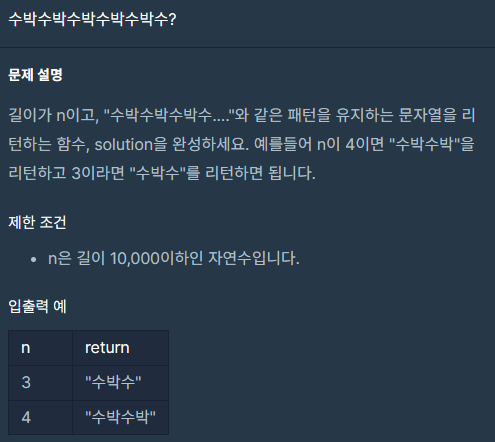
수박수박수박수박수박수?
자소서 팀원들의 피드백
공부하며 느낀 점
수박수박수박수박수박수?
나의 풀이
제일 무난한건 if문으로 홀짝 판별 또는 마지막 글자를 파악 후 수나 박을 붙이는 것일거다.
또는 홀수라면 (n-1)/2회 만큼 수박을 반복시키고 수를 붙이는식으로 해도 될것이다.
아마 후자의 방법이 반복 횟수가 절반으로 줄어서 조금이나마 더 성능이 나을 것이다.
function sol0(n) {
    var answer = '';
    const length = (Math.floor(n/2))
    console.log(length)
    const odd = n%2

    for (let i = 0 ; i < length ; i++){
        answer += '수박'
    }

    if (odd === 1){
        answer +='수'
    }

    return answer;
}
다른 사람의 풀이
// 다른 사람 풀이 1
function sol1(n) {
    return '수박'.repeat(n/2) + (n%2 === 1 ? '수' : '');
}
나와 같은 방법이지만 더 압축되었다.
for와 frepeat의 속도차이를 비교할 수 있을듯하다.
// 다른 살마 풀이 2
function sol2(n) {
    return "수박".repeat(n).slice(0,n)
}
repeat(n) 을 repeat(n/2+1) 로 고쳐서 연산을 줄인 다음에 속도를 비교해봐야겠다.
function sol21(n) {
    return "수박".repeat(n/2+1).slice(0,n)
}
// 다른 사람 풀이 3
function sol3(n){
var result = "수박수박수박수박수박수박수박수박수박수박수박수박수박수박수박수박수박수박"
//함수를 완성하세요
return result.substring(0,n);
}무식하지만 수박을 적절한 횟수 반복하기만했다면 괜찮은 방법으로 보인다.
문제에서 준 조건이 1만이기 때문에 gpt4에게 수박을 5천번 반복해서 적어달라고 한다음에 비교해봐야겠다.
같은 문자 반복하기
이하는 gpt3.5가 제안한 코드
function copyToClipboard(text) {
    const textArea = document.createElement("textarea");
    textArea.value = text;

    // 아래 두 줄은 textArea를 화면에 표시하지 않고, 클립보드에 복사하기 위한 것입니다.
    textArea.style.position = "fixed";
    document.body.appendChild(textArea);

    textArea.select();
    document.execCommand("copy");

    document.body.removeChild(textArea);
}

function repeatAndCopyToClipboard() {
    const word = "수박";
    const repeatCount = 5000;
    const repeatedWord = word.repeat(repeatCount);
    copyToClipboard(repeatedWord);
    console.log(`"${word}" 단어를 ${repeatCount}번 반복해서 클립보드에 복사했습니다.`);
}

repeatAndCopyToClipboard();
node.js 환경에서는 클립보드에 접근할 수 없으니 브라우저의 콘솔창에서 실행해야한다고한다.
만약 node.js 환경에서 쓰고 싶다면 이하의 코드를 사용해야한다고 한다.
// npm install clipboardy

const clipboardy = require('clipboardy');

function repeatAndCopyToClipboard() {
    const word = "수박";
    const repeatCount = 5000;
    const repeatedWord = word.repeat(repeatCount);

    clipboardy.writeSync(repeatedWord);

    console.log(`"${word}" 단어를 ${repeatCount}번 반복해서 클립보드에 복사했습니다.`);
}

repeatAndCopyToClipboard();
속도 비교
// 솔루션0
function sol0(n) {
  var answer = "";
  const length = Math.floor(n / 2);
  const odd = n % 2;

  for (let i = 0; i < length; i++) {
    answer += "수박";
  }

  if (odd === 1) {
    answer += "수";
  }

  return answer;
}

// 솔루션1
function sol1(n) {
  return "수박".repeat(n / 2) + (n % 2 === 1 ? "수" : "");
}

// 솔루션2
function sol2(n) {
  return "수박".repeat(n).slice(0, n);
}

function sol21(n) {
  return "수박".repeat(n / 2 + 1).slice(0, n);
}

// 솔루션3
function sol3(n) {
  var result =
    "수박 --- 중략 --- 수박""
  return result.substring(0, n);
}

//////////////////////////////////////////////////////////

async function runSolutionWithTiming(solutionFn, number1) {
  const startTime = new Date();
  for (let i = 0; i < 10000000; i++) {
    await solutionFn(number1);
  }
  const endTime = new Date();
  const executionTime = endTime - startTime;

  console.log(`${solutionFn.name} 실행 시간: ${executionTime}ms`);
}

async function main() {
  const number1 = 4546;

  await runSolutionWithTiming(sol0, number1);
  await runSolutionWithTiming(sol1, number1);
  await runSolutionWithTiming(sol2, number1);
  await runSolutionWithTiming(sol21, number1);
  await runSolutionWithTiming(sol3, number1);
}

main()
  .then(() => {
    console.log("모든 실행이 완료되었습니다.");
  })
  .catch((error) => {
    console.error("에러 발생:", error);
  });
위와같은 조건으로 비교해보았다.
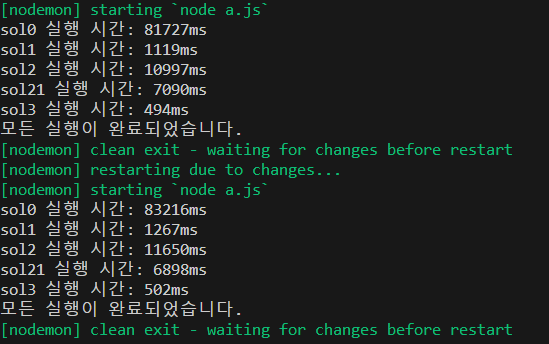
의외로 3이 가장 빨랐으며, 그 이유는 연산할 것이 적어서인듯 하다.
2의 반복 횟수를 줄인 21도 당연히 2보다 빨랐다.
문제는 나의 코드인 0이 왜이리 느리냐는 것이다.
문제 진단.
answer에 자꾸 값이 추가되어서 느려진다?
// 솔루션0
function sol0(n) {
  var answer = "";
  const length = Math.floor(n / 2);
  const odd = n % 2;

  for (let i = 0; i < length; i++) {
    // answer += "수박";
  }

  if (odd === 1) {
    // answer += "수";
  }

  return answer;
}
answer의 값을 변화시키는 요소를 모두 없앤 뒤 반복시켰다.
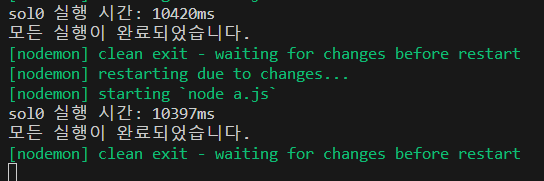
다행히(?) 남들의 코드와 비슷한 속도가 나왔다.
자소서 팀원들의 피드백
- 글자 크키가 너무 크고, 양옆 여백이 너무 넓다. (A3등 활용)
- 일단 기술스택을 다 넣어보자.
- Raw Query 사용 경험을 넣어보자.
- 관련 업종이 아니라도 일한 경력을 넣어보자.
공부하며 느낀 점
- 반복문을 짜는것보다 이미 있는 커다란 것에서 잘라내는 것이
훨씬더 빠르다. 하지만, 코드의 유지 보수 측면에서는 좋지 못한것같다. answer += '수박'은 O(N)의 복잡도를 가진다.
for 문 역시 O(N)의 복잡도를 가진다.
O(N) 의 복잡도의 일을 O(N)으로 일하기 때문에 의 복잡도를 가진다.
또는answer += '수박'을 n회 반복하므로 의 복잡도를 가진다고 표현할 수 도 있다.repeat함수의 경우 native 하게 짜인 함수라서 빠른것같다.
node 개발자