문제 상황
React + styled-components로 사이드바를 개발하는 과정에서 커스텀 prop(예: boolean, string 등)을 DOM에 그대로 넘겨 두 개의 경고 메시지를 마주치게 되었다.
-
카멜케이스(
isSelected)로 넘긴 경우:
- React는 해당 prop을 DOM에 전달하지 않으며, 아래와 같은 경고를 출력한다.

-
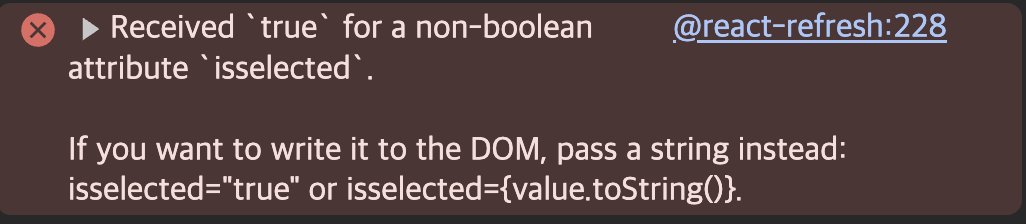
소문자(
isselected)로 넘긴 경우:
- React는 해당 prop을 custom attribute로 DOM에 전달하고, boolean 값이 전달되면 아래와 같은 경고를 출력한다.
원인 정리
- React는 표준 HTML 속성이 아닌 prop을 DOM에 전달하지 않으려 한다.
- 카멜케이스(prop: isSelected)는 DOM에 전달하지 않고 경고만 띄움.
- 소문자(prop: isselected)는 custom attribute로 간주하여 DOM에 전달하고 boolean 값 전달 시 경고 출력.
- string, number, object 등 다른 타입의 커스텀 prop도 마찬가지로 불필요하게 DOM에 전달되면 비슷한 문제 발생 가능.
기존 코드
// index.tsx
<S.Elem
  key={key}
  isSelected={currentPath === key}
  onClick={() => navigate(`${key}`)}
>
  ...
</S.Elem>

// style.ts
export const Elem = styled.div<{ isSelected: boolean }>`
  ...
  background-color: ${({ isSelected, theme }) =>
    isSelected ? theme.color.selectedWhite : "transparent"};
`;
해결 방법
$ Prefix 사용 (공식 권장)
styled-components에서는 prop 이름에 $ prefix(트랜지언트 프롭)를 붙이면 해당 prop을 실제 DOM에 전달하지 않고 내부 스타일 계산에만 사용한다.
수정된 코드
// index.tsx
<S.Elem
  key={key}
  $isSelected={currentPath === key}
  $variant="primary" // string prop 예시
  onClick={() => navigate(`${key}`)}
>
  ...
</S.Elem>

// style.ts
export const Elem = styled.div<{ $isSelected: boolean; $variant?: string }>`
  ...
  background-color: ${({ $isSelected, theme }) =>
    $isSelected ? theme.color.selectedWhite : "transparent"};
  color: ${({ $variant }) => ($variant === "primary" ? "blue" : "black")};
`;$isSelected,$isselected,$variant,$fooBar등$prefix만 붙이면 케이스, 이름 방식 전부 상관 없이 사용 가능하다
결론
- React에서 커스텀 prop(boolean, string, number 등)을 DOM에 직접 전달하면 경고가 발생하거나, 의도치 않은 동작이 생길 수 있다.
- 카멜케이스(prop: isSelected)는 "인식하지 못하는 prop" 경고, 소문자(prop: isselected)는 "boolean attribute" 경고 등 다양한 문제가 있다.
- styled-components에서는
$prefix를 붙이면 안전하게 사용할 수 있고, DOM에는 전달되지 않는다. - 이 방법은 boolean뿐 아니라 string, number, object 등 모든 커스텀 prop에 적용 가능하다.
이 패턴을 사용하면 styled-components에서 커스텀 prop 경고와 불필요한 DOM 속성 문제를 예방할 수 있다.
