스파르티코딩클럽 강의
3주차
join
테이블과 테이블을 붙이는 문법.
테이블을 붙일 때 '기준'이 필요함.
두 테이블의 공통된 정보(key값)를 기준으로 테이블을 연결해서 한 테이블처럼 보이게 하는 것.
left join
outer join의 일종. 합집합. 왼쪽의 모든 행 조회.
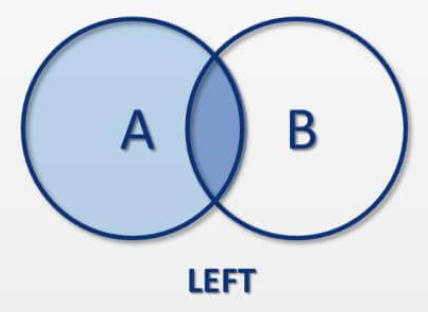
select * from users u
# 위에서 select 한 것을 p라고 부르는 point_users와 합치기.
# 기준은 u의 user_id와 p의 user_id
left join point_users p on u.user_id = p.user_id
inner join
교집합. 겹치지 않는 행은 결과에서 제외됨.
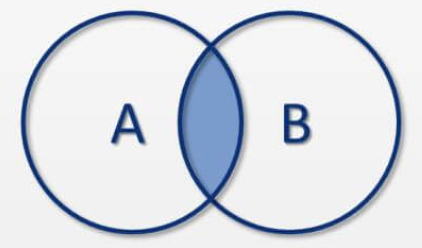
select * from users u
# 위에서 select 한 것을 p라고 부르는 point_users와 합치기.
# 기준은 u의 user_id와 p의 user_id
inner join point_users p on u.user_id = p.user_id
union
쿼리를 합침.
union: 중복된 row 제거
union all: 중복된 row 제거 x
(
	select '7월' as month, c1.title, c2.week, count(*) as cnt from courses c1
	inner join checkins c2 on c1.course_id = c2.course_id
	inner join orders o on c2.user_id = o.user_id
	where o.created_at < '2020-08-01'
	group by c1.title, c2.week
)
union all
(
	select '8월' as month, c1.title, c2.week, count(*) as cnt from courses c1
	inner join checkins c2 on c1.course_id = c2.course_id
	inner join orders o on c2.user_id = o.user_id
	where o.created_at >= '2020-08-01'
	group by c1.title, c2.week
)
4주차
subquery
큰 쿼리문 안에 들어가는 쿼리문.
# join 활용
select u.user_id, u.name, u.email from users u
inner join orders o on u.user_id = o.user_id
where o.payment_method = 'kakaopay'

# subquery 활용
select user_id, name, email from users u
where user_id in (
	select user_id from orders o
	where payment_method = 'kakaopay'
)
where 안 subquery
# 1. 결제수단이 카카오페이인 user_id를 추출
# 2. 추출된 user_id에 한해서 id, name, email 추출
select user_id, name, email from users u
where user_id in (
	select user_id from orders o
	where payment_method = 'kakaopay'
)
select 안 subquery
# 1. select로 c.user_id를 가져올 때 subquery 실행.
# 2. user_id가 c.user_id인 데이터들의 avg(likes) 추출.
select c.checkin_id,
	   c.user_id,
	   c.likes,
	   (
	   	select avg(likes) from checkins
	   	where user_id = c.user_id
	   ) as avg_likes_user
   from checkins c
from 안 subquery
# 1. select로 user_id와 avg(likes)를 새로운 테이블로 생성
# 2. 그 테이블을 point_users 테이블과 join 해서 원하는 데이터 추출
select pu.user_id, pu.point, a.avg_likes from point_users pu
inner join (
	select user_id, round(avg(likes),1) as avg_likes from checkins c
	group by user_id
) a on pu.user_id = a.user_id
with
from 안의 subquery로 만든 테이블을 사전에 따로 생성해서 사용하는 방식
with table1 as (
	select course_id, count(distinct(user_id)) as cnt_checkins from checkins
	group by course_id
), table2 as (
	select course_id, count(*) as cnt_total from orders
	group by course_id
)
select c.title,
       a.cnt_checkins,
       b.cnt_total,
       (a.cnt_checkins/b.cnt_total) as ratio
from table1 a inner join table2 b on a.course_id = b.course_id
inner join courses c on a.course_id = c.course_id
sql 문법
문자열
SUBSTRING_INDEX
# email을 @ 기준으로 나눠서 1번째 부분 추출
# -1이면 마지막 부분 추출
SUBSTRING_INDEX(email, '@', 1)
SUBSTRING
# created_at의 1번째부터 10번째까지 추출
SUBSTRING(created_at, 1, 10)
case
경우에 따라 원하는 값을 출력
문법
# point가 10000보다 클 때 특정 메세지
# 그렇지 않을 경우 다른 메세지
# end로 종료
case when point > 10000 then '잘 하고 있어요!'
else '조금만 더 파이팅!' end
예시
# subquery에서 case 별로 나눠서 출력
# 큰 쿼리에서 그 a.lv을 가지고 통계
# subquery는 with로 대체 가능
select a.lv, count(*) as cnt from (
	select user_id, point,
		(case when point > 10000 then '1만 이상'
				when point > 5000 then '5천 이상'
				else '5천 미만' end) as lv
	from point_users pu
) a
group by a.lv

with table1 as (
	select user_id, point,
			(case when point > 10000 then '1만 이상'
					when point > 5000 then '5천 이상'
					else '5천 미만' end) as lv
		from point_users pu
)
select a.lv, count(*) as cnt from table1 a
group by a.lv
퀴즈
3주차
# 1. 결제 수단 별 유저 포인트의 평균값 구해보기
select o.payment_method, round(avg(pu.point), 0) as avg_point from point_users pu
inner join orders o on pu.user_id = o.user_id
group by o.payment_method

# 2. 결제하고 시작하지 않은 유저들을 성씨별로 세어보기
select u.name, count(*) as cnt from enrolleds e
inner join users u on e.user_id = u.user_id
where e.is_registered = 0
group by u.name
order by cnt desc

# 3. 과목 별로 시작하지 않은 유저들을 세어보기
select c.course_id, c.title, count(*) as cnt_notstart from courses c
inner join enrolleds e on c.course_id = e.course_id
where e.is_registered = 0
group by c.course_id

# 4. 웹개발, 앱개발 종합반의 week 별 체크인 수를 세어볼까요? 보기 좋게 정리해보기
select c.title, c2.week, count(*) as cnt from courses c
inner join checkins c2 on c.course_id = c2.course_id
group by c.title, c2.week
order by c.title, c2.week

# 5. 연습 4번에서, 8월 1일 이후에 구매한 고객들만 발라내어 보세요!
select c.title, c2.week, count(*) as cnt from courses c
inner join checkins c2 on c.course_id = c2.course_id
inner join orders o on o.user_id = c2.user_id
where o.created_at >= '2020-08-01'
group by c.title, c2.week
order by c.title, c2.week
4주차
# 1. 전체 유저의 포인트의 평균보다 큰 유저들의 데이터 추출하기
select * from point_users pu
where point > (
	select round(avg(point),2) from point_users
)

# 2. 이씨 성을 가진 유저의 포인트의 평균보다 큰 유저들의 데이터 추출하기
select * from point_users pu
where point > (
	select round(avg(point), 2) from point_users pu2
	inner join users u on u.user_id = pu2.user_id
	where u.name = '이**'
)

# 3. checkins 테이블에 course_id별 평균 likes수 필드 우측에 붙여보기
select c.checkin_id,
	   c.course_id,
	   c.user_id,
	   c.likes,
	   (
	   	select avg(likes) from checkins
	   	where course_id = c.course_id
	   ) as course_avg
from checkins c

# 4. checkins 테이블에 과목명별 평균 likes수 필드 우측에 붙여보기
select c.checkin_id,
	   c2.title,
	   c.user_id,
	   c.likes,
	   (
	   	select avg(likes) from checkins
	   	where course_id = c.course_id
	   ) as course_avg
from checkins c
inner join courses c2 on c.course_id = c2.course_id

# 5. course_id별 like 개수에 전체 인원을 붙이기
select c.title, cnt_checkins, b.cnt_total, cnt_checkins/b.cnt_total as ratio from
(
	select course_id, count(distinct(user_id)) as cnt_checkins from checkins
	group by course_id
) a
inner join (
	select o.course_id, count(o.user_id) as cnt_total from orders o
	group by course_id
) b on a.course_id = b.course_id
inner join courses c on a.course_id = c.course_id
복습
# 1. 평균 이상 포인트를 가지고 있으면 '잘 하고 있어요' / 낮으면 '열심히 합시다!' 표시하기!
select pu.point_user_id, pu.point,
	(case when pu.point > (select avg(pu2.point) from point_users pu2) then '잘 하고 있어요!'
	else '열심히 합시다!' end) as msg
from point_users pu

# 2. 이메일 도메인별 유저의 수 세어보기
select SUBSTRING_INDEX(email, '@', -1) as domain, count(*) from users
group by domain

# 3. '화이팅'이 포함된 오늘의 다짐만 출력해보기
select * from checkins
where comment like '%화이팅%'

# 4. 수강등록정보(enrolled_id)별 전체 강의 수와 들은 강의의 수 출력해보기
with lecture_done as (
	select enrolled_id, count(*) as done_cnt from enrolleds_detail ed
	where done = 1
	group by enrolled_id
), lecture_total as (
	select enrolled_id, count(*) as total_cnt from enrolleds_detail ed2
	group by enrolled_id
)
select a.enrolled_id, a.done_cnt, b.total_cnt from lecture_done a
inner join lecture_total b on a.enrolled_id = b.enrolled_id

# 5. 수강등록정보(enrolled_id)별 전체 강의 수와 들은 강의의 수, 그리고 진도율 출력해보기
with lecture_done as (
	select enrolled_id, count(*) as done_cnt from enrolleds_detail ed
	where done = 1
	group by enrolled_id
), lecture_total as (
	select enrolled_id, count(*) as total_cnt from enrolleds_detail ed2
	group by enrolled_id
)
select a.enrolled_id, a.done_cnt, b.total_cnt, round(a.done_cnt/b.total_cnt, 2) as ratio from lecture_done a
inner join lecture_total b on a.enrolled_id = b.enrolled_id

# 6. 위 코드를 더 간단하게!
select enrolled_id,
       sum(done) as done_cnt,
       count(*) as total_cnt,
       round(sum(done)/count(*), 2) as ratio
from enrolleds_detail ed
group by enrolled_id
숙제
# 3주차 숙제
# enrolled_id별 수강완료(done=1)한 강의 갯수를 세어보고, 완료한 강의 수가 많은 순서대로 정렬해보기. user_id도 같이 출력되어야 한다.

select e.enrolled_id, e.user_id, count(*) as max_count from enrolleds e
inner join enrolleds_detail ed on e.enrolled_id = ed.enrolled_id
where ed.done = 1
group by e.enrolled_id
order by max_count desc
COYG🔴⚪