1. 계산기 만들기
✏️ Test1.
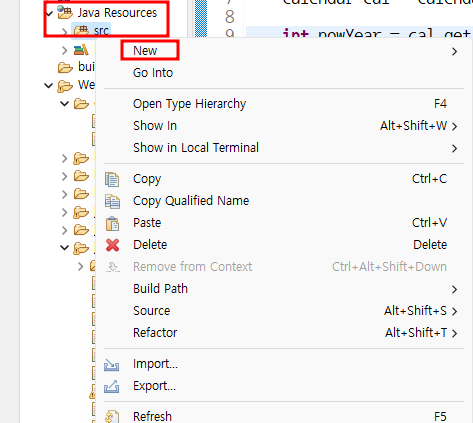
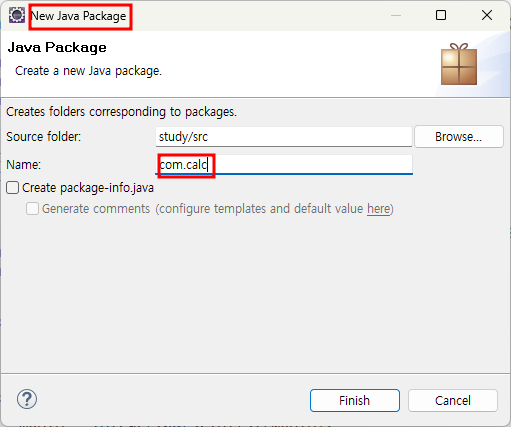
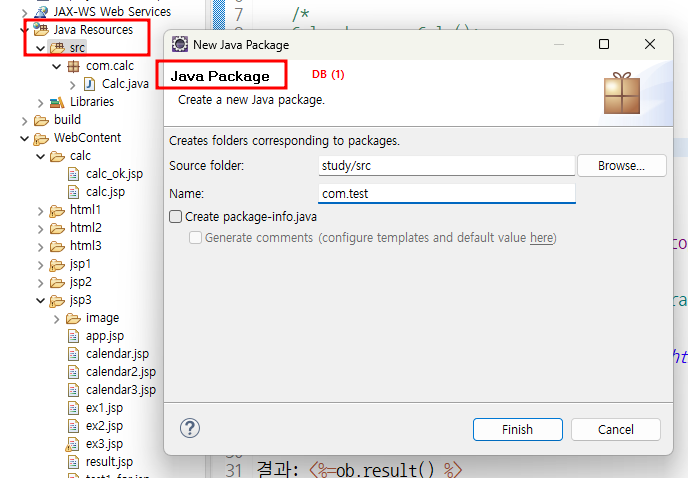
- Java Resource에 자바영역 따로 빼주기
-> getter / setter 받아서 처리하는 것이 더 편함
-
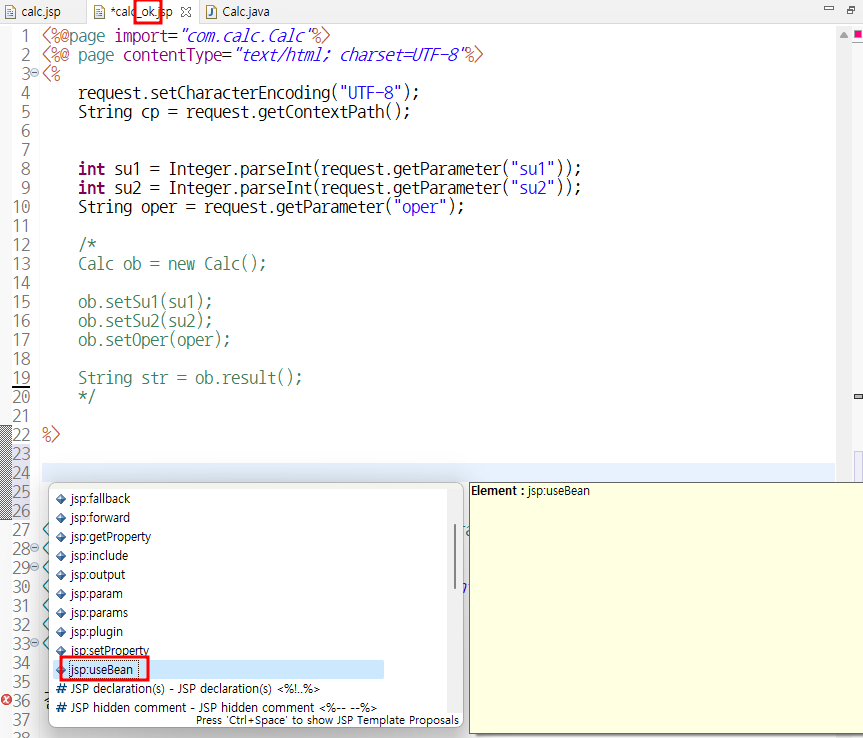
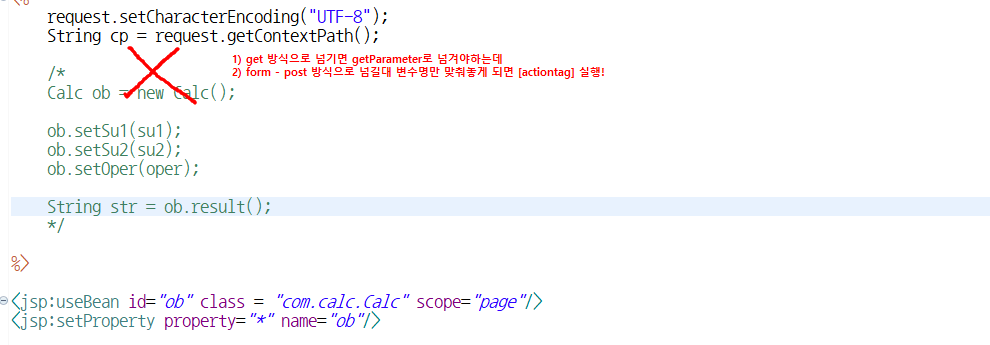
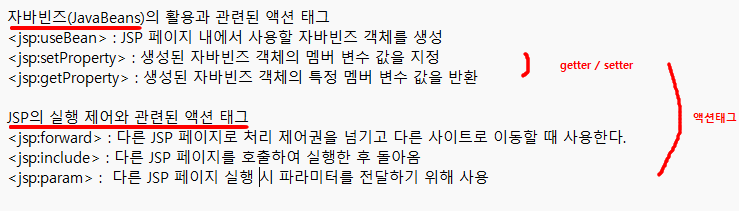
web으로 좀 더 발전해보자면 [actiontag]를 쓸 수 있음
-
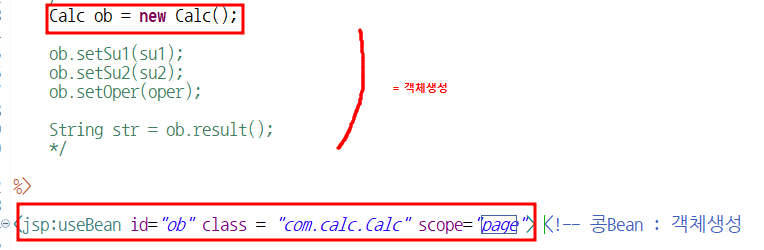
<jsp:useBean id="ob" class = "com.calc.Calc" scope="page"/>
: 콩Bean - 객체생성
--> [Calc ob = new Calc();대신]
- scope="page" : 여러명이 접속했을 때 에러가 안나다가 더 많은 사람들이 접속하면 많은 에러가 나는 것을 방지하기 위해서
ex) ob라는 객체는 현재 접속한 사람만을 위한 페이지가 만들어진다고 생각하면 이해하기 쉬움
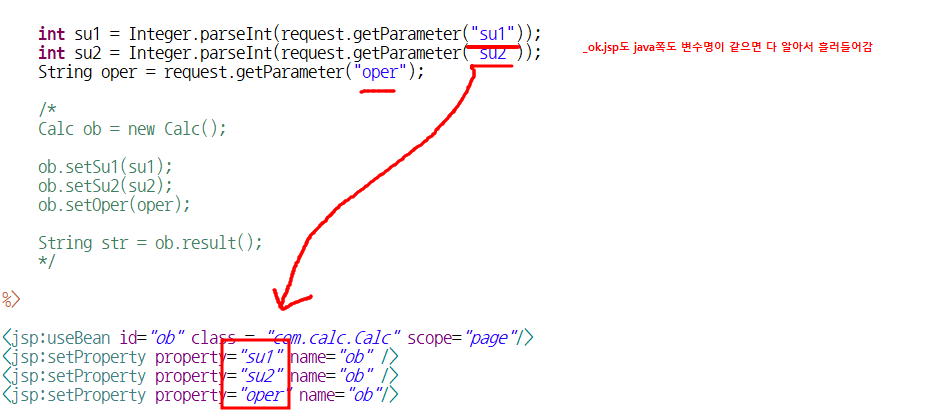
property : 반환값 - 메서드
<jsp:setProperty property="su1" name="ob" value="<%=su1 %>"/>
- setProperty : setter랑 같음
-
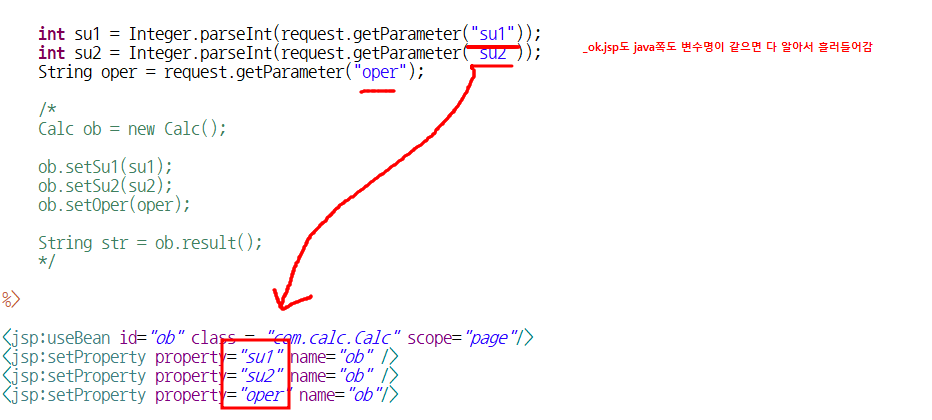
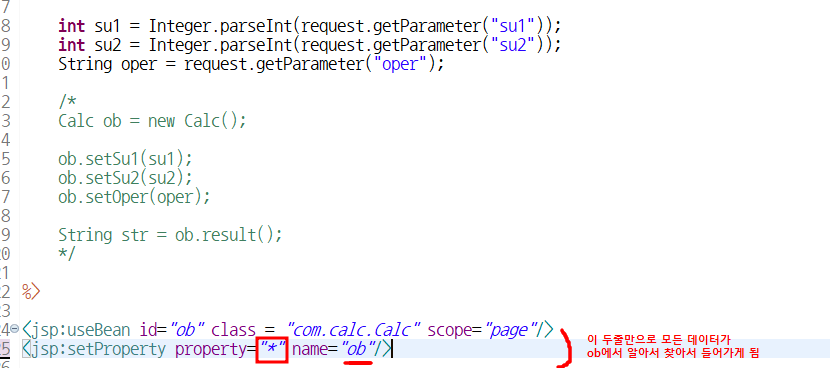
변수명이 같으면 흘러 들어감
-
1번째 방식
-
2번재 방식
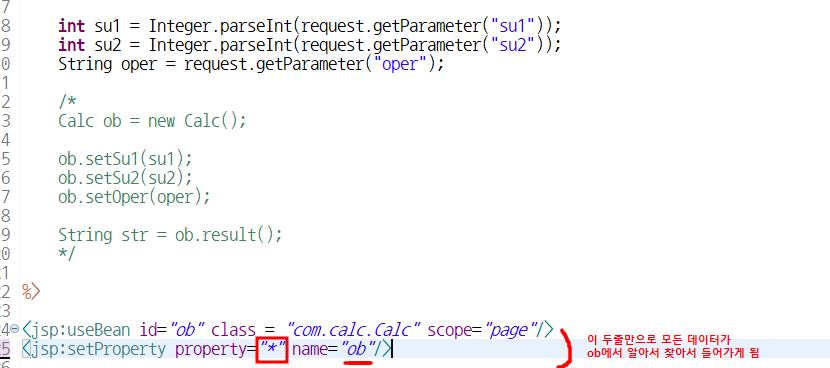
- ⭐ 3번째 제일 베스트
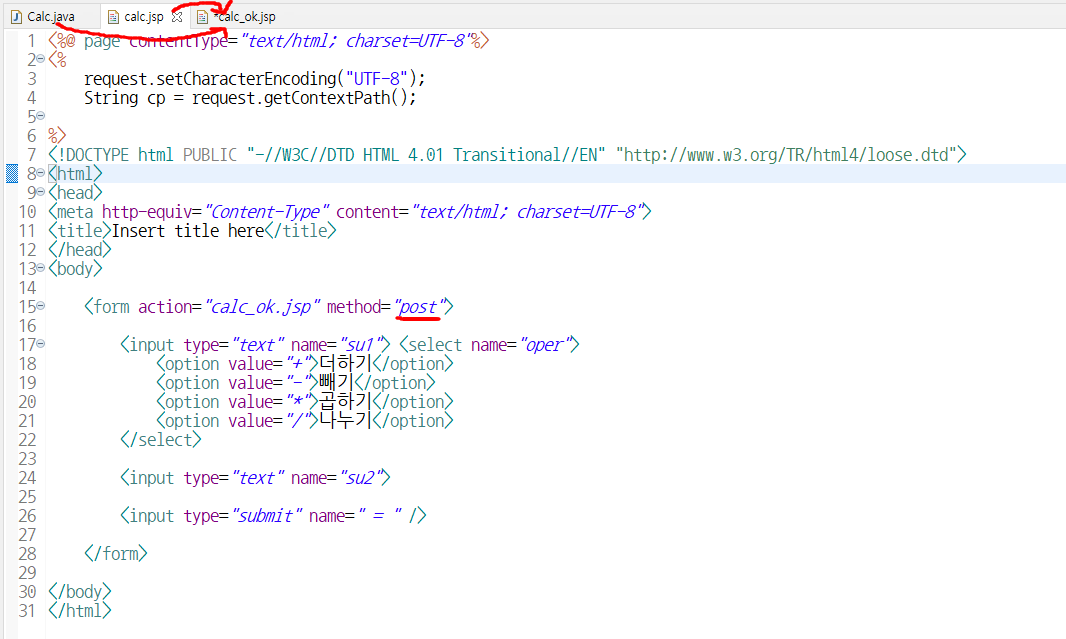
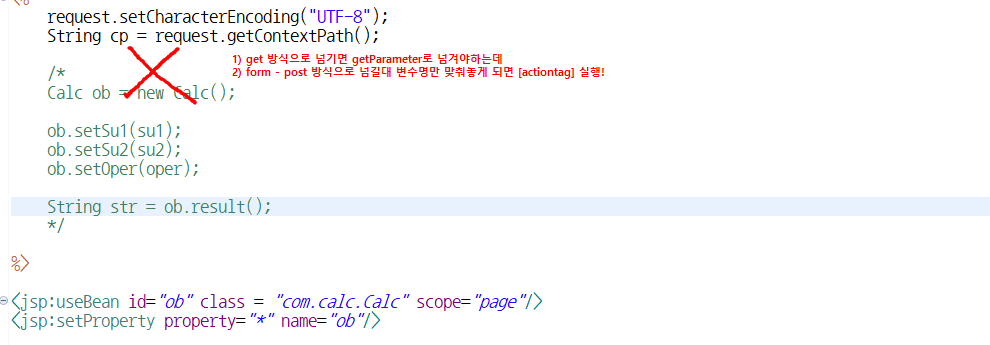
💻 입력
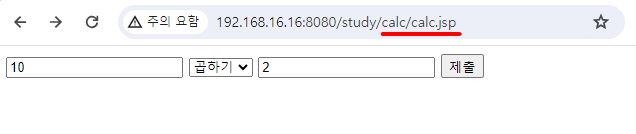

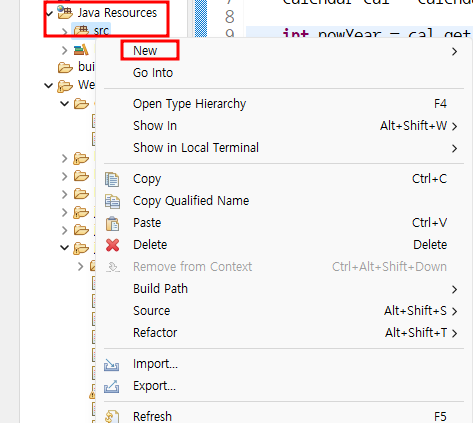
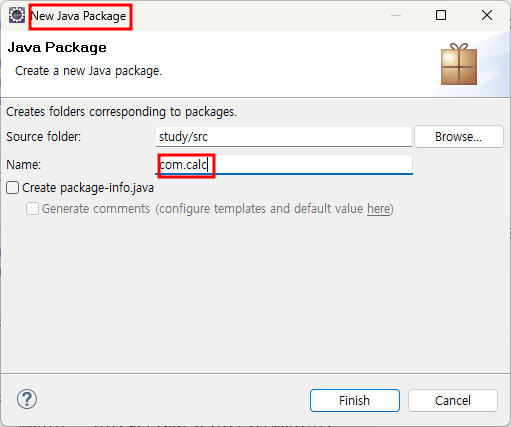
- [Action Tag]
Calc.java [class]
package com.calc;

public class Calc {

	private int su1;
	private int su2;
	private String oper;


	public int getSu1() {
		return su1;
	}


	public void setSu1(int su1) {
		this.su1 = su1;
	}


	public int getSu2() {
		return su2;
	}


	public void setSu2(int su2) {
		this.su2 = su2;
	}


	public String getOper() {
		return oper;
	}


	public void setOper(String oper) {
		this.oper = oper;
	}


	public String result() { //반환값이 String인 이유 :  결과print 가 str이므로

		String str = "";
		int sum = 0;

		if (oper != null) {
			if (oper.equals("+"))
		sum = su1 + su2;
			else if (oper.equals("-"))
		sum = su1 - su2;
			else if (oper.equals("*"))
		sum = su1 * su2;
			else if (oper.equals("/"))
		sum = su1 / su2;

		str = String.format("%d %s %d = %d",su1,oper,su2,sum);

		}

		return str;
	}

}
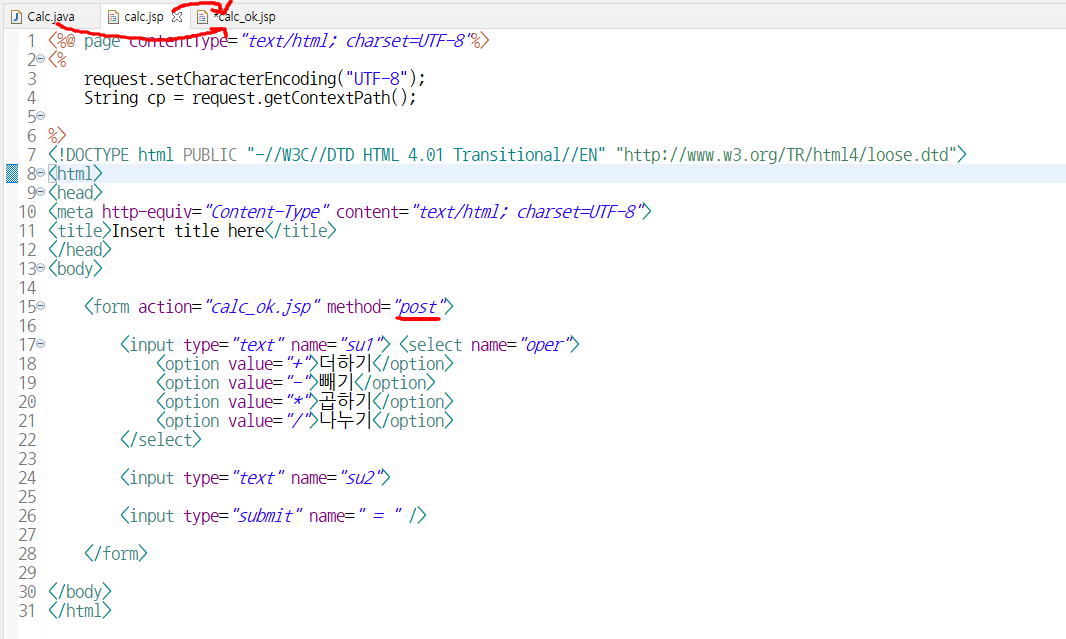
clac.jsp
<%@ page contentType="text/html; charset=UTF-8"%>
<%
	request.setCharacterEncoding("UTF-8");
	String cp = request.getContextPath();

%>
<!DOCTYPE html PUBLIC "-//W3C//DTD HTML 4.01 Transitional//EN" "http://www.w3.org/TR/html4/loose.dtd">
<html>
<head>
<meta http-equiv="Content-Type" content="text/html; charset=UTF-8">
<title>Insert title here</title>
</head>
<body>

	<form action="calc_ok.jsp" method="post">

		<input type="text" name="su1"> <select name="oper">
			<option value="+">더하기</option>
			<option value="-">빼기</option>
			<option value="*">곱하기</option>
			<option value="/">나누기</option>
		</select>

		<input type="text" name="su2">

		<input type="submit" name=" = " />

	</form>

</body>
</html>
calc_ok.jsp
<%@page import="com.calc.Calc"%>
<%@ page contentType="text/html; charset=UTF-8"%>
<%
	request.setCharacterEncoding("UTF-8");
	String cp = request.getContextPath();


	int su1 = Integer.parseInt(request.getParameter("su1"));
	int su2 = Integer.parseInt(request.getParameter("su2"));
	String oper = request.getParameter("oper");

	Calc ob = new Calc(); //객체생성 해줘야 class 쓸 수 있음

	ob.setSu1(su1);
	ob.setSu2(su2);
	ob.setOper(oper);

	String str = ob.result();
%>
<!DOCTYPE html PUBLIC "-//W3C//DTD HTML 4.01 Transitional//EN" "http://www.w3.org/TR/html4/loose.dtd">
<html>
<head>
<meta http-equiv="Content-Type" content="text/html; charset=UTF-8">
<title>Insert title here</title>
</head>
<body>


결과: <%=str %>


</body>
</html>
📌 출력
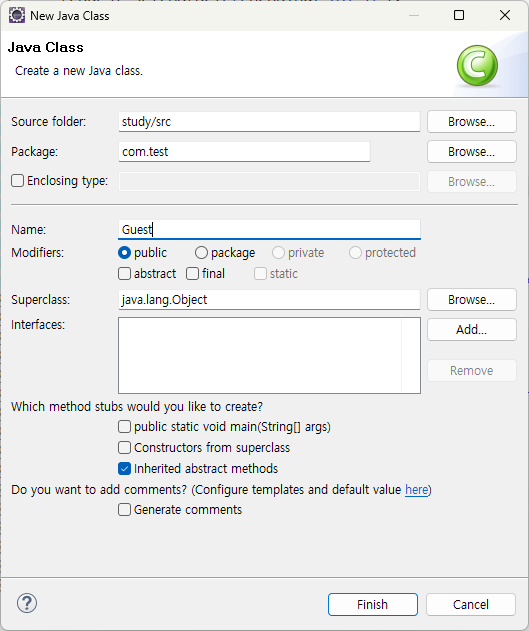
2. [Web과 DB연동] - Guest 게시글 올리기
✏️ Test2.
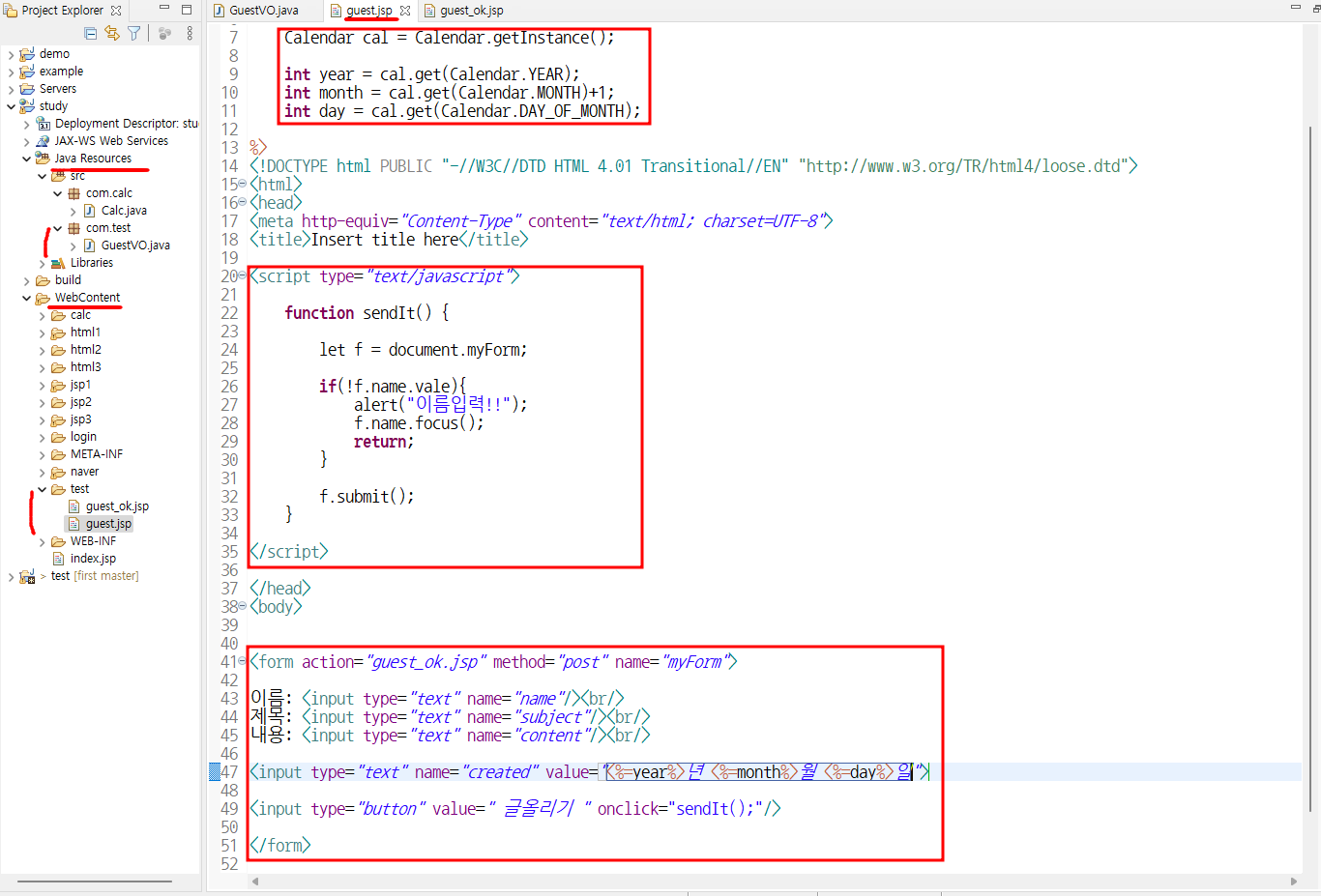
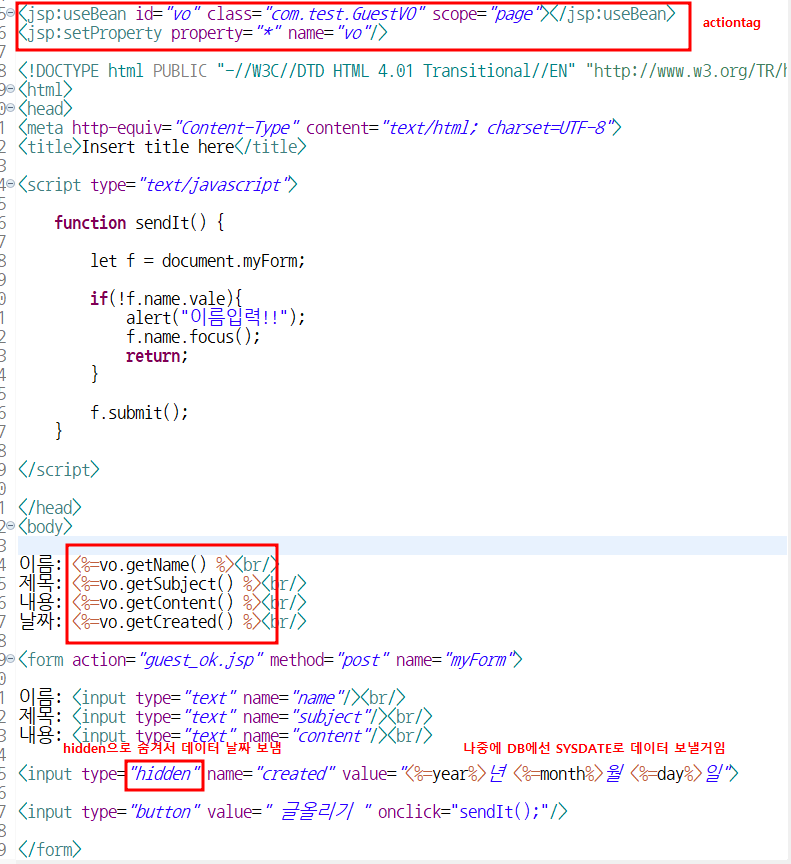
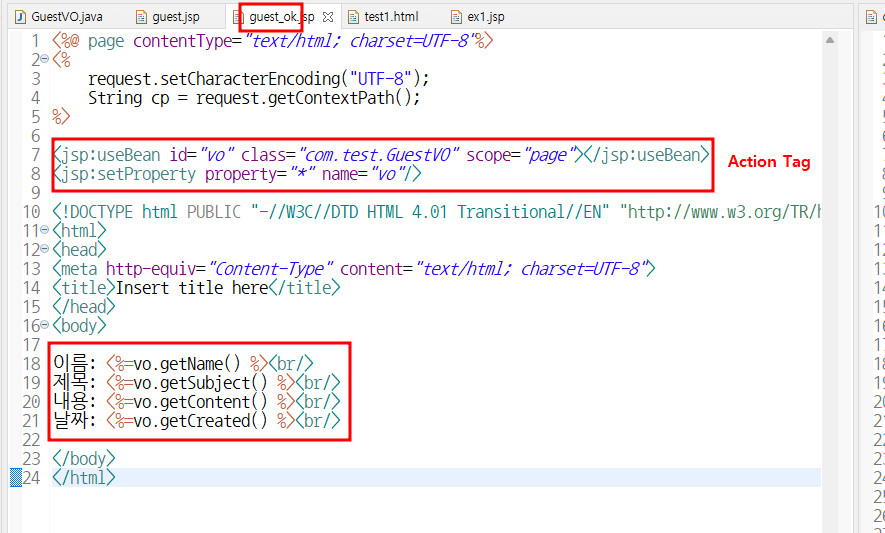
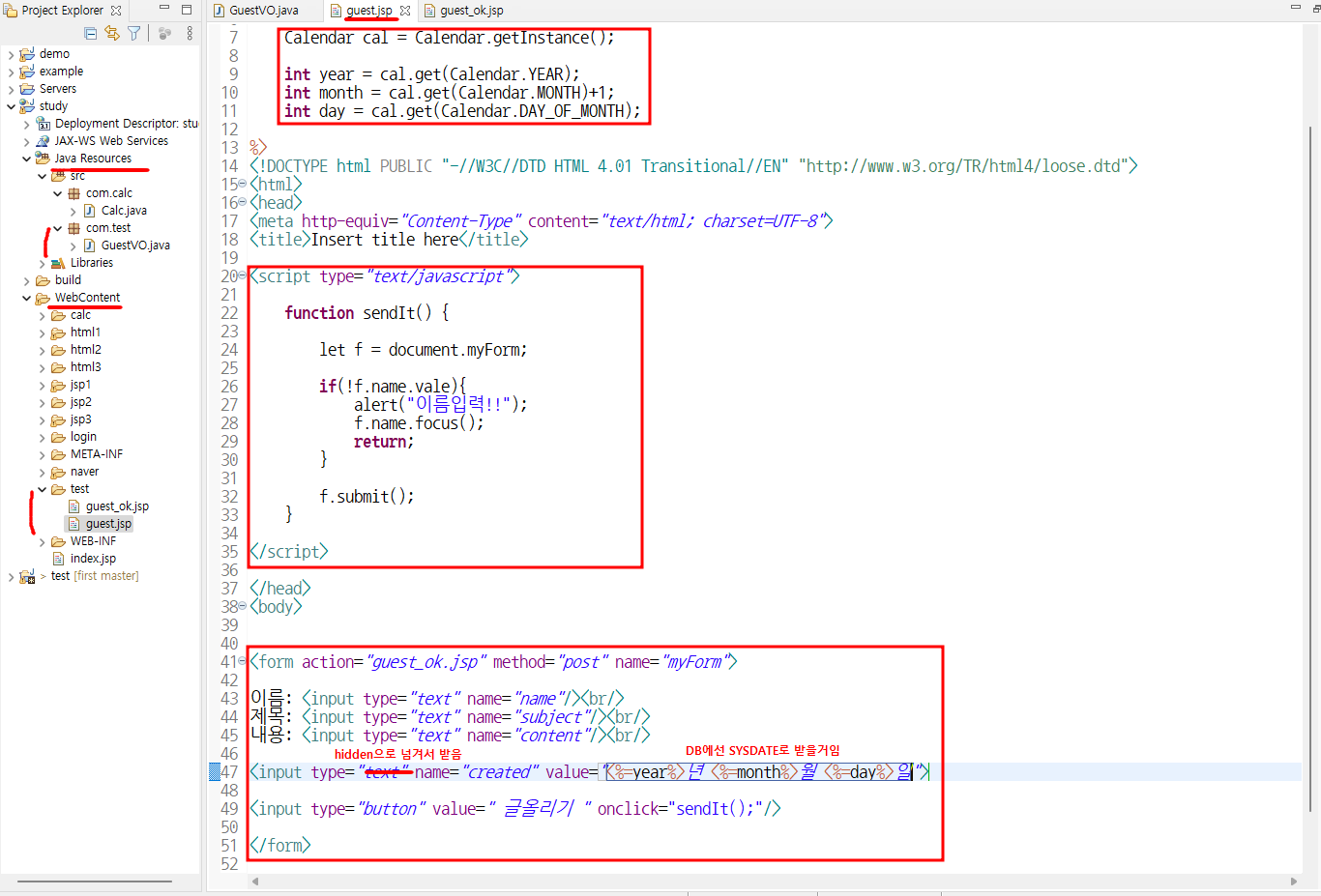
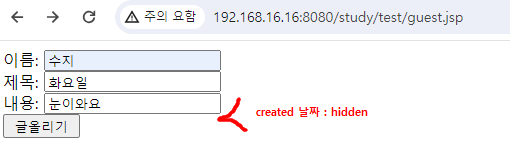
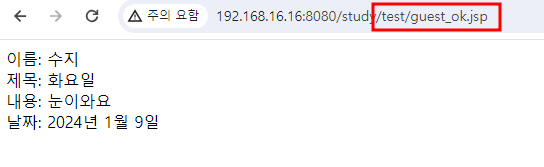
guest.jsp
<%@page import="java.util.Calendar"%>
<%@ page contentType="text/html; charset=UTF-8"%>
<%

	request.setCharacterEncoding("UTF-8");
	String cp = request.getContextPath();

	Calendar cal = Calendar.getInstance();

	int year = cal.get(Calendar.YEAR);
	int month = cal.get(Calendar.MONTH) + 1;
	int day = cal.get(Calendar.DAY_OF_MONTH);

%>

<!DOCTYPE html PUBLIC "-//W3C//DTD HTML 4.01 Transitional//EN" "http://www.w3.org/TR/html4/loose.dtd">
<html>
<head>
<meta http-equiv="Content-Type" content="text/html; charset=UTF-8">
<title>Insert title here</title>

<script type="text/javascript">

	function sendIt() {

		let f = document.myForm;

		if (!f.name.value) {
			alert("이름입력!!");
			f.name.focus();
			return;
		}

		f.submit();
	}

</script>

</head>
<body>

	<form action="guest_ok.jsp" method="post" name="myForm">

		이름: <input type="text" name="name" /><br /> 제목: <input type="text"
			name="subject" /><br /> 내용: <input type="text" name="content" /><br />

		<input type="hidden" name="created"
			value="<%=year%>년 <%=month%>월 <%=day%>일"> <input
			type="button" value=" 글올리기 " onclick="sendIt();" />

	</form>


</body>
</html>
guest_ok.jsp
<%@ page contentType="text/html; charset=UTF-8"%>
<%
	request.setCharacterEncoding("UTF-8");
	String cp = request.getContextPath();
%>

<jsp:useBean id="vo" class="com.test.GuestVO" scope="page"></jsp:useBean>
<jsp:setProperty property="*" name="vo"/>

<!DOCTYPE html PUBLIC "-//W3C//DTD HTML 4.01 Transitional//EN" "http://www.w3.org/TR/html4/loose.dtd">
<html>
<head>
<meta http-equiv="Content-Type" content="text/html; charset=UTF-8">
<title>Insert title here</title>
</head>
<body>

이름: <%=vo.getName() %><br/>
제목: <%=vo.getSubject() %><br/>
내용: <%=vo.getContent() %><br/>
날짜: <%=vo.getCreated() %><br/>

</body>
</html>
GuestVO.java [class]
package com.test;

public class GuestVO {

	private String name;
	private String subject;
	private String content;
	private String created;

	public String getName() {
		return name;
	}
	public void setName(String name) {
		this.name = name;
	}
	public String getSubject() {
		return subject;
	}
	public void setSubject(String subject) {
		this.subject = subject;
	}
	public String getContent() {
		return content;
	}
	public void setContent(String content) {
		this.content = content;
	}
	public String getCreated() {
		return created;
	}
	public void setCreated(String created) {
		this.created = created;
	}

}
3. 홈페이지 꾸미기 / Action Tag - [include]
✏️ Test3.
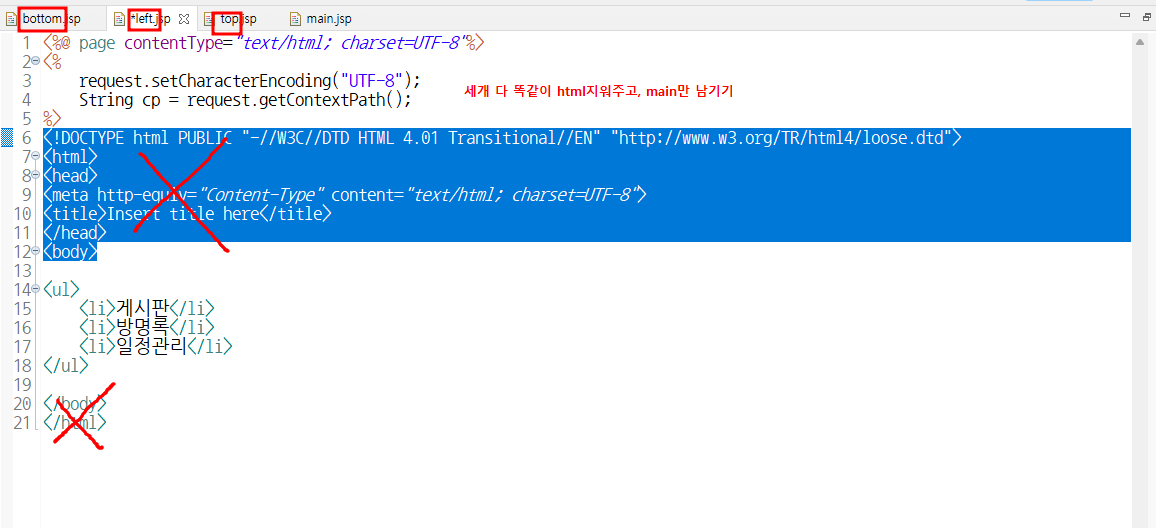
left.jsp
<%@ page contentType="text/html; charset=UTF-8"%>
<%
	request.setCharacterEncoding("UTF-8");
	String cp = request.getContextPath();
%>

<ul>
	<li>게시판</li>
	<li>방명록</li>
	<li>일정관리</li>
</ul>
top.jsp
<%@ page contentType="text/html; charset=UTF-8"%>
<%
	request.setCharacterEncoding("UTF-8");
	String cp = request.getContextPath();
%>

| 로그인 | 회원가입 |
bottom.jsp
<%@ page contentType="text/html; charset=UTF-8"%>
<%
	request.setCharacterEncoding("UTF-8");
	String cp = request.getContextPath();
%>

<p align="center"> <!-- p : paragraph 약자 -->
| 소개 | 이용약관 | 도움말 | 사이트맵 |
main.jsp - 폴더를 벗어난 바깥에
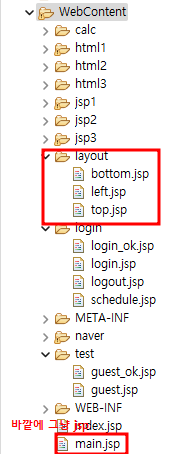
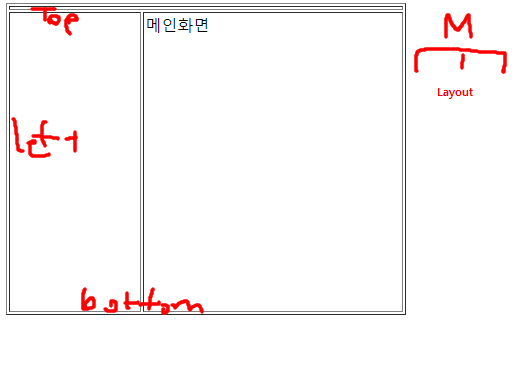
<%@ page contentType="text/html; charset=UTF-8"%>
<%
	request.setCharacterEncoding("UTF-8");
String cp = request.getContextPath();
%>
<!DOCTYPE html PUBLIC "-//W3C//DTD HTML 4.01 Transitional//EN" "http://www.w3.org/TR/html4/loose.dtd">
<html>
<head>
<meta http-equiv="Content-Type" content="text/html; charset=UTF-8">
<title>Insert title here</title>
</head>
<body>

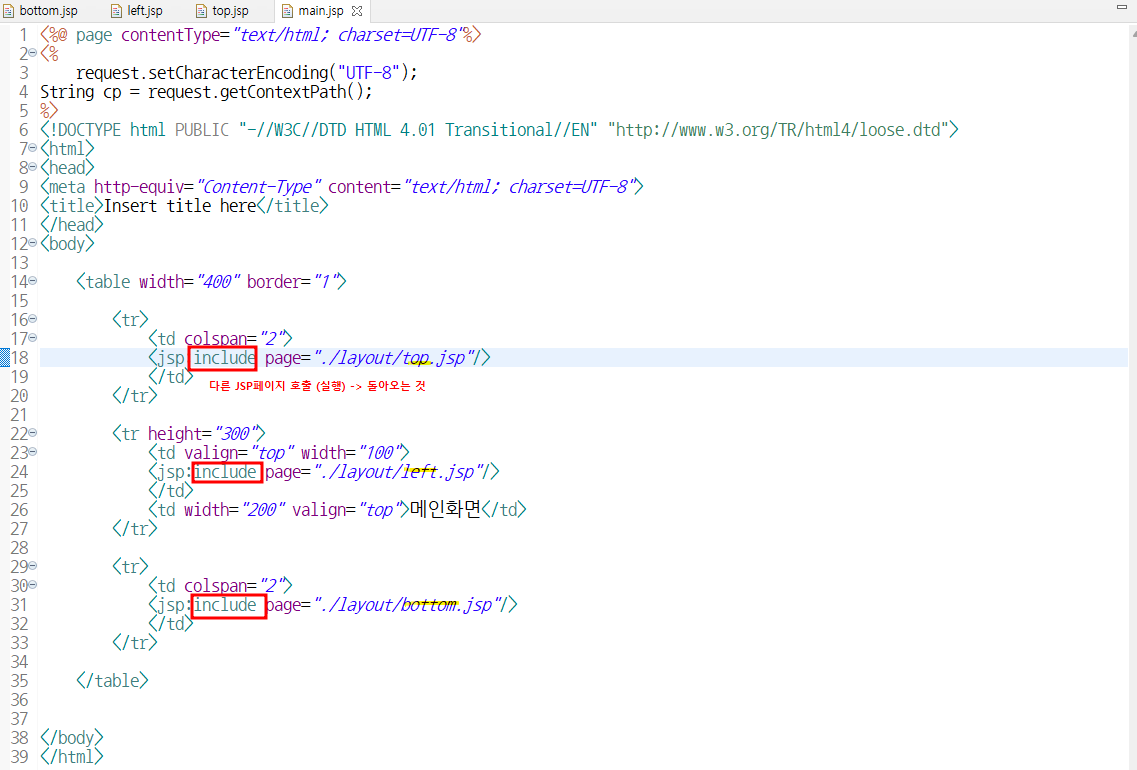
	<table width="400" border="1">

		<tr>
			<td colspan="2">
			<jsp:include page="./layout/top.jsp"/>
			</td>
		</tr>

		<tr height="300">
			<td valign="top" width="100">
			<jsp:include page="./layout/left.jsp"/>
			</td>
			<td width="200" valign="top">메인화면</td>
		</tr>

		<tr>
			<td colspan="2">
			<jsp:include page="./layout/bottom.jsp"/>
			</td>
		</tr>

	</table>


</body>
</html>
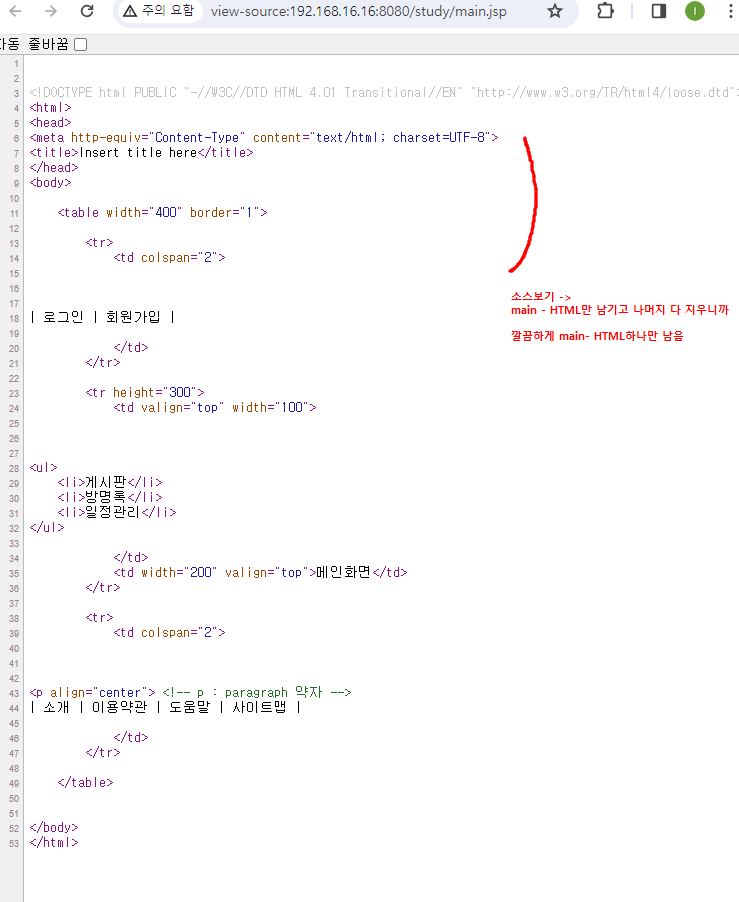
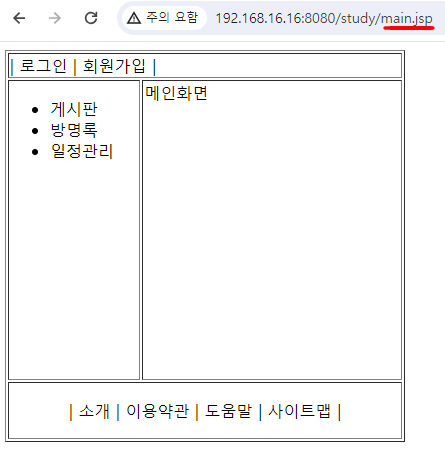
Action Tag - include
4. Action Tag - [forward / param]
✏️ Test4.
for1.jsp
<%@ page contentType="text/html; charset=UTF-8"%>
<%
	String cp = request.getContextPath();

String eng = "test";
String kor = "테스트";
%>

<jsp:forward page="for2.jsp">
	<jsp:param value="<%=eng%>" name="eng" />
	<jsp:param value="<%=kor%>" name="kor" />
</jsp:forward>
for2.jsp
<%@ page contentType="text/html; charset=UTF-8"%>
<%
	request.setCharacterEncoding("UTF-8");
	String cp = request.getContextPath();

	String eng = request.getParameter("eng");
	String kor = request.getParameter("kor");
%>
<!DOCTYPE html PUBLIC "-//W3C//DTD HTML 4.01 Transitional//EN" "http://www.w3.org/TR/html4/loose.dtd">
<html>
<head>
<meta http-equiv="Content-Type" content="text/html; charset=UTF-8">
<title>Insert title here</title>
</head>
<body>

포워딩된 Value<br/>
eng: <%=eng %><br/>
kor: <%=kor %><br/>

</body>
</html>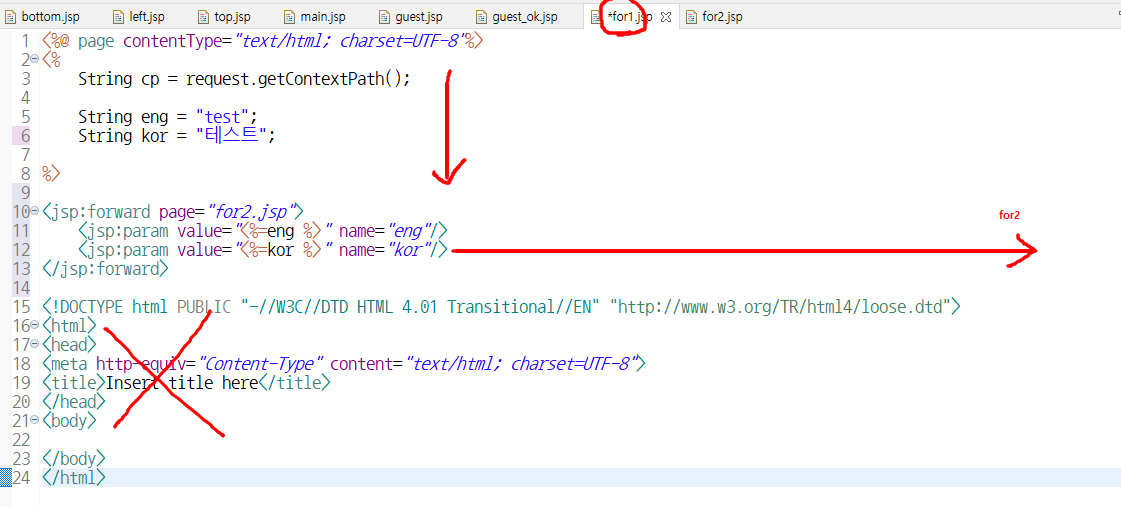
📌 출력
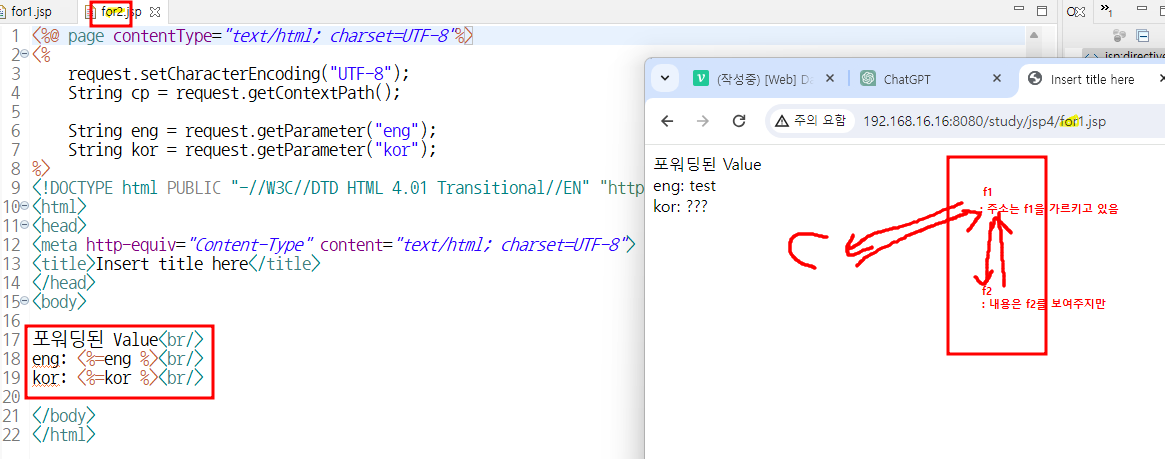
forward란?
: (주소안바뀜)주소는 client에게 원래 주소(for1) 보여주면서 ,
내용은 for2꺼 보여주는 것
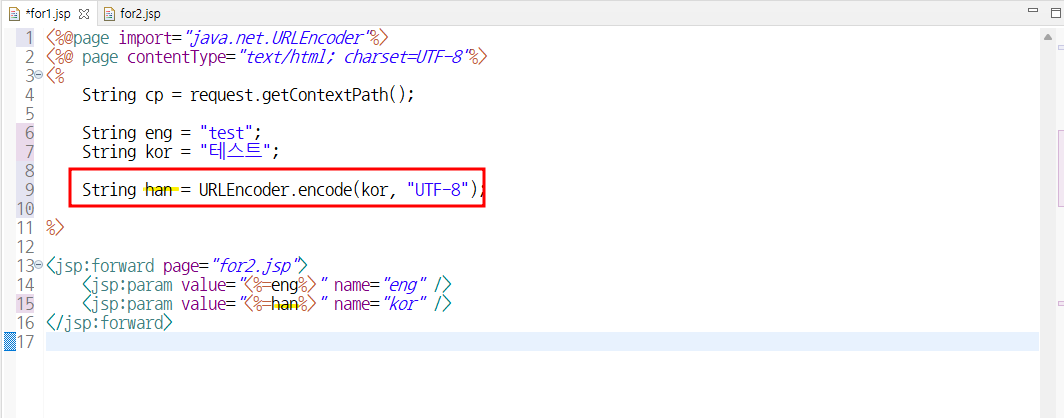
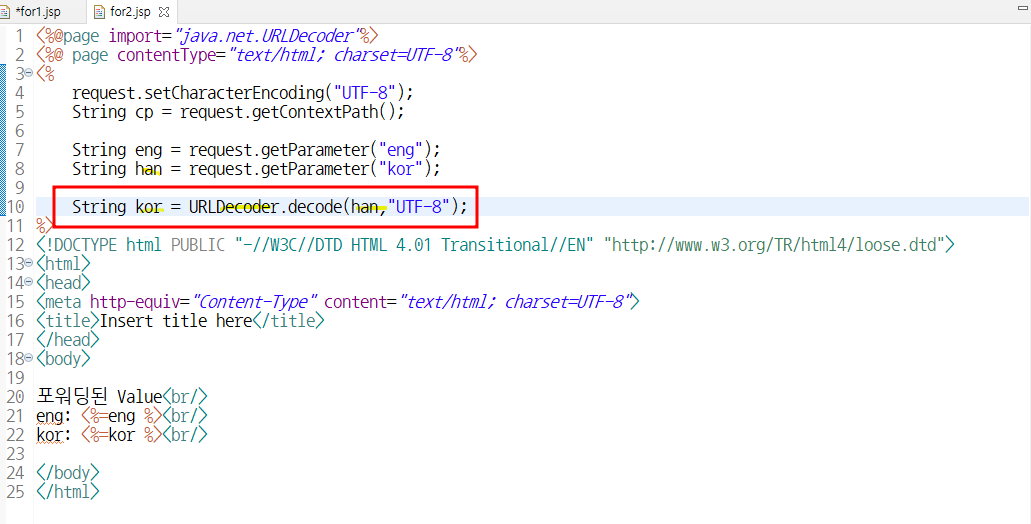
-> encoding작업 필수 ( 한글데이터를 보낼때 forward방식으로 보내면 깨지니까 , 압축해서 보내서 압축풀어서 사용하기
-> 보낼때는 Encoding / 받을때는 Decoding
- 보낼때는 Encoding
- 받을때는 Decoding**
param
: 데이터 가져가서 전달해
5. ⭐ DB연동
오라클 사용설명서
✏️ Test5.
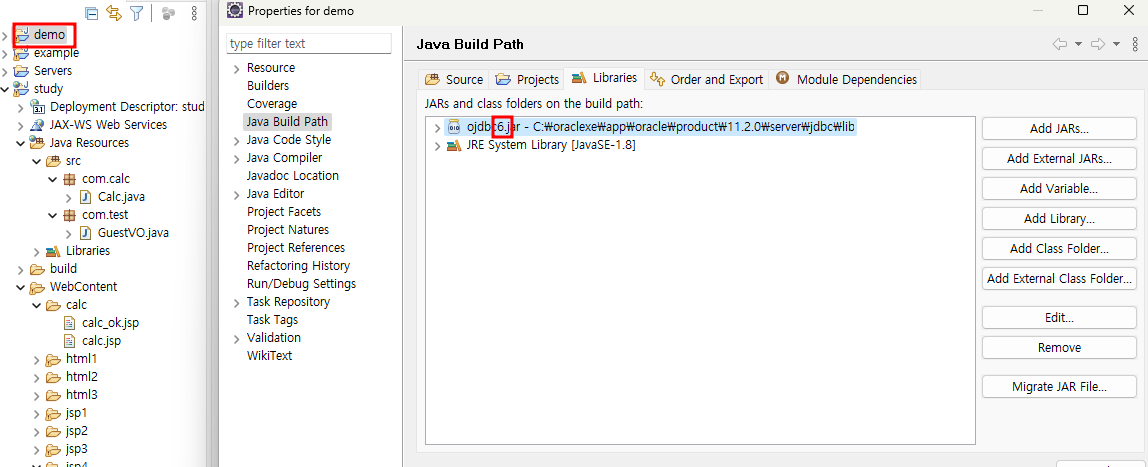
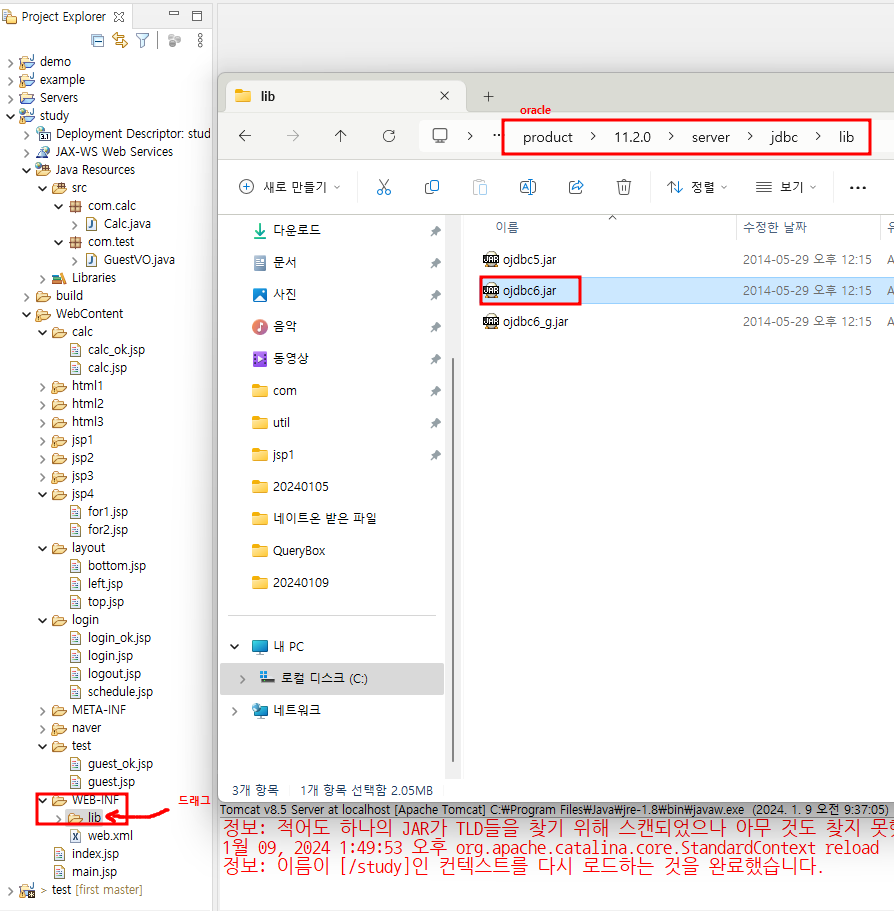
C:\oraclexe\app\oracle\product\11.2.0\server\jdbc\lib
:[오라클] 외부라이브파일 : 사용설명서 -> [WEB-INF]에 드래그 -> 복사완료
C:\java\work\study\WebContent\WEB-INF\lib확인 완료!
- 반드시 lib옆에 있어야 함
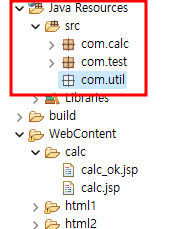
:공용으로 사용하는 친구들은 web - class만들어서 사용함
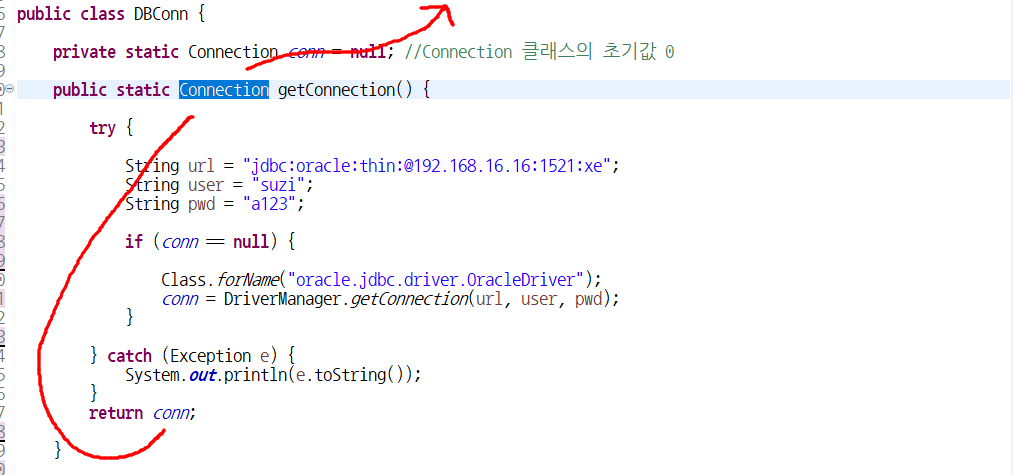
DBConn:
- Class.forName("oracle.jdbc.driver.OracleDriver"); //OracleDriver
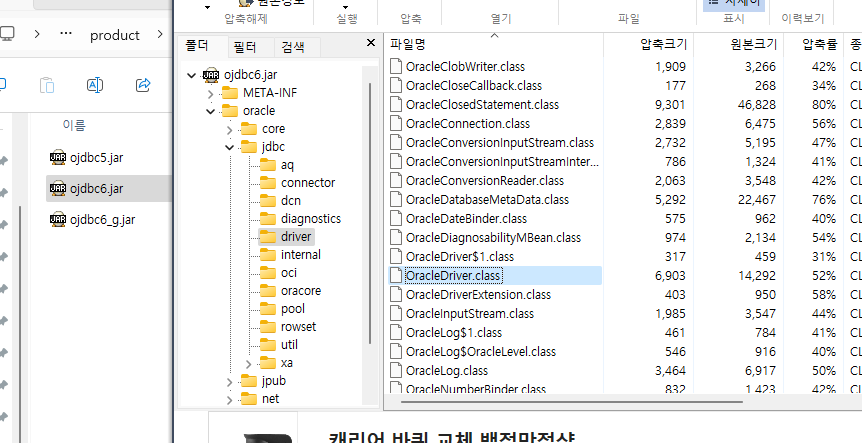
: 클래스 내 (클래스 + 오라클의 목차)
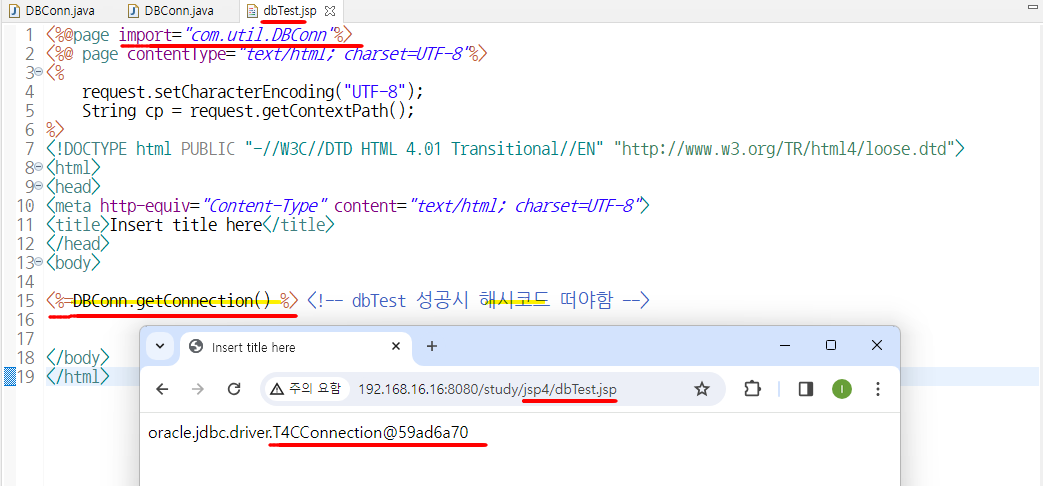
dbTest: DB 테스트하는 법
해시코드 떴으면 DB연결 잘 된거임
JSB만드는법
1) 테이블 만들기
2) DB사용할거면 DTO에 데이터 넣기
3) DAO(insert/update/delete)만들기 + scanner디자인
: DAO - Conn이 필수 : pstmt만들기 위해
//db에선 잘 실행되면 1 / 아니면 0
//conn이 pstmt를 만듦
-[css]
.txtField{ -> .이면 class / #이면
}
<input type="reset" class="btn" value=" 다시입력 "/>
"document.myForm.hak.focus()~
: 다시리셋됐을때 학번에 커서 깜빡깜빡
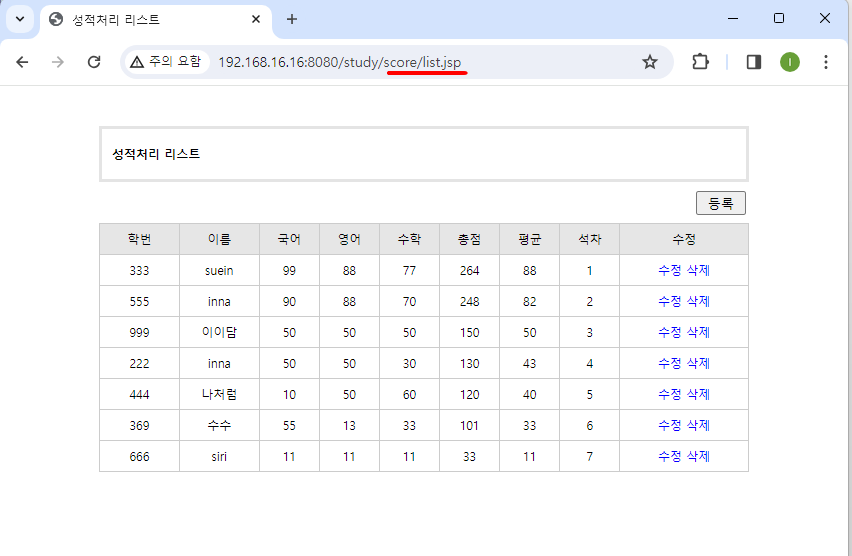
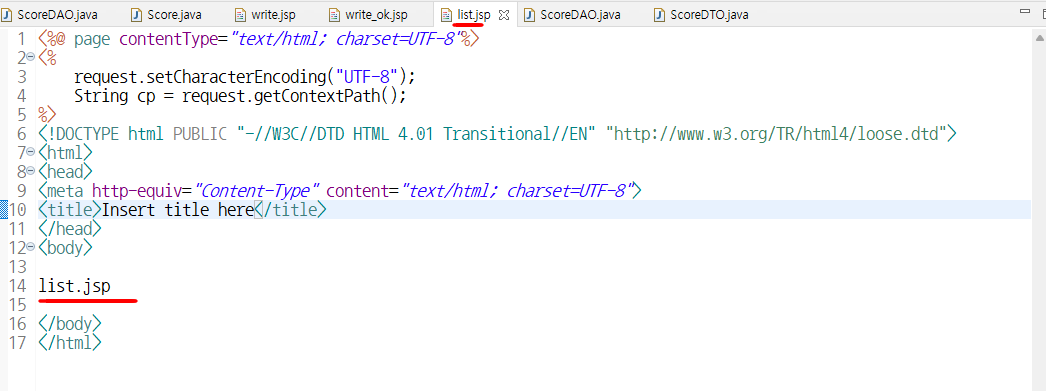
onclick="javascript:location.href='<%=cp%>/score/list.jsp';"/>
- list.jsp'; = 모든 jsp를 보여주는 곳
-> list파일 하나 만들어야함
response.sendRedirect("list.jsp");
- 리스트는 버튼이 불필요함 -버튼 CSS삭제
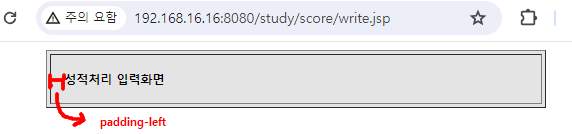
padding-left
💻 입력
⬇️ write.jsp
<%@page import="com.score.ScoreDAO"%>
<%@page import="com.util.DBConn"%>
<%@page import="java.sql.Connection"%>
<%@ page contentType="text/html; charset=UTF-8"%>
<%
	request.setCharacterEncoding("UTF-8");
	String cp = request.getContextPath();
%>


<!DOCTYPE html PUBLIC "-//W3C//DTD HTML 4.01 Transitional//EN" "http://www.w3.org/TR/html4/loose.dtd">
<html>
<head>
<meta http-equiv="Content-Type" content="text/html; charset=UTF-8">
<title>성적처리</title>

<script type="text/javascript">
	function sendIt() {
		let f = document.myForm;

		if(!f.hak.value){
			alert("학번을 입력하세요");
			f.hak.focus();
			return;
		}

		f.action = "<%=cp%>/score/write_ok.jsp";
		f.submit();
	}

</script>

<style type="text/css">
body {
	font-size: 9pt;
}

td {
	font-size: 9pt;
}

.txtField {
	font-size: 9pt;
	border: 1px solid;
}

.btn {
	font-size: 9pt;
	background: #e6e6e6;
}
</style>

</head>
<body>

	<table width="500" cellpadding="0" cellspacing="3"
		align="center" bgcolor="#e4e4e4">
		<tr height="50">
			<td bgcolor="#ffffff" style="padding-left: 10pt;">
			<b>성적처리 입력화면</b></td>
		</tr>
	</table>
	<br />

	<form action="" method="post" name="myForm">
		<table width="500" cellpadding="0" cellspacing="0" align="center">

			<tr height="3">
				<td colspan="2" bgcolor="#cccccc"></td>
			</tr>

			<tr height="30">
				<td align="center" width="100" bgcolor="#e6e4e6">학번</td>
				<td style="padding-left: 5px;"><input type="text" name="hak"
					size="10" maxlength="7" class="txtField"></td>
			</tr>

			<tr height="2">
				<td colspan="2" bgcolor="#cccccc"></td>
			</tr>

			<tr height="30">
				<td align="center" width="100" bgcolor="#e6e4e6">이름</td>
				<td style="padding-left: 5px;"><input type="text" name="name"
					size="20" maxlength="10" class="txtField"></td>
			</tr>

			<tr height="2">
				<td colspan="2" bgcolor="#cccccc"></td>
			</tr>

			<tr height="30">
				<td align="center" width="100" bgcolor="#e6e4e6">국어</td>
				<td style="padding-left: 5px;"><input type="text" name="kor"
					size="20" maxlength="3" class="txtField"></td>
			</tr>

			<tr height="2">
				<td colspan="2" bgcolor="#cccccc"></td>
			</tr>

			<tr height="30">
				<td align="center" width="100" bgcolor="#e6e4e6">영어</td>
				<td style="padding-left: 5px;"><input type="text" name="eng"
					size="20" maxlength="3" class="txtField"></td>
			</tr>

			<tr height="2">
				<td colspan="2" bgcolor="#cccccc"></td>
			</tr>

			<tr height="30">
				<td align="center" width="100" bgcolor="#e6e4e6">수학</td>
				<td style="padding-left: 5px;"><input type="text" name="mat"
					size="20" maxlength="3" class="txtField"></td>
			</tr>

			<tr height="3">
				<td colspan="2" bgcolor="#cccccc"></td>
			</tr>

			<tr height="35">
				<td align="center" colspan="2">
				<input type="button" class="btn" value=" 입력완료 " onclick="sendIt();"/>
				<input type="reset" class="btn" value=" 다시입력 " onclick="document.myForm.hak.focus();"/>
				<input type="button" class="btn" value=" 입력취소 " onclick="javascript:location.href='<%=cp%>/score/list.jsp';"/>
				</td>
			</tr>
		</table>
	</form>


</body>
</html>
⬇️ write_ok.jsp
<%@page import="com.score.ScoreDAO"%>
<%@page import="com.util.DBConn"%>
<%@page import="java.sql.Connection"%>
<%@ page contentType="text/html; charset=UTF-8"%>
<%
	request.setCharacterEncoding("UTF-8");
	String cp = request.getContextPath();
%>

<jsp:useBean id="dto" class="com.score.ScoreDTO" scope="page"/>
<jsp:setProperty property="*" name="dto"/>

<%
	Connection conn = DBConn.getConnection();

	ScoreDAO dao = new ScoreDAO(conn);

	int result = dao.insertData(dto);

	if(result!=0){//1이면
		response.sendRedirect("list.jsp");
	}

	DBConn.close(); //DB필수로 닫기!
%>
⬇️ list.jsp
<%@page import="java.util.List"%>
<%@page import="com.score.ScoreDAO"%>
<%@page import="com.score.ScoreDTO"%>
<%@page import="com.util.DBConn"%>
<%@page import="java.sql.Connection"%>
<%@ page contentType="text/html; charset=UTF-8"%>
<%
	request.setCharacterEncoding("UTF-8");
	String cp = request.getContextPath();

	//class를 호출하려면 connection이 필요함

	Connection conn = DBConn.getConnection();

	ScoreDAO dao = new ScoreDAO(conn);

	List<ScoreDTO> lists = dao.getList();

	DBConn.close();

%>
<!DOCTYPE html PUBLIC "-//W3C//DTD HTML 4.01 Transitional//EN" "http://www.w3.org/TR/html4/loose.dtd">
<html>
<head>
<meta http-equiv="Content-Type" content="text/html; charset=UTF-8">
<title>성적처리 리스트</title>

<style type="text/css">
body {
	font-size: 9pt;
}

td {
	font-size: 9pt;
}

.txtField {
	font-size: 9pt;
	border: 1px solid;
}

a {
	text-decoration: none;
	color: blue;
}

a:hover, a:active {
	font-size: 9pt;
	color: #f28011;
	text-decoration: underline;
}

</style>

</head>
<body>

	<br />
	<br />

	<table width="650" cellpadding="0" cellspacing="3" align="center"
		bgcolor="#e4e4e4">
		<tr height="50">
			<td bgcolor="#ffffff" style="padding-left: 10px;"><b>성적처리 리스트</b>
			</td>
		</tr>
	</table>

	<table width="650" cellpadding="0" cellspacing="3" align="center">
		<tr height="35">
			<td align="right">
			<input type="button" class="btn" value=" 등록 " onclick="location='<%=cp%>/score/write.jsp';">
			</td>
		</tr>
	</table>

	<table width="650" cellpadding="0" cellspacing="1" align="center" bgcolor="#cccccc">
		<tr height="30">
			<td align="center" bgcolor="#e6e6e6" width="80">학번</td>
			<td align="center" bgcolor="#e6e6e6" width="80">이름</td>
			<td align="center" bgcolor="#e6e6e6" width="60">국어</td>
			<td align="center" bgcolor="#e6e6e6" width="60">영어</td>
			<td align="center" bgcolor="#e6e6e6" width="60">수학</td>
			<td align="center" bgcolor="#e6e6e6" width="60">총점</td>
			<td align="center" bgcolor="#e6e6e6" width="60">평균</td>
			<td align="center" bgcolor="#e6e6e6" width="60">석차</td>
			<td align="center" bgcolor="#e6e6e6" width="130">수정</td>
		</tr>

		<%for(ScoreDTO dto : lists){ %>
		<tr height="30">
			<td align="center" bgcolor="#ffffff"><%=dto.getHak() %></td>
			<td align="center" bgcolor="#ffffff"><%=dto.getName() %></td>
			<td align="center" bgcolor="#ffffff"><%=dto.getKor() %></td>
			<td align="center" bgcolor="#ffffff"><%=dto.getEng() %></td>
			<td align="center" bgcolor="#ffffff"><%=dto.getMat() %></td>
			<td align="center" bgcolor="#ffffff"><%=dto.getTot() %></td>
			<td align="center" bgcolor="#ffffff"><%=dto.getAve() %></td>
			<td align="center" bgcolor="#ffffff"><%=dto.getRank() %></td>
			<td align="center" bgcolor="#ffffff">
			<a href="<%=cp%>/score/update.jsp?hak=<%=dto.getHak() %>">수정</a>
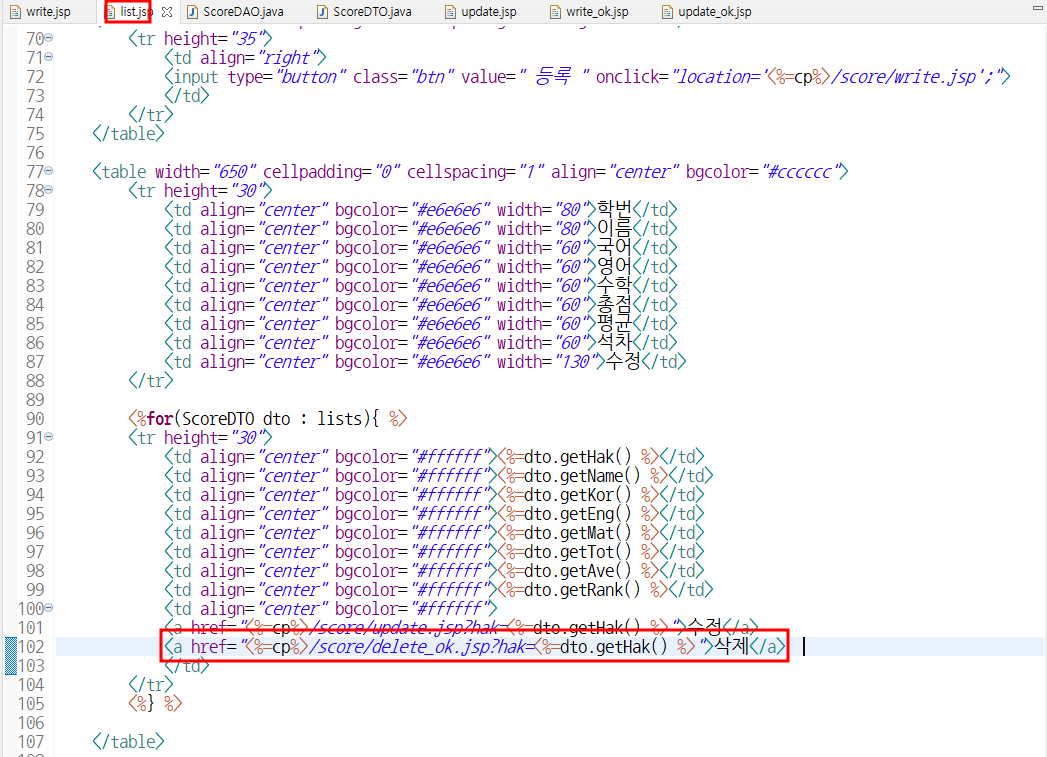
			<a href="<%=cp%>/score/delete_ok.jsp?hak=<%=dto.getHak() %>">삭제</a>
			</td>
		</tr>
		<%} %>

	</table>

</body>
</html>
⬇️ update.jsp
<%@page import="com.score.ScoreDTO"%>
<%@page import="com.score.ScoreDAO"%>
<%@page import="com.util.DBConn"%>
<%@page import="java.sql.Connection"%>
<%@ page contentType="text/html; charset=UTF-8"%>
<%
	request.setCharacterEncoding("UTF-8");
	String cp = request.getContextPath();

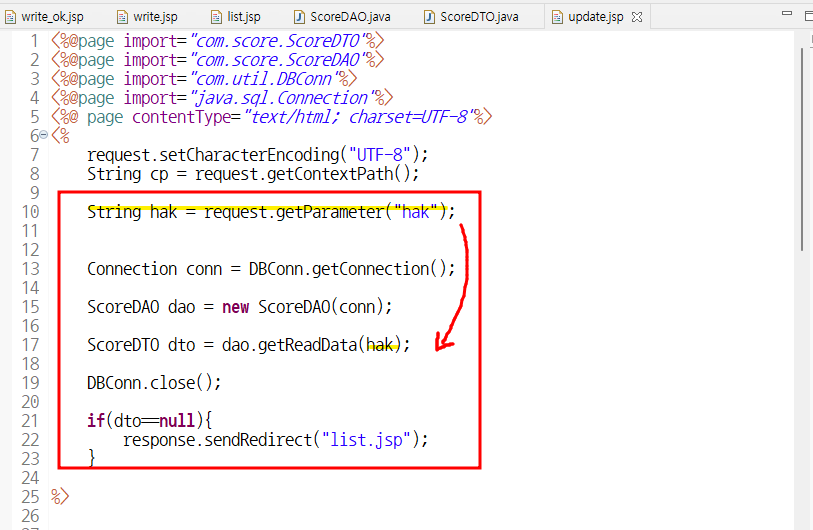
	String hak = request.getParameter("hak");


	Connection conn = DBConn.getConnection();

	ScoreDAO dao = new ScoreDAO(conn);

	ScoreDTO dto = dao.getReadData(hak);

	DBConn.close();

	if(dto==null){
		response.sendRedirect("list.jsp");
	}

%>


<!DOCTYPE html PUBLIC "-//W3C//DTD HTML 4.01 Transitional//EN" "http://www.w3.org/TR/html4/loose.dtd">
<html>
<head>
<meta http-equiv="Content-Type" content="text/html; charset=UTF-8">
<title>성적처리 수정</title>

<script type="text/javascript">
	function sendIt() {

		let f = document.myForm;

		f.action = "<%=cp%>/score/update_ok.jsp";
		f.submit();
	}

</script>

<style type="text/css">
body {
	font-size: 9pt;
}

td {
	font-size: 9pt;
}

.txtField {
	font-size: 9pt;
	border: 1px solid;
}

.btn {
	font-size: 9pt;
	background: #e6e6e6;
}


</style>

</head>
<body>

	<table width="500" cellpadding="0" cellspacing="3"
		align="center" bgcolor="#e4e4e4">
		<tr height="50">
			<td bgcolor="#ffffff" style="padding-left: 10pt;">
			<b>성적처리 수정</b></td>
		</tr>
	</table>
	<br />

	<form action="" method="post" name="myForm">
		<table width="500" cellpadding="0" cellspacing="0" align="center">

			<tr height="3">
				<td colspan="2" bgcolor="#cccccc"></td>
			</tr>

			<tr height="30">
				<td align="center" width="100" bgcolor="#e6e4e6">학번</td>
				<td style="padding-left: 5px;">
				<%=dto.getHak() %>
				</td>
			</tr>

			<tr height="2">
				<td colspan="2" bgcolor="#cccccc"></td>
			</tr>

			<tr height="30">
				<td align="center" width="100" bgcolor="#e6e4e6">이름</td>
				<td style="padding-left: 5px;">
				<%=dto.getName() %>
				</td>
			</tr>

			<tr height="2">
				<td colspan="2" bgcolor="#cccccc"></td>
			</tr>

			<tr height="30">
				<td align="center" width="100" bgcolor="#e6e4e6">국어</td>
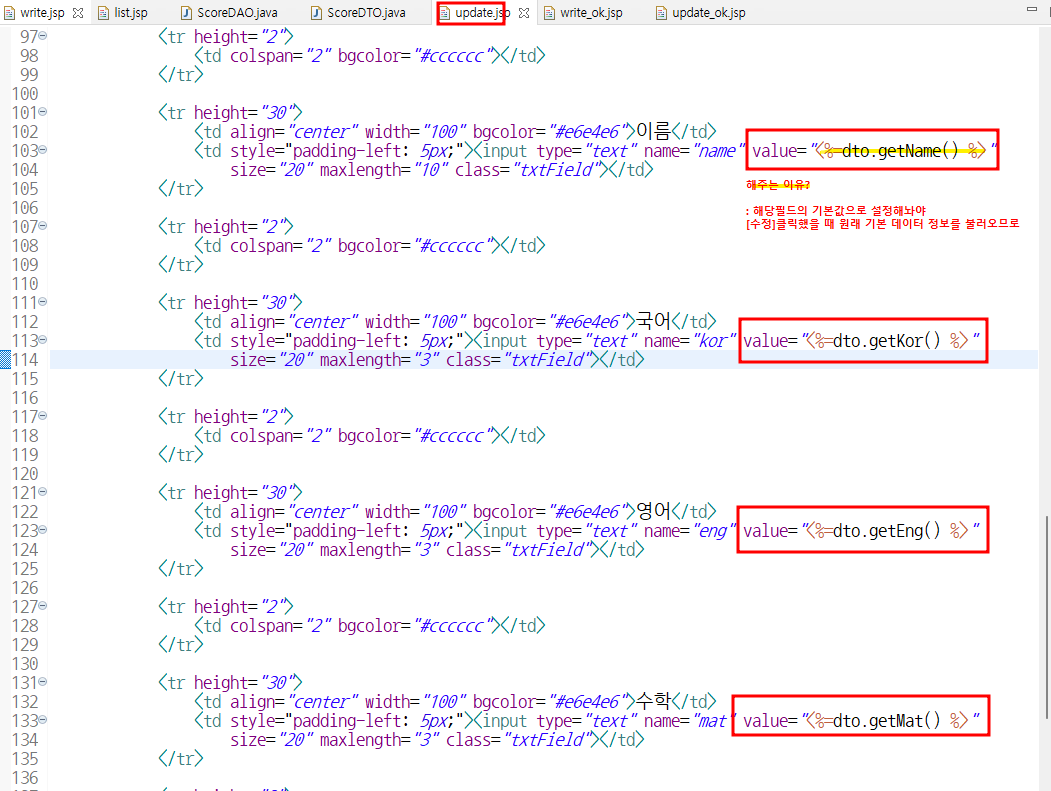
				<td style="padding-left: 5px;"><input type="text" name="kor" value="<%=dto.getKor() %>"
					size="20" maxlength="3" class="txtField"></td>
			</tr>

			<tr height="2">
				<td colspan="2" bgcolor="#cccccc"></td>
			</tr>

			<tr height="30">
				<td align="center" width="100" bgcolor="#e6e4e6">영어</td>
				<td style="padding-left: 5px;"><input type="text" name="eng" value="<%=dto.getEng() %>"
					size="20" maxlength="3" class="txtField"></td>
			</tr>

			<tr height="2">
				<td colspan="2" bgcolor="#cccccc"></td>
			</tr>

			<tr height="30">
				<td align="center" width="100" bgcolor="#e6e4e6">수학</td>
				<td style="padding-left: 5px;"><input type="text" name="mat" value="<%=dto.getMat() %>"
					size="20" maxlength="3" class="txtField"></td>
			</tr>

			<tr height="3">
				<td colspan="2" bgcolor="#cccccc"></td>
			</tr>

			<tr height="35">
				<td align="center" colspan="2">

				<input type="hidden" name="hak" value="<%=dto.getHak()%>"/>

				<input type="button" class="btn" value=" 수정완료 " onclick="sendIt();"/>
				<input type="button" class="btn" value=" 수정취소 " onclick="javascript:location.href='<%=cp%>/score/list.jsp';"/>
				</td>
			</tr>
		</table>
	</form>


</body>
</html>
⬇️ update_ok.jsp
<%@page import="com.score.ScoreDAO"%>
<%@page import="com.util.DBConn"%>
<%@page import="java.sql.Connection"%>
<%@ page contentType="text/html; charset=UTF-8"%>
<%
	request.setCharacterEncoding("UTF-8");
	String cp = request.getContextPath();
%>

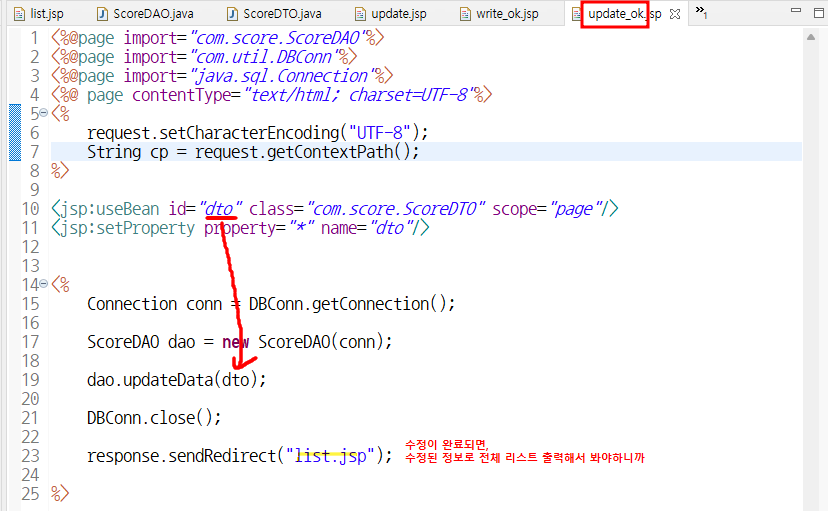
<jsp:useBean id="dto" class="com.score.ScoreDTO" scope="page"/>
<jsp:setProperty property="*" name="dto"/>


<%
	Connection conn = DBConn.getConnection();

	ScoreDAO dao = new ScoreDAO(conn);

	dao.updateData(dto);

	DBConn.close();

	response.sendRedirect("list.jsp");

%>⬇️delete.jsp
<%@page import="com.score.ScoreDAO"%>
<%@page import="com.util.DBConn"%>
<%@page import="java.sql.Connection"%>
<%@ page contentType="text/html; charset=UTF-8"%>
<%
	request.setCharacterEncoding("UTF-8");
	String cp = request.getContextPath();

	String hak = request.getParameter("hak");
%>

<jsp:useBean id="dto" class="com.score.ScoreDTO" scope="page"/>
<jsp:setProperty property="*" name="dto"/>

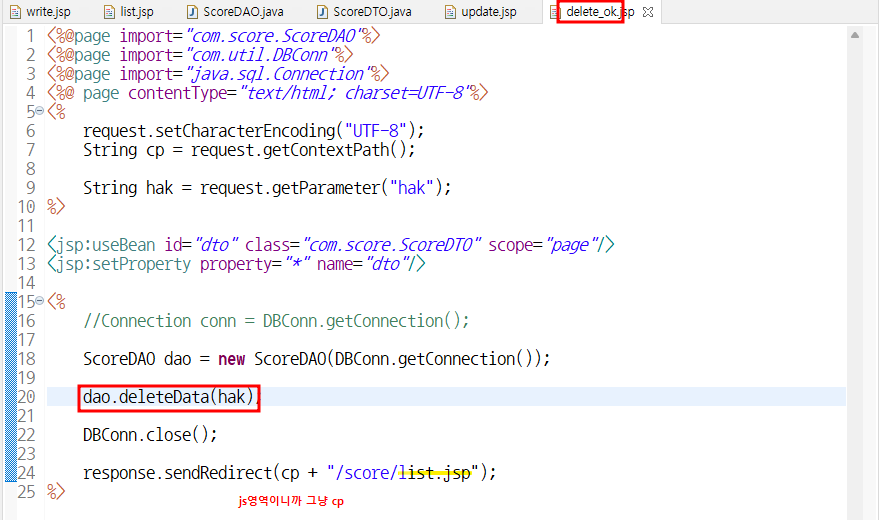
<%
	//Connection conn = DBConn.getConnection();

	ScoreDAO dao = new ScoreDAO(DBConn.getConnection());

	dao.deleteData(hak);

	DBConn.close();

	response.sendRedirect(cp + "/score/list.jsp");
%>⬇️scoreDAO.java
package com.score;

import java.sql.Connection;
import java.sql.PreparedStatement;
import java.sql.ResultSet;
import java.util.ArrayList;
import java.util.List;

public class ScoreDAO {

	private Connection conn;

	public ScoreDAO(Connection conn) {
		this.conn = conn;
	}

	// 1. 데이터 입력 (write.jsp -> wirte_ok.jsp에서 쓸 예정)
	public int insertData(ScoreDTO dto) {

		int result = 0;

		PreparedStatement pstmt = null;
		String sql;

		try {

			sql = "insert into score (hak,name,kor,eng,mat) ";
			sql += "values (?,?,?,?,?)";

			pstmt = conn.prepareStatement(sql);

			pstmt.setString(1, dto.getHak());
			pstmt.setString(2, dto.getName());
			pstmt.setInt(3, dto.getEng());
			pstmt.setInt(4, dto.getKor());
			pstmt.setInt(5, dto.getMat());

			result = pstmt.executeUpdate();

			pstmt.close();

		} catch (Exception e) {
			System.out.println(e.toString());
		}
		return result;
	}

	// 2. 전체 데이터 가져오는 것 (list.jsp에서 사용예정)
	public List<ScoreDTO> getList() {

		List<ScoreDTO> lists = new ArrayList<ScoreDTO>();
		PreparedStatement pstmt = null;
		ResultSet rs = null;
		String sql;

		try {
			sql = "select hak,name,kor,eng,mat, ";
			sql += "(kor+eng+mat) tot, (kor+eng+mat)/3 ave, ";
			sql += "rank() over (order by (kor+eng+mat) desc) rank ";
			sql += "from score";

			pstmt = conn.prepareStatement(sql);

			rs = pstmt.executeQuery();

			while (rs.next()) {

				ScoreDTO dto = new ScoreDTO();
				dto.setHak(rs.getString("hak"));
				dto.setName(rs.getString("name"));
				dto.setKor(rs.getInt("kor"));
				dto.setEng(rs.getInt("eng"));
				dto.setMat(rs.getInt("mat"));
				dto.setTot(rs.getInt("tot"));
				dto.setAve(rs.getInt("ave"));
				dto.setRank(rs.getInt("rank"));

				lists.add(dto); // list반복할때마다 하나씩 넣어주기

			}

			pstmt.close();
			rs.close();

		} catch (Exception e) {
			System.out.println(e.toString());
		}
		return lists;
	}

	// 3.hak으로 한개의 데이터 검색 -> 가지고와야지 (update.jsp)에서 사용 가능
	public ScoreDTO getReadData(String hak) {

		ScoreDTO dto = null;
		PreparedStatement pstmt = null;
		ResultSet rs = null;
		String sql;

		try {

			sql = "select hak,name,kor,eng,mat ";
			sql += "from score where hak = ?";

			pstmt = conn.prepareStatement(sql);

			pstmt.setString(1, hak);

			rs = pstmt.executeQuery();

			if (rs.next()) {

				dto = new ScoreDTO();

				dto.setHak(rs.getString("hak"));
				dto.setName(rs.getString("name"));
				dto.setKor(rs.getInt("kor"));
				dto.setEng(rs.getInt("eng"));
				dto.setMat(rs.getInt("mat"));
			}

			pstmt.close();
			rs.close();

		} catch (Exception e) {
			System.out.println(e.toString());
		}
		return dto; // 반환값 dto
	}


	// 4.수정은 2개의 메서드 필요 (update -> update_ok에서 사용예정)
	public int updateData(ScoreDTO dto) {

		int result = 0;
		PreparedStatement pstmt = null;
		String sql;

		try {
			sql = "update score set kor=?,eng=?,mat=? ";
			sql += "where hak=?";

			pstmt = conn.prepareStatement(sql);

			pstmt.setInt(1, dto.getKor());
			pstmt.setInt(2, dto.getEng());
			pstmt.setInt(3, dto.getMat());
			pstmt.setString(4, dto.getHak());

			result = pstmt.executeUpdate();

			pstmt.close();

		} catch (Exception e) {
			System.out.println(e.toString());
		}
		return result;
	}

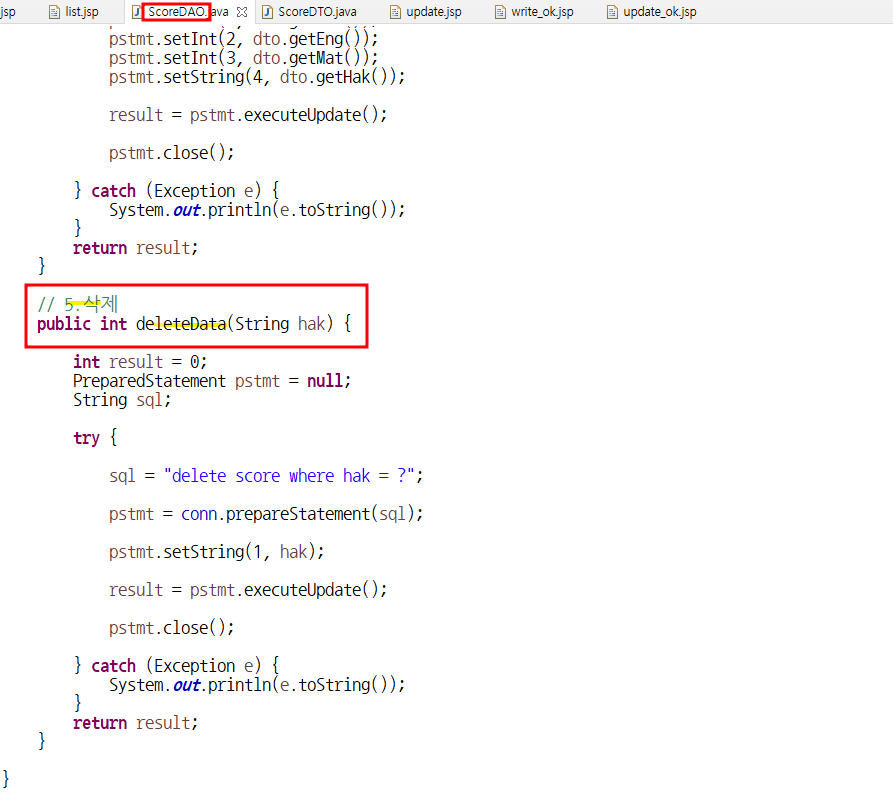
	// 5.삭제
	public int deleteData(String hak) {

		int result = 0;
		PreparedStatement pstmt = null;
		String sql;

		try {

			sql = "delete score where hak = ?";

			pstmt = conn.prepareStatement(sql);

			pstmt.setString(1, hak);

			result = pstmt.executeUpdate();

			pstmt.close();

		} catch (Exception e) {
			System.out.println(e.toString());
		}
		return result;
	}

}
⬇️scoreDTO.java
package com.score;

public class ScoreDTO {

	private String hak;
	private String name;
	private int kor;
	private int eng;
	private int mat;

	private int tot;
	private int ave;
	private int rank;

	public String getHak() {
		return hak;
	}
	public void setHak(String hak) {
		this.hak = hak;
	}
	public String getName() {
		return name;
	}
	public void setName(String name) {
		this.name = name;
	}
	public int getKor() {
		return kor;
	}
	public void setKor(int kor) {
		this.kor = kor;
	}
	public int getEng() {
		return eng;
	}
	public void setEng(int eng) {
		this.eng = eng;
	}
	public int getMat() {
		return mat;
	}
	public void setMat(int mat) {
		this.mat = mat;
	}
	public int getTot() {
		return tot;
	}
	public void setTot(int tot) {
		this.tot = tot;
	}
	public int getAve() {
		return ave;
	}
	public void setAve(int ave) {
		this.ave = ave;
	}
	public int getRank() {
		return rank;
	}
	public void setRank(int rank) {
		this.rank = rank;
	}

}
(1) 여기서 데이터를 넣고
입력완료를 누르게 되면
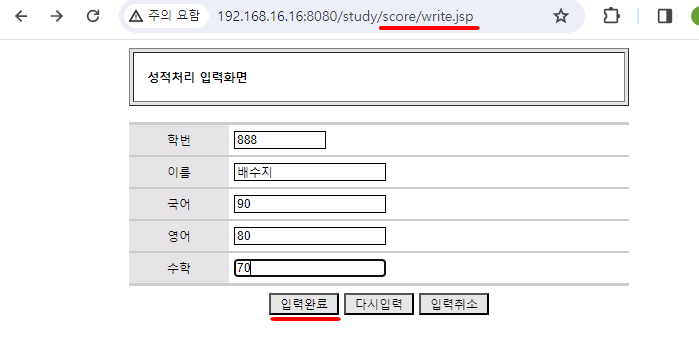
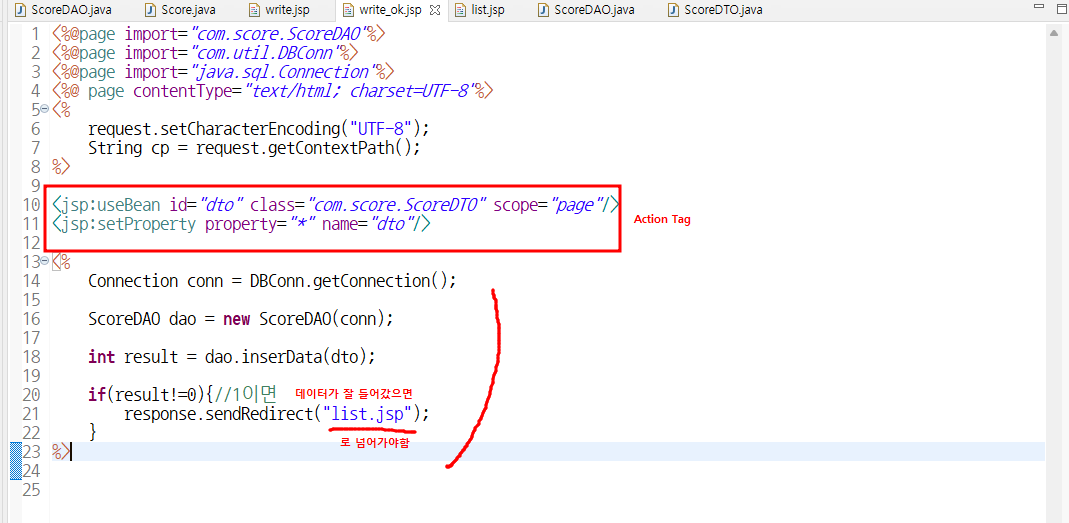
(2) list.jsp로 넘어가는 과정
:⭐ DB에서 꺼내온걸 보여주기 위해서 -> Redirect!!!!⭐
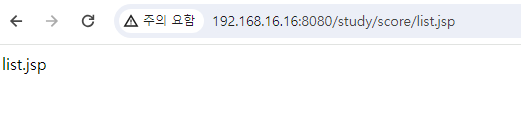
(3) 입력완료 화면
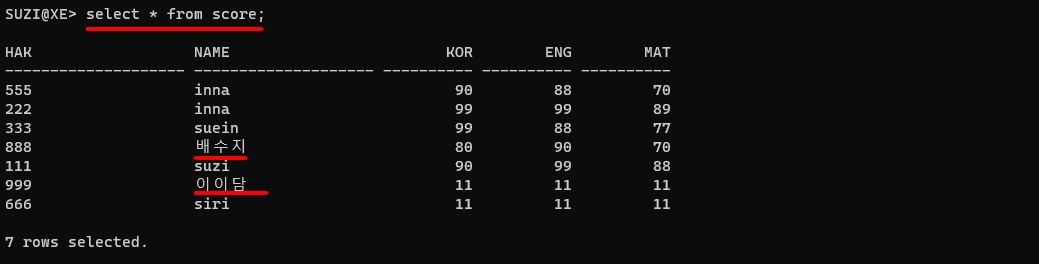
(4) sqlplus에서 select 해보니까 데이터 잘 들어간 걸 확인할 수 있음
외우기!

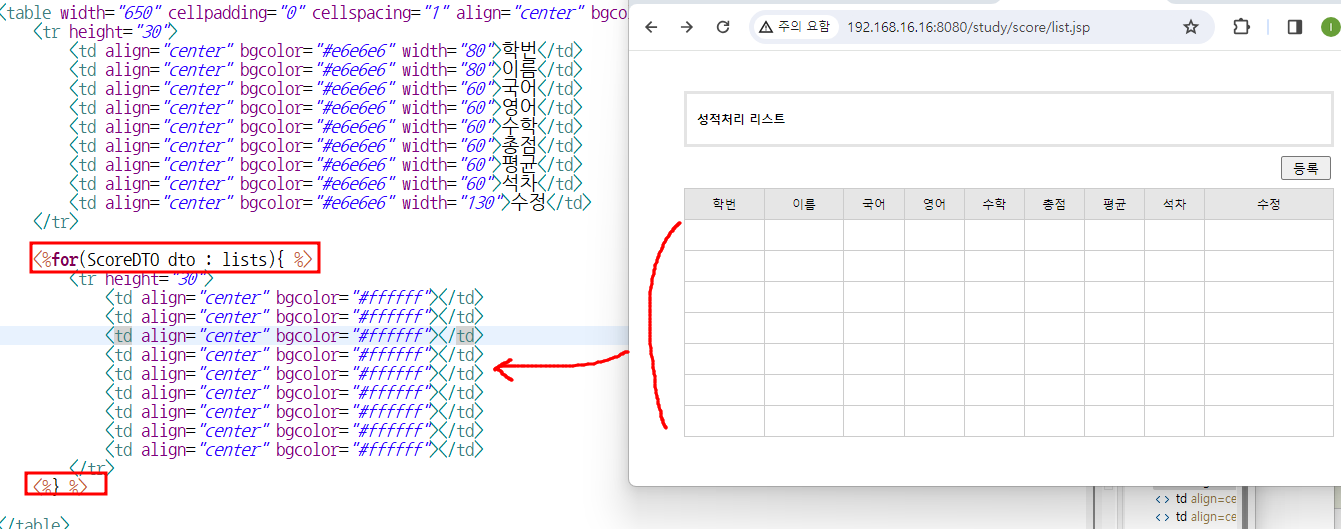
데이터 입력하기
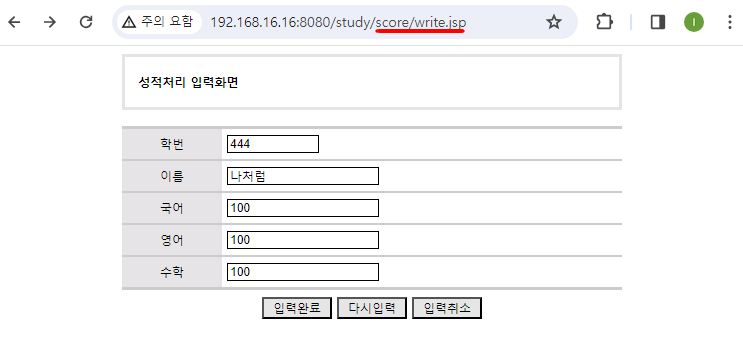
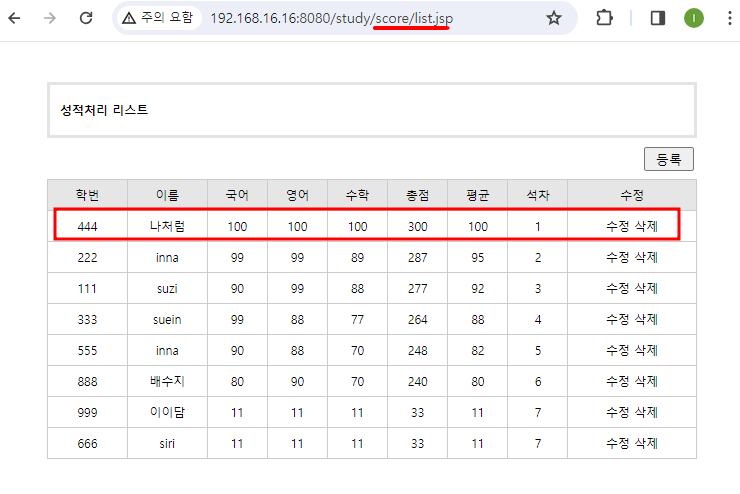
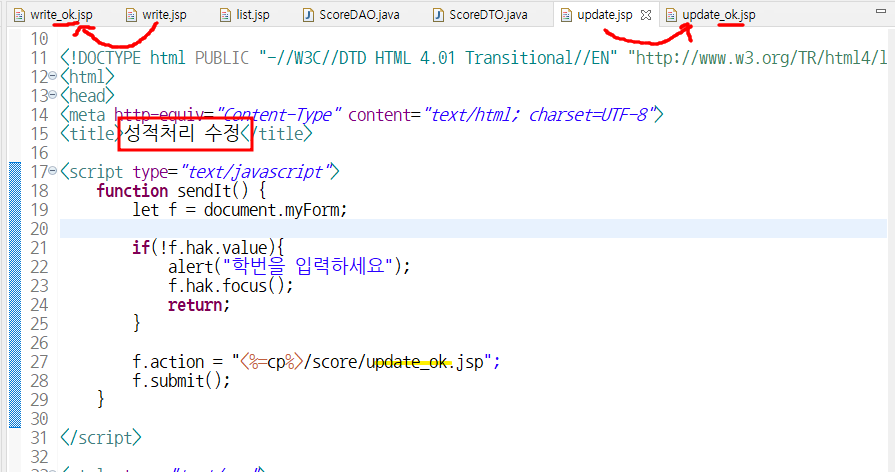
수정 (2개 메서드 필요)
css 작업
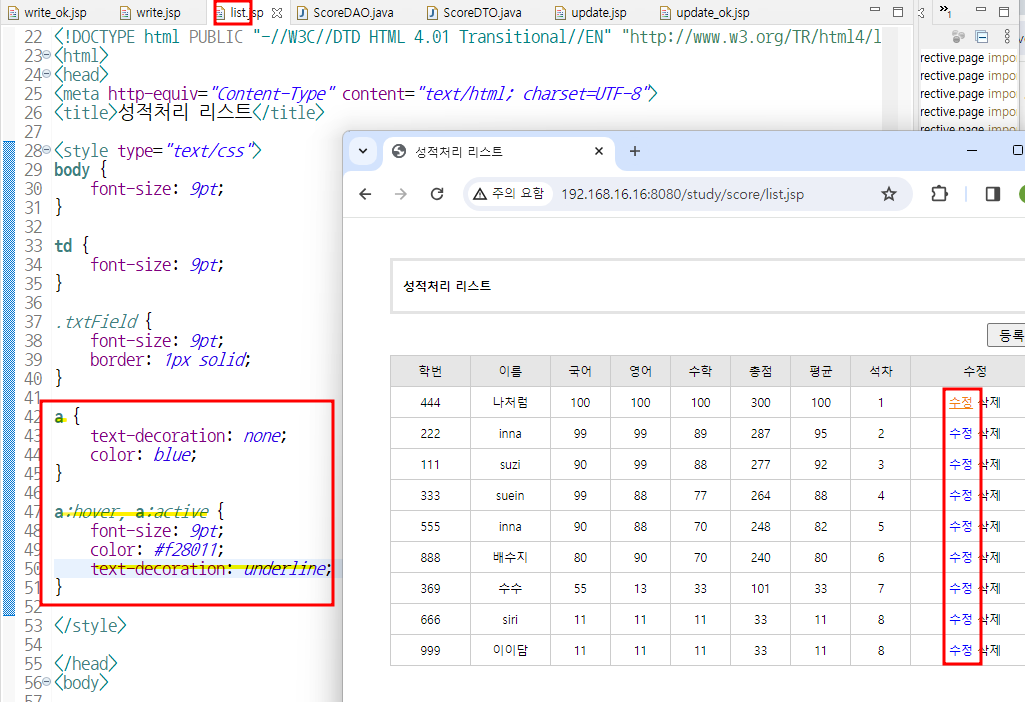
- (돋보기st) 글자 크게도 가능
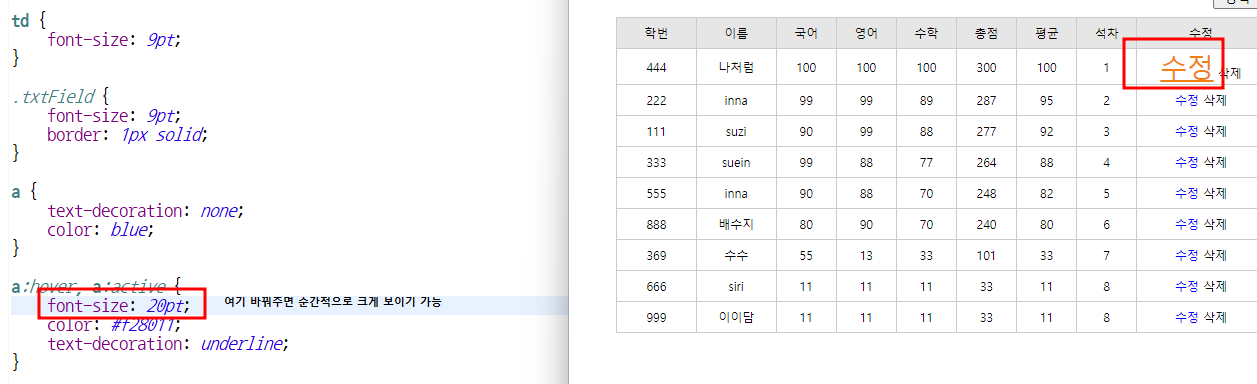
update [수정]
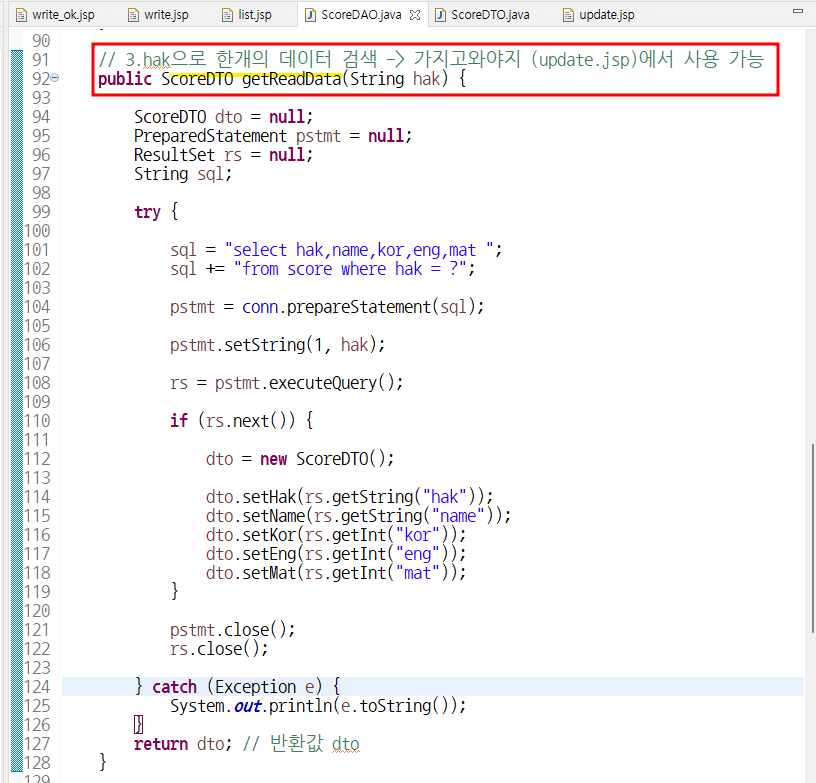
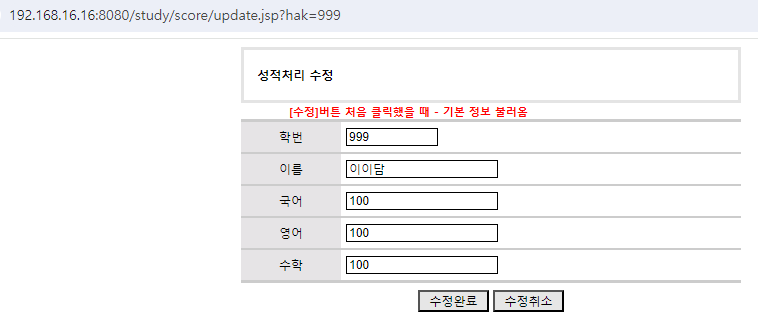
- 기본 데이터 띄우는 쿼리
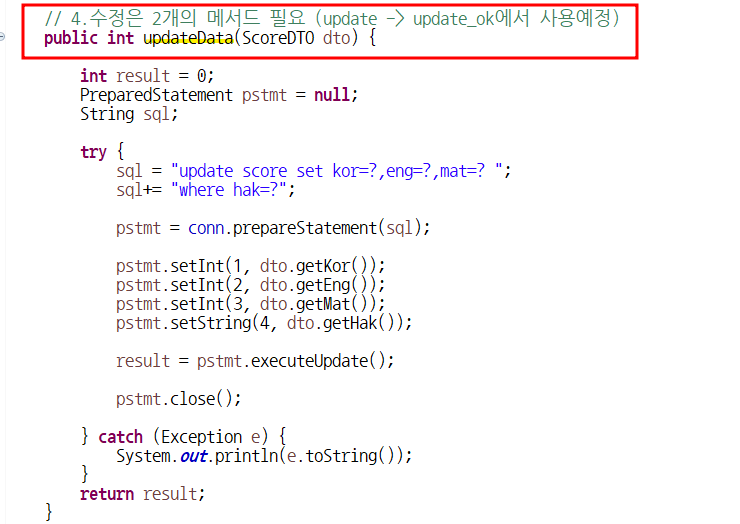
- update_ok에서 사용할 메서드
hak이 오류가 나는 이유는 앞에 넘어오는 데이터인 getParameter("hak")을 안받아서
update_ok에서의 dto
- <% script %> 기존 정보들을 불러와서 기본값으로 설정
✅ 수정완료
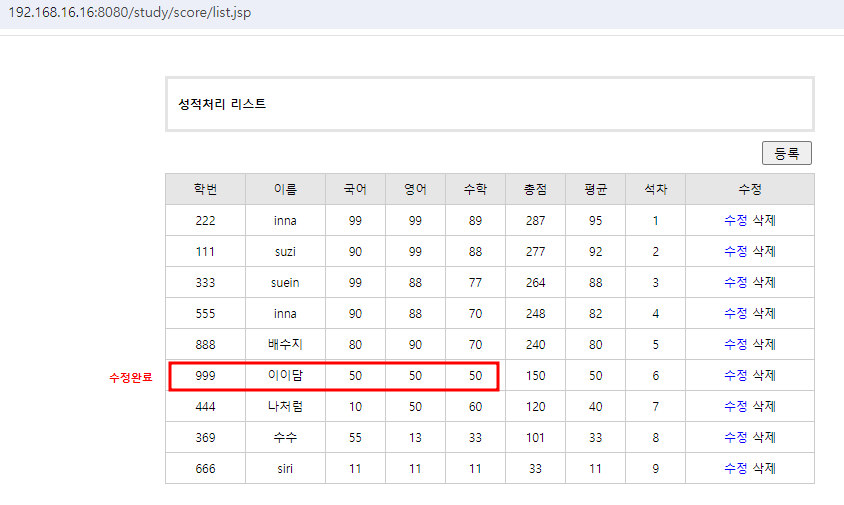
근데 학번이랑 이름은 바뀌지않으므로 추가작업 실행
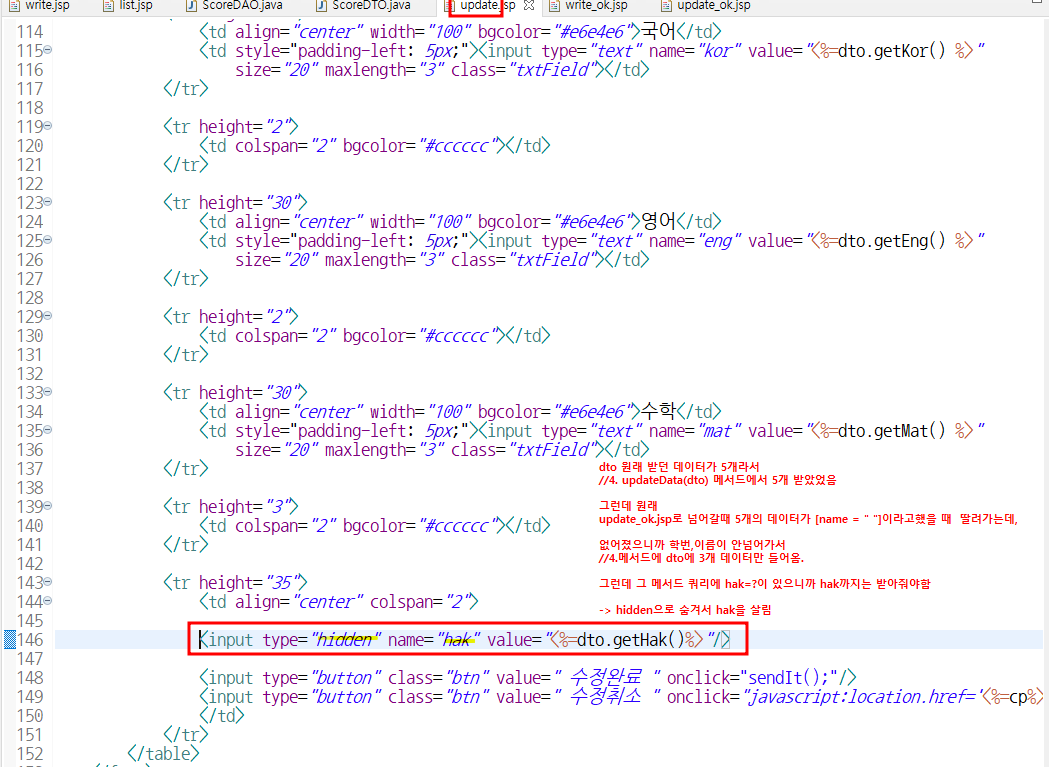
- dto 원래 받던 데이터가 5개라서
//4. updateData(dto) 메서드에서 5개 받았었음
그런데 원래
update_ok.jsp로 넘어갈때 5개의 데이터가 [name = " "]이라고했을 때 딸려가는데,
없어졌으니까 학번,이름이 안넘어가서
//4.메서드에 dto에 3개 데이터만 들어옴.
그런데 그 메서드 쿼리에 hak=?이 있으니까 hak까지는 받아줘야함
-> hidden으로 숨겨서 hak을 살림
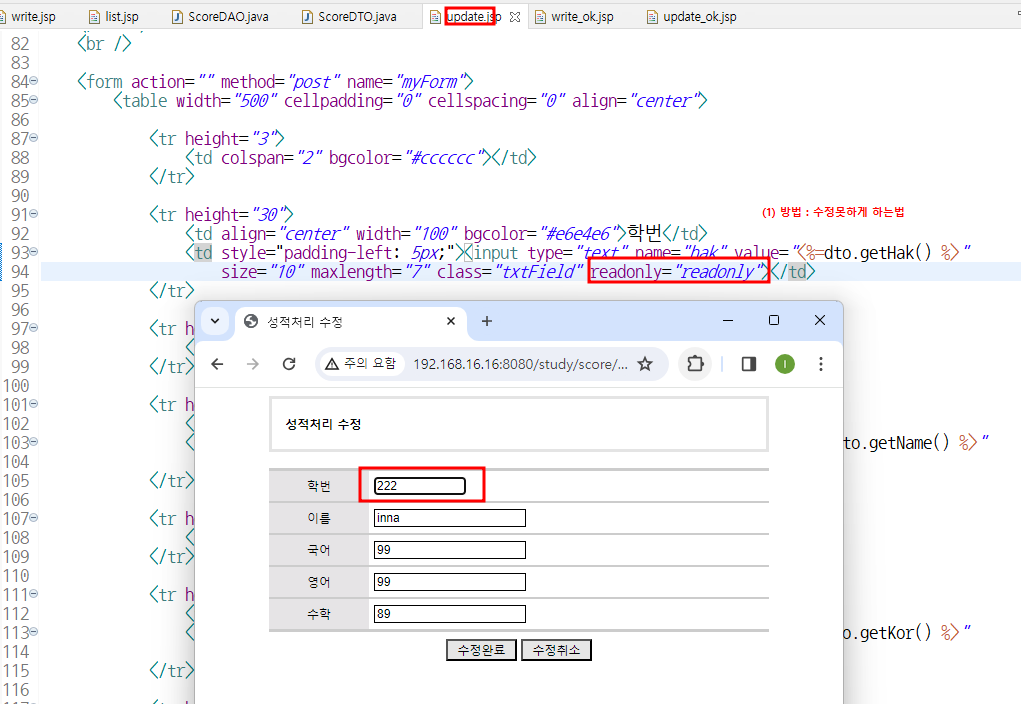
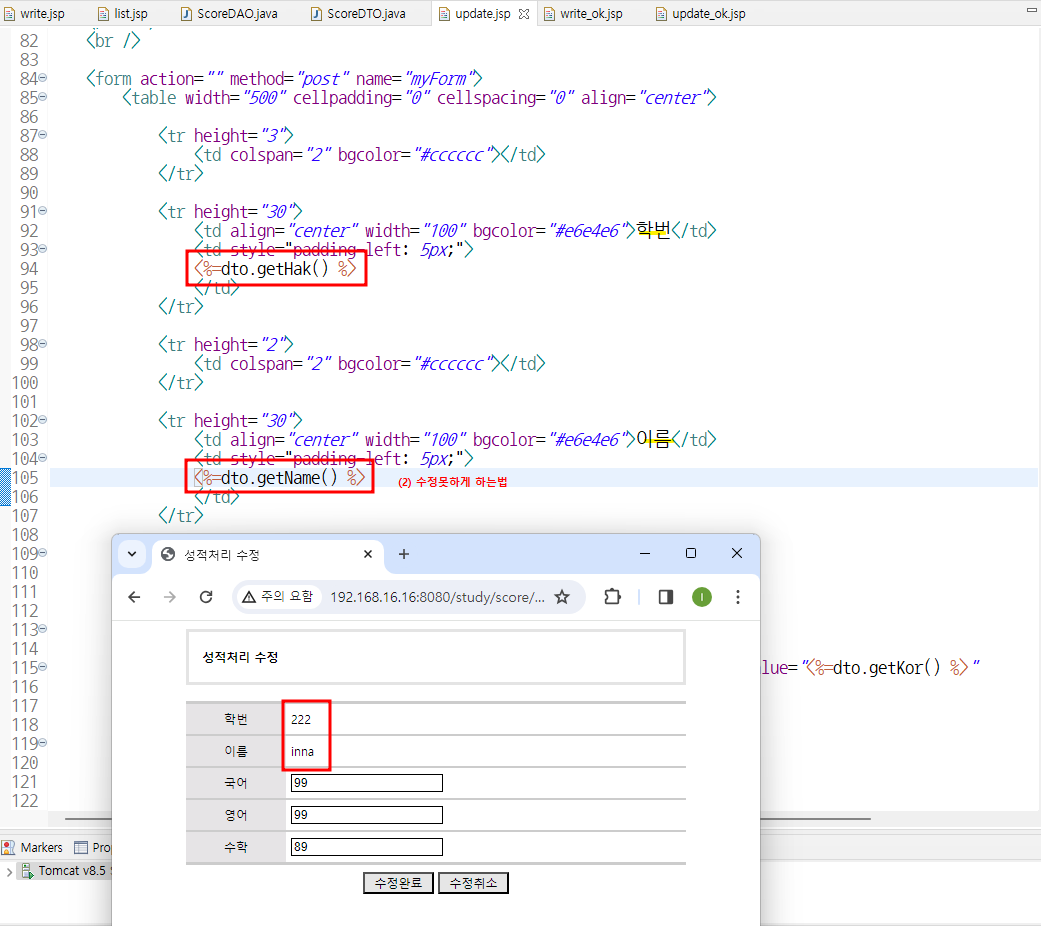
- ⭐✏️ hidden으로 숨겨서 hak 받음
삭제
✅ 수정/삭제 가능