→ 테스트 코드가 실제로 애플리케이션 코드의 어느 부분까지 실행되었는지를 측정하는 도구
→ 즉, 테스트의 품질을 수치로 시각화 해주는 도구이다.
🧩 Jacoco로 할 수 있는 것들
| 기능 | 설명 |
|---|---|
| 🧩 커버리지 측정 | 코드 실행 비율 계산 |
| 📊 리포트 생성 | HTML / XML / CSV 결과물 생성 |
| ⚙️ 커버리지 기준선 | 80% 이하 빌드 실패 등 설정 가능 |
| 🤖 CI/CD 통합 | Jenkins, GitHub, GitLab, SonarQube 연동 |
| 🧱 모듈별 리포트 | 각 계층 커버리지 따로 관리 |
| 🔍 누락 탐지 | 테스트되지 않은 코드 자동 표시 |
| 📈 추세 관리 | 버전별 커버리지 추적 및 비교 |
| 📱 Android 대응 | Multi-module 환경에서도 사용 가능 |
🔍 왜 사용하나?
| 목적 | 설명 |
|---|---|
| 1. 테스트 품질 측정 | 단순히 테스트가 ‘존재한다’가 아니라, 실제 코드 중 어느 부분이 실행되는지를 확인할 수 있습니다. |
| 2. 미검증 코드 식별 | 테스트가 닿지 않은 코드(예: 예외처리, 분기문 등)를 찾아내어 테스트 보완이 가능해집니다. |
| 3. 리팩토링 안정성 확보 | 테스트 커버리지가 높을수록, 리팩토링 시 기존 기능이 깨지지 않았다는 자신감을 가질 수 있습니다. |
| 4. CI/CD 자동화에 활용 | GitHub Actions, Jenkins 같은 CI 툴과 연동해 “테스트 커버리지 80% 이상 유지” 같은 품질 기준을 자동으로 검증할 수 있습니다. |
⚙️ 측정 방식
| 종류 | 설명 |
|---|---|
| Line Coverage | 몇 개의 코드 줄이 테스트 중 실행되었는가 |
| Branch Coverage | if/else, when 등의 분기문 중 몇 개가 테스트되었는가 |
| Method Coverage | 전체 메서드 중 몇 개가 호출되었는가 |
| Class Coverage | 전체 클래스 중 몇 개가 테스트 중 인스턴스화되었는가 |
Jacoco 적용 코드
JacocoPlugin.kt
import org.gradle.api.Plugin
import org.gradle.api.Project
import org.gradle.api.tasks.testing.Test
import org.gradle.kotlin.dsl.configure
import org.gradle.kotlin.dsl.register
import org.gradle.kotlin.dsl.withType
import org.gradle.testing.jacoco.plugins.JacocoPluginExtension
import org.gradle.testing.jacoco.tasks.JacocoReport

/*=======================================================================================
 *                                                                                      *
 *              Copyright(c) 2025, Beaverworks Inc., All rights reserved.               *
 *                                                                                      *
 *      Unauthorized copying of this file, via any medium is strictly prohibited        *
 *      Proprietary and confidential.                                                   *
 *                                                                                      *
========================================================================================*/

class JacocoPlugin : Plugin<Project> {
    override fun apply(target: Project) {
        target.plugins.apply("jacoco")

        target.extensions.configure<JacocoPluginExtension> {
            toolVersion = "0.8.10"
        }

        target.tasks.withType<Test>().configureEach {
            finalizedBy("jacocoTestReport")
        }

        target.tasks.register<JacocoReport>("jacocoTestReport") {
            dependsOn(target.tasks.withType<Test>())

            // ✅ 커버리지 제외 파일 패턴
            val fileFilter = listOf(
                "**/R.class",
                "**/R$*.class",
                "**/BuildConfig.*",
                "**/Manifest*.*",
                "**/*Test*.*",
                "android/**/*.*",
                "**/*Module*.*",
                "**/*Database*.*",
                "**/*Dao*.*"
            )

            // ✅ 클래스 파일 경로 (AGP 8 대응)
            val kotlinDebug = target.layout.buildDirectory.dir("tmp/kotlin-classes/debug").get().asFile
            val javacDebug = target.layout.buildDirectory.dir("intermediates/javac/debug/classes").get().asFile

            classDirectories.setFrom(
                target.files(
                    target.fileTree(kotlinDebug) { exclude(fileFilter) },
                    target.fileTree(javacDebug) { exclude(fileFilter) }
                )
            )

            // ✅ 소스 디렉토리
            sourceDirectories.setFrom(
                target.files("src/main/java", "src/main/kotlin")
            )

            // ✅ 실행 데이터 (exec 파일 경로)
            executionData.setFrom(
                target.fileTree(target.layout.buildDirectory.asFile) {
                    include(
                        "jacoco/testDebugUnitTest.exec",
                        "outputs/unit_test_code_coverage/debugUnitTest/testDebugUnitTest.exec",
                        "**/*.ec"
                    )
                }
            )

            // ✅ 리포트 옵션
            reports {
                html.required.set(true)
                xml.required.set(true)
                csv.required.set(false)

                html.outputLocation.set(target.layout.buildDirectory.dir("reports/jacoco/html"))
                xml.outputLocation.set(target.layout.buildDirectory.file("reports/jacoco/jacoco.xml"))
            }

            // ✅ 파일 존재 여부 체크 (없을 경우 SKIP)
            onlyIf {
                val hasClass = classDirectories.files.any { it.exists() }
                val hasExec = executionData.files.any { it.exists() }
                if (!hasClass) println("⚠️ [JaCoCo] No class files found for ${target.path}")
                if (!hasExec) println("⚠️ [JaCoCo] No execution data found for ${target.path}")
                hasClass && hasExec
            }

            doLast {
                println("✅ Jacoco report → ${target.layout.buildDirectory.dir("reports/jacoco/html").get().asFile}")
            }
        }
    }
}
동작 결과
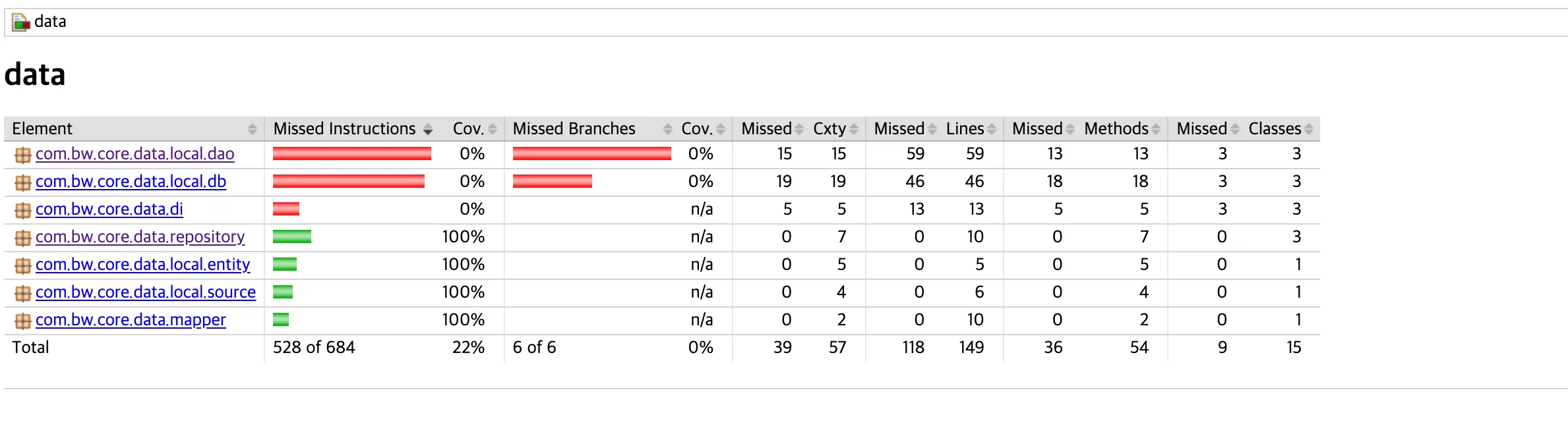

🧩 요약 — 현재 커버리지 현황
| 패키지 | 커버리지 | 설명 |
|---|---|---|
| com.bw.core.data.local.dao | ❌ 0% | DAO (Room 인터페이스) — 테스트 불가 / 불필요 |
| com.bw.core.data.local.db | ❌ 0% | Room Database — 직접 테스트할 필요 거의 없음 |
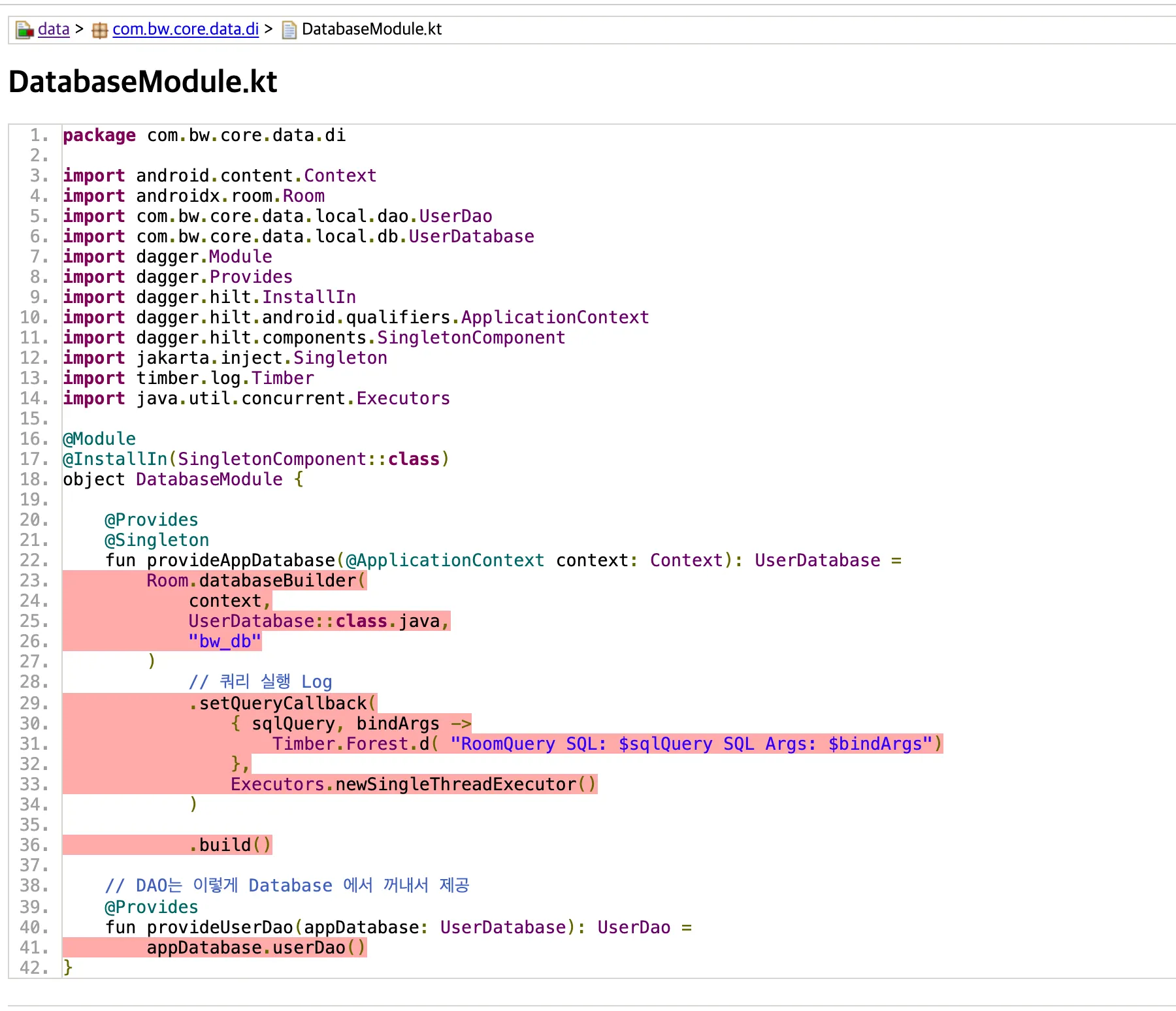
| com.bw.core.data.di | ❌ 0% | Hilt Module — 단위 테스트로 커버 불가능 |
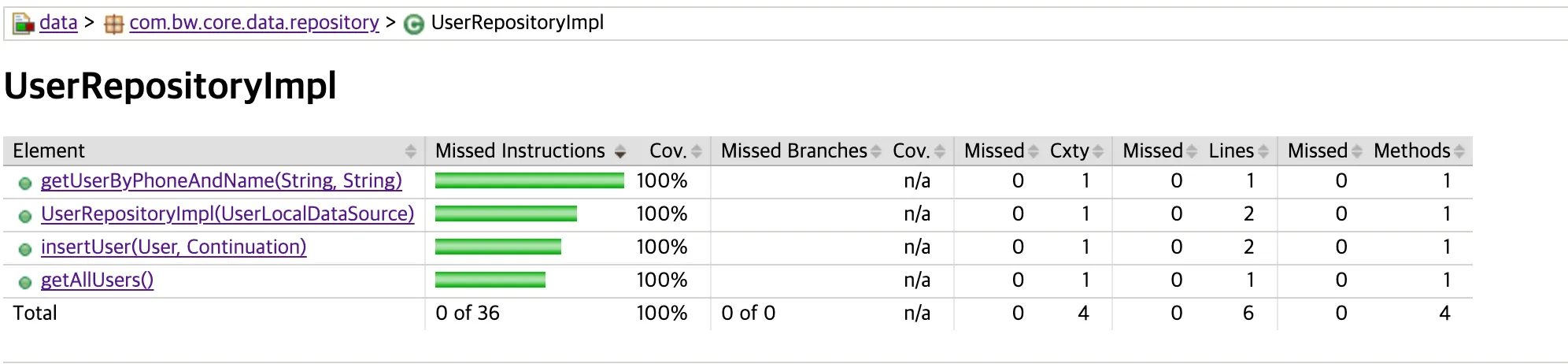
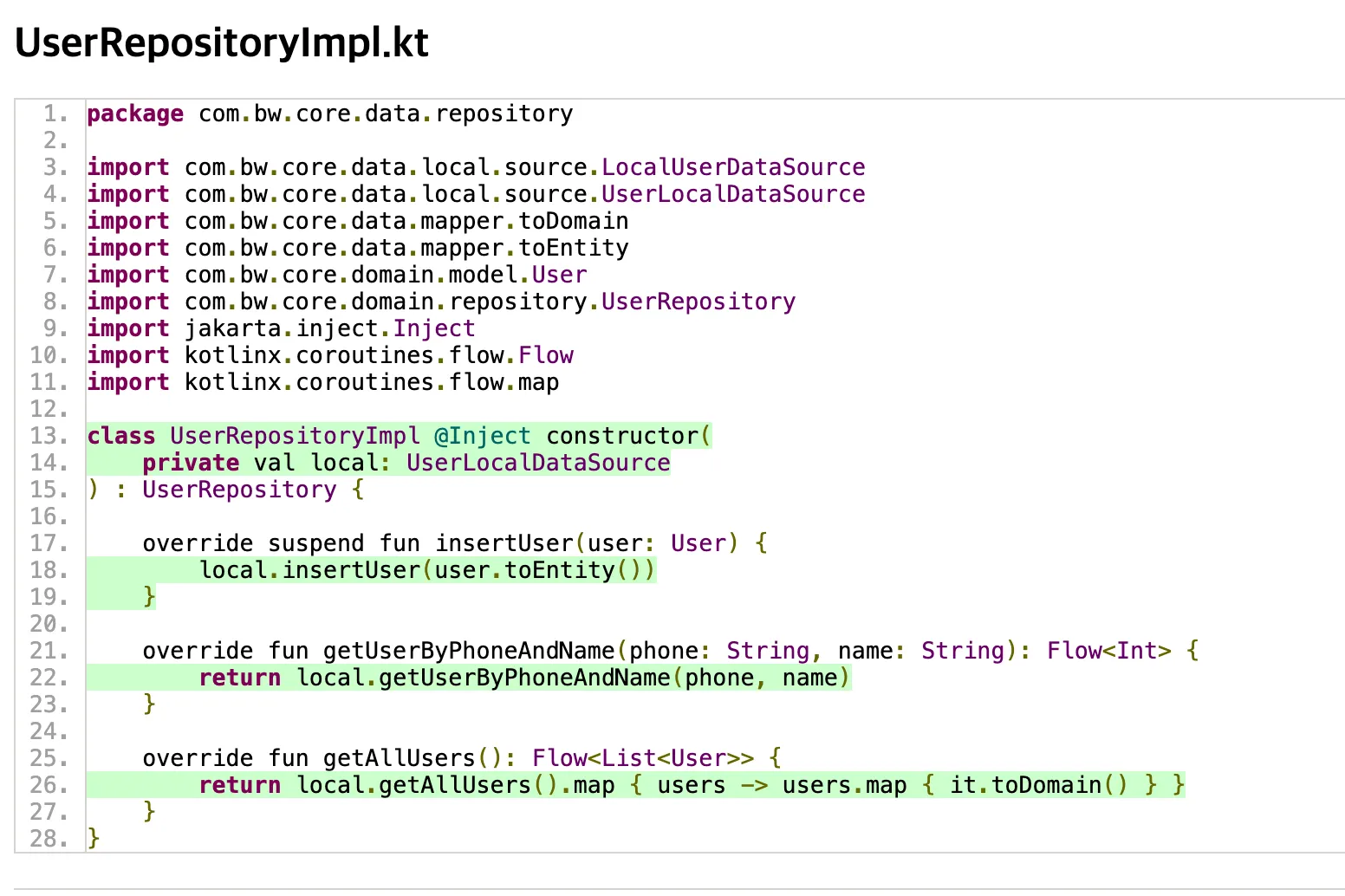
| com.bw.core.data.repository | ✅ 100% | Repository 구현체 — 완벽히 테스트됨 👍 |
| com.bw.core.data.local.entity | ✅ 100% | Entity (데이터 클래스) — 모두 커버됨 |
| com.bw.core.data.local.source | ✅ 100% | Local DataSource — 모두 커버됨 |
| com.bw.core.data.mapper | ✅ 100% | Mapper — 모두 커버됨 |
🔍 2️⃣ 왜 0%가 나왔을까?
| 패키지 | 이유 |
|---|---|
| dao | Room DAO 인터페이스는 @Dao + @Query로만 구성되어 있어서 바이트코드 실행이 없어요. 즉, 테스트가 실행될 코드 자체가 없기 때문에 커버리지 0%. |
| db | UserDatabase는 @Database + abstract class 구조로 테스트 코드가 실제 실행되지 않음. |
| di | Hilt Module은 컴파일 타임에 Dagger가 생성하므로 런타임 실행 코드가 없음. 따라서 JaCoCo에서 커버 불가. |
🧠 3️⃣ 진짜 의미 있는 커버리지
| 패키지 | 역할 | 상태 |
|---|---|---|
| repository | 비즈니스 로직 (UseCase에 가까운 영역) | 완벽하게 테스트됨 |
| local.source | 데이터 소스 계층 (Room DAO 래핑) | 테스트 정상 수행됨 |
| mapper, entity | 단순 데이터 변환 계층 | 테스트 혹은 실행 시 커버됨 |
→ 즉, “앱 로직 핵심부는 모두 커버되고 있다”는 뜻이다.
→ dao/db/di 이 세 가지는 대부분의 프로젝트에서 커버리지 제외 대상(fileFilter) 으로 지정했다.

처음부터 다시 시작!!