📕 문제
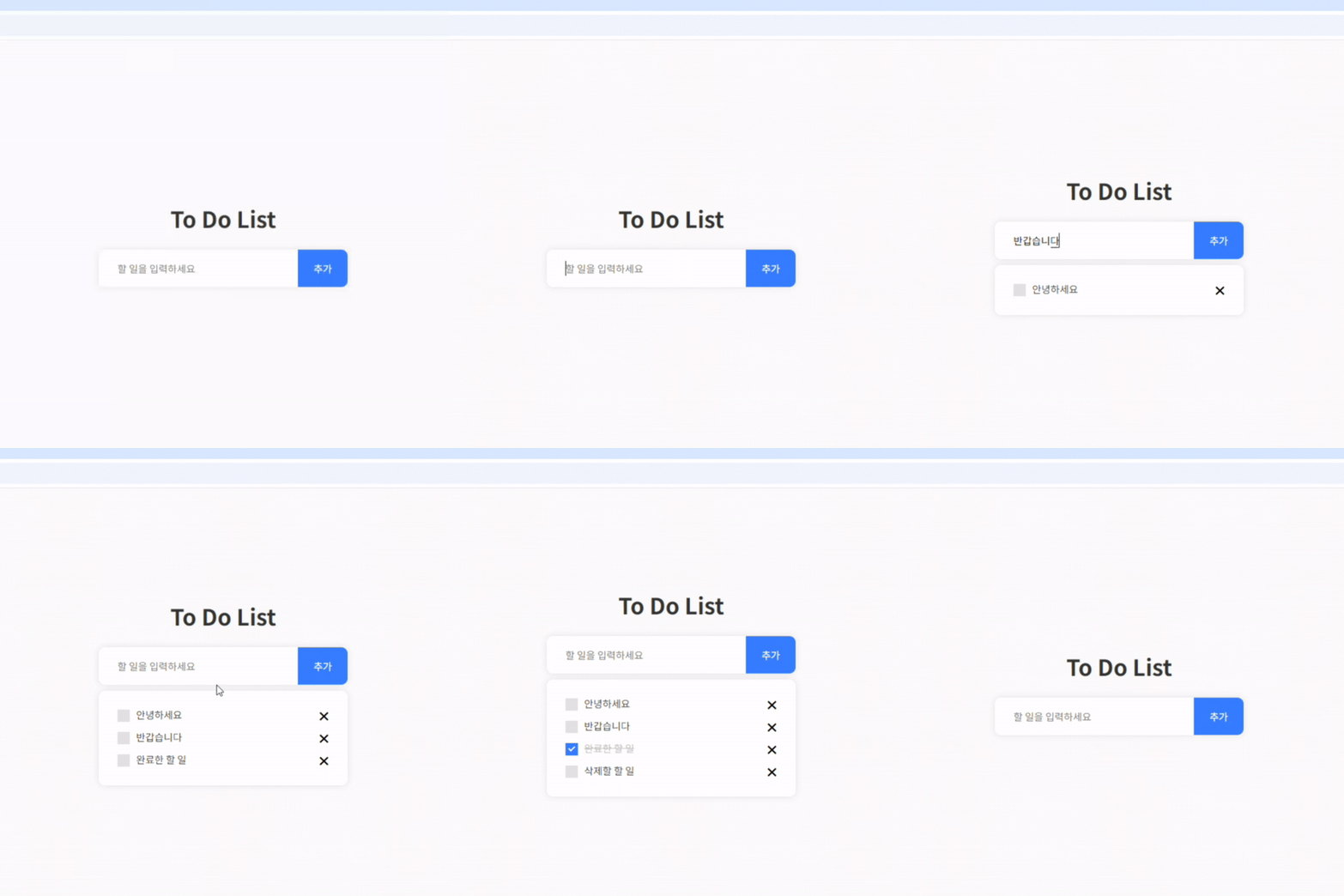
- 할 일을 추가 할 수 있는 투두 리스트를 만듭니다.
- HTML로 기본 구조를 만듭니다.
- 자바스크립트로 할 일 추가 기능을 구현합니다.
a. 입력 필드와 “추가” 버튼을 통해 새로운 할 일을 추가합니다. - CSS로 간단한 스타일을 적용합니다.
- 할 일 항목의 완료 표시, 삭제 기능을 구현합니다.
🤔 고민과정
-
insertAdjacentHTML로 넣은 '삭제' 버튼이 작동하지 않는다.
▶ 동적으로 생성한 객체는 동적 이벤트 바인딩 하기
🔗 동적 이벤트 바인딩 -
li의 개수가 0이면 .box를 숨기고 싶다.
▶ 변화 감지 MutationObserver 사용하기
🔗 MutationObserver
✅ 결과물
html
<!DOCTYPE html>
<html lang="en">

<head>
    <meta charset="UTF-8">
    <meta name="viewport" content="width=device-width, initial-scale=1.0">
    <title>To Do List</title>
    <link rel="preconnect" href="https://fonts.googleapis.com">
    <link rel="preconnect" href="https://fonts.gstatic.com" crossorigin>
    <link href="https://fonts.googleapis.com/css2?family=Noto+Sans+KR:wght@100..900&display=swap" rel="stylesheet">
    <link href="reset.css" rel="stylesheet">
    <link href="style.css" rel="stylesheet">
</head>

<body>
    <div class="contents">
        <h1 class="tit">To Do List</h1>

        <div class="input-box">
            <input id="input-box__input" type="text" placeholder="할 일을 입력하세요" />
            <button id="input-box__btn">추가</button>
        </div>

        <div class="box">
            <ul id="list"></ul>
        </div>
    </div>

    <script src="script.js"></script>
</body>

</html>
css
body {
    display: flex;
    justify-content: center;
    align-items: center;
    padding: 40px 20px;
    background-color: #f6f6f6;
    font-family: "Noto Sans KR", sans-serif;
    scroll-margin-block-end: 5ex;
    overflow-y: scroll;
}

.contents {
    min-width: 400px;
    max-width: 700px;
    text-align: center;
}

.tit {
    font-size: 36px;
    color: #333;
    margin: 0 0 30px;
}

.input-box,
.box {
    border-radius: 10px;
    background-color: #fff;
    box-shadow: 0 0 10px rgba(0, 0, 0, 0.1);
}

.input-box {
    display: flex;
    overflow: hidden;
}

#input-box__input {
    width: 80%;
    min-height: 60px;
    font-size: 16px;
    padding: 10px 30px;
    outline: none;
    border: 0;
    background-color: transparent;
}

#input-box__btn {
    width: 20%;
    font-size: 16px;
    border: 0;
    color: #fff;
    background-color: #357bff;
    cursor: pointer;
    transition: all ease .1s;
}

#input-box__btn:hover {
    background-color: #2b66d5;
}

.box {
    display: none;
    padding: 30px;
    margin: 10px 0 0;
}

.list-item {
    display: flex;
    flex-wrap: wrap;
    text-align: left;
}

.list-item+.list-item {
    margin-top: 16px;
}

.checkbox {
    display: block;
    position: relative;
    width: calc(100% - 30px);
    min-height: 20px;
    padding-left: 30px;
    cursor: pointer;
    font-size: 16px;
    color: #333;
    -webkit-user-select: none;
    -moz-user-select: none;
    -ms-user-select: none;
    user-select: none;
}

.checkbox input[type="checkbox"] {
    display: none;
}

.checkbox .checkbox__check {
    width: 20px;
    height: 20px;
    background: #ddd;
    position: absolute;
    top: 0;
    left: 0;
}

.checkbox input[type="checkbox"]:checked+.checkbox__check {
    background: #357bff;
}

.checkbox input[type="checkbox"]:checked~.checkbox__txt {
    text-decoration: line-through;
    color: #bbb;
}

.checkbox .checkbox__check:after {
    content: "";
    position: absolute;
    display: none;
}

.checkbox input[type="checkbox"]:checked+.checkbox__check:after {
    display: block;
}

.checkbox .checkbox__check:after {
    width: 6px;
    height: 10px;
    border: solid #fff;
    border-width: 0 2px 2px 0;
    -webkit-transform: rotate(45deg);
    -ms-transform: rotate(45deg);
    transform: rotate(45deg);
    position: absolute;
    left: 7px;
    top: 3px;
}

.del-btn {
    display: flex;
    align-items: center;
    justify-content: end;
    width: 30px;
    height: 20px;
    font-size: 20px;
    padding: 0;
    margin: 0;
    border: 0;
    background-color: transparent;
    cursor: pointer;
}
javascript
const inputBoxInput = document.querySelector('#input-box__input');
const inputBoxBtn = document.querySelector('#input-box__btn');
const box = document.querySelector('.box');
const list = document.querySelector('#list');

// 엔터키 이벤트
inputBoxInput.addEventListener("keydown", (e) => {
    if (e.keyCode === 13 && inputBoxInput.value !== '') {
        createTodo();
    }
});

// 추가 버튼 클릭시
inputBoxBtn.addEventListener("click", () => {
    createTodo();
});

// 할일 추가
function createTodo() {
    // 입력창에 내용이 비어있으면
    if (inputBoxInput.value == '') {
        alert('할 일을 입력해 주세요');
    } else {
        // li의 개수로 체크박스 id생성
        let liLength = list.childElementCount;
        let checkboxId = liLength + 1;

        // li에 html코드 넣기
        let listItemHtml = `
        <li class="list-item">
            <label for="checkbox${checkboxId}" class="checkbox">
                <input type="checkbox" id="checkbox${checkboxId}" />
                <span class="checkbox__check"></span>
                <span class="checkbox__txt">${inputBoxInput.value}</span>
            </label>
            <button class="del-btn">✖</button>
        </li>`;
        list.insertAdjacentHTML('beforeend', listItemHtml);

        // 입력창 초기화
        inputBoxInput.value = '';
    }
}


// 삭제 버튼 클릭시
// 동적 이벤트 바인딩 : list에서 click이벤트를 잡아서 소스코드 실행
list.addEventListener("click", removeTodo);

// 할일 삭제
function removeTodo(e) {
    // 클릭한 대상이 del-btn이라는 클래스를 가지고 있으면
    if (e.target.classList.contains('del-btn')) {
        e.target.parentNode.remove();
    }
}


window.onload = function () {
    boxToggle();
};

// box display 설정
function boxToggle() {
    let liLength = list.childElementCount;

    // li의 개수가 1개 이상이면
    if (liLength >= 1) {
        box.style.display = 'block';
    } else {
        box.style.display = 'none';
    }
}

// Mutation Observer
// 변경을 감지할 노드 선택
const targetNode = list;

// 감지 옵션 (감지할 변경)
let config = {
    childList: true,
};

// 콜백 함수에 연결된 감지기 인스턴스 생성
const observer = new MutationObserver(boxToggle);

// 설정한 변경의 감지 시작(대상 노드에 감시자 전달)
observer.observe(targetNode, config);