파이썬 표준 라이브러리
파이썬을 설치할 때 자동으로 컴퓨터에 설치된다.
1. datetime.date
import datetime
day1=datetime.date(2021,12,23)
day2=datetime.date(2021,12,25)
diff = day1-day2
print(diff.days)

day=day1
print(day.weekday())
print(day.isoweekday())

print(datetime.date.today())
//출력결과
-2 3 4 2024-06-11
- datetime.date(년도,월,날짜)
- (datetime.timedelta를 나타내는 변수).days
두 날짜 간의 일 수 차이를 반환한다. datetime.timedelta 객체의 속성이다. datetime.timedelta는 두 날짜 또는 시간 간의 차이를 나타낸다. .day 뿐만 아니라 .seconds .microseconds도 포함 된다. - (datetime.date를 나타내는 변수).weekday() 또는 .isoweekday()
요일을 반환한다. 0은 월요일, 1은 화요일 ...6은 일요일이다. 월요일이 1부터 시작하게 하기 위해 isoweekday함수를 사용해도 된다. - datetime.date.today()
오늘 날짜 정보를 출력한다.
- D-day 계산기
import time
import datetime

today=datetime.date.today()
input_date=input('날짜를 입력해주세요(예: 20240701) : ')
year=int(input_date[0:4])
month=int(input_date[4:6])
day=int(input_date[6:8])

targetdate=datetime.date(year,month,day)

d_day=targetdate-today
if d_day.days<0:
    print(f'd-day : {abs(d_day.days)} 지났습니다 ')
else :
    print(f'd-day : {d_day.days} 남았습니다 ')
2. time.time()
import time

print(time.time())
print(time.localtime(time.time()))

tm=time.localtime(time.time())
print(tm.tm_year)
print(tm.tm_mon)
print(tm.tm_mday)
print(tm.tm_hour)

print(time.asctime(time.localtime(time.time())))
print(time.ctime())

print(time.strftime('%x',time.localtime(time.time())))
print(time.strftime('%c',time.localtime(time.time())))

for i in range(10):
    print(i)
    time.sleep(1)

//출력결과
1718121432.1015098
time.struct_time(tm_year=2024, tm_mon=6, tm_mday=12, tm_hour=0, tm_min=57, tm_sec=12, tm_wday=2, tm_yday=164, tm_isdst=0)
2024
6
12
0
Wed Jun 12 00:57:12 2024
Wed Jun 12 00:57:12 2024
06/12/24
Wed Jun 12 00:57:12 2024- time.time()
현재 시간을 실수 형태로 리턴한다. 1970년 1월 1일 0시 0분 0초를 기준으로 지난 시간을 초 단위로 리턴한다. - time.localtime(time.time())
time.time()이 리턴한 실숫값을 사용해서 연, 월, 일, 시, 분, 초, 요일(wday), 해당연도의 1월 1일부터 현재 날짜까지의 경과한 일 수(yday), DST가 적용되는지(isdst)를 반환한다. (time.struct_time 객체 리턴) - time.asctime(time.localtime(time.time()))
time.localtime가 리턴한 튜플 형태의 값을 인수로 받아서 날짜와 시간을 알아보기 쉬운 형태로 리턴한다. - time.ctime()
항상 현재 시간만을 리턴한다. time.ctime()=time.asctime(time.localtime(time.time())) 같은 결과를 출력한다. - time.strftime('출력할형식포맷_코드',time.localtime(time.time()))
시간에 관계된 것을 세밀하게 표현하는 여러 가지 포맷 코드를 제공한다. 포맷코드 %x는 날짜 형식(06/12/24)이며 %c는 시간형식(Wed Jun 12 00:48:12 2024)이다. - time.sleep()
주로 루프 안에서 많이 사용하며 일정한 시간을 두고 루프를 실행할 수 있다. 인수는 실수 형태로 1이면 1초, 0.5면 0.5초이다.
3. math.gcd
import math

print(math.gcd(60,100,80))
print(math.lcm(15,25))- math.gcd
최대 공약수(gcd, greatest common divisor)를 쉽게 구하는 함수 - math.lcm
최소 공배수(lcm,least common multiple)를 쉽게 구하는 함수
4. random
- 난수(규칙이 없는 임의의 수)를 발생시키는 모듈
import random
print(random.random())
print(random.randint(1,10))
data=[1,2,3,4,5]
print(random.sample(data,len(data)))

def random_pop(data):
    number=random.choice(data)
    data.remove(number)
    return number

print(random_pop(data))
//출력결과
0.5479522283746899
9
[2, 4, 1, 5, 3]
3- random.random()
0.0에서 1.0 사이의 실수 중 난수 값을 리턴 - random.randint()
1에서 10 사이의 정수 중 난수 값을 리턴 - random.choice()
입력으로 받은 리스트에서 무작위로 하나를 선택하여 리턴 - random.sample()
리스트의 항목을 무작위로 섞음
-로또 번호 생성기
import random
result=[]
while len(result)<6:
    num=random.randint(1,45)
    if num not in result:
        result.append(num)
print(result)
5. shutil
- 파일을 복사하거나 이동할 때 사용되는 모듈이다
import shutil
shutil.copy('c:/doit/a.txt','c:/temp/a.txt.bak')
//작업 중인 파일을 자동으로 백업하는 프로그램이다. a.txt를 a.txt.bak이라는 이름으로 복사한다.
6. pickle
- 객체의 형태를 그대로 유지하면서 파일에 저장하고 불러올 수 있게 하는 모듈
import pickle

f=open('test.txt','wb')
data={1:'python',2:'you need'}
pickle.dump(data,f)
f.close()

f=open('test.txt','rb')
data=pickle.load(f)
print(data)
f.close()- pickle.dump()
딕셔너리 객체를 그대로 파일에 저장한다. 객체를 직렬화하여 파일에 저장될 때 사용된다. 이를 통해 파이썬 객체를 파일에 저장하고 나중에 다시 로드하여 사용할 수 있다. - pickle.load()
pickle.dump로 저장한 파일을 원래 딕서녀리 객체 상태 그대로 불러온다.
7. OS
- 환경변수나 디렉터리, 파일 등의 OS 자원을 제어할 수 있게 해주는 모듈이다.
import os
print(os.environ)
print(os.environ['PATH'])
print(os.chdir('c:\WINDOWS'))
print(os.system('dir'))
print(os.getcwd())
f=os.popen('dir')- os.environ
현재 시스템의 환경 변숫값을 리턴한다 - os.chdir()
현재 디렉터리의 위치를 변경한다 - osgetcwd()
현재 자신의 디렉터리 위치를 리턴한다 - os.system()
시스템 자체의 프로그램이나 기타 명령어를 파이썬에서 호출할 수 있다. 괄호 안에 dir이 들어간다면 현재 디렉터리에서 시스템 명령어 dir을 실행하라는 것. - os.popen()
시스템 명령어를 실행한 결괏값을 읽기 모드 형태의 파일 객체로 리턴한다. - 기타 유용한 os 관련 함수
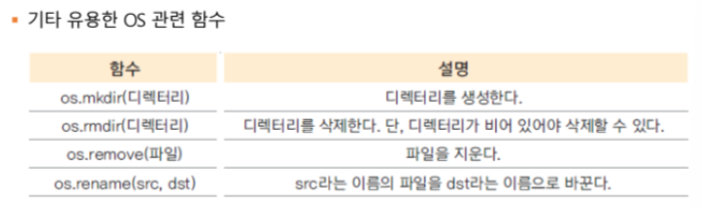
- os.popen 함수를 이용한 IP 정보 추출
import os

def get_ip():
    ip=[]
    stream=os.popen('ipconfig')
    output=stream.read()
    lines=output.split('\n')

    for line in lines:
        if 'IPv4' in line:
            ipp=line.split(':')[1].strip()
            ip.append(ipp)
    return ip
print(get_ip())
8. webbrowser
- 파이썬 프로그램에서 시스템 브라우저를 호출할 때 사용하는 모듈이다
import webbrowser
webbrowser.open_new('http://python')
//이미 열린 브라우저로 사이트를 여는 경우 : webbrowser.open('http://python')