지난 포스팅에 이어서 State에 대한 이야기를 이어가봅니다.
전구 역할을 하는 Bulb 컴포넌트를 새로 생성합니다. 이 컴포넌트는 부모 컴포넌트로부터 props를 통해 전구의 상태를 전달받으며, 구조 분해 할당을 사용해 light 값을 직접 받아옵니다.
import { useState } from "react";

const Bulb = ({ light }) => {
  return (
    <div>
      {light === "ON" ? (
        <h1 style={{ backgroundColor: "orange" }}>ON</h1>
      ) : (
        <h1 style={{ backgroundColor: "gray" }}>OFF</h1>
      )}
    </div>
  );
};

function App() {
  const [count, setCount] = useState(0);
  const [light, setLight] = useState("OFF");
  return (
    <>
      <div>
        <h1>{light}</h1>
        <button
          onClick={() => {
            setLight(light === "ON" ? "OFF" : "ON");
          }}
        >
          {light === "ON" ? "끄기" : "켜기"}
        </button>
      </div>
      <div>
        <h1>{count}</h1>
        <button
          onClick={() => {
            setCount(count + 1);
          }}
        >
          +
        </button>
      </div>
    </>
  );
}

export default App;
이제 전구 컴포넌트인 Bulb를 App 컴포넌트에 배치시켜줍니다.props로 light를 전달해줍니다.
import { useState } from "react";

const Bulb = ({ light }) => {
  return (
    <div>
      {light === "ON" ? (
        <h1 style={{ backgroundColor: "orange" }}>ON</h1>
      ) : (
        <h1 style={{ backgroundColor: "gray" }}>OFF</h1>
      )}
    </div>
  );
};

function App() {
  const [count, setCount] = useState(0);
  const [light, setLight] = useState("OFF");
  return (
    <>
      <div>
        <Bulb light={light} />
        <button
          onClick={() => {
            setLight(light === "ON" ? "OFF" : "ON");
          }}
        >
          {light === "ON" ? "끄기" : "켜기"}
        </button>
      </div>
      <div>
        <h1>{count}</h1>
        <button
          onClick={() => {
            setCount(count + 1);
          }}
        >
          +
        </button>
      </div>
    </>
  );
}

export default App;
Bulb 컴포넌트는 현재 props로 전달받은 light 값이 초기 상태에서 설정된 "OFF"이므로, 회색 배경의 꺼진 전구가 렌더링됩니다.
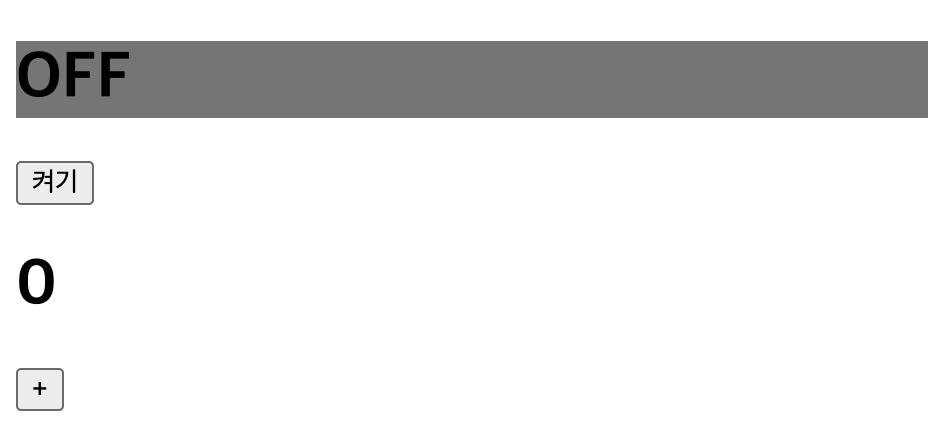
이때, 켜기 버튼을 클릭해 light 상태 값을 "ON"으로 변경하면, 주황색의 켜진 전구가 렌더링되는 것을 확인할 수 있습니다.
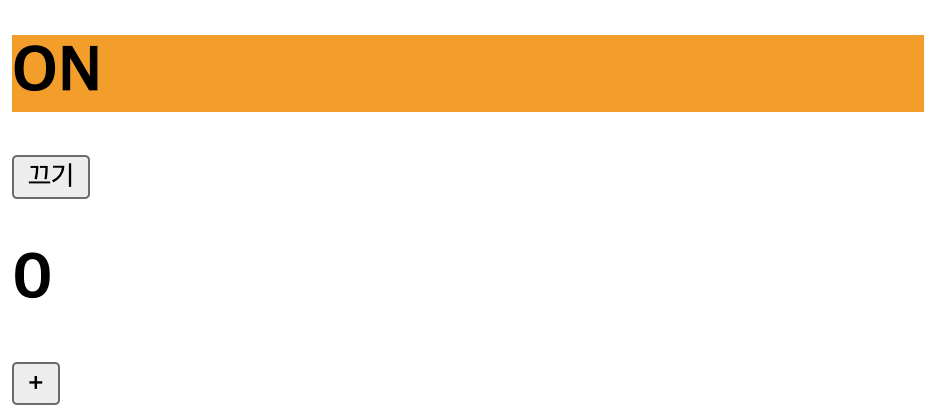
Bulb 컴포넌트와 같은 자식 컴포넌트는 부모로부터 전달받은 props 값이 변경되면 리렌더링이 발생합니다. 이는 자식 컴포넌트 자체의 state가 변경되지 않더라도, 부모로부터 받은 props 값이 바뀌면 리렌더링이 이루어진다는 것을 의미합니다.
이번에는 카운트 값을 증가시키기 위해 “+” 버튼을 클릭합니다. 이때, “+” 버튼을 클릭했음에도 Bulb 컴포넌트가 리렌더링됩니다. 하지만, light 상태 값이 아닌 count 상태 값을 변경했기 때문에, light와 count 상태는 서로 관련이 없어 보입니다.
리렌더링이 발생하는 세 가지 상황
- 자신이 관리하는 state의 값이 변경되었을 때
👉🏻 컴포넌트 내부에서 관리하는 상태(state)가 변경되면 해당 컴포넌트는 리렌더링됩니다. - 자신이 제공받는 props의 값이 변경되었을 때
👉🏻 부모 컴포넌트로부터 전달받은 props 값이 변경되면, 자식 컴포넌트는 리렌더링됩니다. - 부모 컴포넌트가 리렌더링되었을 때
👉🏻 부모 컴포넌트가 리렌더링되면, 자식 컴포넌트도 리렌더링됩니다. 이 경우 자식 컴포넌트가 전달받는 props 값이 동일하더라도, 리렌더링이 발생할 수 있습니다.
Bulb 컴포넌트는 count의 증가와 아무런 관련이 없습니다. 하지만 부모 컴포넌트가 리렌더링되면서, Bulb 컴포넌트도 불필요하게 리렌더링되고 있습니다. 이런 방식으로 부모 컴포넌트의 리렌더링 때문에 관련 없는 자식 컴포넌트가 반복적으로 리렌더링된다면, 성능 저하를 초래할 수 있습니다.
이러한 문제를 방지하기 위해, 관련 없는 상태를 하나의 컴포넌트에 몰아넣는 대신, 서로 다른 상태를 독립적인 컴포넌트로 분리하는 것이 좋습니다. 이렇게 하면 상태 변경이 해당 상태와 관련된 컴포넌트에만 영향을 미치므로 불필요한 리렌더링을 줄이고 성능을 개선할 수 있습니다.
Bulb 컴포넌트와 Counter 컴포넌트를 분리해줍니다.
import { useState } from "react";

const Bulb = () => {
  const [light, setLight] = useState("OFF");
  return (
    <div>
      {light === "ON" ? (
        <h1 style={{ backgroundColor: "orange" }}>ON</h1>
      ) : (
        <h1 style={{ backgroundColor: "gray" }}>OFF</h1>
      )}

      <button
        onClick={() => {
          setLight(light === "ON" ? "OFF" : "ON");
        }}
      >
        {light === "ON" ? "끄기" : "켜기"}
      </button>
    </div>
  );
};

const Counter = () => {
  const [count, setCount] = useState(0);

  return (
    <div>
      <h1>{count}</h1>
      <button
        onClick={() => {
          setCount(count + 1);
        }}
      >
        +
      </button>
    </div>
  );
};

function App() {
  return (
    <>
      <Bulb />
      <Counter />
    </>
  );
}

export default App;
한 걸음 더 나아가서 Bulb와 Counter 컴포넌트를 별도의 파일로 분리해 관리하면, 컴포넌트의 재사용성과 유지보수성이 더욱 향상됩니다.
[Bulb.jsx]
import { useState } from "react";

const Bulb = () => {
  const [light, setLight] = useState("OFF");
  return (
    <div>
      {light === "ON" ? (
        <h1 style={{ backgroundColor: "orange" }}>ON</h1>
      ) : (
        <h1 style={{ backgroundColor: "gray" }}>OFF</h1>
      )}

      <button
        onClick={() => {
          setLight(light === "ON" ? "OFF" : "ON");
        }}
      >
        {light === "ON" ? "끄기" : "켜기"}
      </button>
    </div>
  );
};

export default Bulb;
[Counter.jsx]
import { useState } from "react";

const Counter = () => {
  const [count, setCount] = useState(0);

  return (
    <div>
      <h1>{count}</h1>
      <button
        onClick={() => {
          setCount(count + 1);
        }}
      >
        +
      </button>
    </div>
  );
};

export default Counter;
[App.jsx]
import Bulb from "./components/Bulb";
import Counter from "./components/Counter";

function App() {
  return (
    <>
      <Bulb />
      <Counter />
    </>
  );
}

export default App;