Insert the missing statement to get all the columns from the Customers table.
SELECT * FROM Customers;
Write a statement that will select the City column from the Customers table.
SELECT City FROM Customers;
Select all the different values from the Country column in the Customers table.
SELECT DISTINCT Country FROM Customers;
**DISTINCT는 SELECT와 함께 사용하고 UNIQUE는 CREATE TABLE할 때 사용
Select all records where the City column has the value "Berlin".
SELECT * FROM Customers WHERE City = 'Berlin';
Use the NOT keyword to select all records where City is NOT "Berlin".
SELECT * FROM Customers WHERE NOT City = 'Berlin';
Select all records where the CustomerID column has the value 32.
SELECT * FROM Customers WHERE CustomerID = 32;
Select all records where the City column has the value 'Berlin' and the PostalCode column has the value 12209.
SELECT * FROM Customers WHERE City = 'Berlin' AND PostalCode = 12209;
Select all records where the City column has the value 'Berlin' or 'London'.
SELECT * FROM Customers WHERE City = 'Berlin' OR City = 'London';
Select all records from the Customers table, sort the result alphabetically by the column City.
SELECT * FROM Customers ORDER BY City;
Select all records from the Customers table, sort the result reversed alphabetically by the column City.
SELECT * FROM Customers ORDER BY City DESC;
Select all records from the Customers table, sort the result alphabetically, first by the column Country, then, by the column City.
SELECT * FROM Customers ORDER BY Country, City;
Insert a new record in the Customers table.
INSERT INTO Customers (CustomerName, Address) VALUES ('Hekkan Burger', 'Gateveien 15');
Select all records from the Customers where the PostalCode column is empty.
SELECT * FROM Customers WHERE PostalCode IS NULL;
Select all records from the Customers where the PostalCode column is NOT empty.
SELECT * FROM Customers WHERE PostalCode IS NOT NULL;
Update the City column of all records in the Customers table.
UPDATE Customers SET City = 'Oslo';
Set the value of the City columns to 'Oslo', but only the ones where the Country column has the value "Norway".
UPDATE Customers SET City = 'Oslo' WHERE Country = 'Norway';
Update the City value and the Country value.
UPDATe Customers Set City = 'Oslo', Country = 'Norway' WHERE CustomerID = 32;
Delete all the records from the Customers table where the Country value is 'Norway'.
DELETE FROM Customers WHERE Country = 'Norway';
Delete all the records from the Customers table.
DELETE FROM Customers;
Use the MIN function to select the record with the smallest value of the Price column.
SELECT MIN(Price) FROM Products;
Use an SQL function to select the record with the highest value of the Price column.
SELECT MAX(Price) From Products;
Use the correct function to return the number of records that have the Price value set to 18.
SELECT COUNT(*) FROM Products WHERE Price = 18;
Use an SQL function to calculate the average price of all products.
SELECT AVG(Price) FROM Products;
Use an SQL function to calculate the sum of all the Price column values in the Products table.
SELECT SUM(Price) FROM Products;
Select all records where the value of the City column starts with the letter "a".
SELECT * FROM Cutomers WHERE City LIKE 'a%';
Select all records where the value of the City column ends with the letter "a".
SELECT * FROM Customers WHERE City LIKE '%a';
Select all records where the value of the City column contains the letter "a".
SELECT * FROM Customers WHERE City LIKE '%a%';
Select all records where the value of the City column starts with letter "a" and ends with the letter "b".
SELECT * FROM Customers WHERE City LIKE 'a%b';
Select all records where the value of the City column does NOT start with the letter "a".
SELECT * FROM Customers WHERE City NOT LIKE 'a%';
Select all records where the second letter of the City is an "a".
SELECT * FROM Custmoers WHERE City Like '_a%';
Select all records where the first letter of the City is an "a" or a "c" or an "s".
SELECT * FROM Customers WHERE City LIKE '[acs]%';
Select all records where the first letter of the City starts with anything from an "a" to an "f".
SELECT * FROM Customers WHERE City LIKE '[a-f]%';
Select all records where the first letter of the City is NOT an "a" or a "c" or an "f".
SELECT * FROM Customers WHERE City LIKE '[^acf]%';
Use the IN operator to select all the records where Country is either "Norway" or "France".
SELECT * FROM Customers WHERE Country IN ('Norway', 'France');
Use the IN operator to select all the records where Country is NOT "Norway" and NOT "France".
SELECT * FROM Custmoers WHERE Country NOT IN ('Norway', 'France');
Use the BETWEEN operator to select all the records where the value of the Price column is between 10 and 20.
SELECT * FROM Products WHERE Price BETWEEN 10 AND 20;
Use the BETWEEN operator to select all the records where the value of the Price column is NOT between 10 and 20.
SELECT * FROM Products WHERE Price NOT BETWEEN 10 AND 20;
Use the BETWEEN operator to select all the records where the value of the ProductName column is alphabetically between 'Geitost' and 'Pavlova'.
SELECT * FROM Products WHERE ProductName BETWEEN 'Geitost' AND 'Pavlova';
When displaying the Customers table, make an ALIAS of the PostalCode column, the column should be called Pno instead.
SELECT CustomerName, Address, PostalCode as Pno FROM Customers;
When displaying the Customers table, refer to the table as Consumers instead of Customers.
SELECT * FROM Customers as Consumers;
Insert the missing parts in the JOIN clause to join the two tables Orders and Customers, using the CustomerID field in both tables as the relationship between the two tables.
SELECT * FROM Orders LEFT JOIN Custmoers ON Orders.CustomerID = Customers.CustomerID;
Choose the correct JOIN clause to select all records from the two tables where there is a match in both tables.
SELECT * FROM Orders INNER JOIN Customers On Orders.CustomerID = Customers.CustomerID;
Choose the correct JOIN clause to select all the records from the Customers table plus all the matches in the Orders table.
SELECT * FROM Orders RIGHT JOIN Customers On Orders.CustmoerID = Customers.CustomerID;
List the number of customers in each country.
SELECT COUNT(CustmoerID), Country FROM Customers GROUP BY COUNTRY;
List the number of customers in each country, ordered by the country with the most customers first.
SELECT COUNT(CustomerID), Country FROM GROUP BY Country ORDER BY COUNT(CustomerID) DESC;
Write the correct SQL statement to create a new database called testDB.
CREATE DATABASE testDB;
Write the correct SQL statement to delete a database named testDB.
DROP DATABASE testDB;
Write the correct SQL statement to create a new table called Persons.
CREATE TABLE Persons(PersonID int, LastName varchar(255);
Write the correct SQL statement to delete a table called Persons.
DROP TABLE Persons;
Use the TRUNCATE statement to delete all data inside a table.
TRUNCATE TABLE Persons;
Add a column of type DATE called Birthday.
ALTER TABLE Persons ADD Birthday DATE;
Delete the column Birthday from the Persons table.
ALTER TABLe Persons DROP COLUMN Birthday;
DELETE : 데이터를 '한 줄 한 줄' 제거하는 명령어. 데이터가 담겨있던 Storage가 release되지 않아 commit 전에는 ROLLBACK을 통해 되돌릴 수 있다.
TRUNCATE : 데이터를 CREATE 상태로 되돌린다. 데이터를 '한번에' 지워버린다. 자동 commit이 되어 되돌릴 수 없다.
**DROP : 테이블 자체를 날려버린다. 자동 commit
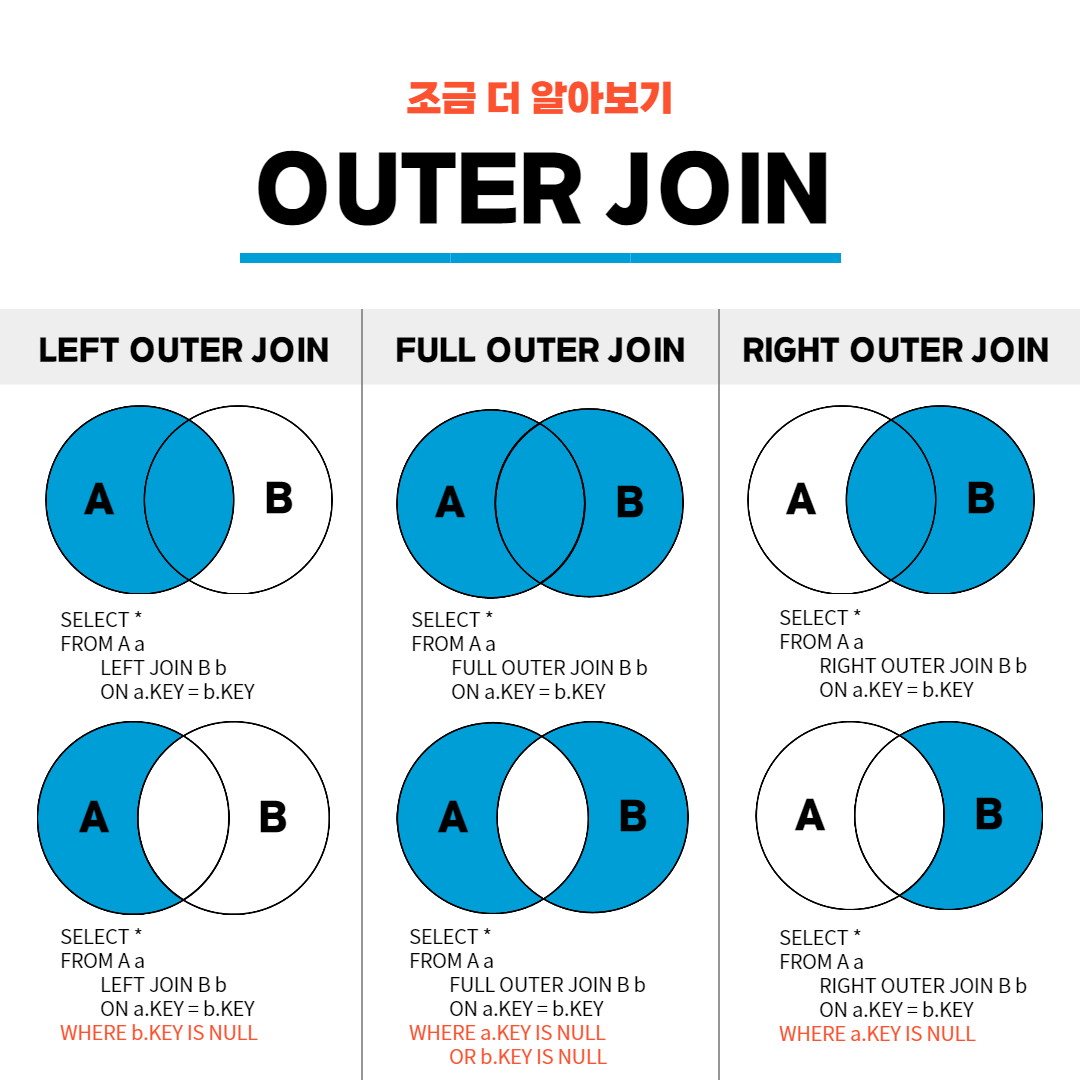
innter join은 교집합
