스타크래프트 페이지를 위한 이미지 화면 출력
<!DOCTYPE html>
<html lang="ko">
<head>
    <meta charset="UTF-8">
    <title>스타크래프트</title>
    <style>
        .background {
            position: relative;
            background-image: url('background.png');
            background-size: 500px 330px;
            width: 500px;
            height: 330px;
        }
        #drone {
            position: absolute;
            width: 100px;
            height: 100px;
            top: 100px;
            left: 60px;
        }
        #bunker {
            position: absolute;
            width: 150px;
            height: 150px;
            top: 80px;
            right: 20px;
        }
        #spit {
            display: none;
            position: absolute;
            top: 140px;
            left: 150px;
            width: 50px;
            height: 30px;
            z-index: 2;
        }
    </style>
</head>
<body>
    <div class='background'>
        <img id='drone' src="drone.png" alt="drone">
        <img id='spit' src="spit.png" alt="spit">
        <img id='bunker' src="bunker.png" alt="bunker">
    </div>
    <script
  src="https://code.jquery.com/jquery-3.5.1.js"
  integrity="sha256-QWo7LDvxbWT2tbbQ97B53yJnYU3WhH/C8ycbRAkjPDc="
  crossorigin="anonymous"></script>
    <script>
        //$() .click() 익명함수
        $('#drone').click(function(){
            console.log('침 발사');
        });
    </script>
</body>
</html>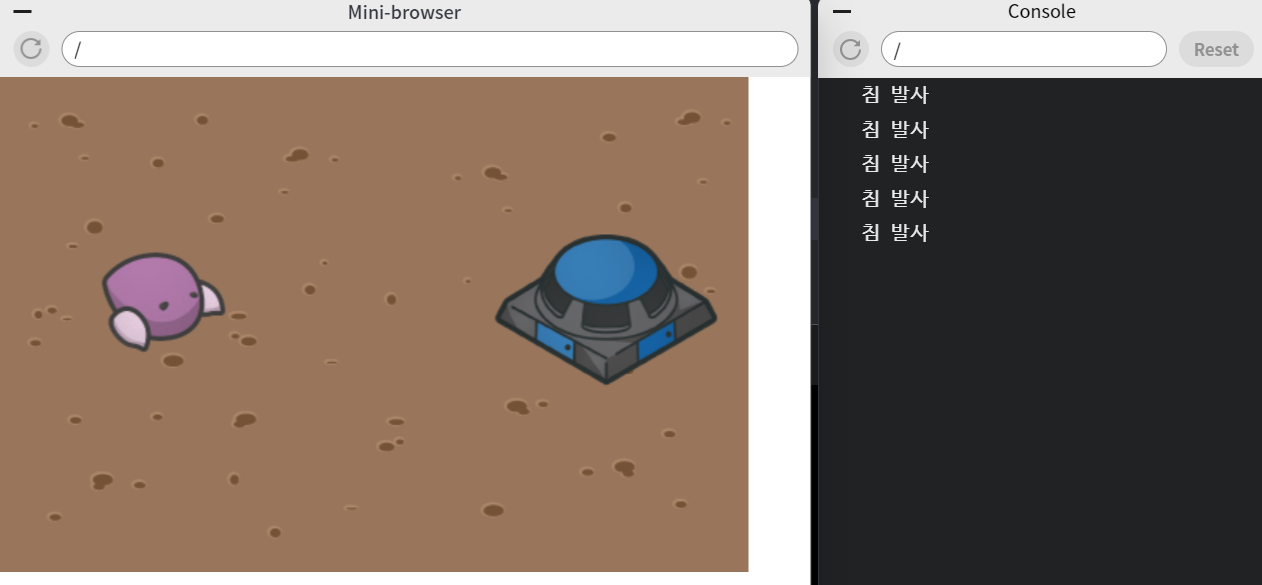
드론 클릭 시 침이 나타나도록
<!DOCTYPE html>
<html lang="ko">
<head>
    <meta charset="UTF-8">
    <title>스타크래프트</title>
    <style>
        .background {
            position: relative;
            background-image: url('background.png');
            background-size: 500px 330px;
            width: 500px;
            height: 330px;
        }
        #drone {
            position: absolute;
            width: 100px;
            height: 100px;
            top: 100px;
            left: 60px;
        }
        #bunker {
            position: absolute;
            width: 150px;
            height: 150px;
            top: 80px;
            right: 20px;
        }
        #spit {
            display: none;
            position: absolute;
            top: 140px;
            left: 150px;
            width: 50px;
            height: 30px;
            z-index: 2;
        }
    </style>
</head>
<body>
    <div class='background'>
        <img id='drone' src="drone.png" alt="drone">
        <img id='spit' src="spit.png" alt="spit">
        <img id='bunker' src="bunker.png" alt="bunker">
    </div>
    <script
  src="https://code.jquery.com/jquery-3.5.1.js"
  integrity="sha256-QWo7LDvxbWT2tbbQ97B53yJnYU3WhH/C8ycbRAkjPDc="
  crossorigin="anonymous"></script>
    <script>
        $('#drone').click(function(){
            // $() .
            $('#spit').fadeIn();
        });
    </script>
</body>
</html>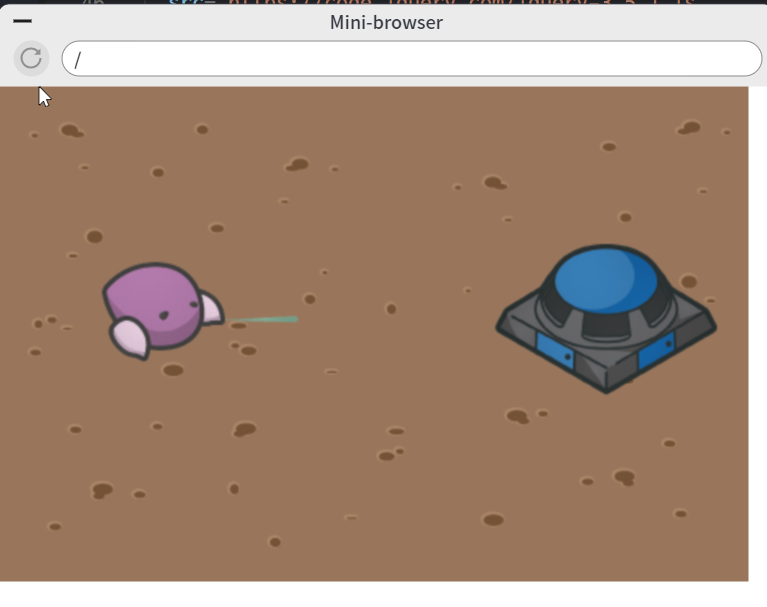
드론 클릭 시 침이 나타나서 벙커 공격
	<script>
        $('#drone').click(function(){
            $('#spit').fadeIn();
            // $() .animate {left: +=250}
            $('#spit').animate({left: '+=250'});
        });
	</script>
드론 클릭 시 침이 나타나서 벙커 공격한 후 침이 원위치로 돌아옴
	<script>
        $('#drone').click(function(){
            $('#spit').fadeIn();
            $('#spit').animate({left: '+=250'});
            // .fadeOut() .css()
            $('#spit').fadeOut();
            $('#spit').css({left: '150px'});
        });
    </script>
침을 맞으면 벙커의 hp가 줄어들도록
    <script>
        var hp = 3;
        $('#drone').click(function(){
            $('#spit').fadeIn();
            $('#spit').animate({left: '+=250'});
            $('#spit').fadeOut(function(){
                hp = hp - 1;
                $('#hp').text('HP: ' + hp);
            });
            // 익명함수 $() .text()
            $('#spit').css({left: '150px'});
        });
    </script>
hp가 0이 되면 벙커가 사라지도록
    <script>
        var hp = 3;
        $('#drone').click(function(){
            $('#spit').fadeIn();
            $('#spit').animate({left: '+=250'});
            $('#spit').fadeOut(function(){
                hp = hp - 1;
                $('#hp').text('HP: ' + hp);
                // if() {}, .fadeOut()
                if(hp == 0){
                    $('#bunker').fadeOut();
                }
            });
            $('#spit').css({left: '150px'});
        });
    </script>
최종 코드
<!DOCTYPE html>
<html lang="ko">
<head>
    <meta charset="UTF-8">
    <title>스타크래프트</title>
    <style>
        .background {
            position: relative;
            background-image: url('background.png');
            background-size: 500px 330px;
            width: 500px;
            height: 330px;
        }
        #drone {
            position: absolute;
            width: 100px;
            height: 100px;
            top: 100px;
            left: 60px;
        }
        #bunker {
            position: absolute;
            width: 150px;
            height: 150px;
            top: 80px;
            right: 20px;
        }
        #spit {
            display: none;
            position: absolute;
            top: 140px;
            left: 150px;
            width: 50px;
            height: 30px;
            z-index: 2;
        }
    </style>
</head>
<body>
    <h1 id='hp'>HP: 3</h1>
    <div class='background'>
        <img id='drone' src="drone.png" alt="drone">
        <img id='spit' src="spit.png" alt="spit">
        <img id='bunker' src="bunker.png" alt="bunker">
    </div>
    <script
  src="https://code.jquery.com/jquery-3.5.1.js"
  integrity="sha256-QWo7LDvxbWT2tbbQ97B53yJnYU3WhH/C8ycbRAkjPDc="
  crossorigin="anonymous"></script>
    <script>
        var hp = 3;
        $('#drone').click(function(){
            $('#spit').fadeIn();
            $('#spit').animate({left: '+=250'});
            $('#spit').fadeOut(function(){
                hp = hp - 1;
                $('#hp').text('HP: ' + hp);
                if(hp == 0){
                    $('#bunker').fadeOut();
                }
            });
            $('#spit').css({left: '150px'});
        });
    </script>
</body>
</html>
파인애플 좋아하세요?