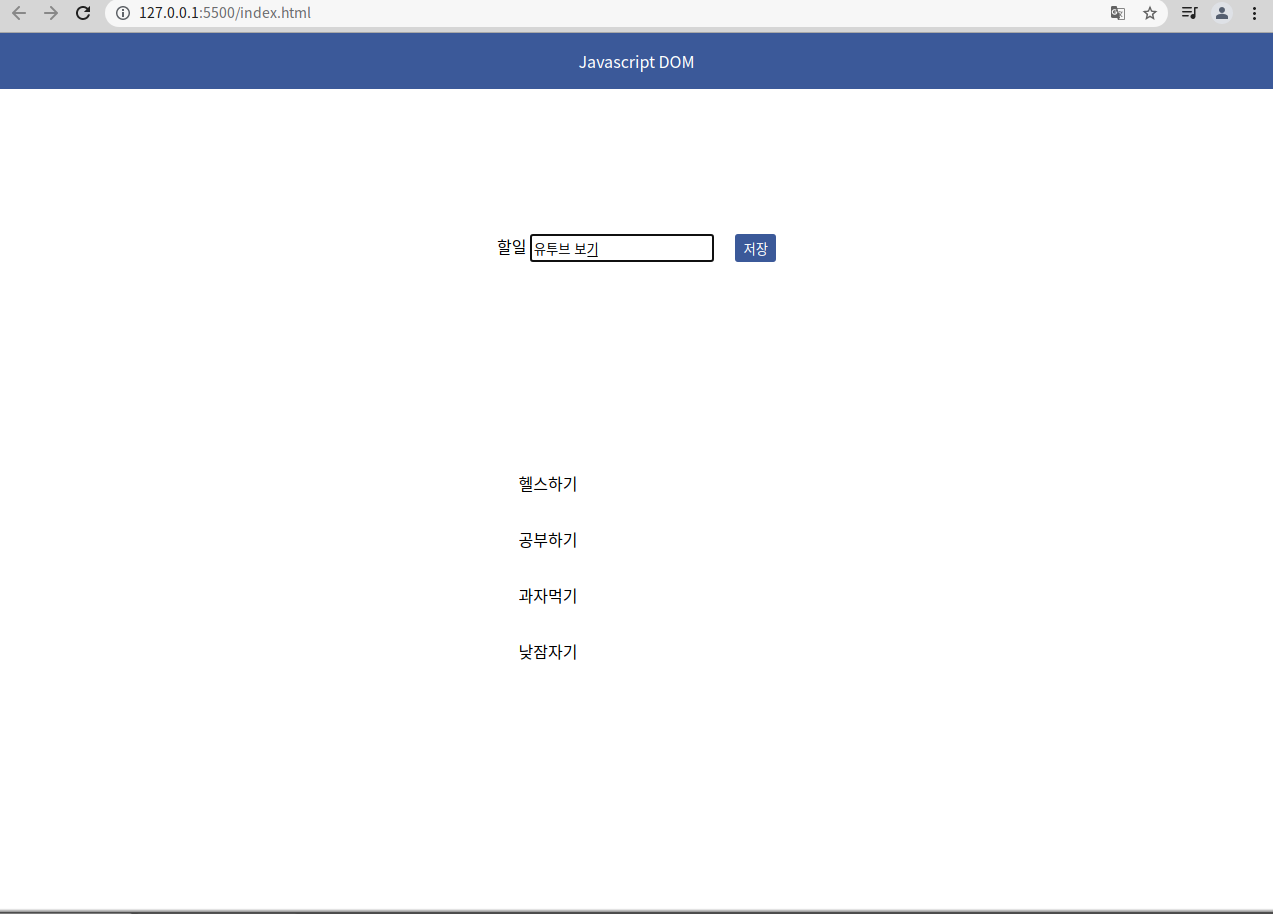
할 일을 정리해보자
Link
To-Do List
누르면 이동합니다!
HTML
<!DOCTYPE html>
<html lang="en">
<head>
    <meta charset="UTF-8">
    <meta name="viewport" content="width=device-width, initial-scale=1.0">
    <meta http-equiv="X-UA-Compatible" content="ie=edge">
    <title>오늘의 할 일</title>
    <link rel = "stylesheet" href = "css/style.css"
</head>
<body>
    <div class="header">
        <hi>Javascript DOM</hi>
    </div>
    <div class="content">
        <form id = "todo-form">
            <div>
                <lable for = "todo-input">할일</lable>
                <input type = "text" id="todo-input">
            </div>
            <button class = "submit">저장</button>
        </form>
        <p id = "msg">내용을 입력하세요</p>
        <ul id = "todo-list">
            <li class = "item"></li>
            <li class = "item"></li>
            <li class = "item"></li>
            <li class = "item"></li>
        </ul>
    </div>
    <script src="js/main.js"></script>
</body>
</html>
정리(form 태그)
CSS
* {
    margin: 0 ;
    padding: 0
}

.header {
    background: #3b5999;
    color: #fff;
    padding: 1rem;
    text-align: center;
}

.content {
    display: flex;
    flex-direction: column;
    align-items: center;
}

#todo-form {
    width: 300px;
    height: 30px;
    margin-top: 8rem;
    display: flex;
    align-items: center;
    justify-content: space-around;
    padding: 1rem;
}

label {
    font-weight: bold;
    margin-right: 0.5rem;
}

input {
    padding: 0.1rem;
    height: 20px;
}

button {
    border: none;
    background: #3b5999;
    color: #fff;
    padding: 0.3rem 0.5rem;
    border-radius: 0.2rem;
}

#todo-list {
    margin-top: 3rem;
    list-style: none;
    width: 300px;
    padding-left: 2rem;
}

.item{
    padding: 1rem;
}

#msg {
    font-size: 12px;
    color: red;
    display: none;
}
Javascript
const todos = document.querySelector('#todo-list');
const button = document.querySelector(".submit");
const todoInput = document.querySelector('#todo-input');
const msg = document.querySelector('#msg')

button.addEventListener('click', onsubmit)

function onsubmit(e) {
    e.preventDefault();

    if(todoInput.value === '') {
        msg.style.display = 'block';
        setTimeout(()=> msg.style.display = 'none', 2000)
        return;
    }

    const li = document.createElement('li');
    li.appendChild(document.createTextNode(todoInput.value));
    li.classList.add('item');
    todos.appendChild(li);
    todoInput.value = '';
}
정리(DOM)
element 가져오기
- single element
const form = document.getElementById("todo-form");Document.getElementById() 메서드는 주어진 문자열과 일치하는 id 속성을 가진 요소를 찾고, 이를 나타내는 Element 객체를 반환.
ID는 문서 내에서 유일해야 하기 때문에 특정 요소를 빠르게 찾을 때 유용.
id에 맞는 요소가 없을 때 getElementById()는 null을 반환.
const form = document.querySelector("#todo-form"); Document.querySelector()는 제공한 선택자 또는 선택자 뭉치와 일치하는 문서 내 첫 번째 Element를 반환. 일치하는 요소가 없으면 null을 반환.
- multiple element
const items = document.querySelectorAll('.item');
items.forEach((item) => {
     console.log(item);
 })
// forEach는 array 객체 요소들이 순서대로 호출.(for 보다 깔끔, 직관)

console.log(document.getElementsByClassName('item'))
console.log(document.getElementsByTagName('li'))
꿈꾸는중