1. 오늘의 목표
- 단순 조회를 넘어, 데이터를 직접 수정하는 기능 추가하기
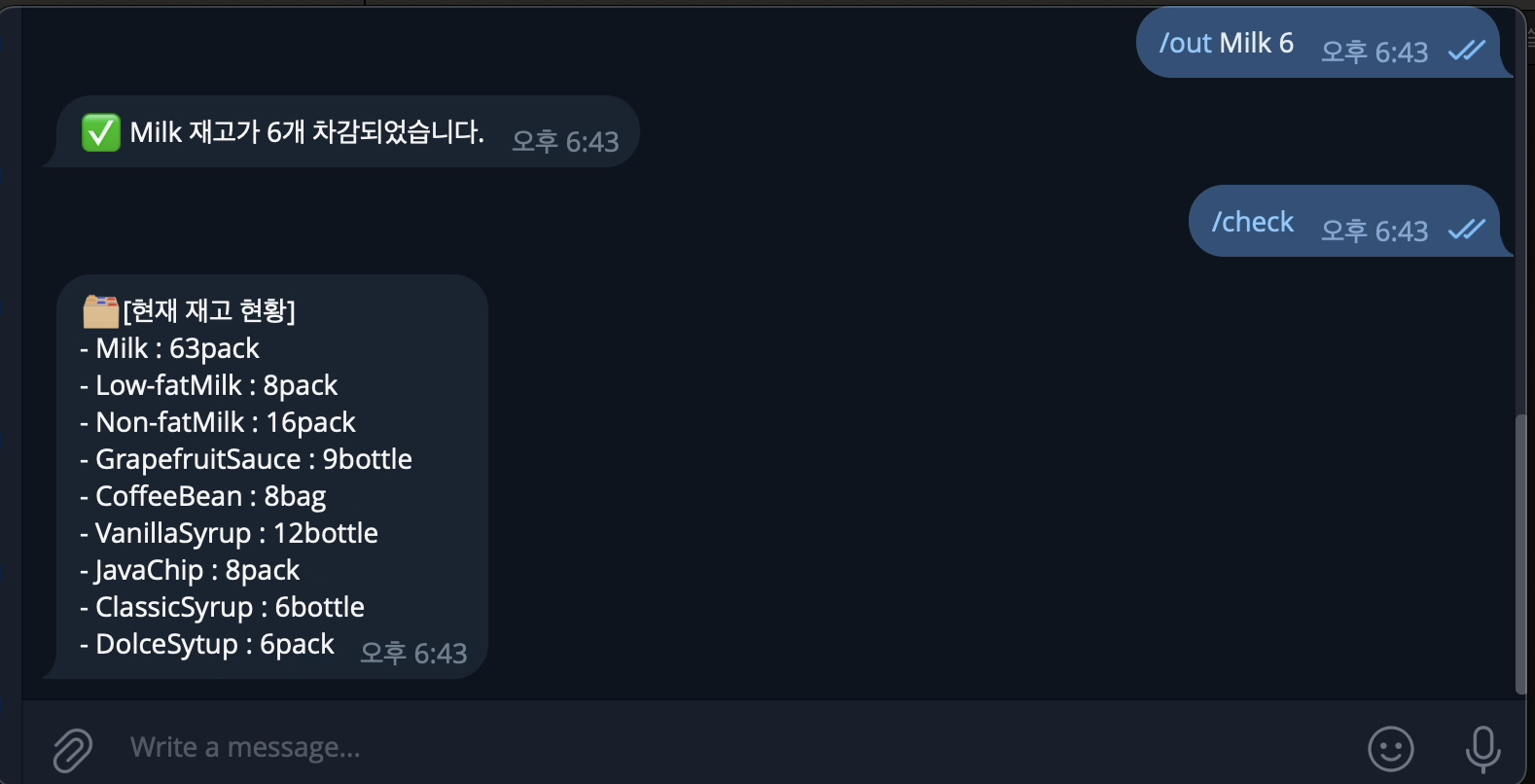
/in [아이템] [수량],/out [아이템] [수량]명령어로 재고 증감 구현
2. 주요 학습 내용
- context.args 활용: 사용자가 명령어 뒤에 입력한 추가 정보(아이템명, 수량)를 리스트 형태로 받아오는 법을 학습.
- 데이터 타입 변환 (int): 텔레그램에서 들어온 '글자' 형태의 숫자를 계산이 가능한 '정수' 형태로 바꾸는 과정의 중요성 체감.
- 데이터 전처리 (capitalize, strip): 사용자가 소문자로 입력해도 장부의 대문자 데이터와 매칭될 수 있도록 글자를 다듬는 법 학습.
- 들여쓰기의 논리: 파이썬에서 들여쓰기 한 칸이 코드의 실행 순서와 조건에 얼마나 큰 영향을 미치는지 직접 디버깅하며 확인.
3. 오늘 만난 에러와 해결법 (Troubleshooting)
| 에러 메시지 / 상황 | 원인 | 해결 방법 |
|---|---|---|
AttributeError: module 'pandas' has no attribute 'read' | read_csv를 read.csv로 잘못 기입 | 점(.)을 언더바(_)로 수정 |
ufunc 'add' did not contain a loop... | 숫자와 글자를 더하려고 함 | int(context.args[1])로 숫자 변환 처리 |
| 실행은 되는데 숫자가 안 바뀜 | to_csv 저장 로직이 특정 조건문 안에 갇혀 있음 | 저장 코드를 if-else 문 밖으로 빼서 공통 실행되게 수정 |
4. 결과
/in Milk 5입력 시 재고가 즉시 반영됨 (파일 데이터 수정 완료!)
[English Version]
1. Today's Goals
- Move beyond data retrieval and implement data modification.
- Create
/inand/outcommands to manage inventory levels in real-time.
2. Key Concepts Learned
- Handling
context.args: Learned how to extract extra information (arguments) provided by users after a command. - Type Casting (
int): Understood that user input is always a string, and converting it to an integer is essential for calculations. - Data Sanitization: Used
.strip()and.capitalize()to ensure user input matches the format in the CSV file regardless of case or spacing. - Logic Flow & Indentation: Realized how crucial indentation is in Python for determining when a specific block of code (like saving a file) executes.
3. Troubleshooting
| Error / Situation | Cause | Solution |
|---|---|---|
AttributeError: ... no attribute 'read' | Used read.csv instead of read_csv | Corrected the syntax to read_csv |
ufunc 'add' ... dtype('int64'), dtype('<U1') | Attempted to add a string to an integer | Applied int() to the user input |
| No errors, but no data change | The save function (to_csv) was misplaced | Moved the save logic outside the conditional blocks |
[Japanese Version]
1. 今日の目標
- 単なるデータ照会を超え、データを直接修正する機能を実装する。
/inおよび/outコマンドで在庫の増減をリアルタイムで反映させる。
2. 主な学習内容
- context.args の活用: コマンドの後に入力された引数(アイテム名、数量)をリスト形式で取得する方法を習得。
- データ型の変換 (int): テレグラムから届く「文字列」としての数字を、計算可能な「整数」に変換する重要性を実感。
- データの前処理: ユーザーが小文字で入力しても、CSVのデータと一致するように
.capitalize()や.strip()でデータを整える方法を学習。 - インデントの論理: Pythonにおけるインデントが、コードの実行順序や条件にどれほど大きな影響を与えるかをデバッグを通じて確認。
3. トラブルシューティング
| エラーメッセージ / 状況 | 原因 | 解決方法 |
|---|---|---|
AttributeError: ... no attribute 'read' | read_csv を read.csv と誤記 | read_csv に修正 |
ufunc 'add' ... (dtype('int64'), dtype('<U1')) | 数値と文字列を加算しようとした | int() を使用して数値に変換 |
| エラーはないが数値が変わらない | 保存処理 (to_csv) の位置ミス | 保存コードを if-else 文の外に出して共通実行に変更 |

비전공자가 AI 엔지니어가 되는 과정