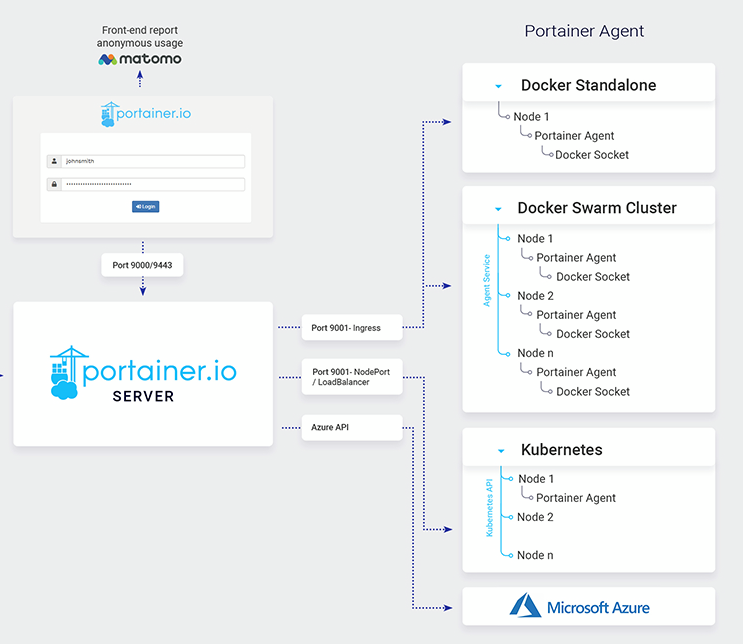
✅ Portainer Management Server를 사용하여 관리 이점
- 다수의 노드, Swarm 클러스터 등 하나의 UI 에서 중앙 관리가 가능
- Management server 는 자체 서버에서 실행 되므로 노드들의 리소스를 컨테이너 실행에 집중 가능
- agent 노드들에는 Portainer agent 만 실행하면 되므로, Management server에서 자동 연동 가능
Best practice
https://docs.portainer.io/start/architecture
Portainer server 설치
https://docs.portainer.io/start/install/server/docker/linux
portainer data 생성
[root@PORTAINER-SERVER ~]# docker volume create portainer_data
[root@PORTAINER-SERVER ~]# ll /var/lib/docker/volumes/
backingFsBlockDev  metadata.db        portainer_data/
portainer server 설치
[root@PORTAINER-SERVER ~]# docker run -d -p 8000:8000 -p 9000:9000 -p 9443:9443 --name portainer --restart=always -v /var/run/docker.sock:/var/run/docker.sock -v portainer_data:/data portainer/portainer-ce:latest

Unable to find image 'portainer/portainer-ce:2.21.5' locally
2.21.5: Pulling from portainer/portainer-ce
dc8df0f2921e: Pull complete
c82aa9c9fb45: Pull complete
d40df14c1d7a: Pull complete
a3939f2dc487: Pull complete
204b2fbb824e: Pull complete
a53c840f28bf: Pull complete
ee150ff12c5f: Pull complete
30018066dd52: Pull complete
d2eff0616a4a: Pull complete
7412de78d4f4: Pull complete
4f4fb700ef54: Pull complete
Digest: sha256:4f19aeddcb00e71412e312c39c184883033c48bfda66b88353c3cd5c36d65242
Status: Downloaded newer image for portainer/portainer-ce:2.21.5
18134fb8c52e48e0e6803d788ac4ffd58e252fe3f7230b40c274bfac6552cc17
Host IP:9000 접속
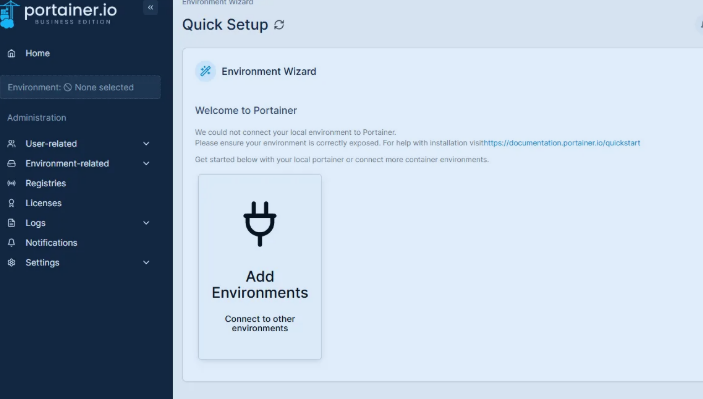
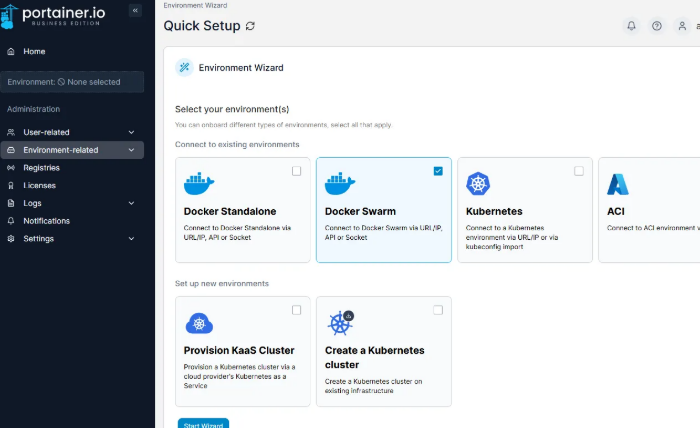
admin 계정 생성 후 환경 설정
Portainer agent 설치 (docker swarm cluster)
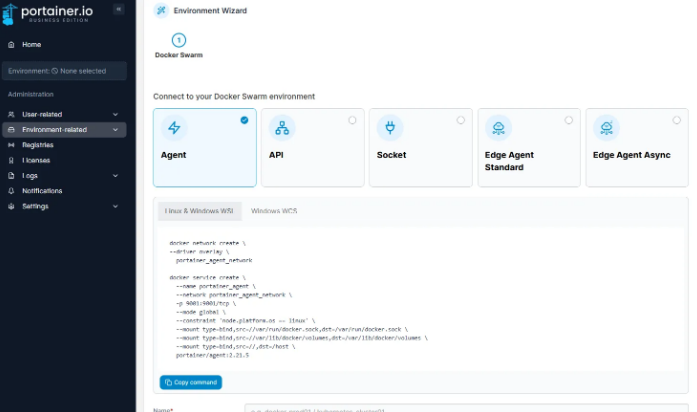
https://docs.portainer.io/admin/environments/add/swarm/agent
위 캡처본에서 제공 되는 커맨드를 Swarm 노드에서 실행 시켜준다.
Only do this once for your environment, regardless of how many nodes are in the cluster. You do not need to add each node as an individual environment in Portainer. Adding just one node (we recommend the manager node) will allow Portainer to manage the entire cluster.

클러스터에 있는 노드 수에 관계없이 환경에 대해 이 작업을 한 번만 수행하세요. 포테이너에서 각 노드를 개별 환경으로 추가할 필요는 없습니다. 하나의 노드(관리자 노드 권장)만 추가하면 포테이너가 전체 클러스터를 관리할 수 있습니다.[root@Docker-Manager01 ~]# docker network create \
--driver overlay \
portainer_agent_network
docker service create \
--name portainer_agent \
--network portainer_agent_network \
-p 9001:9001/tcp \
--mode global \
--constraint 'node.platform.os == linux' \
--mount type=bind,src=//var/run/docker.sock,dst=/var/run/docker.sock \
--mount type=bind,src=//var/lib/docker/volumes,dst=/var/lib/docker/volumes \
--mount type=bind,src=//,dst=/host \
portainer/agent:2.21.5
[root@Docker-Manager01 ~]# docker service ls
ID NAME MODE REPLICAS IMAGE PORTS
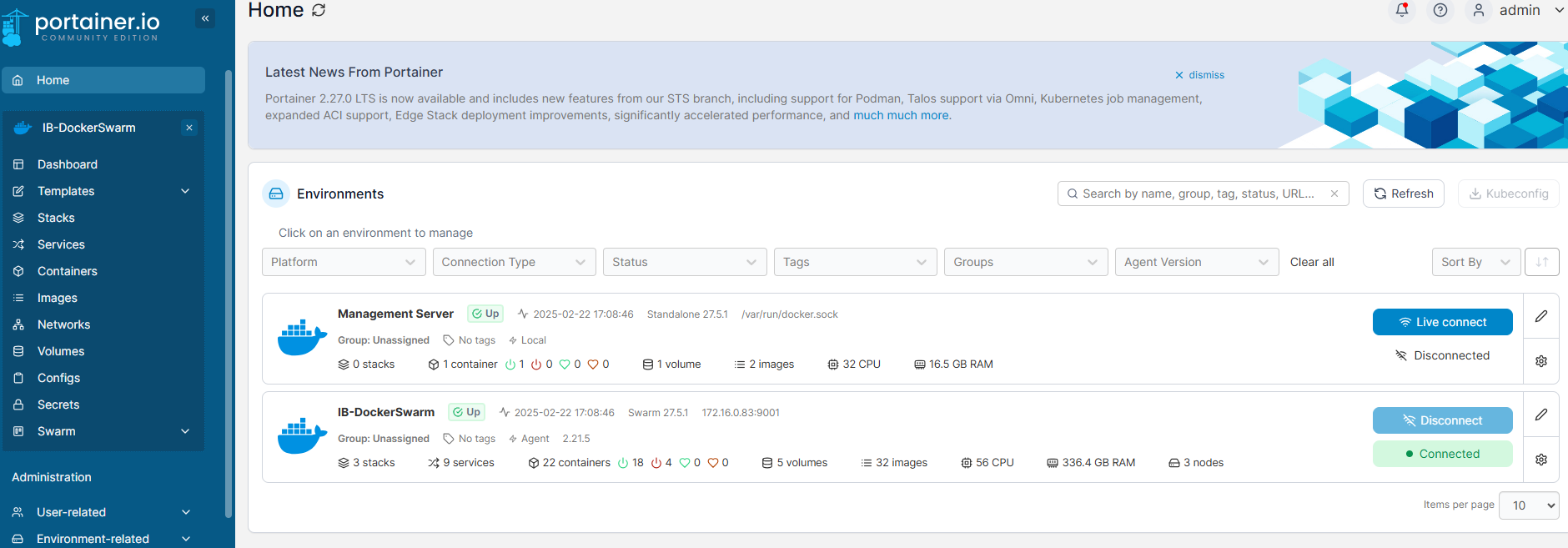
qqjucamg0fyl portainer_agent global 3/3 portainer/agent:2.21.5 *:9001->9001/tcp추가 된 Docker Swarm 클러스터 확인 가능

sysop