1. 액티비티 수명주기
안드로이드 시스템에서 액티비티는 다음과 같은 수명주기를 갖는다.
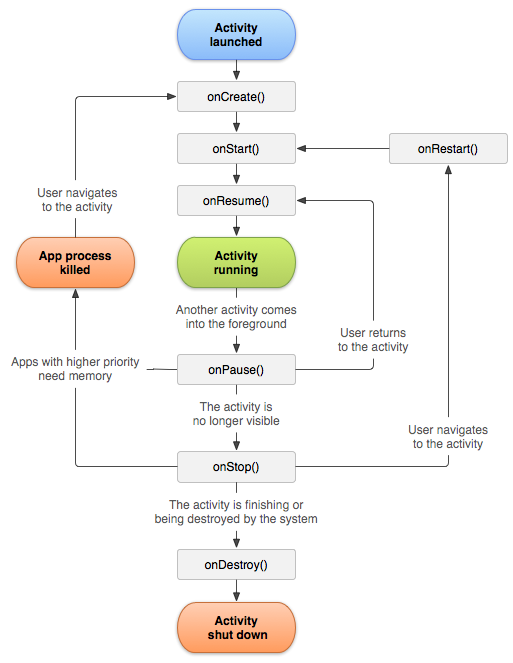
단순화 하면 총 6가지의 콜백 함수
onCreate->onStart->onResume->onPause->onStop->onDestroy 이다.
여기서 눈여겨 봐야할 콜백함수는 onResume과 onPause 이다.
onResume과 onPause는 각각 화면이 보였다가 안보일때 실행된다. 따라서 위 두 함수를 이용하면 화면이 없어진 상태에서 시스템에 의해 자동적으로 화면이 없어질때 데이터를 임시적으로 저장해둘 수 있다.
이때 사용되는 메소드가 getSharedPreferences() 메소드 이다.
화면이 보이지 않을때 호출되는 onPause 메소드에서 getSharedPreferences()메소드를 통해 데이터를 임시로 저장해두고
SharedPreferences preference = getSharedPreferences("pref", Activity.MODE_PRIVATE);
SharedPreferences.Editor editor = preference.edit();
editor.putString(```);
editor.commit(); // commit을 해주어야 데이터가 저장된다.
이 데이터를 onResume 메소드에서 getSharedPreferences() 메소드를 통해 다시 받을 수 있따. getSharedPreferences() 메소드를 통해 저장된 데이터는 어플리케이션이 삭제될 때까지 없어지지 않는다.
SharedPreferences preference = getSharedPreferences("pref", Activity.MODE_PRIVATE);
if ((preference != null) && (preference.contains("name")) ){
    String name = preference.getString('''); ///name에 데이터가 저장된다.
}
2. 서비스
서비스란, 액티비티와 달리 화면없이 백그라운드에서 돌아가는 안드로이드 구성요소라고 생각하면 된다. 즉, 화면없이 보이지 않는 영역에서 돌아가게 된다. 예를들어 메신저 어플리케이션같은 경우에는 메시지를 항상 수신받을 수 있는 상태여야 한다. 따라서 액티비티가 아닌 서비스를 이용해야 화면이 없는 상태에서도 메시지를 수신할 수 있다.1) 서비스 시작
우선 서비스를 시작하기 위해서는 **AndroidManifest**에 <service> 태그를 통해 서비스를 추가해주어야 한다.<service
android:name=".MyService"
android:enabled="true"
android:exported="true"></service>
그 다음 서비스를 startService() 메소드를 통해 서비스를 실행시킨다. 이때 서비스에 인텐트를 담아서 실행시킬 수 있다.
Intent intent = new Intent(''');
startService(intent);
서비스의 생명주기는 onCreate()로 만들어지고 별다른 과정없이 onDestroy()로 종료된다. 처음 startService()로 서비스를 실행시키면 서비스는 계속 실행되다가 stopService() 메소드가 호출될때까지 실행된다. 중간에 시스템에서 메모리가 부족하여 서비스를 스스로 종료시킬수도 있다.
2) 서비스 실행
서비스는 onCreate()로 만들어진후, 시스템이 서비스 클래스에 있는 onStartCommand() 콜백 메소드를 실행시킨다. public int onStartCommand(Intent intent, int flags, int startId) {
/// 받은 intent도 이용할 수 있음.
}3) 서비스에서 액티비티로 데이터 전달
마찬가지로 인텐트를 선언해서 전달하고자 하는 데이터를 부가데이터로 넣어준후에 startActivity()에 인텐트를 넣어서 보내주면 된다.이때 화면이 없는 서비스에서 화면이 있는 액티비티를 불러야 하는 것이므로 새로운 Task를 추가해주어야 한다. Task는 액티비티가 저장되어 있는 stack이라고 생각하면 된다. 따라서 인텐트에 FLAG_ACTIVITY_NEW_TASK 플래그를 추가해주어야 한다.
Intent intent = new Intent(''');
intent.addFlags(Intent.FLAG_ACTIVITY_NEW_TASK|Intent.FLAG_ACTIVITY_SINGLE_TOP|Intent.FLAG_ACTIVITY_SINGLE_TOP);
showIntent.putExtra(''');

startActivity(showIntent);