Failed to execute 'removeChild' on 'Node': The node to be removed is not a child of this node
react

리액트 기반으로 공부를 하며 진행하다가 위와 같은 오류에 직면했다.
리액트로 구글 지도에 사용자 커스텀 컨트롤러를 넣으면서 발생한 문제였다.
구글 지도 출력 컴포넌트
	...
    return isLoaded ? (
        <Box sx={{ height: '100%' }}>
            <GoogleMap
                options={{
                    mapTypeControl: false,
                    fullscreenControlOptions: {
                        position: google.maps.ControlPosition.TOP_RIGHT,
                    },
                }}
                mapContainerStyle={containerStyle}
                center={center}
                zoom={8}
                onLoad={onLoad}
                onUnmount={onUnmount}
            >
                <MapDetailController
                    data={data}
                    placeId={selectedPlaceId}
                    setPlaceId={setSelectedPlaceId}
                />
                ...
            </GoogleMap>
        </Box>
    ) : (
        <> map not loaded </>
    )
}
커스텀 컨트롤을 생성하기 위한 부모 컴포넌트
const MapCustomController = ({ children, position }) => {
    const googleMap = useGoogleMap()
    const ref = useRef()
    useEffect(() => {
        if (googleMap && ref) {
            googleMap.controls[window.google.maps.ControlPosition[position]].push(ref.current)
        }
    }, [googleMap, ref])
    return <div ref={ref}>{children}</div>
}

export default MapCustomController
클릭한 구글 지도 마커의 상세정보를 보여주는 커스텀 컨트롤
export const MapDetailController = ({ data, placeId, setPlaceId }) => {
    // placeId null로 만들어 상세창 종료
    const handleClickDetailClose = () => {
        setPlaceId(null)
    }
    return (
        data && (
            <MapCustomController position="LEFT_CENTER">
                <Paper>
                    ...
                    <MapDetailInfo detail={data} />
                    ...
                </Paper>
            </MapCustomController>
        )
    )
}
마커 클릭시 나오는 상세정보 창 (정상작동)
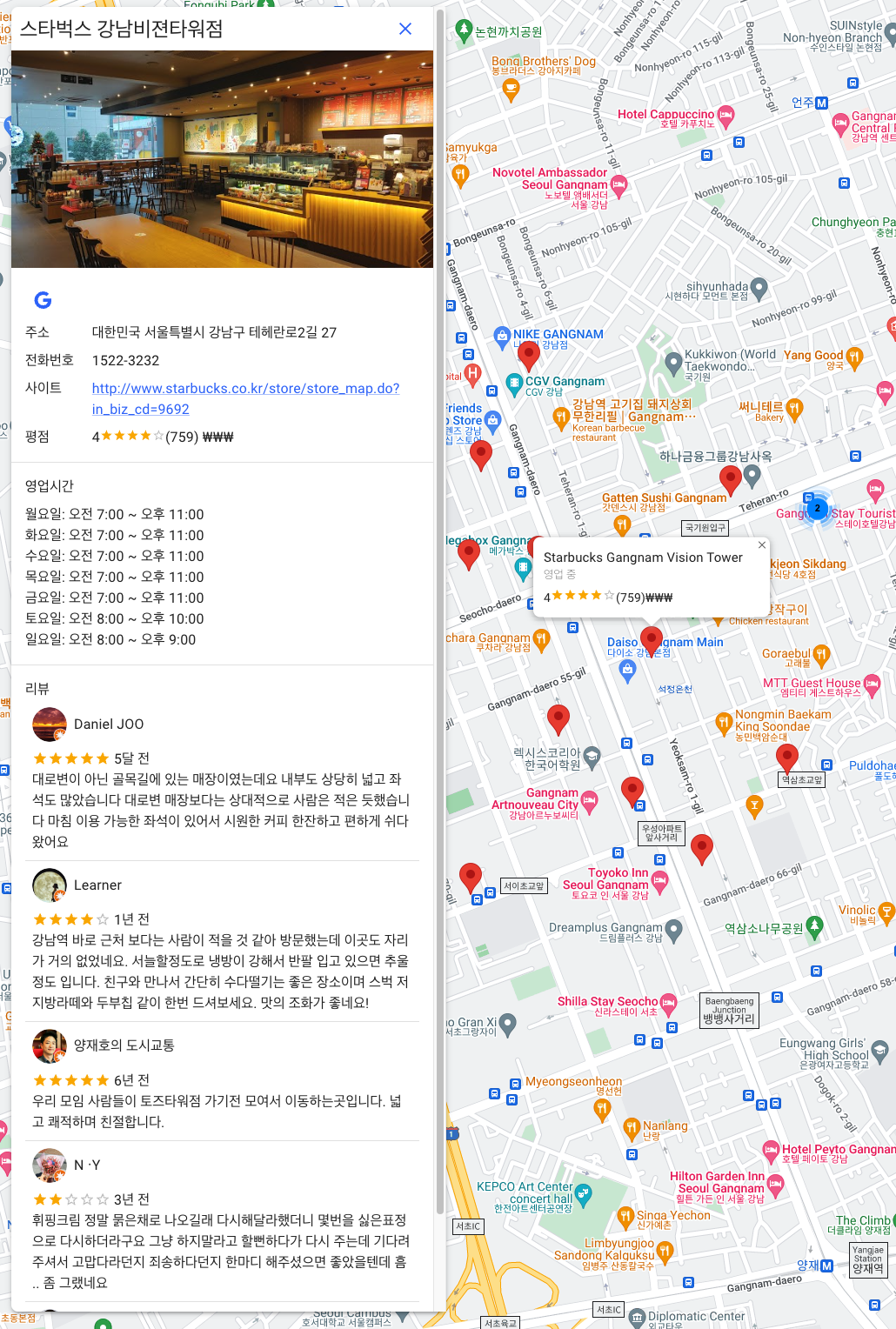
처음 마커를 클릭했을 때는 정상적으로 상세정보 창이 뜨지만, 다시 한 번 다른 마커를 클릭했을 때는 오류가 발생하면서 화면에 아무것도 보여지지 않았다.
발생한 오류
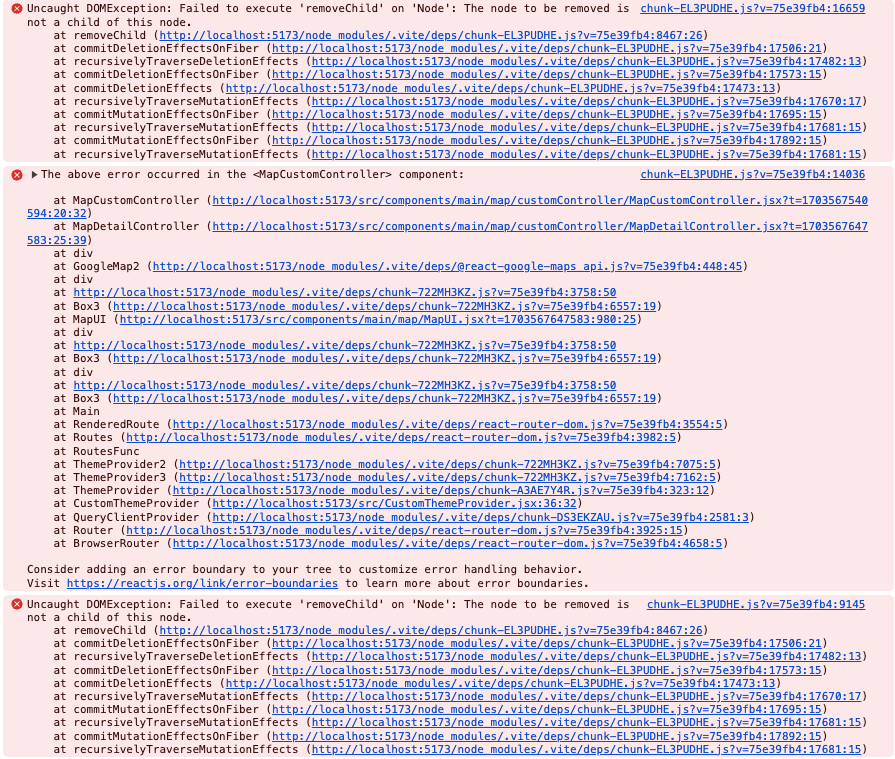
내가 예상했던 동작 순서는
1. 구글 지도 컴포넌트에서 MapDetailController를 선언함으로써, 이를 랜더링하기 시작
2. MapDetailController 안에 선언한 부모 컴포넌트인 MapCustomController를 먼저 랜더링
3. 후에 자식 컴포넌트 내용인 MapDetailController정보를 랜더링하여 출력하는 것을 기대했다
하지만, 실제 동작은 그렇지 못했다
그래서 로그를 찍어 확인해보기로 했다
const MapCustomController = ({ children, position }) => {
	console.log('parent render !!!!') // parent 컴포넌트 주석 추가
    const googleMap = useGoogleMap()
    const ref = useRef()
    useEffect(() => {
        if (googleMap && ref) {
            googleMap.controls[window.google.maps.ControlPosition[position]].push(ref.current)
        }
    }, [googleMap, ref])
    return <div ref={ref}>{children}</div>
}

export default MapCustomController

...

export const MapDetailController = ({ data, placeId, setPlaceId }) => {
	console.log('children render !!!') // children 컴포넌트 주석 추가
    return (
        data && (
            <MapCustomController position="LEFT_CENTER">
                <Paper>
                	...
                    <MapDetailInfo detail={data} />
                    ...
                </Paper>
            </MapCustomController>
        )
    )
}
부모 컴포넌트와 자식 컴포넌트에 각각 랜더링 되었다는 주석을 추가해주고 지도 마커를 클릭해보았다
정상적으로 작동되는 것을 확인하려면 먼저 로그에는 부모컴포넌트 호출 로그가 뜨고, 후에 자식 컴포넌트 호출 로그가 떠야했다

하지만 결과는 그렇지 못했다. 먼저 자식 컴포넌트를 호출하고, 후에 부모 컴포넌트를 호출했다.
그래서 어떻게 수정하면 좋지하고 고민하던 중, 회사 동료분의 도움을 받아 아래와 같이 수정했다.
	...
    return isLoaded ? (
        <Box sx={{ height: '100%' }}>
            <GoogleMap
                options={{
                    mapTypeControl: false,
                    fullscreenControlOptions: {
                        position: google.maps.ControlPosition.TOP_RIGHT,
                    },
                }}
                mapContainerStyle={containerStyle}
                center={center}
                zoom={8}
                onLoad={onLoad}
                onUnmount={onUnmount}
            >
				<MapCustomController position="LEFT_CENTER">
                	<MapDetailController
                    data={data}
                    placeId={selectedPlaceId}
                    setPlaceId={setSelectedPlaceId}
                	/>
                </MapCustomController>
                ...
            </GoogleMap>
        </Box>
    ) : (
        <> map not loaded </>
    )
}
export const MapDetailController = ({ data, placeId, setPlaceId }) => {
console.log('children render !!!') // children 컴포넌트 주석 추가
return (
data && (
{/* MapCustomController 제외 */}
{/* <MapCustomController position="LEFT_CENTER"> */}
<Paper>
...
<MapDetailInfo detail={data} />
...
</Paper>
{/* </MapCustomController> */}
)
)
}
수정 후에 부모컴포넌트 랜더링 후 자식 컴포넌트가 랜더링 되는 것을 확인할 수 있었으며,
Failed to execute 'removeChild' on 'Node': The node to be removed is not a child of this node
오류도 해결이 되었다