<%@ include file="파일경로"%>
include 디렉티브 태그 예제
// 메인 페이지
<%@ page language="java" contentType="text/html; charset=UTF-8"
    pageEncoding="UTF-8"%>
<!DOCTYPE html>
<html>
<head>
<meta charset="UTF-8">
<title>include 디렉티브 태그 예제</title>
</head>
<body>
	<!-- 헤더 영역 -->
    // include 디렉티브 태그를 이용해서 불러온다
	<%@ include file="header.jsp" %>
	<h4>-----------------------------------현재 페이지 영역---------------------------</h4>
	<!-- 푸터 영역 -->
	<%@ include file="footer.jsp" %>
</body>
</html>
// header 영역
<%@ page language="java" contentType="text/html; charset=UTF-8"
    pageEncoding="UTF-8"%>
<!DOCTYPE html>
<html>
<head>
<meta charset="UTF-8">
<title></title>
</head>
<body>
	<h4>헤더 페이지 영역!</h4>
</body>
</html>
// footer 영역
<%@ page language="java" contentType="text/html; charset=UTF-8"
    pageEncoding="UTF-8"%>
<!DOCTYPE html>
<html>
<head>
<meta charset="UTF-8">
<title></title>
</head>
<body>
	<p>Copyright ㈜ 진세종</p>
</body>
</html>
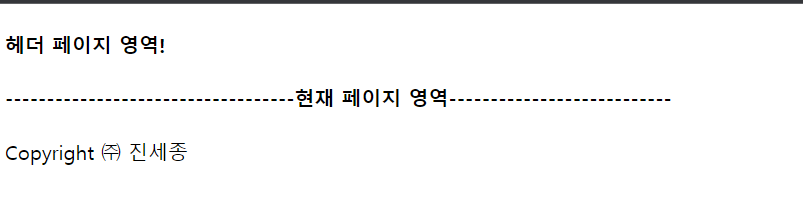
실행
메인 페이지 jsp에서 실제로 <body>태그안에
  <h4>-----------------------------------현재 페이지 영역---------------------------</h4>
만 적혀있지만 include 디렉티브 태그로 헤더영역과 푸터영역이 덮여씌어진다. 반복되는 내용이 있다면 include를 사용하면 유용하다.

개발자 지망생