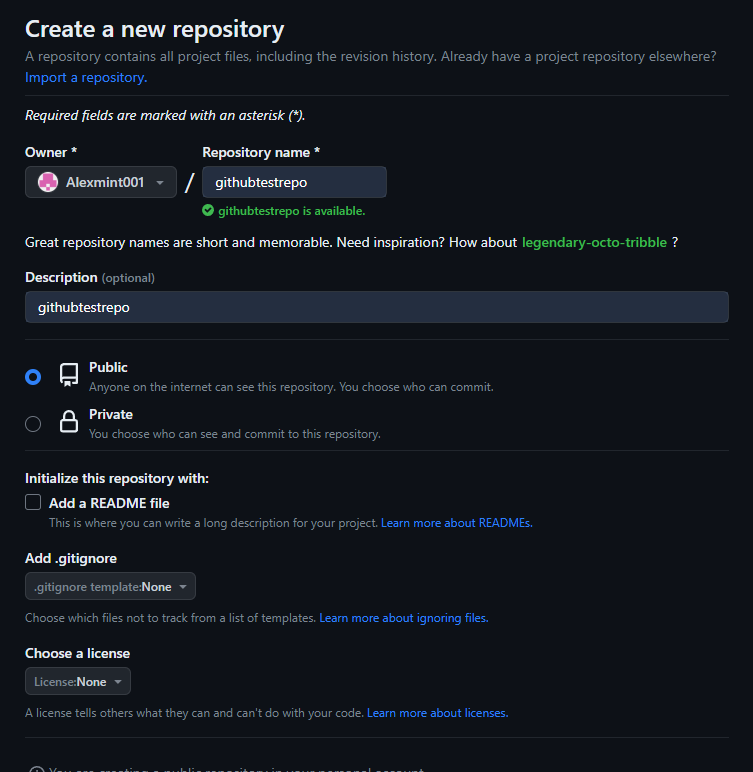
Github 와 Git을 처음 공부하면서 여러가지를 배우고 있는데 그 중 겪게 된 error를 정리해본다.
Github에서 Repositories를 만들 때 README.md를 생성하지 않았을 경우 따로 로컬저장소에서 파일을 만들어야 한다고 함.
그래서 폴더를 새로 만든 후에 Github 에서 주어진 아래의 코드를 git bash에서 입력했다.
git init
git add README.md
git commit -m "first commit"
git branch -M main
git remote add origin https://github.com/Alexmint001/githubtestrepo.git
git push -u origin main
echo "# githubtestrepo" >> README.md
이 코드는 README.md 파일에 githubtestrepo 라는 컨텐츠가 생성이 된다라는 뜻.
git init
이 코드는 Git 저장소를 생성한다라는 뜻
git add README.md
README.md 파일을 스테이지에 올려준다라는 뜻
git commit -m "first commit"
first commit 이라는 메시지를 달고 커밋
git branch -M main
main이라는 branch로 생성을 한다.??
git remote add origin https://github.com/Alexmint001/githubtestrepo.git
원격 저장소의 주소에 연결하겠다.
여기에서 error가 생겼다.
error: src refspec main does not match any
error: failed to push some refs to 'https://github.com/Alexmint001/githubtestrepo.git'
하지만 알아보니 여기가 문제가 아니었다.
애초에 사용자 정보를 입력했어야 하는데 입력을 안해서 생긴 문제였다.
git config --global user.email "you@example.com"
git config --global user.name "Your Name"
사용자 정보를 입력하니 바로 Github에 업로드 되었다.