애플의 로그인 정책으로인해 Sign In With Apple이 거의 필수가 되었습니다.
Flutter로 만든 앱에서 애플로그인을 하는 방법을 정리해보겠습니다.
버전 정보
- MacOS Montery 12.4
- Flutter 3.0.2
- firebase_core: ^1.18.0
- firebase_auth: ^3.3.20
- sign_in_with_apple: ^4.0.0
- crypto: ^3.0.2
- target iOS 15.0
세팅
- 애플 개발자 아이디 (이게 제일 비싼듯;;)
- App ID 등록
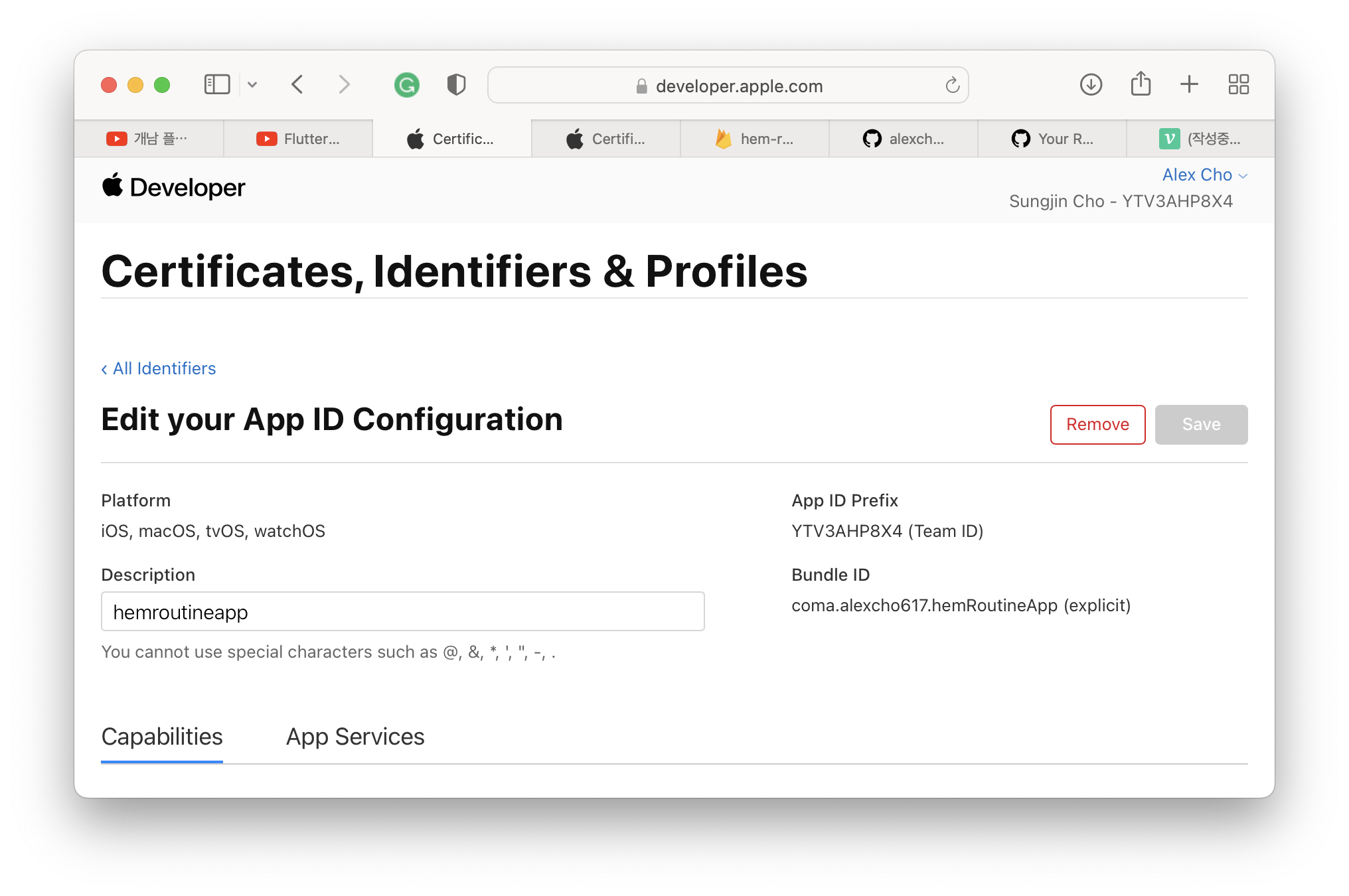
Bundle ID가 등록 안될 경우가 있다. 앱 프로젝트를 먼저 만들고 앱 아이디를 등록 할 시 안될 수 있기 때문에 앱 아이디를 먼저 확인 하는것이 중요하다.
검색해보니 안되는 이유는 누군가가 먼저 등록했기 때문에 안된다고 하는데 애플 개인 계정으로 Bundle ID를 만들기 때문에 중복의 가능성이 적을 수 밖에 없어 사실 이게 맞는 이유인지는 모르겠다.
위 과정이 중요한 이유는 파이어베이스에서 iOS 프로젝트를 만들시 번들 아이디를 입력하게 되는데 위 과정이 먼저 되어있지 않다면 파이어베이스 연결을 다시 해야한다.
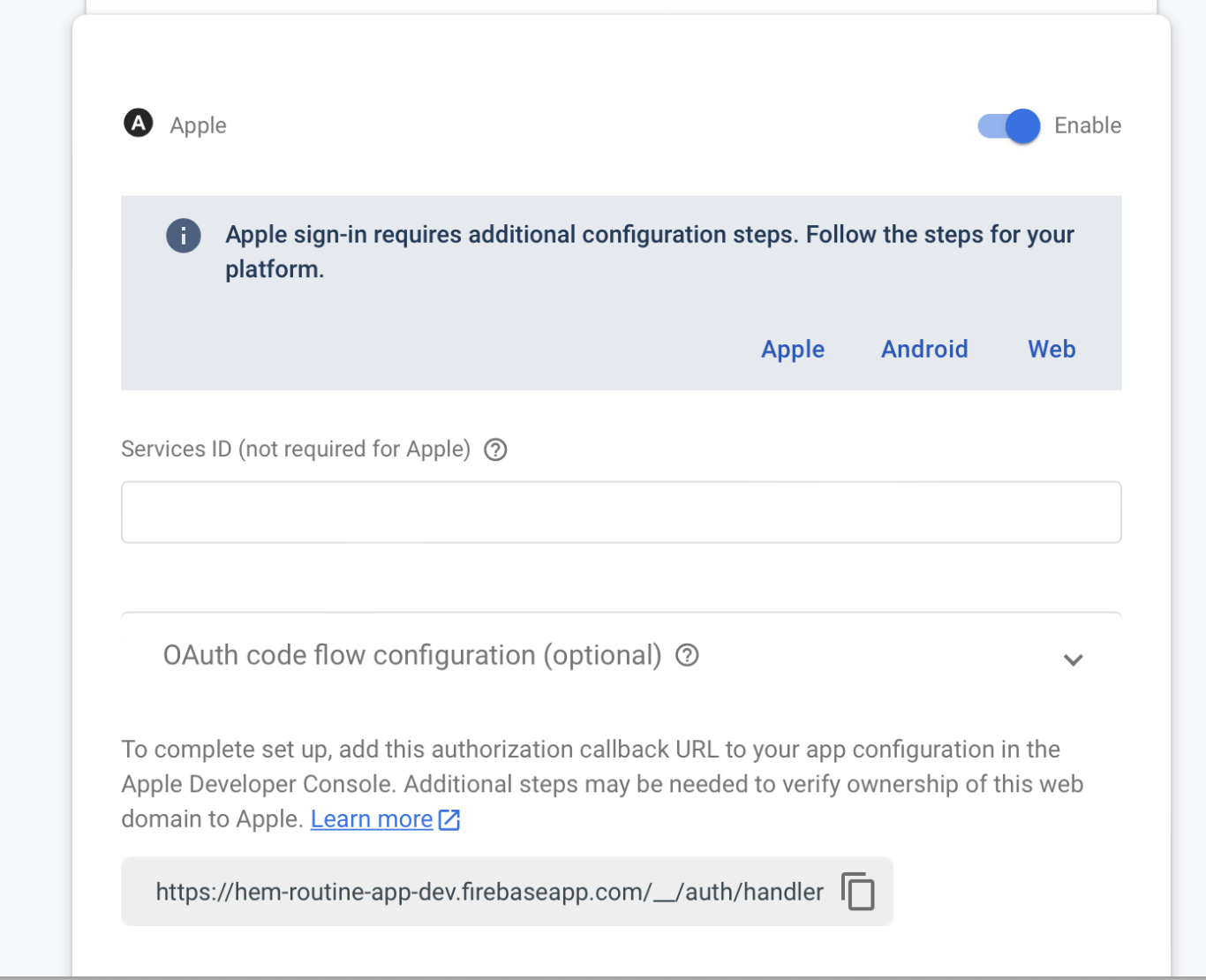
- Firebase Auth - Sign in method 에서 Apple 켜기
코드
플로우
getAppleIDCredential( )로 AppleIDCredential 생성 → AuthorizationCredentialAppleID.idToken, rawNonce, accessToken→ OAuthCredential 생성 → FirebaseAuth.signInWithCredential(AuthCredential)로 로그인
- 로그인 코어함수 마지막 oauthCredential 생성시 idToken, accessToken, rawNonce 3가지 추가 (플러터 버전 3.0.2 기준)
String generateNonce([int length = 32]) {
  const charset =
      '0123456789ABCDEFGHIJKLMNOPQRSTUVXYZabcdefghijklmnopqrstuvwxyz-._';
  final random = Random.secure();
  return List.generate(length, (_) => charset[random.nextInt(charset.length)])
      .join();
}

String sha256ofString(String input) {
  final bytes = utf8.encode(input);
  final digest = sha256.convert(bytes);
  return digest.toString();
}

Future<OAuthCredential> signInWithApple() async {
  final rawNonce = generateNonce();
  final nonce = sha256ofString(rawNonce);

  final appleCredential = await SignInWithApple.getAppleIDCredential(
    scopes: [
      AppleIDAuthorizationScopes.email,
      AppleIDAuthorizationScopes.fullName,
    ],
    nonce: nonce,
  );

  final oauthCredential = OAuthProvider("apple.com").credential(
      idToken: appleCredential.identityToken,
      rawNonce: rawNonce,
      accessToken: appleCredential.authorizationCode);

  return oauthCredential;
}
Federated identity & social sign-in | Firebase Documentation
Firebase Doc 참조
- 함수 호출 및 라우팅 부분 (프로토타입)
		Column(
          children: [
            SignInWithAppleButton(
              onPressed: () async {
                //get apple credential
                appleCredential = await signInWithApple();
                if (appleCredential != null) {
                  print("auth credential not null");
                } else {
                  print("auth credential null");
                }
                //login with apple credential
                await _auth
                    .signInWithCredential(appleCredential!)
                    .then((value) {
                  if (_auth.currentUser != null) {
                    print("auth.currentuser not null");
                    Get.to(HomePage());
                    print(_auth.currentUser!.displayName);
                  } else {
                    print("auth current user is null");
                  }
                });

              },
            ),
Reference
https://www.youtube.com/watch?v=kUC2UW-hfSY
Federated identity & social sign-in | Firebase Documentation

r u having fun?