김영한님의 스프링 MVC 2편 을 공부하여 정리한 글입니다.
타임리프
타임리프 사용 선언
<html xmlns:th="http://www.thymeleaf.org">- 간단한 표현:
- 변수 표현식: ${...}
- 선택 변수 표현식: *{...}
- 메시지 표현식: #{...}
- 링크 URL 표현식: @{...}
- 조각 표현식: ~{...}
- 리터럴
- 텍스트: 'one text', 'Another one!',…
- 숫자: 0, 34, 3.0, 12.3,…
- 불린: true, false
- 널: null
- 리터럴 토큰: one, sometext, main,…
- 문자 연산:
- 문자 합치기: +
- 리터럴 대체: |The name is ${name}|
- 산술 연산:
- Binary operators: +, -, *, /, %
- Minus sign (unary operator): -
- 불린 연산:
- Binary operators: and, or
- Boolean negation (unary operator): !, not
- 비교와 동등:
- 비교: >, <, >=, <= (gt, lt, ge, le)
- 동등 연산: ==, != (eq, ne)
- 조건 연산:
- If-then: (if) ? (then)
- If-then-else: (if) ? (then) : (else)
- Default: (value) ?: (defaultvalue)
- 특별한 토큰:
- No-Operation: _
텍스트 - text, utext
th:text

<span th:text="${data}">
[[${data}]]
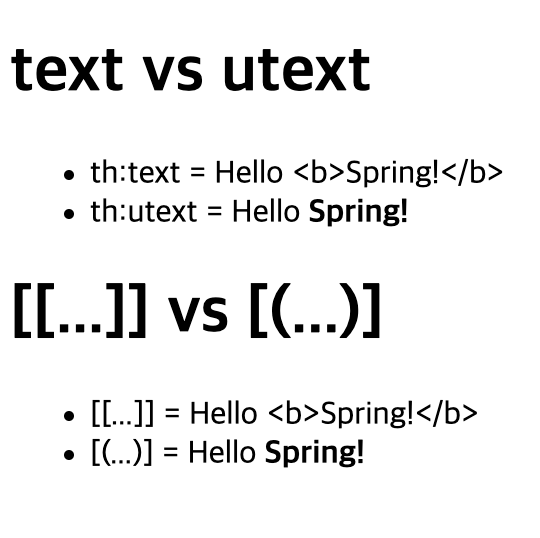
HTML의 콘텐츠(content)에 데이터를 출력할 때 사용
HTML 엔티티
HTML 문서는 < , > 같은 특수 문자를 기반으로 정의한다.
웹 브라우저는 < 를 HTML 테그의 시작으로 인식한다. 따라서 < 를 테그의 시작이 아니라 문자로 표현할 수 있는 방법이 필요한데, 이것을 HTML 엔티티라 한다.
Escape
th:text
[[...]]
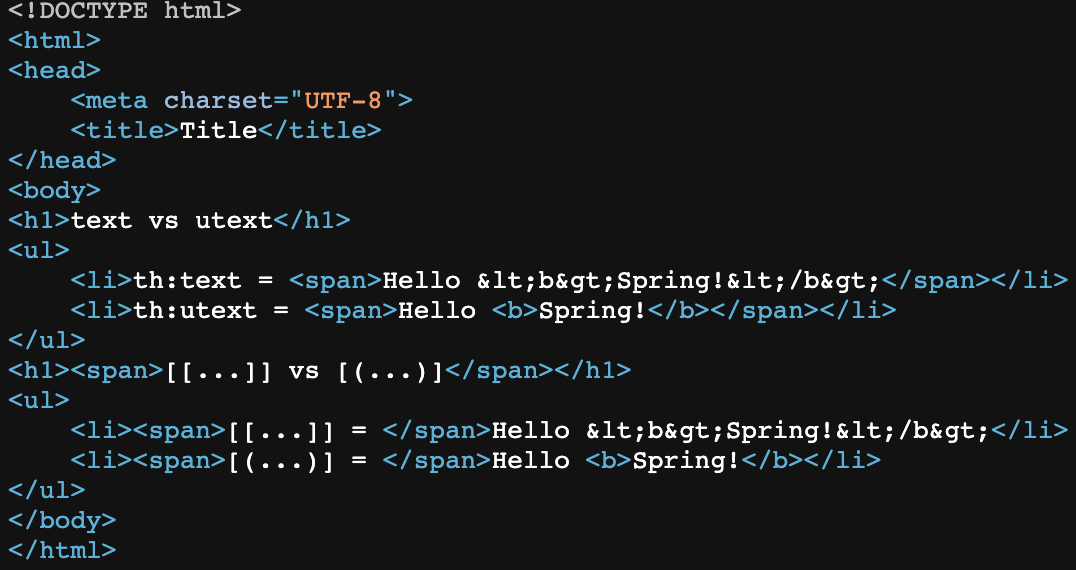
HTML에서 사용하는 특수 문자를 HTML 엔티티로 변경하는 것을 이스케이프(escape)라 한다. 그리고 타임리프가 제공하는 th:text , [[...]] 는 기본적으로 이스케이스(escape)를 제공한다.
Unescape
th:utext
[(...)]
이스케이프 기능을 사용하지 않기 위해서 사용한다.
변수 - SpringEL
타임리프에서 변수를 사용할 때는 변수 표현식을 사용한다.
${...}Object
- user.username
- user['username']
- user.getUsername()
List
- users[0].username
- users[0]['username']
- users[0].getUsername()
Map
- userMap['userA'].username
- userMap['userA']['username']
- userMap['userA'].getUsername()
지역변수
th:with<h1>지역 변수 - (th:with)</h1>
<div th:with="first=${users[0]}">
<p>처음 사람의 이름은 <span th:text="${first.username}"></span></p>
</div>지역 변수는 선언한 태그 안에서만 사용 가능하다.
기본 객체들
- ${#request} - 스프링 부트 3.0부터 제공하지 않는다.
- ${#response} - 스프링 부트 3.0부터 제공하지 않는다.
- ${#session} - 스프링 부트 3.0부터 제공하지 않는다.
- ${#servletContext} - 스프링 부트 3.0부터 제공하지 않는다.
- ${#locale}
<!DOCTYPE html>
<html xmlns:th="http://www.thymeleaf.org">
<head>
    <meta charset="UTF-8">
    <title>Title</title>
</head>
<body>
<h1>식 기본 객체 (Expression Basic Objects)</h1>
<ul>
    <li>request = <span th:text="${#request}"></span></li>
    <li>response = <span th:text="${#response}"></span></li>
    <li>session = <span th:text="${#session}"></span></li>
    <li>servletContext = <span th:text="${#servletContext}"></span></li>
    <li>locale = <span th:text="${#locale}"></span></li>
</ul>
<h1>편의 객체</h1>
<ul>
    <li>Request Parameter = <span th:text="${param.paramData}"></span></li>
    <li>session = <span th:text="${session.sessionData}"></span></li>
    <li>spring bean = <span th:text="${@helloBean.hello('Spring!')}"></span></li>
</ul>
</body>
</html>- HTTP 요청 파라미터 접근: param
예) ${param.paramData} - HTTP 세션 접근: session
예) ${session.sessionData} - 스프링 빈 접근: @
예) ${@helloBean.hello('Spring!')}
유틸리티 객체와 날짜
- #message : 메시지, 국제화 처리
- #uris : URI 이스케이프 지원
- #dates : java.util.Date 서식 지원
- #calendars : java.util.Calendar 서식 지원
- #temporals : 자바8 날짜 서식 지원
- #numbers : 숫자 서식 지원
- #strings : 문자 관련 편의 기능
- #objects : 객체 관련 기능 제공
- #bools : boolean 관련 기능 제공
- #arrays : 배열 관련 기능 제공
- #lists , #sets , #maps : 컬렉션 관련 기능 제공
- #ids : 아이디 처리 관련 기능 제공, 뒤에서 설명
자바8 날짜
<!DOCTYPE html>
<html xmlns:th="http://www.thymeleaf.org">
<head>
    <meta charset="UTF-8">
    <title>Title</title>
</head>
<body>
<h1>LocalDateTime</h1>
<ul>
    <li>default = <span th:text="${localDateTime}"></span></li>
    <li>yyyy-MM-dd HH:mm:ss = <span th:text="${#temporals.format(localDateTime,'yyyy-MM-dd HH:mm:ss')}"></span></li>
</ul>
<h1>LocalDateTime - Utils</h1>
<ul>
    <li>${#temporals.day(localDateTime)} = <span th:text="${#temporals.day(localDateTime)}"></span></li>
    <li>${#temporals.month(localDateTime)} = <span th:text="${#temporals.month(localDateTime)}"></span></li>
    <li>${#temporals.monthName(localDateTime)} = <span th:text="${#temporals.monthName(localDateTime)}"></span></li>
    <li>${#temporals.monthNameShort(localDateTime)} = <span th:text="${#temporals.monthNameShort(localDateTime)}"></span></li>
    <li>${#temporals.year(localDateTime)} = <span th:text="${#temporals.year(localDateTime)}"></span></li>
    <li>${#temporals.dayOfWeek(localDateTime)} = <span th:text="${#temporals.dayOfWeek(localDateTime)}"></span></li>
    <li>${#temporals.dayOfWeekName(localDateTime)} = <span th:text="${#temporals.dayOfWeekName(localDateTime)}"></span></li>
    <li>${#temporals.dayOfWeekNameShort(localDateTime)} = <span th:text="${#temporals.dayOfWeekNameShort(localDateTime)}"></span></li>
    <li>${#temporals.hour(localDateTime)} = <span th:text="${#temporals.hour(localDateTime)}"></span></li>
    <li>${#temporals.minute(localDateTime)} = <span th:text="${#temporals.minute(localDateTime)}"></span></li>
    <li>${#temporals.second(localDateTime)} = <span th:text="${#temporals.second(localDateTime)}"></span></li>
    <li>${#temporals.nanosecond(localDateTime)} = <span th:text="${#temporals.nanosecond(localDateTime)}"></span></li>
</ul>
</body>
</html>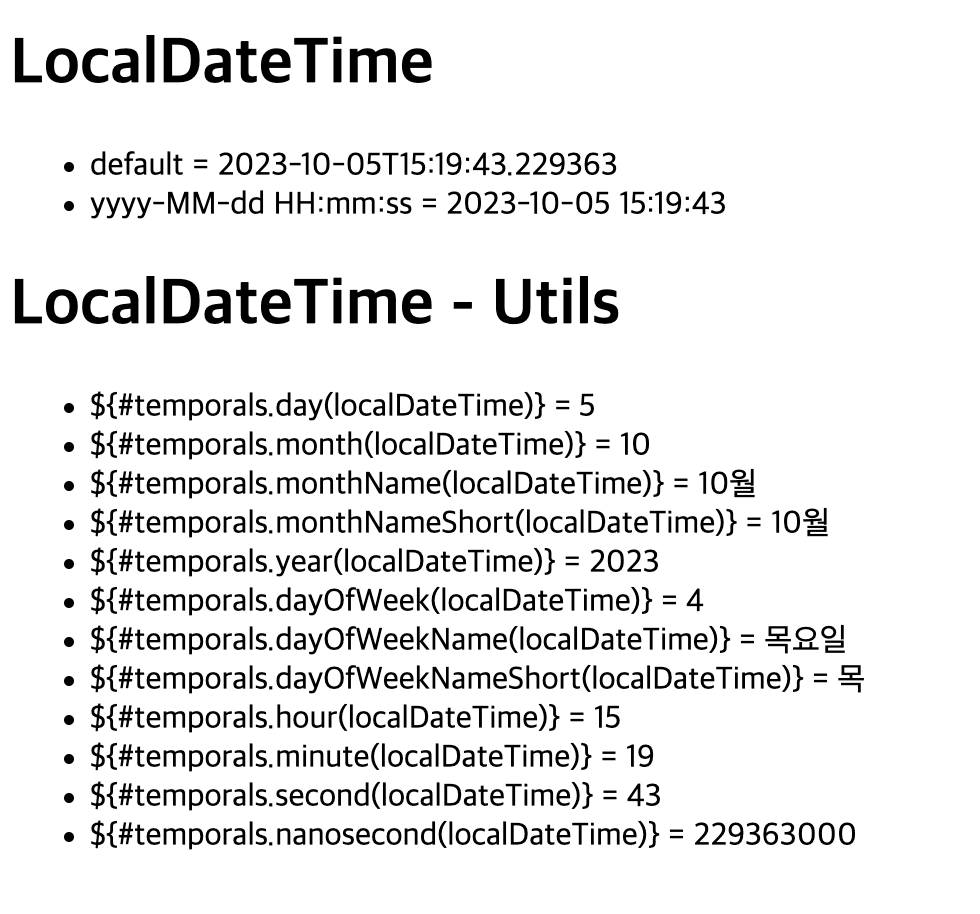
URL 링크
@{...}<!DOCTYPE html>
<html xmlns:th="http://www.thymeleaf.org">
<head>
<meta charset="UTF-8">
<title>Title</title>
</head>
<body>
<h1>URL 링크</h1>
<ul>
<li><a th:href="@{/hello}">basic url</a></li>
<li><a th:href="@{/hello(param1=${param1}, param2=${param2})}">hello query param</a></li>
<li><a th:href="@{/hello/{param1}/{param2}(param1=${param1}, param2=${param2})}">path variable</a></li>
<li><a th:href="@{/hello/{param1}(param1=${param1}, param2=${param2})}">path variable + query parameter</a></li>
</ul>
</body>
</html>- 단순한 URL
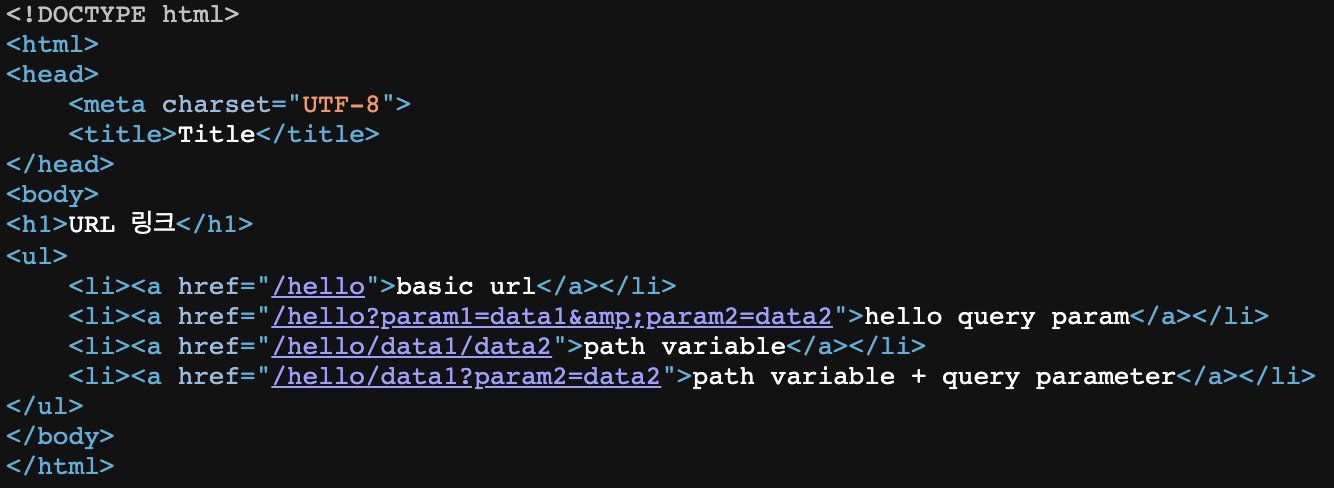
@{/hello} -> /hello
- 쿼리 파라미터
@{/hello(param1=${param1}, param2=${param2})}
-> /hello?param1=data1& param2=data2
() 에 있는 부분은 쿼리 파라미터로 처리된다.
- 경로 변수
@{/hello/{param1}/{param2}(param1=${param1}, param2=${param2})}
-> /hello/data1/data2
URL 경로상에 변수가 있으면 () 부분은 경로 변수로 처리된다.
- 경로 변수 + 쿼리 파라미터
@{/hello/{param1}(param1=${param1}, param2=${param2})}
-> /hello/data1?param2=data2
경로 변수와 쿼리 파라미터를 함께 사용할 수 있다.
- 상대경로, 절대경로, 프로토콜 기준을 표현할 수 도 있다.
/hello : 절대 경로
hello : 상대 경로
리터럴
리터럴은 소스 코드상에 고정된 값을 말하는 용어이다.
타임리프에서 문자 리터럴은 항상 ' (작은 따옴표)로 감싸야 한다.
- 문자: 'hello'
- 숫자: 10
- 불린: true , false
- null: null
<!DOCTYPE html>
<html xmlns:th="http://www.thymeleaf.org">
<head>
    <meta charset="UTF-8">
    <title>Title</title>
</head>
<body>
<h1>리터럴</h1>
<ul>
    <!--주의! 다음 주석을 풀면 예외가 발생함-->
    <!-- <li>"hello world!" = <span th:text="hello world!"></span></li>-->
    <li>'hello' + ' world!' = <span th:text="'hello' + ' world!'"></span></li>
    <li>'hello world!' = <span th:text="'hello world!'"></span></li>
    <li>'hello ' + ${data} = <span th:text="'hello ' + ${data}"></span></li>
    <li>리터럴 대체 |hello ${data}| = <span th:text="|hello ${data}|"></span></li>
</ul>
</body>
</html>
연산
<!DOCTYPE html>
<html xmlns:th="http://www.thymeleaf.org">
<head>
<meta charset="UTF-8">
<title>Title</title>
</head>
<body>
<ul>
<li>산술 연산
<ul>
<li>10 + 2 = <span th:text="10 + 2"></span></li>
<li>10 % 2 == 0 = <span th:text="10 % 2 == 0"></span></li>
</ul>
</li>
<li>비교 연산
<ul>
<li>1 > 10 = <span th:text="1 > 10"></span></li>
<li>1 gt 10 = <span th:text="1 gt 10"></span></li>
<li>1 >= 10 = <span th:text="1 >= 10"></span></li>
<li>1 ge 10 = <span th:text="1 ge 10"></span></li>
<li>1 == 10 = <span th:text="1 == 10"></span></li>
<li>1 != 10 = <span th:text="1 != 10"></span></li>
</ul>
</li>
<li>조건식
<ul>
<li>(10 % 2 == 0)? '짝수':'홀수' = <span th:text="(10 % 2 == 0)?'짝수':'홀수'"></span></li>
</ul>
</li>
<li>Elvis 연산자
<ul>
<li>${data}?: '데이터가 없습니다.' = <span th:text="${data}?: '데이터가없습니다.'"></span></li>
<li>${nullData}?: '데이터가 없습니다.' = <span th:text="${nullData}?:'데이터가 없습니다.'"></span></li>
</ul>
</li>
<li>No-Operation
<ul>
<li>${data}?: _ = <span th:text="${data}?: _">데이터가 없습니다.</span>
</li>
<li>${nullData}?: _ = <span th:text="${nullData}?: _">데이터가없습니다.</span></li>
</ul>
</li>
</ul>
</body>
</html>- 비교연산: HTML 엔티티를 사용해야 하는 부분을 주의하자,
> (gt), < (lt), >= (ge), <= (le), ! (not), == (eq), != (neq, ne)
-
조건식: 자바의 조건식과 유사하다.
-
Elvis 연산자: 조건식의 편의 버전
-
No-Operation: _ 인 경우 마치 타임리프가 실행되지 않는 것 처럼 동작한다. 이것을 잘 사용하면 HTML 의 내용 그대로 활용할 수 있다. 마지막 예를 보면 데이터가 없습니다. 부분이 그대로 출력된다.
속성 값 설정
타임리프 태그 속성(Attribute)
타임리프는 주로 HTML 태그에 th: 속성을 지정하는 방식으로 동작한다.
th: 로 속성을 적용하면 기존 속성을 대체한다.
기존 속성이 없으면 새로 만든다.
<!DOCTYPE html>
<html xmlns:th="http://www.thymeleaf.org">
<head>
    <meta charset="UTF-8">
    <title>Title</title>
</head>
<body>
<h1>속성 설정</h1>
<input type="text" name="mock" th:name="userA" />
<h1>속성 추가</h1>
- th:attrappend = <input type="text" class="text" th:attrappend="class='large'" /><br/>
- th:attrprepend = <input type="text" class="text" th:attrprepend="class='large'" /><br/>
- th:classappend = <input type="text" class="text" th:classappend="large" /><br/>
<h1>checked 처리</h1>
- checked o <input type="checkbox" name="active" th:checked="true" /><br/>
- checked x <input type="checkbox" name="active" th:checked="false" /><br/>
- checked=false <input type="checkbox" name="active" checked="false" /><br/>
</body>
</html>-
attrappend : 속성 뒤에 값을 추가한다.
-
attrprepend : 속성 앞에 값을 추가한다.
-
classappend : class 속성에 자연스럽게 값을 추가한다.
-
checked : HTML에서 checked 속성은 checked 속성의 값과 상관없이 checked 라는 속성만 있어도 체크가 된다. 타임리프의 th:checked 는 값이 false 인 경우 checked 속성 자체를 제거한다.
반복
타임리프에서 반복은 th:each 를 사용한다. 추가로 반복에서 사용할 수 있는 여러 상태 값을 지원한다.
<!DOCTYPE html>
<html xmlns:th="http://www.thymeleaf.org">
<head>
    <meta charset="UTF-8">
    <title>Title</title>
</head>
<body>
<h1>기본 테이블</h1>
<table border="1">
    <tr>
        <th>username</th>
        <th>age</th>
    </tr>
    <tr th:each="user : ${users}">
        <td th:text="${user.username}">username</td>
        <td th:text="${user.age}">0</td>
    </tr>
</table>
<h1>반복 상태 유지</h1>
<table border="1">
    <tr>
        <th>count</th>
        <th>username</th>
        <th>age</th>
        <th>etc</th>
    </tr>
    <tr th:each="user, userStat : ${users}">
        <td th:text="${userStat.count}">username</td>
        <td th:text="${user.username}">username</td>
        <td th:text="${user.age}">0</td>
        <td>
            index = <span th:text="${userStat.index}"></span>
            count = <span th:text="${userStat.count}"></span>
            size = <span th:text="${userStat.size}"></span>
            even? = <span th:text="${userStat.even}"></span>
            odd? = <span th:text="${userStat.odd}"></span>
            first? = <span th:text="${userStat.first}"></span>
            last? = <span th:text="${userStat.last}"></span>
            current = <span th:text="${userStat.current}"></span>
        </td>
    </tr>
</table>
</body>
</html>
반복 기능
<tr th:each="user : ${users}">
반복시 오른쪽 컬렉션( ${users} )의 값을 하나씩 꺼내서 왼쪽 변수( user )에 담아서 태그를 반복
실행한다.
th:each 는 List 뿐만 아니라 배열, java.util.Iterable , java.util.Enumeration 을 구현한 모든 객체를 반복에 사용할 수 있다.
Map 도 사용할 수 있는데 이 경우 변수에 담기는 값은 Map.Entry 이다.
반복 상태 유지
<tr th:each="user, userStat : ${users}">반복의 두번째 파라미터를 설정해서 반복의 상태를 확인 할 수 있다.
두번째 파라미터는 생략 가능한데, 생략하면 지정한 변수명( user ) + Stat 가 된다.
여기서는 user + Stat = userStat 이므로 생략 가능하다.
반복 상태 유지 기능
- index : 0부터 시작하는 값
- count : 1부터 시작하는 값
- size : 전체 사이즈
- even , odd : 홀수, 짝수 여부( boolean )
- first , last :처음, 마지막 여부( boolean )
- current : 현재 객체
조건부 평가
<!DOCTYPE html>
<html xmlns:th="http://www.thymeleaf.org">
<head>
    <meta charset="UTF-8">
    <title>Title</title>
</head>
<body>
<h1>if, unless</h1>
<table border="1">
    <tr>
        <th>count</th>
        <th>username</th>
        <th>age</th>
    </tr>
    <tr th:each="user, userStat : ${users}">
        <td th:text="${userStat.count}">1</td>
        <td th:text="${user.username}">username</td>
        <td>
            <span th:text="${user.age}">0</span>
            <span th:text="'미성년자'" th:if="${user.age lt 20}"></span>
            <span th:text="'미성년자'" th:unless="${user.age ge 20}"></span>
        </td>
    </tr>
</table>
<h1>switch</h1>
<table border="1">
    <tr>
        <th>count</th>
        <th>username</th>
        <th>age</th>
    </tr>
    <tr th:each="user, userStat : ${users}">
        <td th:text="${userStat.count}">1</td>
        <td th:text="${user.username}">username</td>
        <td th:switch="${user.age}">
            <span th:case="10">10살</span>
            <span th:case="20">20살</span>
            <span th:case="*">기타</span>
        </td>
    </tr>
</table>
</body>
</html>
if, unless(if의 반대)
타임리프는 해당 조건이 맞지 않으면 태그 자체를 렌더링하지 않는다.
switch
애스터리스크(*) 는 만족하는 조건이 없을 때 사용하는 디폴트이다.
주석
<!DOCTYPE html>
<html xmlns:th="http://www.thymeleaf.org">
<head>
    <meta charset="UTF-8">
    <title>Title</title>
</head>
<body>
<h1>예시</h1>
<span th:text="${data}">html data</span>
<h1>1. 표준 HTML 주석</h1>
<!--
<span th:text="${data}">html data</span>
-->
<h1>2. 타임리프 파서 주석</h1>
<!--/* [[${data}]] */-->
<!--/*-->
<span th:text="${data}">html data</span>
<!--*/-->
<h1>3. 타임리프 프로토타입 주석</h1>
<!--/*/
<span th:text="${data}">html data</span>
/*/-->
</body>
</html>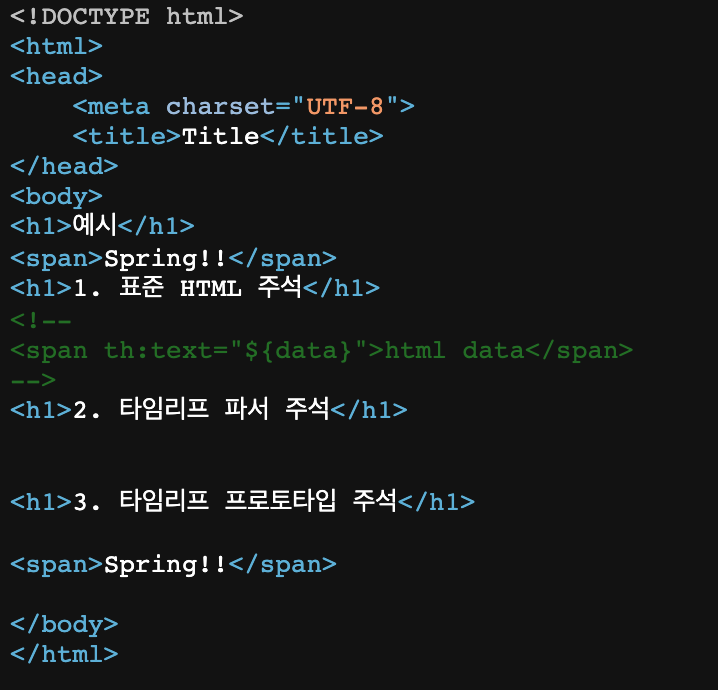
-
표준 HTML 주석
자바스크립트의 표준 HTML 주석은 타임리프가 렌더링 하지 않고, 그대로 남겨둔다. -
타임리프 파서 주석
타임리프 파서 주석은 타임리프의 진짜 주석이다. 렌더링에서 주석 부분을 제거한다. -
타임리프 프로토타입 주석
타임리프 프로토타입은 약간 특이한데, HTML 주석에 약간의 구문을 더했다.
HTML 파일을 그대로 열어보면 주석처리가 되지만, 타임리프를 렌더링 한 경우에만 보이는 기능이다.
블록
<!DOCTYPE html>
<html xmlns:th="http://www.thymeleaf.org">
<head>
    <meta charset="UTF-8">
    <title>Title</title>
</head>
<body>
<th:block th:each="user : ${users}">
    <div>
        사용자 이름1 <span th:text="${user.username}"></span>
        사용자 나이1 <span th:text="${user.age}"></span>
    </div>
    <div>
        요약 <span th:text="${user.username} + ' / ' + ${user.age}"></span>
    </div>
</th:block>
</body>
</html>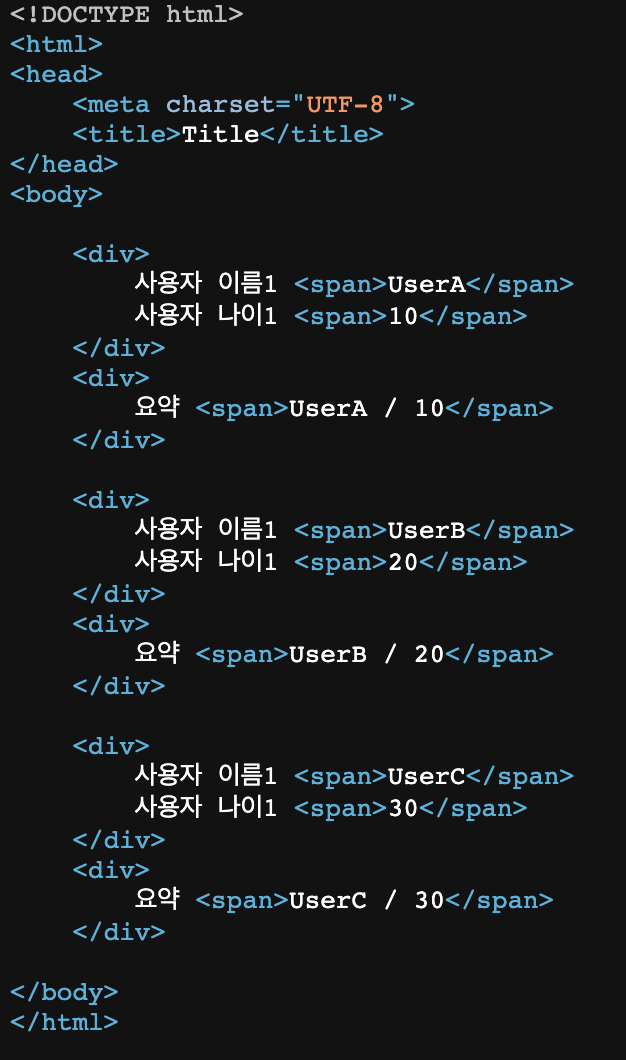
자바스크립트 인라인
자바스크립트 인라인 선언
<script th:inline="javascript"><!DOCTYPE html>
<html xmlns:th="http://www.thymeleaf.org">
<head>
<meta charset="UTF-8">
<title>Title</title>
</head>
<body>
<!-- 자바스크립트 인라인 사용 전 -->
<script>
var username = [[${user.username}]];
var age = [[${user.age}]];
//자바스크립트 내추럴 템플릿
var username2 = /*[[${user.username}]]*/ "test username";
//객체
var user = [[${user}]];
</script>
<!-- 자바스크립트 인라인 사용 후 -->
<script th:inline="javascript">
var username = [[${user.username}]];
var age = [[${user.age}]];
//자바스크립트 내추럴 템플릿
var username2 = /*[[${user.username}]]*/ "test username";
//객체
var user = [[${user}]];
</script>
<!-- 자바스크립트 인라인 each -->
<script th:inline="javascript">
[# th:each="user, stat : ${users}"]
var user[[${stat.count}]] = [[${user}]];
[/]
</script>
</body>
</html>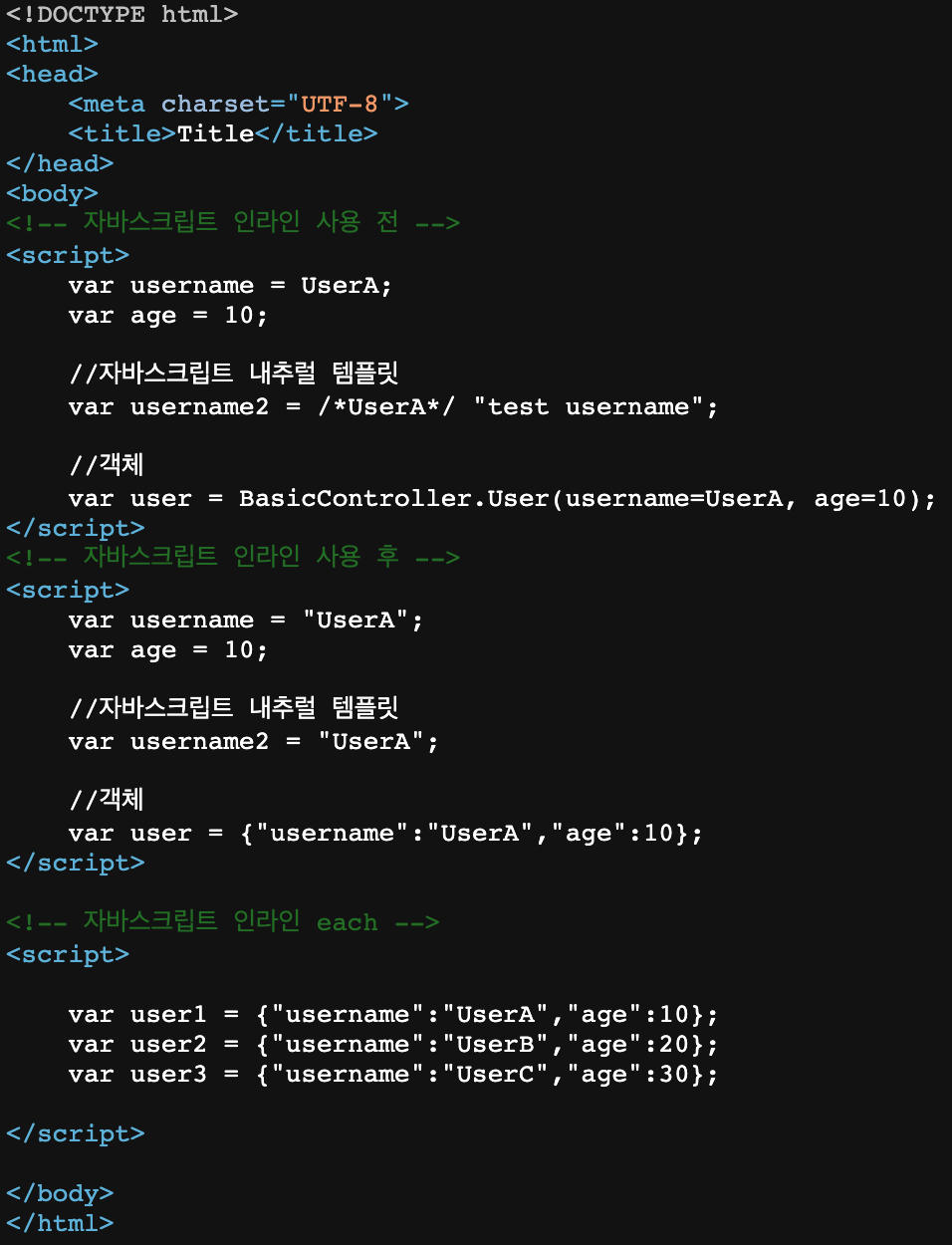
텍스트 렌더링
var username = [[${user.username}]];
인라인 사용 전 : var username = userA;
인라인 사용 후 : var username = "userA";
자바스크립트 내추럴 템플릿
var username2 = /*[[${user.username}]]*/ "test username";
인라인 사용 전 : var username2 = /*userA*/ "test username";
인라인 사용 후 : var username2 = "userA";
객체
var user = [[${user}]];
인라인 사용 전 : var user = BasicController.User(username=userA, age=10);  toString() 호출
인라인 사용 후 : var user = {"username":"userA","age":10};  Json으로 변환
템플릿 조각
웹페이지 개발할 때 공통영역이 있다. 공통영역을 수정할때 템플릿 조각과 레이아웃 기능을 사용한다면 수정하기 쉬워진다.
footer
<!DOCTYPE html>
<html xmlns:th="http://www.thymeleaf.org">
<body>
<footer th:fragment="copy">
    푸터 자리 입니다.
</footer>
<footer th:fragment="copyParam (param1, param2)">
    <p>파라미터 자리 입니다.</p>
    <p th:text="${param1}"></p>
    <p th:text="${param2}"></p>
</footer>
</body>
</html>
<!DOCTYPE html>
<html xmlns:th="http://www.thymeleaf.org">
<head>
<meta charset="UTF-8">
<title>Title</title>
</head>
<body>
<h1>부분 포함</h1>
<h2>부분 포함 insert</h2>
<div th:insert="~{template/fragment/footer :: copy}"></div>
<h2>부분 포함 replace</h2>
<div th:replace="~{template/fragment/footer :: copy}"></div>
<h2>부분 포함 단순 표현식</h2>
<div th:replace="template/fragment/footer :: copy"></div>
<h1>파라미터 사용</h1>
<div th:replace="~{template/fragment/footer :: copyParam ('데이터1', '데이터2')}"></div>
</body>
</html>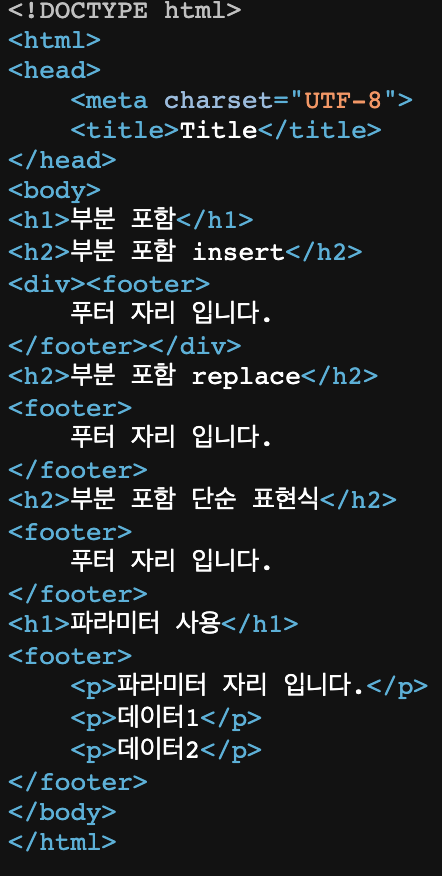
- template/fragment/footer :: copy
template/fragment/footer.html 템플릿에 있는 th:fragment="copy" 라는 부분을 템플릿 조각으로 가져와서 사용한다는 의미이다.
insert
th:insert 를 사용하면 현재 태그 내부에 추가한다.
replace
th:replace 를 사용하면 현재 태그를 대체한다.
파라미터 사용
파라미터를 전달해서 동적으로 조각을 렌더링 할 수도 있다.
템플릿 레이아웃
공통으로 사용하지만, 각 페이지마다 필요한 정보를 더 추가해서 사용하는 방법이다.
<html xmlns:th="http://www.thymeleaf.org">
<head th:fragment="common_header(title,links)">
    <title th:replace="${title}">레이아웃 타이틀</title>

    <!-- 공통 -->
    <link rel="stylesheet" type="text/css" media="all" th:href="@{/css/awesomeapp.css}">
    <link rel="shortcut icon" th:href="@{/images/favicon.ico}">
    <script type="text/javascript" th:src="@{/sh/scripts/codebase.js}"></script>

    <!-- 추가 -->
    <th:block th:replace="${links}" />
</head>
<!DOCTYPE html>
<html xmlns:th="http://www.thymeleaf.org">
<head th:replace="template/layout/base :: common_header(~{::title},~{::link})">
<title>메인 타이틀</title>
<link rel="stylesheet" th:href="@{/css/bootstrap.min.css}">
<link rel="stylesheet" th:href="@{/themes/smoothness/jquery-ui.css}">
</head>
<body>
메인 컨텐츠
</body>
</html>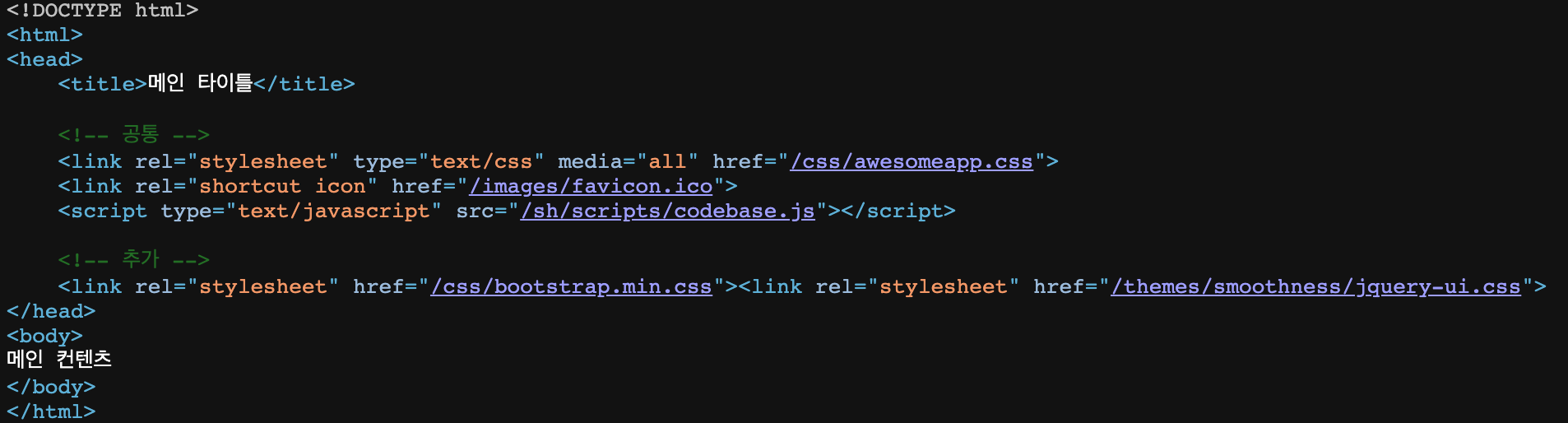
- ::title 은 현재 페이지의 title 태그들을 전달한다.
- ::link 는 현재 페이지의 link 태그들을 전달한다.
<!DOCTYPE html>
<html th:fragment="layout (title, content)" xmlns:th="http://www.thymeleaf.org">
<head>
    <title th:replace="${title}">레이아웃 타이틀</title>
</head>
<body>
<h1>레이아웃 H1</h1>
<div th:replace="${content}">
    <p>레이아웃 컨텐츠</p>
</div>
<footer>
    레이아웃 푸터
</footer>
</body>
</html>
<!DOCTYPE html>
<html th:replace="~{template/layoutExtend/layoutFile :: layout(~{::title},~{::section})}"
xmlns:th="http://www.thymeleaf.org">
<head>
<title>메인 페이지 타이틀</title>
</head>
<body>
<section>
<p>메인 페이지 컨텐츠</p>
<div>메인 페이지 포함 내용</div>
</section>
</body>
</html>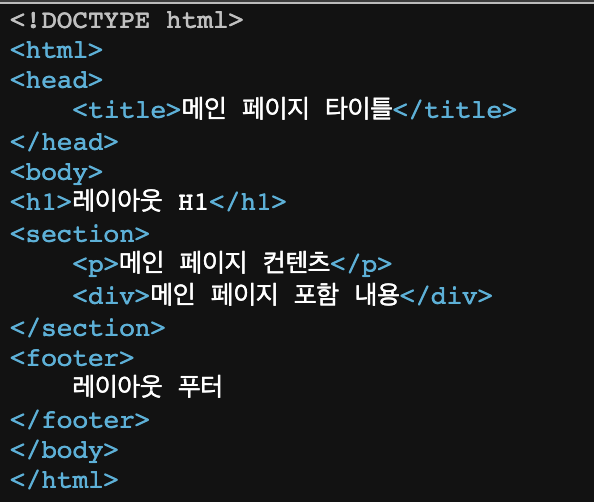
- html 태그도 th:replace를 사용하여 교체할 수 있다.