김영한님의 스프링 MVC 2편 을 공부하여 정리한 글입니다.
파일 업로드 소개
HTML Form을 통한 파일 업로드를 이해하려면 먼저 폼을 전송하는 다음 두 가지 방식의 차이를 이해해야 한다.
HTML 폼 전송 방식
- application/x-www-form-urlencoded
- multipart/form-data
application/x-www-form-urlencoded 방식
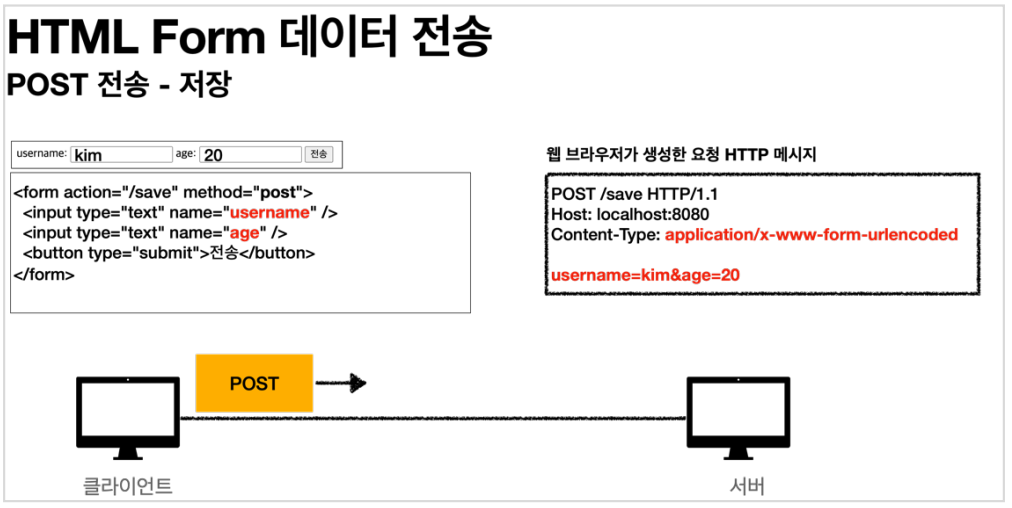
- HTML 폼 데이터를 서버로 전송하는 가장 기본적인 방법이다.
- Form 태그에 별도의 enctype 옵션이 없으면 웹 브라우저는 요청 HTTP 메시지의 헤더에 다음 내용을 추가한다.
Content-Type: application/x-www-form-urlencoded
그리고 폼에 입력한 전송할 항목을 HTTP Body에 문자로 username=kim&age=20 와 같이 & 로 구분해서 전송한다.
multipart/form-data 방식
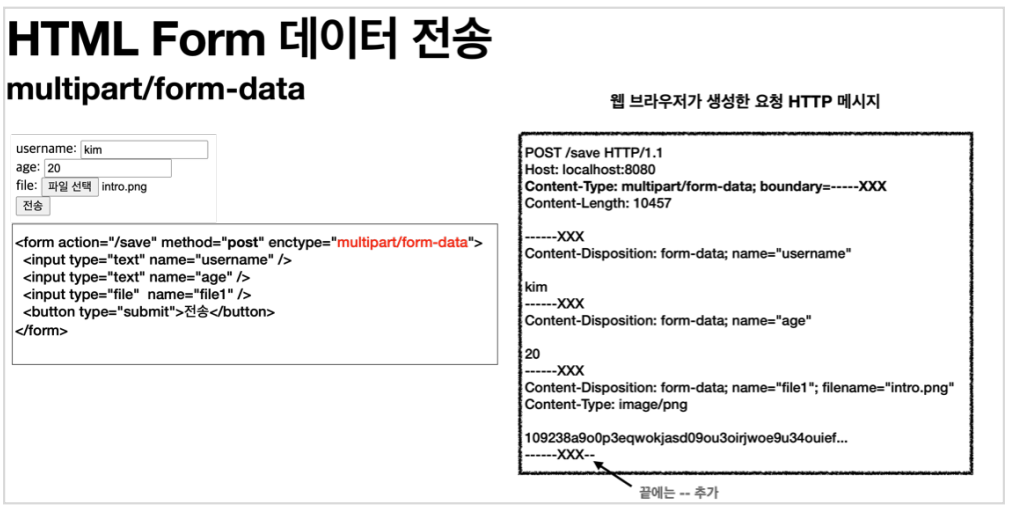
- Form 태그에 별도의 enctype="multipart/form-data" 를 지정해야 한다.
- multipart/form-data 방식은 다른 종류의 여러 파일과 폼의 내용 함께 전송할 수 있다.
- 폼의 입력 결과로 생성된 HTTP 메시지를 보면 각각의 전송 항목이 구분이 되어있다.
ContentDisposition 이라는 항목별 헤더가 추가되어 있고 여기에 부가 정보가 있다 - multipart/form-data 는 각각의 항목을 구분해서, 한번에 전송하는 것이다.
서블릿과 파일 업로드1
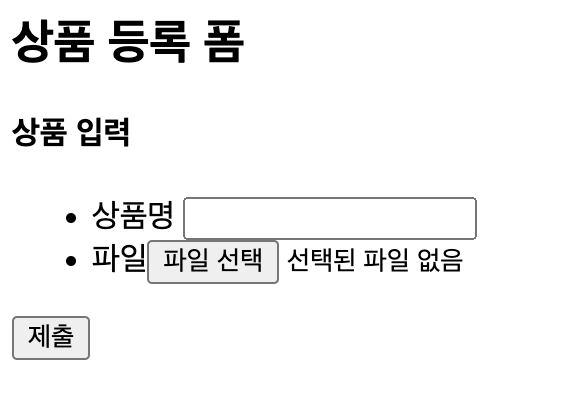
Controller
@Slf4j
@Controller
@RequestMapping("/servlet/v1")
public class ServletUploadControllerV1 {

    @GetMapping("/upload")
    public String newFile() {
        return "upload-form";
    }

    @PostMapping("/upload")
    public String saveFileV1(HttpServletRequest request) throws ServletException, IOException {
        log.info("request={}", request);

        String itemName = request.getParameter("itemName");
        log.info("itemName={}",itemName);

        Collection<Part> parts = request.getParts();
        log.info("parts={}", parts);

        return "upload-form";
    }
}
멀티파트 사용 옵션
업로드 사이즈 제한
spring.servlet.multipart.max-file-size=1MB
spring.servlet.multipart.max-request-size=10MB- 사이즈를 넘으면 예외( SizeLimitExceededException )가 발생한다.
- max-file-size : 파일 하나의 최대 사이즈, 기본 1MB
- max-request-size : 멀티파트 요청 하나에 여러 파일을 업로드 할 수 있는데, 그 전체 합이다. 기본 10MB
spring.servlet.multipart.enabled
spring.servlet.multipart.enabled=false- 옵션을 끄면 서블릿 컨테이너는 멀티파트와 관련된 처리를 하지 않는다.
서블릿과 파일 업로드2
application.properties
file.dir=파일 업로드 경로 #설정(예): /Users/kimyounghan/study/file/- 해당 경로에 실제 폴더를 미리 만들어두자.
- application.properties 에서 설정할 때 마지막에 / (슬래시)가 포함된 것에 주의하자.
Controller
@Slf4j
@Controller
@RequestMapping("/servlet/v2")
public class ServletUploadControllerV2 {

    @Value("${file.dir}")
    private String fileDir;

    @GetMapping("/upload")
    public String newFile() {
        return "upload-form";
    }

    @PostMapping("/upload")
    public String saveFileV1(HttpServletRequest request) throws ServletException, IOException {
        log.info("request={}", request);

        String itemName = request.getParameter("itemName");
        log.info("itemName={}", itemName);

        Collection<Part> parts = request.getParts();
        log.info("parts={}", parts);

        for (Part part : parts) {
            log.info("=== PART ===");
            log.info("name={}", part.getName());
            Collection<String> headerNames = part.getHeaderNames();
            for (String headerName : headerNames) {
                log.info("header {}: {}", headerName, part.getHeader(headerName));
            }
            //편의 메서드
            //content=disposition; filename
            log.info("submittedFilename={}", part.getSubmittedFileName());
            log.info("size={}", part.getSize());

            //데이터 읽기
            InputStream inputStream = part.getInputStream();
            String body = StreamUtils.copyToString(inputStream, StandardCharsets.UTF_8);
            log.info("body={}", body);

            //파일에 저장하기
            if (StringUtils.hasText(part.getSubmittedFileName())) {
                String fullPath = fileDir + part.getSubmittedFileName();
                log.info("파일저장 fullPath={}", fullPath);
                part.write(fullPath);
            }

        }

        return "upload-form";
    }
}- @Value("${file.dir}")
application.properties 에서 설정한 file.dir 의 값을 주입한다.
Part 주요 메서드
- part.getSubmittedFileName() : 클라이언트가 전달한 파일명
- part.getInputStream(): Part의 전송 데이터를 읽을 수 있다.
- part.write(): Part를 통해 전송된 데이터를 저장할 수 있다.
스프링과 파일 업로드
Controller
@Slf4j
@Controller
@RequestMapping("/spring")
public class SpringUploadController {

    @Value("${file.dir}")
    private String fileDir;

    @GetMapping("/upload")
    public String newFile() {
        return "upload-form";
    }

    @PostMapping("/upload")
    public String saveFile(@RequestParam String itemName, @RequestParam MultipartFile file, HttpServletRequest request) throws IOException {

        log.info("request={}", request);
        log.info("itemName={}", itemName);
        log.info("multipartFile={}", file);

        if (!file.isEmpty()) {
            String fullPath = fileDir + file.getOriginalFilename();
            log.info("파일 저장 fullPath={}", fullPath);
            file.transferTo(new File(fullPath));
        }

        return "upload-form";
    }
}
MultipartFile 주요 메서드
- file.getOriginalFilename() : 업로드 파일 명
- file.transferTo(...) : 파일 저장
예제로 구현하는 파일 업로드, 다운로드
Item
@Data
public class Item {

    private Long id;
    private String itemName;
    private UploadFile attachFile;
    private List<UploadFile> imageFiles;
}
ItemRepository
@Repository
public class ItemRepository {

    private final Map<Long, Item> store = new HashMap<>();
    private Long sequence = 0L;

    public Item save(Item item) {
        item.setId(++sequence);
        store.put(item.getId(), item);
        return item;
    }

    public Item findById(Long id) {
        return store.get(id);
    }
}
UploadFile
@Data
public class UploadFile {

    private String uploadFileName;
    private String storeFileName;

    public UploadFile(String uploadFileName, String storeFileName) {
        this.uploadFileName = uploadFileName;
        this.storeFileName = storeFileName;
    }
}- uploadFileName : 고객이 업로드한 파일명
- storeFileName : 서버 내부에서 관리하는 파일명
- 다른 고객이 같은 파일이름을 업로드 하는 경우 기존 파일 이름과 충돌이 날 수 있다. 서버에서는 저장할 파일명이 겹치지 않도록 내부에서 관리하는 별도의 파일명이 필요하다.
FileStore
@Component
public class FileStore {

    @Value("${file.dir}")
    private String fileDir;

    public String getFullPath(String fileName) {
        return fileDir + fileName;
    }

    public List<UploadFile> storeFiles(List<MultipartFile> multipartFiles) throws IOException {
        List<UploadFile> storeFileResult = new ArrayList<>();
        for (MultipartFile multipartFile : multipartFiles) {
            if (!multipartFile.isEmpty()) {
                storeFileResult.add(storeFile(multipartFile));
            }
        }
        return storeFileResult;
    }

    public UploadFile storeFile(MultipartFile multipartFile) throws IOException {
        if (multipartFile.isEmpty()) {
            return null;
        }

        String originalFilename = multipartFile.getOriginalFilename();
        String storeFileName = createStoreFileName(originalFilename);
        multipartFile.transferTo(new File(getFullPath(storeFileName)));
        return new UploadFile(originalFilename, storeFileName);
    }

    private String createStoreFileName(String originalFilename) {
        String ext = extractExt(originalFilename);
        String uuid = UUID.randomUUID().toString();
        return uuid + "." + ext;
    }

    private String extractExt(String originalFilename) {
        int pos = originalFilename.lastIndexOf(".");
        return originalFilename.substring(pos + 1);
    }
}- 멀티파트 파일을 서버에 저장하는 역할
- createStoreFileName() : 서버 내부에서 관리하는 파일명은 유일한 이름을 생성하는 UUID 를 사용해서 충돌하지 않도록 한다.
- extractExt() : 확장자를 별도로 추출해서 서버 내부에서 관리하는 파일명에도 붙여준다. 예를 들어서
고객이 a.png 라는 이름으로 업로드 하면 51041c62-86e4-4274-801d-614a7d994edb.png 와 같이
저장한다.
ItemForm
@Data
public class ItemForm {

    private Long itemId;
    private String itemName;
    private MultipartFile attachFile;
    private List<MultipartFile> imageFiles;
}- List< MultipartFile > imageFiles : 이미지를 다중 업로드 하기 위해 MultipartFile 를 사용했다.
- MultipartFile attachFile : 멀티파트는 @ModelAttribute 에서 사용할 수 있다.
Controller
@Slf4j
@Controller
@RequiredArgsConstructor
public class ItemController {
private final ItemRepository itemRepository;
private final FileStore fileStore;
@GetMapping("/items/new")
public String newItem(@ModelAttribute ItemForm form) {
return "item-form";
}
@PostMapping("/items/new")
public String saveItem(@ModelAttribute ItemForm form, RedirectAttributes redirectAttributes) throws IOException {
UploadFile attachFile = fileStore.storeFile(form.getAttachFile());
List<UploadFile> storeImageFiles = fileStore.storeFiles(form.getImageFiles());
//데이터베이스에 저장
Item item = new Item();
item.setItemName(form.getItemName());
item.setAttachFile(attachFile);
item.setImageFiles(storeImageFiles);
itemRepository.save(item);
redirectAttributes.addAttribute("itemId", item.getId());
return "redirect:/items/{itemId}";
}
@GetMapping("/items/{id}")
public String items(@PathVariable Long id, Model model) {
Item item = itemRepository.findById(id);
model.addAttribute("item", item);
return "item-view";
}
@ResponseBody
@GetMapping("/images/{filename}")
public Resource downloadImage(@PathVariable String filename) throws MalformedURLException {
// "file:/Users/.../Xxxxxxxxxxx-xxxx-xxxxxx.png"
return new UrlResource("file:" + fileStore.getFullPath(filename));
}
@GetMapping("/attach/{itemId}")
public ResponseEntity<Resource> downloadAttach(@PathVariable Long itemId) throws MalformedURLException {
Item item = itemRepository.findById(ite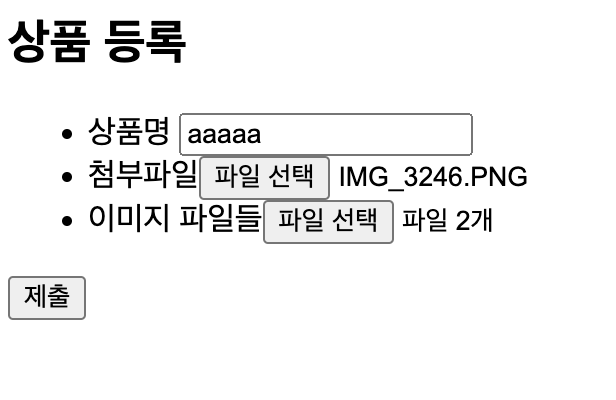
mId);
String storeFileName = item.getAttachFile().getStoreFileName();
String uploadFileName = item.getAttachFile().getUploadFileName();
UrlResource resource = new UrlResource("file:" + fileStore.getFullPath(storeFileName));
log.info("uploadFileName={}", uploadFileName);
String encodedUploadFileName = UriUtils.encode(uploadFileName, StandardCharsets.UTF_8);
String contentDisposition = "attachment; filename=\"" + encodedUploadFileName + "\"";
return ResponseEntity.ok()
.header(HttpHeaders.CONTENT_DISPOSITION, contentDisposition)
.body(resource);
}
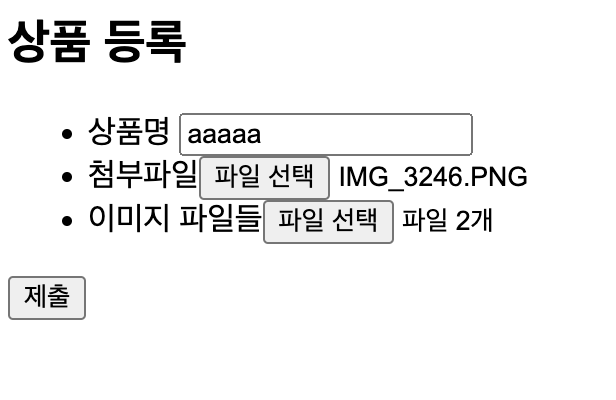
}- @GetMapping("/items/new") : 등록 폼을 보여준다.
- @PostMapping("/items/new") : 폼의 데이터를 저장하고 보여주는 화면으로 리다이렉트 한다.
- @GetMapping("/items/{id}") : 상품을 보여준다.
- @GetMapping("/images/{filename}") : < img > 태그로 이미지를 조회할 때 사용한다. UrlResource 로 이미지 파일을 읽어서 @ResponseBody 로 이미지 바이너리를 반환한다.
- @GetMapping("/attach/{itemId}") : 파일을 다운로드 할 때 실행한다.
예제를 더 단순화 할 수 있지만, 파일 다운로드 시 권한 체크같은 복잡한 상황까지 가정한다 생각하고 이미지 id 를 요청하도록 했다.
파일 다운로드시에는 고객이 업로드한 파일 이름으로 다운로드 하는게 좋다.
이때는 Content-Disposition 해더에 attachment; filename="업로드 파일명" 값을 주면 된다.

저장소