전에 AllAuth를 이용하여 카카오소셜 로그인까지 구현을 했는데 JWT(Access, Refresh Token)발급 받는 로직을 짜지 못해서 추가로 구현해보았습니다
먼저
#Settings.py
INSTALLED_APPS = [
    'django.contrib.admin',
    'django.contrib.auth',
    'django.contrib.contenttypes',
    'django.contrib.sessions',
    'django.contrib.messages',
    'django.contrib.staticfiles',
    'rest_framework',


    'django.contrib.sites',

    'user',
    # 설치한 라이브러리
    'rest_framework.authtoken',
    'rest_framework_simplejwt',
    'dj_rest_auth',
    'dj_rest_auth.registration',

    'allauth',
    'allauth.account',
    'allauth.socialaccount',
    'allauth.socialaccount.providers.kakao',
    'corsheaders',


]
# 사이트는 1개만 사용할 것이라고 명시
SITE_ID = 2

AUTH_USER_MODEL = 'user.User'

REST_USE_JWT = True

REST_FRAMEWORK = {
    'DEFAULT_AUTHENTICATION_CLASSES': (
        'rest_framework_simplejwt.authentication.JWTAuthentication',
    )
}

# 추가적인 JWT 설정, 다 쓸 필요는 없지만 혹시 몰라서 다 넣었다.
SIMPLE_JWT = {
    'ACCESS_TOKEN_LIFETIME': timedelta(minutes=30),
    'REFRESH_TOKEN_LIFETIME': timedelta(days=7),
    'ROTATE_REFRESH_TOKENS': False,
    'BLACKLIST_AFTER_ROTATION': False,
    'UPDATE_LAST_LOGIN': False,

    'ALGORITHM': 'HS256',
    'SIGNING_KEY': SECRET_KEY,
    'VERIFYING_KEY': None,
    'AUDIENCE': None,
    'ISSUER': None,
    'JWK_URL': None,
    'LEEWAY': 0,

    'AUTH_HEADER_TYPES': ('Bearer',),
    'AUTH_HEADER_NAME': 'HTTP_AUTHORIZATION',
    'USER_ID_FIELD': 'id',
    'USER_ID_CLAIM': 'user_id',
    'USER_AUTHENTICATION_RULE': 'rest_framework_simplejwt.authentication.default_user_authentication_rule',

    'AUTH_TOKEN_CLASSES': ('rest_framework_simplejwt.tokens.AccessToken',),
    'TOKEN_TYPE_CLAIM': 'token_type',
    'TOKEN_USER_CLASS': 'rest_framework_simplejwt.models.TokenUser',

    'JTI_CLAIM': 'jti',

    'SLIDING_TOKEN_REFRESH_EXP_CLAIM': 'refresh_exp',
    'SLIDING_TOKEN_LIFETIME': timedelta(minutes=5),
    'SLIDING_TOKEN_REFRESH_LIFETIME': timedelta(days=1),
}
#models.py
from django.db import models
# Create your models here.
from django.db import models
from django.contrib.auth.models import AbstractBaseUser, BaseUserManager, PermissionsMixin
# 헬퍼 클래스
class UserManager(BaseUserManager):
def create_user(self, email, password, **kwargs):
if not email:
raise ValueError('Users must have an email address')
user = self.model(
email=email,
)
user.set_password(password)
user.save(using=self._db)
return user
def create_superuser(self, email=None, password=None, **extra_fields):
superuser = self.create_user(
email=email,
password=password,
)
superuser.is_staff = True
superuser.is_superuser = True
superuser.is_active = True
superuser.save(using=self._db)
return superuser
# AbstractBaseUser를 상속해서 유저 커스텀
class User(AbstractBaseUser, PermissionsMixin):
email = models.EmailField(max_length=30, unique=True, null=False, blank=False)
is_superuser = models.BooleanField(default=False)
is_active = models.BooleanField(default=True)
is_staff = models.BooleanField(default=False)
created_at = models.DateTimeField(auto_now_add=True)
updated_at = models.DateTimeField(auto_now=True)
# 헬퍼 클래스 사용
objects = UserManager()
# 사용자의 username field는 email으로 설정 (이메일로 로그인)
USERNAME_FIELD = 'email'#views.py
from json import JSONDecodeError
from django.http import JsonResponse
from django.shortcuts import render
from dj_rest_auth.registration.views import SocialLoginView
from allauth.socialaccount.providers.kakao import views as kakao_view
from allauth.socialaccount.providers.oauth2.client import OAuth2Client
import requests
from allauth.socialaccount.models import SocialAccount
from rest_framework import status
import json
from user.models import User
# Create your views here.
def kakao_callback(request):
client_id = "6589033212a382a6c5ae48fbd88350aa"
#code = request.GET.get("code")
print(json.loads(request.body))
data =json.loads(request.body)
code = data.get('code')
print(code)
# code로 access token 요청
token_request = requests.get(f"https://kauth.kakao.com/oauth/token?grant_type=authorization_code&client_id={client_id}&client_secret=Azywmif8MviNwe5gRMAvQrC91XH5SxRY&redirect_uri=http://localhost:3000/auth/code&code={code}")
token_response_json = token_request.json()
print(token_response_json)
token_request.raise_for_status();
access_token = token_response_json.get("access_token")
# access token으로 카카오톡 프로필 요청
profile_request = requests.post(
"https://kapi.kakao.com/v2/user/me",
headers={"Authorization": f"Bearer {access_token}"},
)
profile_json = profile_request.json()
kakao_account = profile_json.get("kakao_account")
email = kakao_account.get("email", None) # 이메일!
# 이메일 없으면 오류 => 카카오톡 최신 버전에서는 이메일 없이 가입 가능해서 추후 수정해야함
if email is None:
return JsonResponse({'err_msg': 'failed to get email'}, status= status.HTTP_400_BAD_REQUEST)
# 3. 전달받은 이메일, access_token, code를 바탕으로 회원가입/로그인
try:
# 전달받은 이메일로 등록된 유저가 있는지 탐색
user = User.objects.get(email=email)
# FK로 연결되어 있는 socialaccount 테이블에서 해당 이메일의 유저가 있는지 확인
social_user = SocialAccount.objects.get(user=user)
# 있는데 구글계정이 아니어도 에러
if social_user.provider != 'kakao':
return JsonResponse({'err_msg': 'no matching social type'}, status=status.HTTP_400_BAD_REQUEST)
# 이미 Google로 제대로 가입된 유저 => 로그인 & 해당 우저의 jwt 발급
data = {'access_token': access_token, 'code': code}
accept = requests.post("http://localhost:8000/auth/finish/", data=data)
accept_status = accept.status_code
print(accept.json)
# 뭔가 중간에 문제가 생기면 에러
if accept_status != 200:
return JsonResponse({'err_msg': 'failed to signin'}, status=accept_status)
accept_json = accept.json()
accept_json.pop('user', None)
return JsonResponse(accept_json)
except User.DoesNotExist:
# 전달받은 이메일로 기존에 가입된 유저가 아예 없으면 => 새로 회원가입 & 해당 유저의 jwt 발급
data = {'access_token': access_token, 'code': code}
accept = requests.post("http://localhost:8000/auth/finish/", data=data)
accept_status = accept.status_code
# 뭔가 중간에 문제가 생기면 에러
if accept_status != 200:
return JsonResponse({'err_msg': 'failed to signup'}, status=accept_status)
accept_json = accept.json()
accept_json.pop('user', None)
return JsonResponse(accept_json)
class KakaoLogin(SocialLoginView):
adapter_class = kakao_view.KakaoOAuth2Adapter
callback_url = "http://localhost:8000/auth/code"
client_class = OAuth2ClientJWT 도입을 위해 이제 수정할 코드는
#Settings.py
REST_FRAMEWORK = {
    'DEFAULT_PERMISSION_CLASSES': (
        'rest_framework.permissions.IsAuthenticated',
    ),
    'DEFAULT_AUTHENTICATION_CLASSES': (
        'rest_framework_simplejwt.authentication.JWTAuthentication',
    )
}
# Settings.py
def kakao_callback(request):
client_id = "6589033212a382a6c5ae48fbd88350aa"
#code = request.GET.get("code")
print(json.loads(request.body))
data =json.loads(request.body)
code = data.get('code')
print(code)
# code로 access token 요청
token_request = requests.get(f"https://kauth.kakao.com/oauth/token?grant_type=authorization_code&client_id={client_id}&client_secret=Azywmif8MviNwe5gRMAvQrC91XH5SxRY&redirect_uri=http://localhost:3000/auth/code&code={code}")
token_response_json = token_request.json()
print(token_response_json)
token_request.raise_for_status();
access_token = token_response_json.get("access_token")
# access token으로 카카오톡 프로필 요청
profile_request = requests.post(
"https://kapi.kakao.com/v2/user/me",
headers={"Authorization": f"Bearer {access_token}"},
)
profile_json = profile_request.json()
kakao_account = profile_json.get("kakao_account")
email = kakao_account.get("email", None) # 이메일!
# 이메일 없으면 오류 => 카카오톡 최신 버전에서는 이메일 없이 가입 가능해서 추후 수정해야함
if email is None:
return JsonResponse({'err_msg': 'failed to get email'}, status= status.HTTP_400_BAD_REQUEST)
# 3. 전달받은 이메일, access_token, code를 바탕으로 회원가입/로그인
try:
# 전달받은 이메일로 등록된 유저가 있는지 탐색
user = User.objects.get(email=email)
# FK로 연결되어 있는 socialaccount 테이블에서 해당 이메일의 유저가 있는지 확인
social_user = SocialAccount.objects.get(user=user)
# 있는데 카카오계정이 아니어도 에러
if social_user.provider != 'kakao':
return JsonResponse({'err_msg': 'no matching social type'}, status=status.HTTP_400_BAD_REQUEST)
# 이미 Kakao로 제대로 가입된 유저 => 로그인 & 해당 유저의 jwt 발급
data = {'access_token': access_token, 'code': code}
accept = requests.post("http://localhost:8000/auth/finish/", data=data)
accept_status = accept.status_code
print(accept.json)
access_token = AccessToken.for_user(user)
refresh_token = RefreshToken.for_user(user)
res = Response(
{
"message": "login success",
"token": {
"access": str(access_token),
"refresh": str(refresh_token),
},
},
status=200,
)
res.set_cookie('access', str(access_token), httponly=True)
res.set_cookie('refresh', str(refresh_token), httponly=True)
# 뭔가 중간에 문제가 생기면 에러
if accept_status != 200:
return JsonResponse({'err_msg': 'failed to signin'}, status=accept_status)
accept_json = accept.json()
accept_json.pop('user', None)
print(res.data)
return JsonResponse(res.data)
except User.DoesNotExist:
# 전달받은 이메일로 기존에 가입된 유저가 아예 없으면 => 새로 회원가입 & 해당 유저의 jwt 발급
data = {'access_token': access_token, 'code': code}
accept = requests.post("http://localhost:8000/auth/finish/", data=data)
accept_status = accept.status_code
# 뭔가 중간에 문제가 생기면 에러
if accept_status != 200:
return JsonResponse({'err_msg': 'failed to signup'}, status=accept_status)
access_token = AccessToken.for_user(user)
refresh_token = RefreshToken.for_user(user)
res = Response(
{
"message": "login success",
"token": {
"access": str(access_token),
"refresh": str(refresh_token),
},
},
status=200,
)
res.set_cookie('access', str(access_token), httponly=True)
res.set_cookie('refresh', str(refresh_token), httponly=True)
accept_json = accept.json()
accept_json.pop('user', None)
print(res.data)
return JsonResponse(res.data)카카오 로그인 후, 발급 받은 accessToken을 가지고 요청을 하면 서버에서는 그 요청으로 받은 JWT를 통해 인증이 되도록 구현을 했습니다. 확인하기 위해 User의 views.py에
@api_view(['GET'])
@permission_classes((IsAuthenticated, ))
@authentication_classes([JWTAuthentication])
def userInfo(request):
    # Bearer 토큰 추출
    token = None
    authorization_header = request.headers.get('Authorization')
    if authorization_header and authorization_header.startswith('Bearer '):
        token = authorization_header.split(' ')[1]

    if not token:
        return Response({'message': 'Access token not provided'}, status=status.HTTP_401_UNAUTHORIZED)

    try:
 # 토큰 검증
        payload = jwt.decode(token, SECRET_KEY, algorithms=['HS256'])
        pk = payload.get('user_id')
        user = get_object_or_404(User, pk=pk)
        serializer = UserSerializer(instance=user)
        return Response(serializer.data, status=status.HTTP_200_OK)

    #except(jwt.exceptions.ExpiredSignatureError):
            # 토큰 만료 시 토큰 갱신
            # data = {'refresh': request.COOKIES.get('refresh', None)}
            # serializer = TokenRefreshSerializer(data=data)
            # if serializer.is_valid(raise_exception=True):
            #     access = serializer.data.get('access', None)
            #     refresh = serializer.data.get('refresh', None)
            #     payload = jwt.decode(access, SECRET_KEY, algorithms=['HS256'])
            #     pk = payload.get('user_id')
            #     user = get_object_or_404(User, pk=pk)
            #     serializer = UserSerializer(instance=user)
            #     res = Response(serializer.data, status=status.HTTP_200_OK)
            #     res.set_cookie('access', access)
            #     res.set_cookie('refresh', refresh)
            #     return res
            # raise jwt.exceptions.InvalidTokenError

    except(jwt.exceptions.InvalidTokenError):
            # 사용 불가능한 토큰일 때
            return Response(status=status.HTTP_400_BAD_REQUEST)
(토큰이 만료된것을 감지 후 Refresh로직은 통신할때 구체적으로 구현해볼 예정입니다)
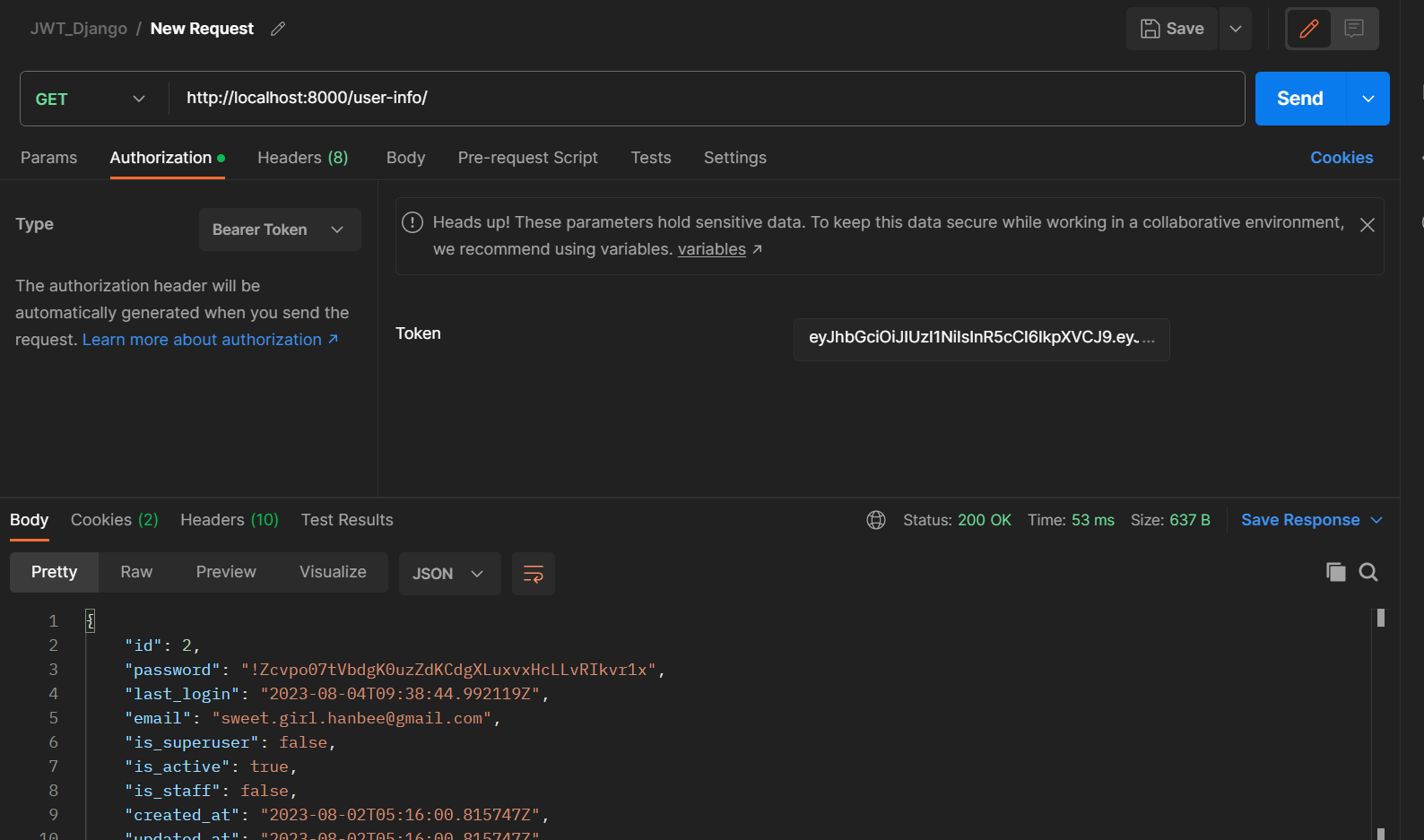
Postman으로 검사한 결과창입니다.
백엔드 개발자