학원 수업내용 복습 2023.11.22
🥑 DAO란?
DAO는 Data Access Object의 줄임말로 DB접속 및 기능을 구현하는 클래스다.
DB에 접속하기 위해 어떠한 내용을 넣어야 하는지 지금부터 알아보자.
🥑 DB 라이브러리 적용하기
코드를 작성하기에 앞서 나는 Oracle DB를 사용하였다.
자바에는 기본적으로 db에 접속하기 위해 여러 기능들을 구현해 놓은 클래스들이 있는데 그것을 import하여 사용한다.
import java.sql.*;
위 코드는 java패키지의 sql패키지 내에 있는 모든 클래스들을 사용하겠다는 의미이다.
하지만 자바에서는 우리들이 정확하게 어떠한 DB프로그램을 사용하는지는 알 수 없기 때문에 그러한 세부적인 기능을 구현한 라이브러리는 우리들이 직접 프로젝트 폴더에 넣어주어야 한다.
우리는 oracle을 사용할 예정이기 때문에 아래와 같은 라이브러리를 사용한다.

💡 ojdbc8-23.2.0.0.jar 다운로드 받는방법
위 링크에 들어가서 jar 버튼을 클릭하면 다운을 받을 수 있다.
라이브러리를 다운받았으면 이 라이브러리를 이클립스에서 우리가 DAO를 구현할 자바프로젝트 안으로 드래그하여 넣어준다!
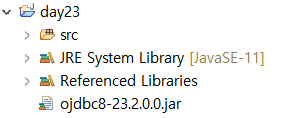
그 다음 자바 프로젝트를 우클릭하여 맨 아래의 properties 클릭
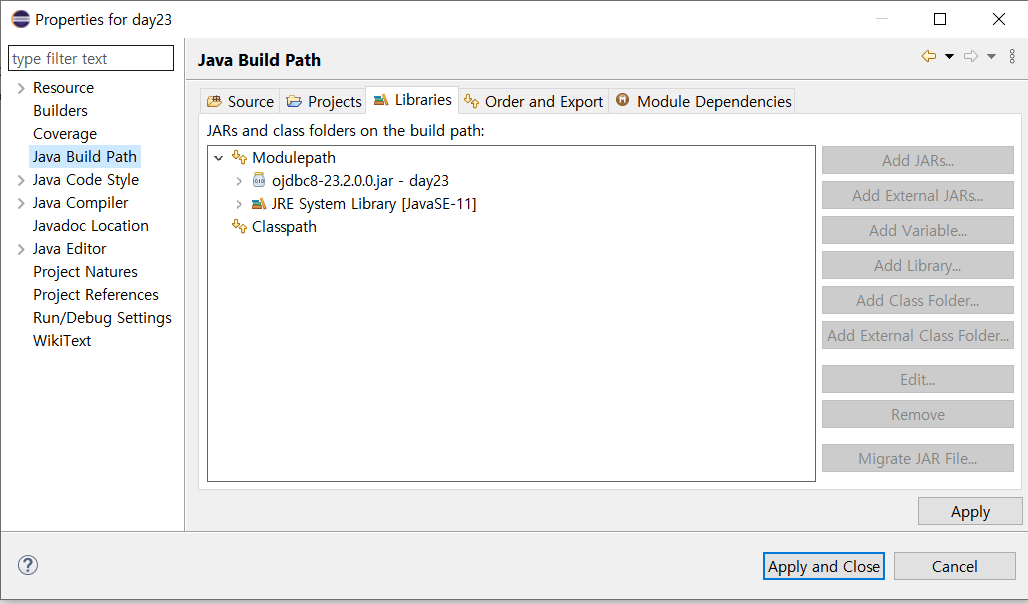
사진과 같이 4번째 Java Build Path를 클릭한 후에 Libraries 탭으로 들어가면 사진과 달리 oracle jdbc가 없을 것이다.
오른쪽에 있는 Add Jar를 클릭해 방금 프로젝트 안에 넣어놓은 라이브러리를 추가하면 위 사진처럼 라이브러리를 적용할 수 있을 것이다.
🥑 DB접속 코드 작성하기
이제 라이브러리를 적용하였으니 코드를 작성해보도록 하자.
import java.sql.*;
// DB접속을 위한 sql관련 클래스들 import하기

public class StudentDAO {	// 내가 만들 StudentDAO클래스

	private Connection conn;
    // 네트워크 및 포트 접속 확인을 위한 Connection
	private PreparedStatement pstmt;
    // 접속된 DB프로그램이 작업을 수행할 수 있는지 확인해주는 Statement
    // (PreparedStatement는 Statement의 서브클래스다)
	private ResultSet rs;
    // 결과값을 저장하여 한 행 단위로 불러올 수 있는 ResultSet

	private String url = "jdbc:oracle:thin:@192.168.138.1:1521:xe";
    // @뒤의 주소는 OracleDB에서 계정을 만들때 특별히 지정해주지 않았을 경우 나의 IP주소를 넣어주면 된다.
	private String user = "c##itbank1";
    // DB계정에서의 user이름
	private String password = "it";
    // DB계정에서의 pw


	private Connection connect() {
    // DB와 물리적 접속을 위한 기능!
    // (원하는 기능을 만들때마다 접속해야하므로 아예 접속 함수를 만든것이다)
		try {
			Class.forName("oracle.jdbc.driver.OracleDriver");
            // Class.forName은 클래스 이름을 매개변수로 받아 class객체를 리턴한다
			conn = DriverManager.getConnection(url, user, password);
            // url, user, password를 이용하여 DB와 접속함
		} catch(Exception e) { e.printStackTrace(); }
		return conn;
	}


	private void close() {
    // 기능을 마무리 할 때에는 꼭 close를 이용하여 닫아주어야 한다.
    // 기능을 만들때마다 마지막에 닫아주어야 하므로 아예 close함수를 만든것
		try {
			if(conn != null) conn.close();
			if(pstmt != null) pstmt.close();
			if(rs != null) rs.close();
		} catch(SQLException e) {
			e.printStackTrace();
		}
	}
}
🥑 예시 클래스 만들어보기
요즘 검볼 캐릭터들이 너무 귀여우므로 검볼에 나오는 학생들의 성적 정보를 조회하거나 추가/삭제/수정하는 기능을 만들어 보자!!

💡 Main 클래스
package gumball;

import java.util.Scanner;

public class Main {

	static StudentDTO input(Scanner sc) {
		StudentDTO dto = new StudentDTO();
		System.out.print("학생 이름 : ");
		dto.setName(sc.nextLine());
		System.out.print("국어 성적 입력 : ");
		dto.setKor(Integer.parseInt(sc.nextLine()));
		System.out.print("수학 성적 입력 : ");
		dto.setMath(Integer.parseInt(sc.nextLine()));
		System.out.print("영어 성적 입력 : ");
		dto.setEng(Integer.parseInt(sc.nextLine()));

		return dto;
	}


	public static void main(String[] args) {
		Handler handler = new Handler();
		Scanner sc = new Scanner(System.in);
		int menu = -1;

		String name;
		String subject;
		int score;

		while(menu != 0) {
			System.out.println("===학생 성적 관리시스템===");
			System.out.println("1. 성적 정보 전체 조회");
			System.out.println("2. 과목별 성적 조회");
			System.out.println("3. 성적 정보 입력");
			System.out.println("4. 성적 정보 삭제");
			System.out.println("5. 성적 정보 변경");
			System.out.println("0. 프로그램 종료");
			System.out.print("입력 >>> ");
			menu = Integer.parseInt(sc.nextLine());
			System.out.println();

			switch(menu) {
			case 1: // 성적 목록 조회
				handler.show();
				System.out.println();
				break;

			case 2:
				System.out.println("조회하실 과목을 입력해 주세요 > ");
				subject = sc.nextLine();
				handler.showsubject(subject);
				System.out.println();
				break;

			case 3: // 성적 정보 입력
				handler.add(input(sc));
				System.out.println();
				break;

			case 4: // 내용 삭제
				System.out.println("어떤 학생의 성적 데이터를 삭제하시겠습니까");
				System.out.print("학생 이름 입력 > ");
				name = sc.nextLine();
				handler.delete(name);
				System.out.println();
				break;

			case 5: // 정보 변경
				System.out.println("어떤 학생의 성적 정보를 수정하시겠습니까");
				System.out.print("학생 이름 입력 > ");
				name = sc.nextLine();
				System.out.println("어떤 과목의 성적을 수정하시겠습니까");
				System.out.print("과목 입력 > ");
				subject = sc.nextLine();
				System.out.print("변경 점수 입력 > ");
				score = Integer.parseInt(sc.nextLine());

				handler.update(name, subject, score);
				System.out.println();
				break;

			case 0:
				break;
			}

		} // end of while

		System.out.println("프로그램이 종료되었습니다.");
		sc.close();


	} // end of main

} // end of class
💡 Handler 클래스
package gumball;

public class Handler {
	StudentDAO dao = new StudentDAO();

	public void show() {
		dao.selectAll();
	}

	public void add(StudentDTO dto) {
		dao.insertStudent(dto);
	}

	public void delete(String name) {
		dao.deleteStudent(name);
	}

	public void update(String name, String subject, int score) {
		if ("국어".equals(subject)) subject = "kor";
		if ("수학".equals(subject)) subject = "math";
		if ("영어".equals(subject)) subject = "eng";
		dao.updateStudent(name, subject, score);
	}

	public void showsubject(String subject) {
		if ("국어".equals(subject)) subject = "kor";
		if ("수학".equals(subject)) subject = "math";
		if ("영어".equals(subject)) subject = "eng";
		dao.selectSubject(subject);

	}


}
💡 StudentDTO 클래스
DTO는 자바 클래스와 DB의 자료형과 그 이름을 연결해주는 역할로
테이블의 colum에 해당하는 부분을 작성해주면 된다.
필드 + getter + setter
package gumball;

public class StudentDTO {
	private String name;
	private int kor;
	private int math;
	private int eng;


	public String getName() {
		return name;
	}
	public void setName(String name) {
		this.name = name;
	}
	public int getKor() {
		return kor;
	}
	public void setKor(int kor) {
		this.kor = kor;
	}
	public int getMath() {
		return math;
	}
	public void setMath(int math) {
		this.math = math;
	}
	public int getEng() {
		return eng;
	}
	public void setEng(int eng) {
		this.eng = eng;
	}
}
💡 StudentDAO 클래스
package gumball;

import java.sql.*;

public class StudentDAO {
	private Connection conn;
	private PreparedStatement pstmt;
	private ResultSet rs;

	private String url = "jdbc:oracle:thin:@192.168.138.1:1521:xe";
	private String user = "c##itbank1";
	private String password = "it";

	private Connection connect() {
		try {
			Class.forName("oracle.jdbc.driver.OracleDriver");
			conn = DriverManager.getConnection(url, user, password);
		} catch(Exception e) { e.printStackTrace(); }

		return conn;
	}

	private void close() {
		try {
			if(conn != null) conn.close();
			if(pstmt != null) pstmt.close();
			if(rs != null) rs.close();
		} catch(SQLException e) {
			e.printStackTrace();
		}
	}


	public void selectAll() {
		try {
			String sql = "select * from student order by name";
			connect();
			pstmt = conn.prepareStatement(sql);
			rs = pstmt.executeQuery();

			System.out.println("\t  [국어] [수학] [영어]");
			while(rs.next()) {
				StudentDTO dto = new StudentDTO();
				dto.setName(rs.getString("name"));
				dto.setKor(rs.getInt("kor"));
				dto.setMath(rs.getInt("math"));
				dto.setEng(rs.getInt("eng"));

				System.out.printf("%5s\t : %3s | %3s | %3s\n",
						dto.getName(), dto.getKor(), dto.getMath(), dto.getEng());
			}

		} catch (SQLException e) {
			e.printStackTrace();
		}finally { close(); }
	} // end of selectAll


	public void insertStudent(StudentDTO dto) {
		try {
			String sql = "insert into Student values(?, ?, ?, ?)";
			connect();
			pstmt = conn.prepareStatement(sql);

			pstmt.setString(1, dto.getName());
			pstmt.setInt(2, dto.getKor());
			pstmt.setInt(3, dto.getMath());
			pstmt.setInt(4, dto.getEng());

			int row = pstmt.executeUpdate();
			System.out.println(row != 0 ? "등록 성공":"등록 실패");

		}catch(SQLException e) {
			e.printStackTrace();
		}finally { close(); }
	}// end of insert


	public void deleteStudent(String name) {
		try {
			String sql = "delete from Student where name = ?";
			connect();
			pstmt = conn.prepareStatement(sql);

			pstmt.setString(1, name);

			int row = pstmt.executeUpdate();
			System.out.println(row != 0 ? "삭제 완료":"삭제 실패");

		} catch(SQLException e) {
			e.printStackTrace();
		} finally { close(); }

	}// end of delete


	public void updateStudent(String name, String subject, int score) {
		try {
			String sql = "update Student set "+ subject + " = ? where name = ? ";
			connect();

			pstmt = conn.prepareStatement(sql);
			pstmt.setInt(1, score);
			pstmt.setString(2, name);

			int row = pstmt.executeUpdate();
			System.out.println(row != 0 ? "업데이트 완료":"업데이트 실패");

		}catch(SQLException e) {
			e.printStackTrace();
		}finally { close(); }
	}// end of update

	public void selectSubject(String subject) {
		try {
			String sql = "select name, "+ subject +" from student order by "+ subject +" desc";
			connect();
			pstmt = conn.prepareStatement(sql);
			rs = pstmt.executeQuery();

			if("kor".equals(subject)) {System.out.println("국어 성적 조회 결과");}
			if("math".equals(subject)) {System.out.println("수학 성적 조회 결과");}
			if("eng".equals(subject)) {System.out.println("영어 성적 조회 결과");}

			while(rs.next()) {
				StudentDTO dto = new StudentDTO();
				dto.setName(rs.getString("name"));

				if("kor".equals(subject)) {	// 국어
					dto.setKor(rs.getInt("kor"));
					System.out.printf("%4s\t: %s\n", dto.getName(), dto.getKor());
				}
				if("math".equals(subject)) {	// 수학
					dto.setMath(rs.getInt("math"));
					System.out.printf("%4s\t: %s\n", dto.getName(), dto.getMath());
				}
				if("eng".equals(subject)) {	// 영어
					dto.setEng(rs.getInt("eng"));
					System.out.printf("%4s\t: %s\n", dto.getName(), dto.getEng());
				}
			}

		}catch(SQLException e) {
			e.printStackTrace();
		}finally { close(); }

	}// end of selectSubject

}// end of class