
2023.11.30
🥨 background-image
요소의 배경 그림을 지정한다
background-image: url('짱구.jpg');
괄호 ( )안에 이미지의 경로를 넣으면 배경에 이미지가 삽입된다.
이때 중요한 것은 요소 자체의 크기가 정해지지 않으면 배경이 나타나지 않으므로
배경을 넣을 요소의 크기를 적어준다.
🥨 background-size
배경의 크기 (너비 및 높이)를 지정한다
background-size: 150px;
background-size: 100% augo; (2개 적을 경우 너비/높이 순)
배경의 크기를 적어주지 않으면 원본크기로 나와서 이미지가 잘리는 경우가 생긴다.
<div class="test" style="background-image: url('danbi.jpg');
                             width: 100px; height: 150px;">

</div>
↑ 이미지 잘림
<div class="test" style="background-image: url('danbi.jpg');
                             background-size: 100%;
                             background-repeat: no-repeat;
                             width: 100px; height: 150px;">

</div>
↑ 배경 사이즈 지정
🥨 background-repeat
배경의 반복을 설정한다
background-repeat: no-repeat;
기본값은 repeat(반복)으로 설정되어있다.
반복되기를 원하지 않는다면 no-repeat으로 적어줘야 한다.
repeat : 반복 (기본값)
no-repeat : 반복안함
repeat-x : x축으로만 반복
repeat-y : y축으로만 반복
<div class="test" style="background-image: url('danbi.jpg');
                             background-size: 50px;
                             background-repeat: repeat-x;
                         	/* x축으로 반복 설정 */
                             width: 200px; height: 150px;">

</div>
<div class="test" style="background-image: url('danbi.jpg');
                             background-size: 50px;
                             background-repeat: repeat-y;
                         	/* y축으로 반복 설정 */
                             width: 200px; height: 150px;">

</div>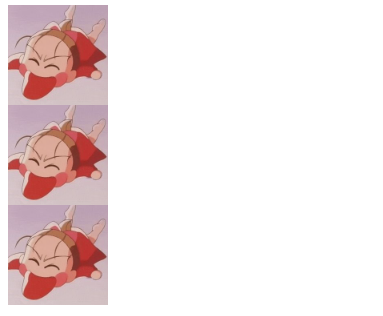
<div class="test" style="background-image: url('danbi.jpg');
                             background-size: 50px;
                             width: 200px; height: 150px;">

</div>
↑ repeat속성 따로 걸어주지 않아서 기본값인 반복으로 출력
🥨 background-position
배경의 위치를 설정한다
background-position: center center;
<div class="test1" style="background-image: url('danbi.jpg');
                             background-size: 50px;
                             background-repeat: no-repeat;
                             background-color: #eee;
                             background-position: top right;
                             width: 200px; height: 150px;">

</div>

<div class="test2" style="background-image: url('danbi.jpg');
                             background-size: 50px;
                             background-repeat: no-repeat;
                             background-color: #fff5b1;
                             background-position: center center;
                             width: 200px; height: 150px;">

</div>

<div class="test3" style="background-image: url('danbi.jpg');
                             background-size: 50px;
                             background-repeat: no-repeat;
                             background-color: #cbdce0;
                             background-position: bottom left;
                             width: 200px; height: 150px;">

</div>
각각 background-position은 다음과 같다
top right
center center
bottom left
🥨 배경 이미지 2개이상 삽입
이미지를 2개 이상 넣을 때에는 콤마(,)를 이용해서 구분한다.
이때 background-size는 구분이 안되고 모든 이미지가 동시에 적용된다.
<div style="width: 100%;
                    height: 300px;
                    background-image: url('danbi.jpg'),
                                      url('짱구.png');
                    background-repeat: repeat-x, no-repeat;
                    background-size: 100px auto;
                    background-position: 0 0, center;">
</div>
🔥 한줄평
배경이미지와 일반 img태그로 넣는 이미지와는 다르다!

기초부터 시작하는 감쟈 ※ 소개글 확인해주세요!! ※