MacOS에서 파일을 실행했을 때, 어떤 확장자를 어떤 프로그램(앱)으로 열어야 할지 코드로 관리하는 방법을 설명할게요.
duti 라는 CLI 도구를 사용하는데 아래 명령어로 설치 할 수 있어요.
duti 설치
brew install duti패키지명 확인
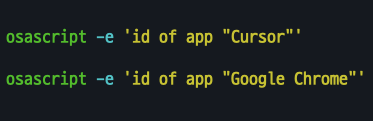
앱의 패키지명(Bundle Identifier)을 먼저 알아야 duti 정의 파일을 작성할 수 있어요. Mac OS에서 앱 패키지명(Bundle Identifier) 확인 하는 방법
을 참고하여 패키지명을 확인합니다.
Raycast 사용자라면 앱을 찾아서
Copy Bundle Identifier액션으로 쉽게 확인 할 수 있어요.
확장자별 사용할 프로그램 정의
duti 정의 파일을 ~/.duti 같은 경로에 작성합니다. 아래는 타입스크립트 .ts 확장자 파일을 Cursor(com.todesktop.230313mzl4w4u92) IDE로 실행하라는 정의입니다.
com.todesktop.230313mzl4w4u92 ts all저는 VS Code에서 Cursor IDE로 갈아탈 때 아래와 같은 정의를 사용했어요.
com.todesktop.230313mzl4w4u92 ts all
com.todesktop.230313mzl4w4u92 tsx all
com.todesktop.230313mzl4w4u92 json all
com.todesktop.230313mzl4w4u92 js all
com.todesktop.230313mzl4w4u92 mjs all
com.todesktop.230313mzl4w4u92 jsx all
com.todesktop.230313mzl4w4u92 cjs all
com.todesktop.230313mzl4w4u92 txt all
com.todesktop.230313mzl4w4u92 md all
com.todesktop.230313mzl4w4u92 mdx all
com.todesktop.230313mzl4w4u92 prisma all

com.todesktop.230313mzl4w4u92 zshrc all
com.todesktop.230313mzl4w4u92 vimrc all
duti 실행하여 적용
위 파일을 ~/.duti 경로에 저장했다면 아래 명령으로 실행하여 적용하면 끝.
duti ~/.duti
취미로 웹 서비스를 개발하며 생산성을 높여주는 도구와 문화, 스킬에 관심이 많습니다. https://www.youtube.com/c/ACupofCommit