curl 수행 시간을 확인 하려면 curl의 write out option에서 time_total 변수를 사용한다.
time_total의 시간 단위는 초이다.
(참고 블로그에는 밀리초로 되어 있으나 공식 사이트를 보면 초 단위임)
write out
--write-out
-w
다양한 변수를 통해 curl 전송 완료 후의 정보를 제공하는 option이다
인자로 표시할 정보 변수가 포함된 format이나 format이 저장된 파일명이 올 수 있음
write out의 정보 인자에 대한 상세는 curl 공식 문서를 참고
포맷 파일을 사용하는 경우
다양한 변수를 사용하거나 특정 포맷이 필요한 경우 포맷을 파일로 만들어 저장하고 -w 인자로 "@파일명"으로 지정
예시
아래 내용으로 time_format.txt 파일을 curl을 실행할 위치에 저장한다.
namelookup:    %{time_namelookup}\n
connect:       %{time_connect}\n
appconnect:    %{time_appconnect}\n
pretransfer:   %{time_pretransfer}\n
redirect:      %{time_redirect}\n
starttransfer: %{time_starttransfer}\n
--------------------------------------\n
total:         %{time_total}\n
curl 명령어를 사용한다.
curl -w @time_format.txt \
     --location 'https://httpbin.org/get'
출력 결과
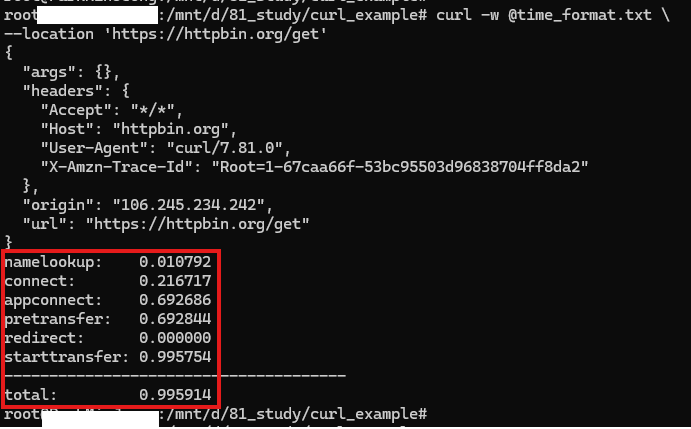
출력 시간 확인을 위한 변수만 사용하는 경우
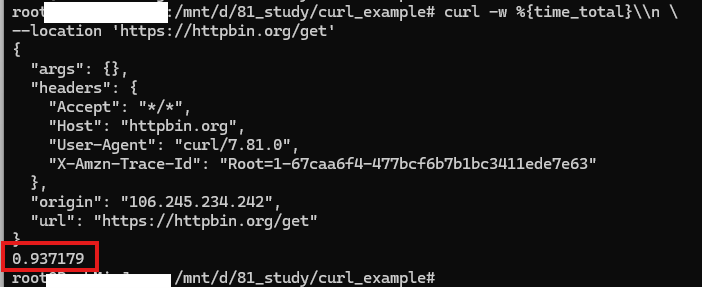
단순 응답 시간만 확인이 필요한 경우 %{time_total}을 -w 인자로 사용한다.
예시
curl -w %{time_total}\\n \
     --location 'https://httpbin.org/get'
출력 결과
참고

개발자