activity_main.xml
<?xml version="1.0" encoding="utf-8"?>
<LinearLayout xmlns:android="http://schemas.android.com/apk/res/android"
    xmlns:app="http://schemas.android.com/apk/res-auto"
    xmlns:tools="http://schemas.android.com/tools"
    android:layout_width="match_parent"
    android:layout_height="match_parent"
    android:orientation="vertical"
    tools:context=".MainActivity">

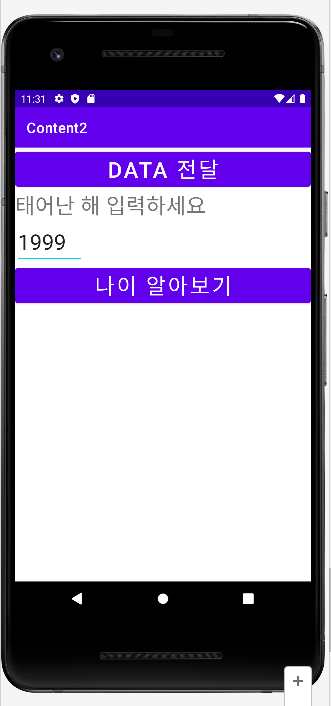
    <Button
        android:id="@+id/btnMain"
        android:text="data 전달"
        android:textSize="30dp"
        android:layout_width="match_parent"
        android:layout_height="wrap_content"/>

    <TextView
        android:text="태어난 해 입력하세요"
        android:textSize="30dp"
        android:layout_width="match_parent"
        android:layout_height="wrap_content"/>
    <EditText
        android:id="@+id/edtYear"
        android:hint="year>>"
        android:textSize="30dp"
        android:layout_width="wrap_content"
        android:layout_height="wrap_content"/>
    <Button
        android:id="@+id/btnAge"
        android:text="나이 알아보기"
        android:textSize="30dp"
        android:layout_width="match_parent"
        android:layout_height="wrap_content"/>
</LinearLayout>
MainActivity.java
package com.example.content2;

import androidx.appcompat.app.AppCompatActivity;

import android.content.Intent;
import android.os.Bundle;
import android.view.View;
import android.widget.Button;
import android.widget.EditText;

public class MainActivity extends AppCompatActivity {
Button btnMain, btnAge;
EditText edtyear;
    @Override
    protected void onCreate(Bundle savedInstanceState) {
        super.onCreate(savedInstanceState);
        setContentView(R.layout.activity_main);
        setContentView(R.layout.activity_main);
        edtyear = findViewById(R.id.edtYear);
        btnAge = findViewById(R.id.btnAge);

        btnAge.setOnClickListener(new View.OnClickListener() {
            @Override
            public void onClick(View view) {
                Intent in = new Intent(MainActivity.this, SecondActivity.class);
                String year = edtyear.getText().toString();
                int yeari = Integer.parseInt(year);
                in.putExtra("year", yeari);
                startActivity(in);
            }
        });


        btnMain = findViewById(R.id.btnMain);
        btnMain.setOnClickListener(new View.OnClickListener() {
            @Override
            public void onClick(View view) {
                Intent intent = new Intent(MainActivity.this, SecondActivity.class);
                intent.putExtra("name", "kimaldong"); //getStringExtra("name")
                intent.putExtra("age",22);

                startActivity(intent);
            }
        });
    }
}
activity_second.xml
<?xml version="1.0" encoding="utf-8"?>
<LinearLayout xmlns:android="http://schemas.android.com/apk/res/android"
    xmlns:app="http://schemas.android.com/apk/res-auto"
    xmlns:tools="http://schemas.android.com/tools"
    android:layout_width="match_parent"
    android:layout_height="match_parent"
    android:orientation="vertical"
    tools:context=".SecondActivity">
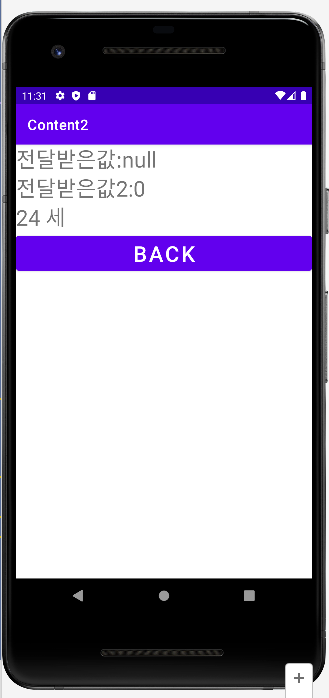
    <TextView
        android:id="@+id/tvname"
        android:text="전달받은값:"
        android:textSize="30dp"
        android:layout_width="match_parent"
        android:layout_height="wrap_content"
        />

    <TextView
        android:id="@+id/tvage"
        android:text="전달받은값2:"
        android:textSize="30dp"
        android:layout_width="match_parent"
        android:layout_height="wrap_content"
        />

    <TextView
        android:id="@+id/realAge"
        android:text=" 세 "
        android:textSize="30dp"
        android:layout_width="match_parent"
        android:layout_height="wrap_content"/>

    <Button
        android:id="@+id/btnback"
        android:text="back"
        android:textSize="30dp"
        android:layout_width="match_parent"
        android:layout_height="wrap_content"/>
</LinearLayout>
SecondActivity.java
package com.example.content2;

import androidx.appcompat.app.AppCompatActivity;

import android.content.Intent;
import android.os.Bundle;
import android.view.View;
import android.widget.Button;
import android.widget.TextView;

public class SecondActivity extends AppCompatActivity {
Button btnBack;
TextView tvname, tvage, realAge;

    @Override
    protected void onCreate(Bundle savedInstanceState) {
        super.onCreate(savedInstanceState);
        setContentView(R.layout.activity_second);
        btnBack = findViewById(R.id.btnback);
        tvname = findViewById(R.id.tvname);
        tvage = findViewById(R.id.tvage);
        realAge = findViewById(R.id.realAge);

        Intent intent = getIntent();
        int realage = intent.getIntExtra("year",0);
        realAge.setText(2022 - realage + 1 + realAge.getText().toString());


        String name = intent.getStringExtra("name");
        tvname.setText(tvname.getText().toString() + name);
        int age = intent.getIntExtra("age",0);
        tvage.setText(tvage.getText().toString() + age);
        btnBack.setOnClickListener(new View.OnClickListener() {
            @Override
            public void onClick(View view) {
                finish();
            }
        });
    }
}

ㅎㅇ