[ Unreal Programming/ C++ #2 TPS-Projects/ Chase ]
Chase 기능
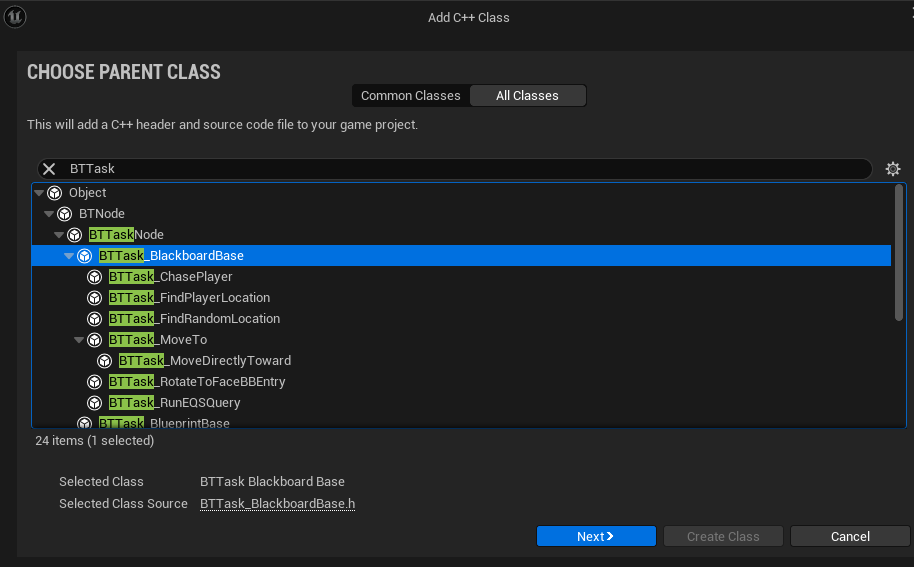
- sequence Node를 만들기 위해 BTTask_BlackboardBase 형태의 C++ 클래스를 하나 만든다
- UBTTask_FindPlayerLocation 이라고 짓는다
BTTask_FindPlayerLocation.h
#pragma once

#include "CoreMinimal.h"
#include "BehaviorTree/Tasks/BTTask_BlackboardBase.h"
#include "BTTask_FindPlayerLocation.generated.h"

UCLASS()
class TEST_PROJECT_PLAYER_API UBTTask_FindPlayerLocation : public UBTTask_BlackboardBase
{
	GENERATED_BODY()

public:
	explicit UBTTask_FindPlayerLocation(FObjectInitializer const& ObjectInitializer);

	virtual EBTNodeResult::Type ExecuteTask(UBehaviorTreeComponent& OwnerComp, uint8* NodeMemory) override;

private:
	UPROPERTY(EditAnywhere, BlueprintReadWrite, Category = "Search", meta = (AllowPrivateAccess = "true"))
	bool SearchRandom = false;

	UPROPERTY(EditAnywhere, BlueprintReadWrite, Category = "Search", meta = (AllowPrivateAccess = "true"))
	float SearchRadius = 250.0f;
};
explicit UBTTask_FindPlayerLocation(FObjectInitializer const& ObjectInitializer);
- 생성자 선언입니다. FObjectInitializer를 매개변수로 받아, 부모 클래스의 초기화 로직을 전달.
- explicit 키워드는 암시적 변환을 방지하여, 인스턴스를 생성할 때 명시적으로 호출되도록 합니다.
virtual EBTNodeResult::Type ExecuteTask(UBehaviorTreeComponent& OwnerComp, uint8* NodeMemory) override;
- AI의 동작을 정의하는 로직을 여기에 작성
BTTask_FindPlayerLocation.cpp
#include "BTTask_FindPlayerLocation.h"
#include "NavigationSystem.h"
#include "BehaviorTree\BlackboardComponent.h"
#include "GameFramework\Character.h"
#include "Kismet\GameplayStatics.h"


UBTTask_FindPlayerLocation::UBTTask_FindPlayerLocation(FObjectInitializer const& ObjectInitializer)
{
	NodeName = TEXT("Find Player Location");
}

EBTNodeResult::Type UBTTask_FindPlayerLocation::ExecuteTask(UBehaviorTreeComponent& OwnerComp, uint8* NodeMemory)
{
	// get player character
	if (auto* const Player = UGameplayStatics::GetPlayerCharacter(GetWorld(), 0))
	{

		// get player location to use as an origin
		auto const PlayerLocation = Player->GetActorLocation();
		if (SearchRandom)
		{
			FNavLocation Loc;

			// get the navigation system and generate a random location near the player
			if (auto* const Navsys = UNavigationSystemV1::GetCurrent(GetWorld()))
			{
				if (Navsys->GetRandomPointInNavigableRadius(PlayerLocation, SearchRadius, Loc))
				{
					OwnerComp.GetBlackboardComponent()->SetValueAsVector(GetSelectedBlackboardKey(), Loc.Location);
					FinishLatentTask(OwnerComp, EBTNodeResult::Succeeded);
					return EBTNodeResult::Succeeded;
				}
			}
		}
		else
		{
			OwnerComp.GetBlackboardComponent()->SetValueAsVector(GetSelectedBlackboardKey(), PlayerLocation);
			return EBTNodeResult::Succeeded;
		}
	}
	return EBTNodeResult::Failed;
}UBTTask_FindPlayerLocation::UBTTask_FindPlayerLocation(FObjectInitializer const& ObjectInitializer) { NodeName = TEXT("Find Player Location"); }
- Behavior Tree Task의 이름을 설정
if (auto* const Player = UGameplayStatics::GetPlayerCharacter(GetWorld(), 0))
- 게임 월드에서 인덱스 0에 해당하는 플레이어 캐릭터를 가져옵니다.
FNavLocation Loc;
// get the navigation system and generate a random location near the player
if (auto* const Navsys = UNavigationSystemV1::GetCurrent(GetWorld()))
{
	if (Navsys->GetRandomPointInNavigableRadius(PlayerLocation, SearchRadius, Loc))
	{
    	OwnerComp.GetBlackboardComponent()->SetValueAsVector(GetSelectedBlackboardKey(), Loc.Location);
	 	FinishLatentTask(OwnerComp, EBTNodeResult::Succeeded);
		return EBTNodeResult::Succeeded;
	}
}
Navsys->GetRandomPointInNavigableRadius: 내비게이션 시스템을 사용해, 플레이어의 위치를 중심으로 SearchRadius 반경 내에서 이동 가능한 무작위 위치를 생성합니다. 이 위치는 Loc 변수에 저장됩니다.OwnerComp.GetBlackboardComponent()->SetValueAsVector(GetSelectedBlackboardKey(), Loc.Location): 생성된 무작위 위치를 블랙보드에 저장합니다.GetSelectedBlackboardKey()는 블랙보드에서 설정된 키를 반환하고,SetValueAsVector()는 해당 키에 좌표 값을 할당
OwnerComp.GetBlackboardComponent()->SetValueAsVector(GetSelectedBlackboardKey(), PlayerLocation);
return EBTNodeResult::Succeeded;
- 플레이어의 위치를 블랙보드에 저장
Adding Sight Perception To The Enemy And Player
- Sight Perception 추가 하기 위해 기존에 만든 AIController 스크립트에 추가 한다
ACAIControllerEnemy.h
#pragma once

#include "CoreMinimal.h"
#include "AIController.h"
#include "Perception/AIPerceptionTypes.h"
#include "BehaviorTree/BlackboardComponent.h"
#include "BehaviorTree/BehaviorTreeComponent.h"
#include "CAIControllerEnemy.generated.h"


UCLASS()
class TEST_PROJECT_PLAYER_API ACAIControllerEnemy : public AAIController
{
	GENERATED_BODY()

public:
	explicit ACAIControllerEnemy(FObjectInitializer const& objectInitializer);

protected:
	virtual void OnPossess(APawn* Inpawn) override;

private :
	class UAISenseConfig_Sight* SightConfig;

	void SetupPerceptionSystem();

	UFUNCTION()
	void OnTargetDetected(AActor* Actor, FAIStimulus const Stimulus);
};
ACAIControllerEnemy.cpp
#include "CAIControllerEnemy.h"
#include "CEnemy.h"
#include "Perception\AIPerceptionComponent.h"
#include "Perception\AISenseConfig_Sight.h"
#include "CTPSPlayer.h"

ACAIControllerEnemy::ACAIControllerEnemy(FObjectInitializer const& objectInitializer)
{
	SetupPerceptionSystem();
}

void ACAIControllerEnemy::OnPossess(APawn* Inpawn)
{
	... 생략
}

void ACAIControllerEnemy::SetupPerceptionSystem()
{
	SightConfig = CreateDefaultSubobject<UAISenseConfig_Sight>(TEXT("Sight Config"));
	if (SightConfig)
	{
		SetPerceptionComponent(*CreateDefaultSubobject<UAIPerceptionComponent>(TEXT("Perception Comp")));
		SightConfig->SightRadius = 500.0f;
		SightConfig->LoseSightRadius = SightConfig->SightRadius + 25.0f;
		SightConfig->PeripheralVisionAngleDegrees = 90.0f;
		SightConfig->SetMaxAge(5.0f);
		SightConfig->AutoSuccessRangeFromLastSeenLocation = 520.0f;
		SightConfig->DetectionByAffiliation.bDetectEnemies = true;
		SightConfig->DetectionByAffiliation.bDetectFriendlies = true;
		SightConfig->DetectionByAffiliation.bDetectNeutrals = true;


		GetPerceptionComponent()->SetDominantSense(*SightConfig->GetSenseImplementation());
		GetPerceptionComponent()->OnTargetPerceptionUpdated.AddDynamic(this, &ACAIControllerEnemy::OnTargetDetected);
		GetPerceptionComponent()->ConfigureSense((*SightConfig));
	}
}

void ACAIControllerEnemy::OnTargetDetected(AActor* Actor, FAIStimulus const Stimulus)
{
	if (auto* const ch = Cast<ACTPSPlayer>(Actor))
	{
		GetBlackboardComponent()->SetValueAsBool("CanSeePlayer", Stimulus.WasSuccessfullySensed());
	}
}SetPerceptionComponent(*CreateDefaultSubobject<UAIPerceptionComponent>(TEXT("Perception Comp")));
- I 지각 컴포넌트를 생성하고, AI 컨트롤러에 설정
- 이 컴포넌트는 AI의 모든 감각을 통합하고 관리하는 역할
SightConfig->SightRadius = 500.0f;
SightConfig->LoseSightRadius = SightConfig->SightRadius + 25.0f;
SightConfig->PeripheralVisionAngleDegrees = 90.0f;
SightConfig->SetMaxAge(5.0f);
SightConfig->AutoSuccessRangeFromLastSeenLocation = 520.0f;
- SightRadius
- AI가 감지할 수 있는 시각적 범위(반지름)입니다. 이 값은 500.0f로 설정되어 있어, AI는 이 범위 내에서 객체를 감지할 수 있습니다.
- LoseSightRadius
- AI가 시야에서 대상이 벗어나는 반경입니다. 이 값은 SightRadius에 25.0f를 더한 값으로, 대상이 시야에서 완전히 벗어나기 전까지 AI가 인식할 수 있는 최대 범위입니다.
- PeripheralVisionAngleDegrees
- AI의 주변 시야 각도입니다. 이 값은 90도이며, AI는 자신의 정면을 중심으로 90도 범위 내에서만 시각적으로 인식할 수 있습니다.
- SetMaxAge
- AI가 마지막으로 본 대상을 기억하는 시간(5초)입니다. 이 시간이 지나면 AI는 대상을 기억하지 못하게 됩니다.
- AutoSuccessRangeFromLastSeenLocation
- AI가 마지막으로 본 위치로부터 520.0f 범위 내에서는 대상이 시야에서 벗어나도 여전히 인식 성공으로 간주됩니다.
- Sight Perception Enemey 뿐만 아니라 Player에게도 추가 한다
ACTPSPlayer.h
private:

	class UAIPerceptionStimuliSourceComponent* StimulusSource;
	void SetupStimulusSource();
ACTPSPlayer.cpp
#include "Perception\AIPerceptionStimuliSourceComponent.h"
#include "Perception\AISense_Sight.h"

ACTPSPlayer::ACTPSPlayer()
{
	... 생략

    SetupStimulusSource();
}

	... 생략

void ACTPSPlayer::SetupStimulusSource()
{
	StimulusSource = CreateDefaultSubobject<UAIPerceptionStimuliSourceComponent>(TEXT("Stimulus"));
	if (StimulusSource)
	{
		StimulusSource->RegisterForSense(TSubclassOf<UAISense_Sight>());
		StimulusSource->RegisterWithPerceptionSystem();
	}
}
StimulusSource = CreateDefaultSubobject<UAIPerceptionStimuliSourceComponent>(TEXT("Stimulus"));
- StimulusSource는 UAIPerceptionStimuliSourceComponent 타입의 컴포넌트로, AI가 감지할 수 있는 자극(Stimuli)을 제공하는 역할
- CreateDefaultSubobject는 이 자극 소스를 생성하고, "Stimulus"라는 이름을 부여
- 이렇게 생성된 자극 소스 컴포넌트는 나중에 플레이어의 행동을 AI가 감지할 수 있도록 하는 중요한 역할
StimulusSource->RegisterForSense(TSubclassOf<UAISense_Sight>());
StimulusSource->RegisterWithPerceptionSystem();
- RegisterForSense는 자극 소스를 AI의 특정 감각(AISense)에 등록하는 함수
- 이 코드에서는 UAISense_Sight, 즉 시각 감각에 플레이어를 등록하고 있습니다. 이를 통해 AI는 플레이어를 시각적으로 감지할 수 있게 됩니다.
- RegisterWithPerceptionSystem은 자극 소스를 언리얼 엔진의 AI 지각 시스템(Perception System)에 등록하는 함수
- 이를 통해 플레이어 캐릭터가 AI에게 인식될 수 있는 자극 소스로 시스템에 추가
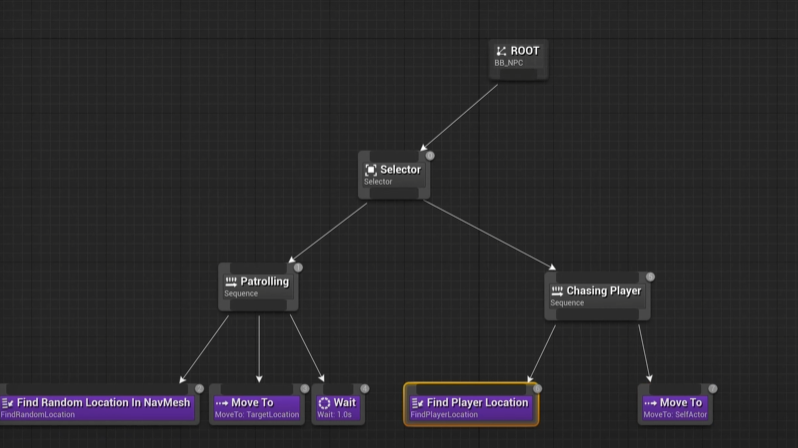
- 시퀀스 하나를 만들고 기존에 만든 시퀀스와 이름을 Patrolling, Chasing Player로 바꾼뒤
- C++로 만든 노드를 추가 하고 기존에 있는 Move to 노드를 추가 한다
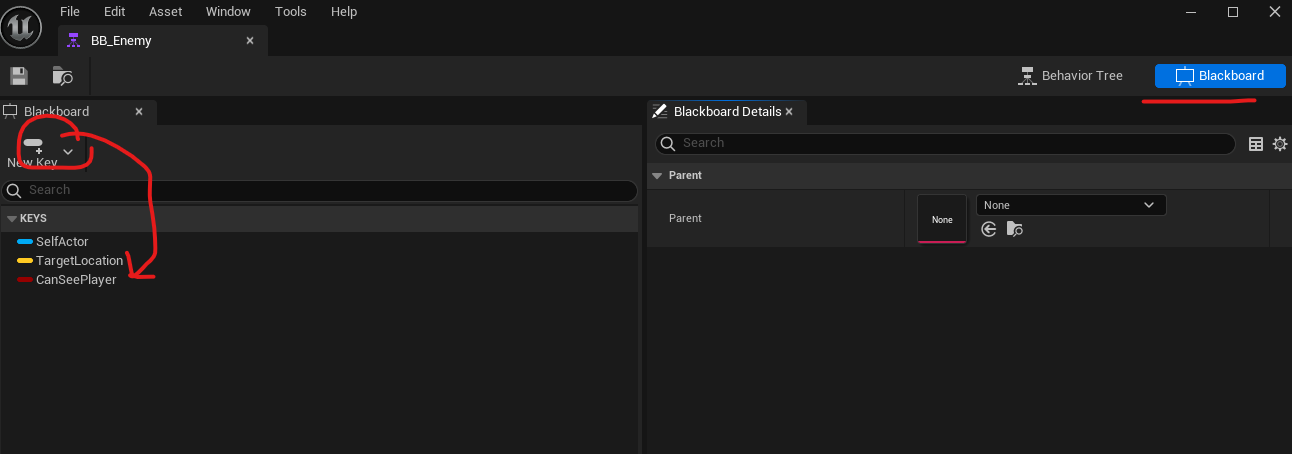
- 우측 상단에 Blackboard에서 CanSeePlayer라는 이름의 bool 변수 key를 추가한다
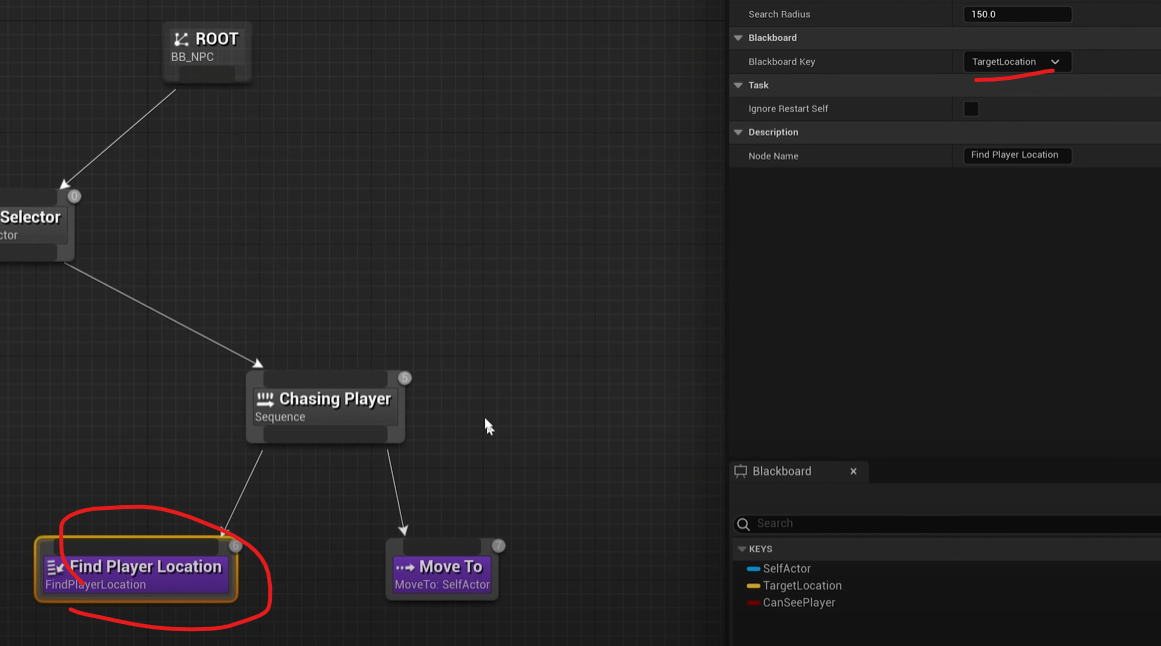
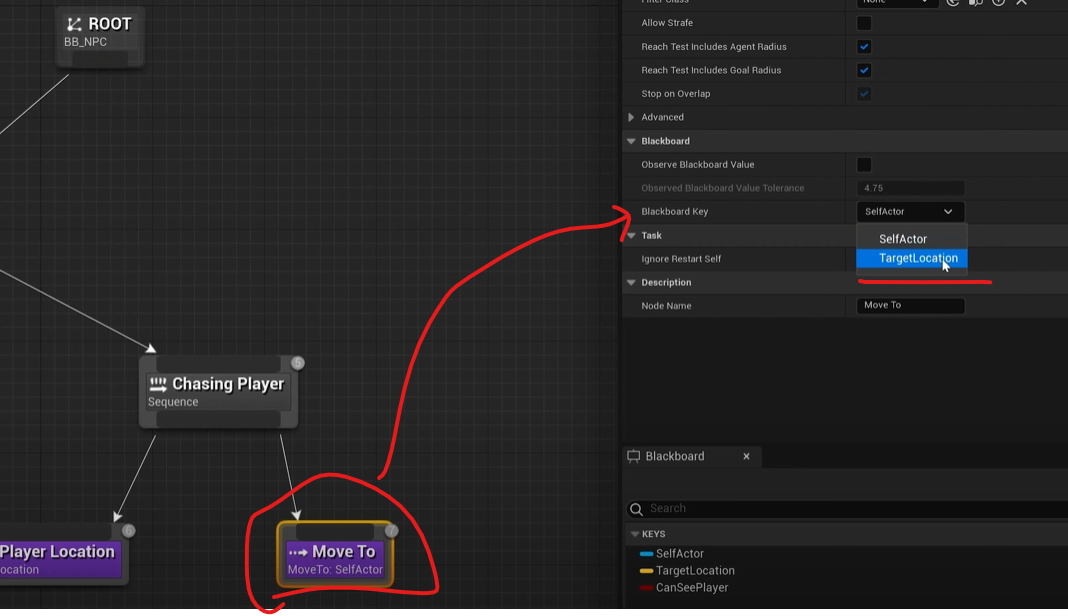
- TargetLocation 값을 넣어준다
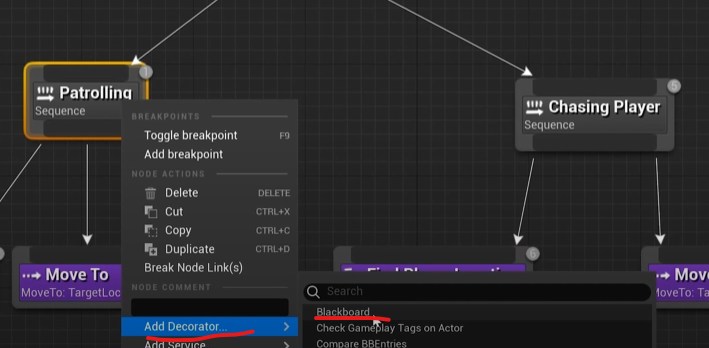
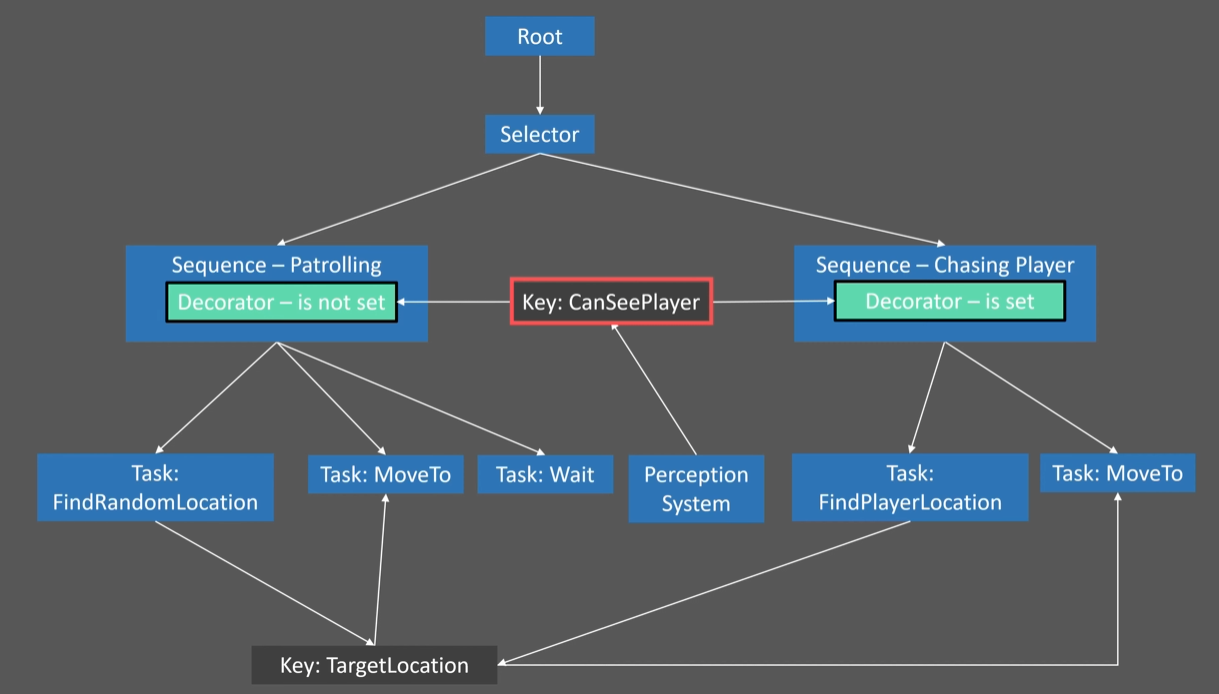
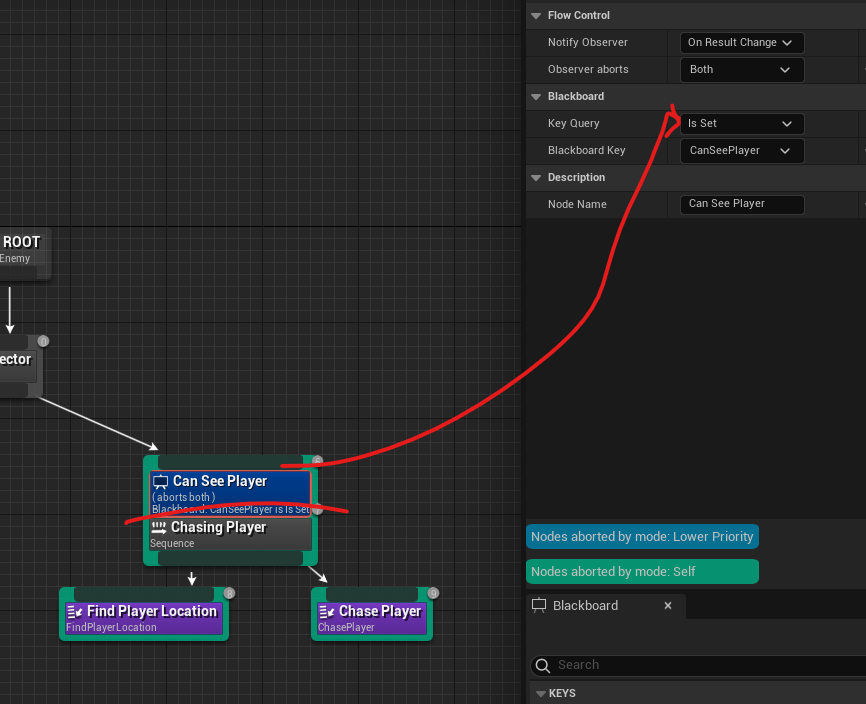
- Patrolling 과 Chasing Player 의 실행이 중첩되면 안되므로 Blackboardkey 추가 한다
-
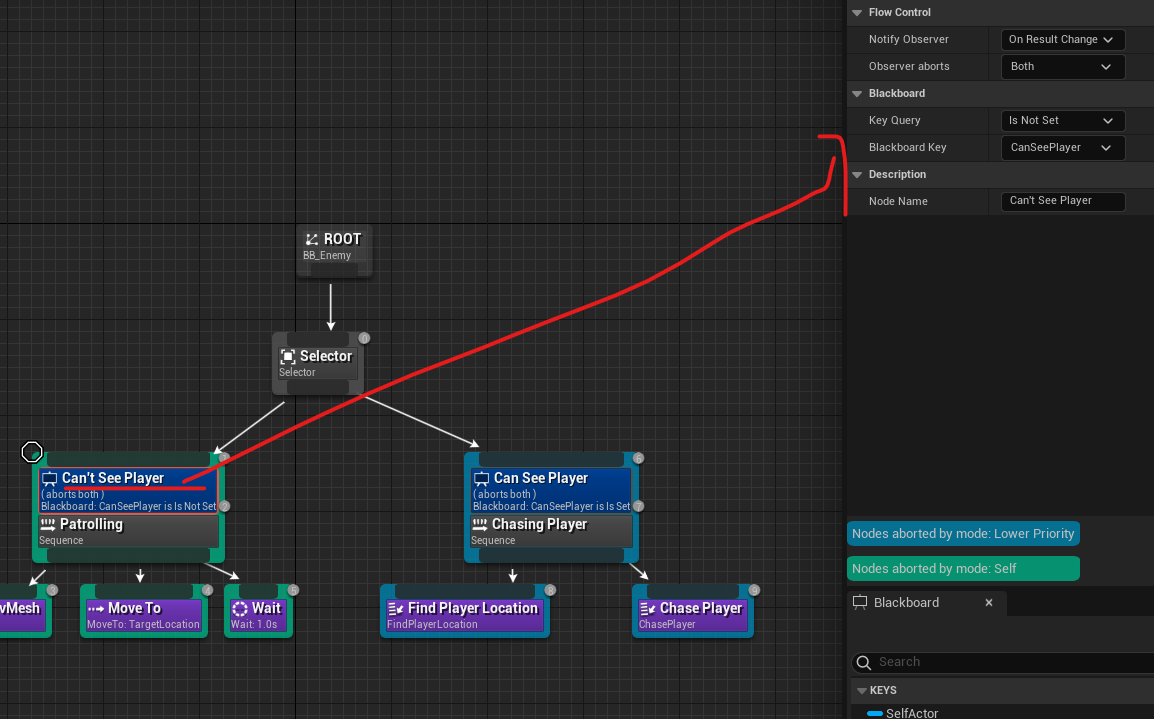
추가한 Blackboardkey의 값을 Blackboard에서 선언한 bool 값으로 구분 짓는다
-
Patrolling = Is Not Set
-
Chasing Player = Is Set
-
Improving AI Chasing
- 이정도만 해도 잘 따라오긴 하나 뭔가 불안한 모습을 보이며 따라 온다 이유는 Patrolling이 실행 되는 와 Chasing이 시작 되어도 Patrolling을 끝까지 수행하뒤 따라 오기 때문이다.
- C++로직으로 Chasing일대 Patrolling을 즉각 중지하고 Chasing 하게 끔 할 것이다.
- sequence Node를 만들기 위해 BTTask_BlackboardBase 형태의 C++ 클래스를 하나 만든다
- BTTask_ChasePlayer 라고 짓는다
BTTask_ChasePlayer.h
#pragma once

#include "CoreMinimal.h"
#include "BehaviorTree/Tasks/BTTask_BlackboardBase.h"
#include "BTTask_ChasePlayer.generated.h"

UCLASS()
class TEST_PROJECT_PLAYER_API UBTTask_ChasePlayer : public UBTTask_BlackboardBase
{
	GENERATED_BODY()

public:
	explicit UBTTask_ChasePlayer(FObjectInitializer const& ObjectInitializer);
	EBTNodeResult::Type ExecuteTask(UBehaviorTreeComponent& OwnerComp, uint8* NodeMemory) override;
};
BTTask_ChasePlayer.cpp
#include "BTTask_ChasePlayer.h"

#include "CAIControllerEnemy.h"
#include "BehaviorTree\BlackboardComponent.h"
#include "Blueprint\AIBlueprintHelperLibrary.h"

UBTTask_ChasePlayer::UBTTask_ChasePlayer(FObjectInitializer const& ObjectInitializer)
{
	NodeName = TEXT("Chase Player");
}

EBTNodeResult::Type UBTTask_ChasePlayer::ExecuteTask(UBehaviorTreeComponent& OwnerComp, uint8* NodeMemory)
{
	// get target location from blackboard via the Enemy Controller
	if (auto* const cont = Cast<ACAIControllerEnemy>(OwnerComp.GetAIOwner()))
	{
		auto const PlayerLocation = OwnerComp.GetBlackboardComponent()->GetValueAsVector(GetSelectedBlackboardKey());

		// move to the Player's location
		UAIBlueprintHelperLibrary::SimpleMoveToLocation(cont, PlayerLocation);

		// finish with success
		FinishLatentTask(OwnerComp, EBTNodeResult::Succeeded);
		return EBTNodeResult::Succeeded;
	}

	return EBTNodeResult::Failed;
}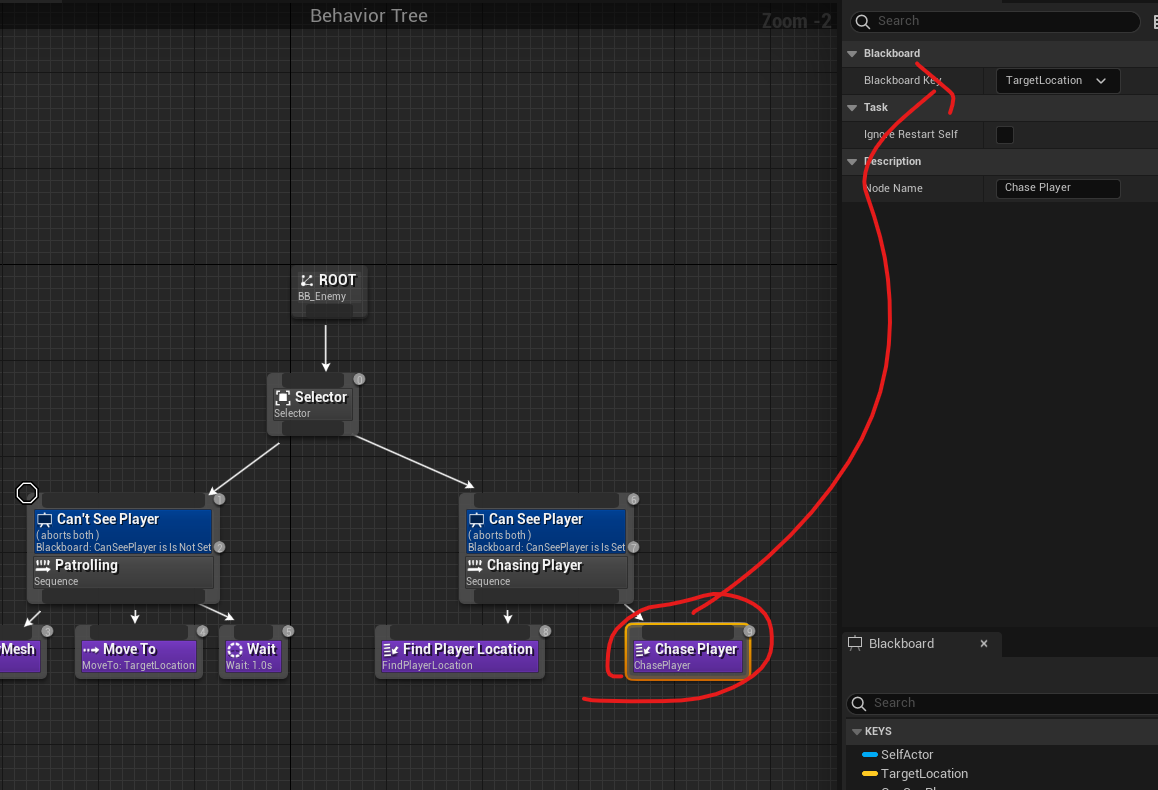
- 이후 BT_Enemy로 넘어가 Move to 노드를 지우고, Chase Player 노드를 추가 한뒤 Blackboardkey에 TargetLocation를 이룬다
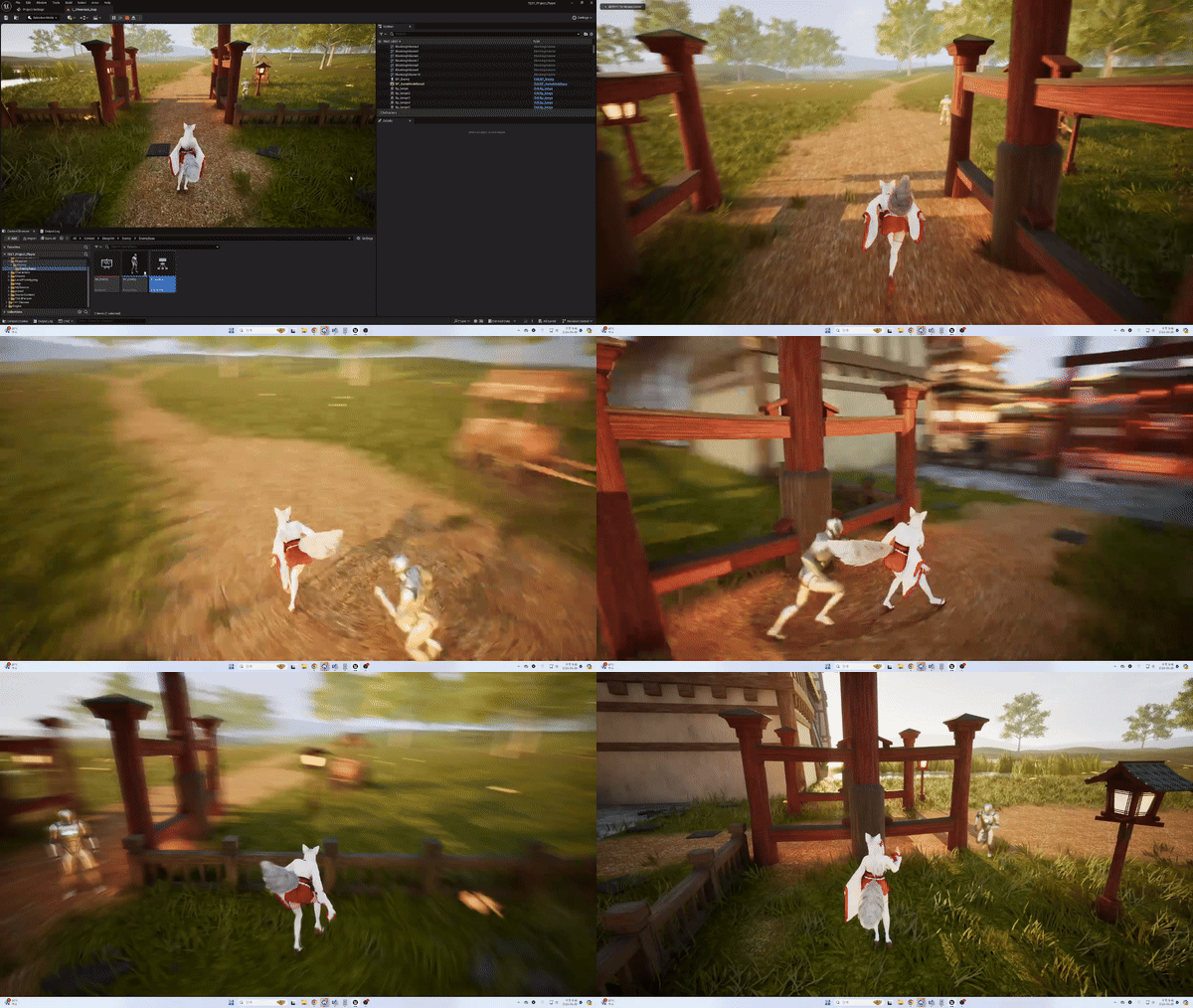
- 결과를 확인한다

This is my study archive