HLS 삽질
HLS
HLS란?
- Http Live Streaming의 줄임말
- HLS는 안정성을 위해 설계되었으며 네트워크 환경에 따라 재생을 최적화하며 네트워크 환경에 동적으로 대응함
.m3u8확장자를 가짐- 스트리밍 데이터를 인코딩해서 segment 단위로 짜르고 어떤 파일을 재생해야 하는 지에 대한 정보는
.m3u8파일을 이용해서 클라이언트에게 전달
HLS의 장점
- HTTP를 사용하기 때문에다른 프로토콜을 사용하는 방식보다 도입 비용을 절약가능
- 캐싱같은 HTTP의 장점 활용 가능
큰그림
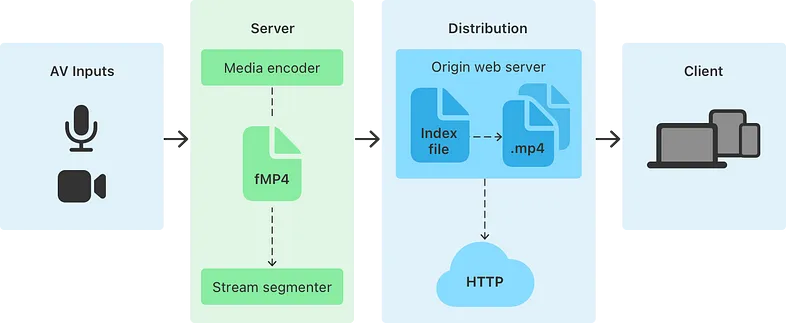
일반적인 경우 AV Inputs를 통해 데이터를 서버로 보내고 서버는 Media encoder를 통해 Stream semegmenter로 변환한다. 이때 HEVC, AG-3를 통해 인코딩한다.
인코딩한 결과는 Fragmented MPEG-4파일 or MPEG- transport stream 로 나온다.
Fragmented MPEG-4 (fMP4) 파일:
- 보통 VOD(Video On Demand) 콘텐츠 사용
- Fragmented MPEG-4는 단일 파일 내에서 비디오 및 오디오 트랙을 조각낸 형식
- 주로 .m4s 확장자
- 사용자가 미디어를 시청하는 동안 서버로부터 요청한 조각(fragment)을 순차적으로 다운로드하여 재생
MPEG-2 전송 스트림(Transport stream):
- 실시간 라이브 이벤트에 사용됩니다.
- MPEG-2 전송 스트림은 비디오 및 오디오 데이터를 여러 개의 패킷으로 분할하여 전송하는 형식
- 이 형식은 일반적으로 .ts 확장자를 가짐 (transport stream의 앞글자)
라이브 이벤트의 경우, 스트리밍이 실시간으로 발생하므로 미디어 스트림이 지속적으로 전송
Stream segmenter는 비디오/오디오 스트림을 일정 시간의 조각(segment)로 나눔
서버는 이 segment들의 목록을 가진 index file을 생성하고 저장함
HSL가 지원하는 Segment는 Fragment MPEG-4, MPEG-2 Transport Streams이외에도 Packed Audio, WebVTT, IMSC Subtitles가 있음
- Packed Audio
- 오디오 샘플과 ID3 태그가 프레임과 타임스탬프 없이 함께 담긴 형태의 세그먼트
- 오디오나 타임스탬프 정보가 없기 때문에 오디오만 사용될 때 또는 라디오 스트리밍 같이 시간 동기화가 크게 중요하지 않은 상황에서 사용
- WebVTT
- Web Video Text Tracks. 자막, 부제 또는 기타 텍스트 정보를 비디오 플레이어에 사용
- IMSC Subtitles
- WebVTT 보다 더 복잡한 시나리오와 고급 자막 스타일링을 지원하기 위한 미디어 세그먼트
Live Event Index File Update
라이브 스트리밍의 경우 위 index File에 있는 segment 리스트를 계속 갱신해야하는데 일반적으로는 아래와 같이 진행됨
- 인덱스 파일의 동적 업데이트 -> 라이브 스트림에서 주기적으로 인덱스 파일 업데이트, 이때 사용된 segment는 제거, 새로운 segments를 추가해서 최신 상태로 유지
- 특정 시간 간격 또는 segment 갯수 기준 업데이트 -> 정의된 시간간격 혹은 특정 segments 갯수를 기준으로 업데이트함
- 시간 기반 세그먼트 수명 설정 -> 각 segment에 수명을 부여해서 해당 시간이 초과한 경우 segment 자동삭제
- 파일 시스템 이벤트 감지 -> 새 segment가 생성되면 자동으로 인덱스 파일 업데이트
.m3u8 파일
segment들의 URI들을 담고 있는 index 파일를 서버에서 관리한다고 했는데 해당 파일을 playlist파일 이라고도함
각종 태그들로 관리되고있는데 해당 태그에 대해서는 나중에 다룸
사용법?
// Create a player instance.
val player = ExoPlayer.Builder(context).build()
// Set the media item to be played.
player.setMediaItem(MediaItem.fromUri(hlsUri))
// Prepare the player.
player.prepare()
URI가 HLS playlist의 URI인 경우 위와 같이 간단하게 설정이 가능함.
만약 URI가 .m3u8이 아닌 경우 MediaItem.Builder의 setMimeType에 MimeTypes.APPLICATION_M3U8을 설정해서 명시적으로 선언할 수 있다.
만약 커스텀 옵션을 사용하고 싶다면 HlsMediaSource를 ExoPlayer에 전달해주면 된다.
// Create a data source factory.
val dataSourceFactory: DataSource.Factory = DefaultHttpDataSource.Factory()
// Create a HLS media source pointing to a playlist uri.
val hlsMediaSource =
  HlsMediaSource.Factory(dataSourceFactory).createMediaSource(MediaItem.fromUri(hlsUri))
// Create a player instance.
val player = ExoPlayer.Builder(context).build()
// Set the HLS media source as the playlist with a single media item.
player.setMediaSource(hlsMediaSource)
// Prepare the player.
player.prepare()
Creating high quality HLS content
In order to get the most out of ExoPlayer, there are certain guidelines you can follow to improve your HLS content. Read our Medium post about HLS playback in ExoPlayer for a full explanation. The main points are:
Use precise segment durations.
Use a continuous media stream; avoid changes in the media structure across segments.
Use the #EXT-X-INDEPENDENT-SEGMENTS tag.
Prefer demuxed streams, as opposed to files that include both video and audio.
Include all information you can in the Multivariant Playlist.
The following guidelines apply specifically for live streams:
Use the #EXT-X-PROGRAM-DATE-TIME tag.
Use the #EXT-X-DISCONTINUITY-SEQUENCE tag.
Provide a long live window. One minute or more is great.