Gradle
전체 구조
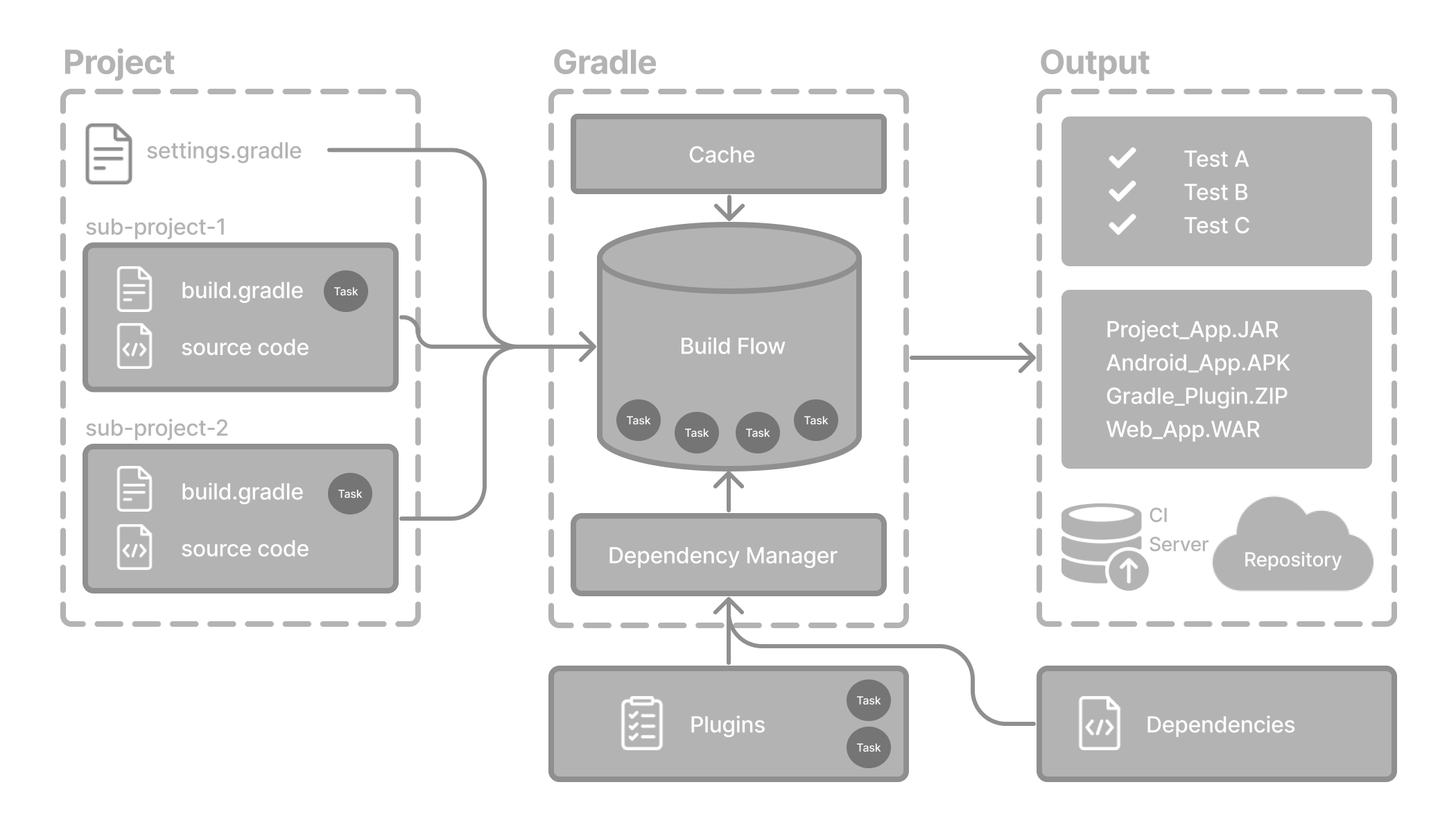
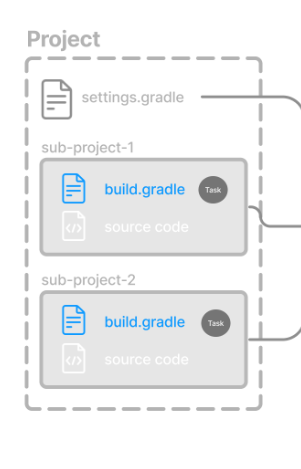
Project
어플리케이션이나 라이브러리같은 빌드될 수 있는 소프트웨어의 집합
Build Scripts
Gradle이 수행할 작업들의 스탭과 상세 정보들
각각의 프로젝트들은 하나 이상의 build scripts를 가질 수 있음
Dependency Management
각각의 프로젝트들은 Gradle이 빌드할 때 필요한 모든 종속성을 알아서 관리함
Tasks
테스트하거나 컴파일하는 기본적인 작업단계
각각의 플젝들은 플러그인이나 빌드 스크립트에 포함된 하나이상의 task가 있음
Plugins
Plugins are used to extend Gradle’s capability and optionally contribute tasks to a project.
구조
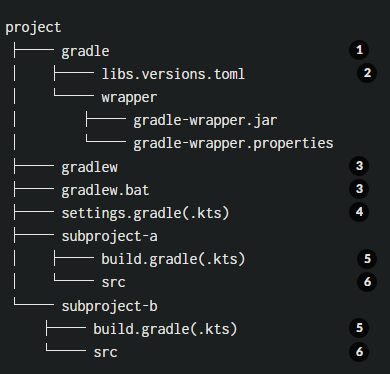
1. Gradle directory to store wrapper files and more
2. Gradle version catalog for dependency management
3. Gradle wrapper scripts
4. Gradle settings file to define a root project name and subprojects
5. Gradle build scripts of the two subprojects - subproject-a and subproject-b
6. Source code and/or additional files for the projects
Gradle 실행
commandLine에서
$ gradle build명령어로 실행 가능
다만 Gradle Wrapper를 사용하는 것을 더 추천함
$ gradlew build // linux or osx
$ gradlew.bat build //window
Gradle Wrapper란?
맨 위 구조 사진에서 Gradle 블럭 전체를 말한다.
Wrapper Script는 그래들 버전을 지정하고 필요하다면 사전에 필요한 파일들을 다운받는다. 이 작업들로 인해 개발자는 빠르게 그래들 플젝들 실행시킬 수 있다.
사용시 장점
- Standardizes a project on a given Gradle version.
- Provisions the same Gradle version for different users.
- Provisions the Gradle version for different execution environments (IDEs, CI servers…).
Wrapper 사용법
- You set up a new Gradle project and add the Wrapper to it.
- You run a project with the Wrapper that already provides it.
- You upgrade the Wrapper to a new version of Gradle.
settings.gradle
The primary purpose of the settings file is to add subprojects to your build.
Gradle supports single and multi-project builds.
For single-project builds, the settings file is optional.
For multi-project builds, the settings file is mandatory and declares all subprojects.
- 그래들 빌드 생명주기보다 먼저 initialized phase에서 플젝 루트에 있는 세팅파일을 찾게된다. 그 세팅파일이 바로 setting.gradles다.
그래들이 해당 파일을 찾게되면Settings오브젝트를 생성한다. 해당 오브젝트의 목적은 빌드에 포함된 모든 플젝에서 사용하기 위함이다.
중요
There is a one-to-one correspondence between a Settings instance and a settings.gradle(.kts) file.
Setting 오브젝트
kts Setting doc
settings script에 속한 많은 top-level properties, block은 Setting API로 이루어져있습니다.
예를들어 루트 플젝이름이 있습니다.
settings.rootProject.name = "root"Standard Settings properties
자주 사용되는 프로퍼티
| Name | Description |
|---|---|
| buildCache | The build cache configuration. |
| plugins | The container of plugins that have been applied to the settings. |
| rootDir | The root directory of the build. The root directory is the project directory of the root project. |
| rootProject | The root project of the build. |
| settings | Returns this settings object. |
주요 사용되는 함수
| Name | Description |
|---|---|
| include() | Adds the given projects to the build. |
| includeBuild() | Includes a build at the specified path to the composite build. |
Setting script
그래들 스크립트의 경우 kts, Groovy를 지원한다. 이번 글에서는 kts를 기준으로 작성
- 보통 루트 디렉토리에 존재한다.
rootProject.name = "root-project"

include("sub-project-a")
include("sub-project-b")
include("sub-project-c")
플젝이름 설정 및 서브 프로젝트 추가
멀티모듈의 경우 해당 모듈들을 추가
Setting Script 구조
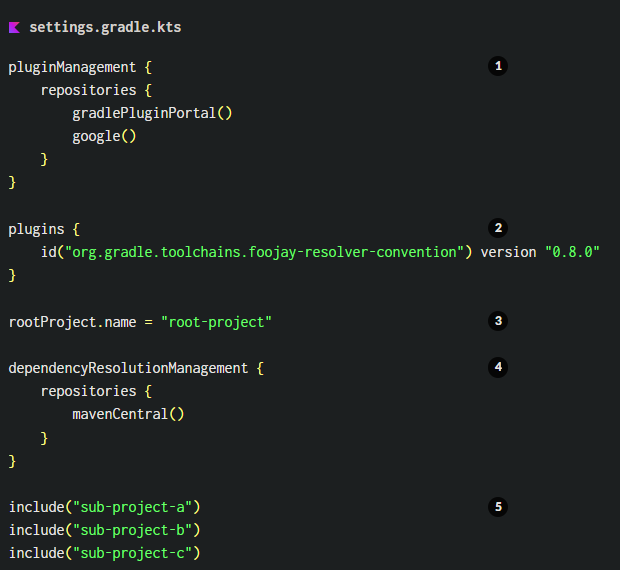
1. Define the location of plugins
2. Apply settings plugins.
3. Define the root project name.
4. Define dependency resolution strategies.
5. Add subprojects to the build.
Define the location of plugins
플러그인을 어디서 제공할지 지정
Apply settings plugins.
옵셔널한 부분으로 플젝세팅에 필요한 플러그인을 적용함 주로 Develocity plugin or Toolchain Resolver pulgin을 사용한다고함
Define the root project name.
rootProject.name = "루트 플젝"Define dependency resolution strategies.
옵셔널한 부분으로 플젝의 dependency resolution 해결의 규칙과 설정을 할 수 있다.
build.gradle