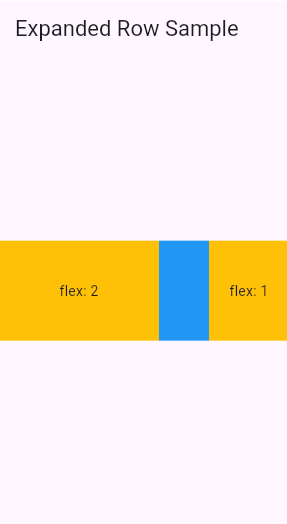
Expanded
flutter Expanded
expanded는 row, column, flex의 자식으로 있어야 하며 주 축에 따라서 사용가능한 남는 공간을 채운다.
Constructors
Expanded({Key? key, int flex = 1, required Widget child})Properties
- child(Widget)
- 자식 위젯들
- fit(FlexFit) - tight(강제로 빈공간을 채운다.), loose(가능한 한 크게 만든다)
- flexible 자식 위젯들이 사용가능한 공간에 어떻게 쓰일 것인가?
- flex(int) - 0이라면 flexble하지 않게 자신의 크기를 유지한다. 아니라면 수치에 따라 여유공간을 나누어 배치(기본 1)
- 자식 위젯에 사용할 flex요소
예시
import 'package:flutter/material.dart';

/// Flutter code sample for [Expanded].

void main() => runApp(const ExpandedApp());

class ExpandedApp extends StatelessWidget {
  const ExpandedApp({super.key});

  @override
  Widget build(BuildContext context) {
    return MaterialApp(
      home: Scaffold(
        appBar: AppBar(title: const Text('Expanded Row Sample')),
        body: const ExpandedExample(),
      ),
    );
  }
}

class ExpandedExample extends StatelessWidget {
  const ExpandedExample({super.key});

  @override
  Widget build(BuildContext context) {
    return Center(
      child: Row(
        children: <Widget>[
          Expanded(flex: 2, child: Container(color: Colors.amber, height: 100)),
          Container(color: Colors.blue, height: 100, width: 50),
          Expanded(child: Container(color: Colors.amber, height: 100)),
        ],
      ),
    );
  }
}