여기에 있는 내용을 읽어보며 요약한 것이다.
Flutter align document
1. Align
자식을 자신 안에 정렬하고 자식의 크기에 따라 크기를 조절할 수 있는 위젯입니다.
이 위젯은 widthFactor과 heightFactor가 null이라면 가능한만큼 커집니다. 만약 넓이가 제한적이지 않고 size Factor가 null이라면 넓이는 자식의 크기와 같습니다. 만약 size Factor가 null이 아니라면 그 크기는 자식의 넓이의 그 배가 됩니다. 예를 들어 widFactor가 2.0이라면 그 위젯의 폭은 항상 자식의 2배가 됩니다.
Center(
  child: Container(
    height: 120.0,
    width: 120.0,
    color: Colors.blue[50],
    child: const Align(
      alignment: Alignment.topRight,
      child: FlutterLogo(
        size: 60,
      ),
    ),
  ),
)
위의 예제는 FlutterLogo를 부모의 Alignment.topRight로 고정하고 있다.

어떻게 작동하는가?
alignment
alignment 속성은 자식 좌표계의 한 점과 이 위젯의 좌표계의 다른 점을 설명합니다. alignment 위젯은 두 점이 서로 위에 정렬되도록 자식을 배치합니다.
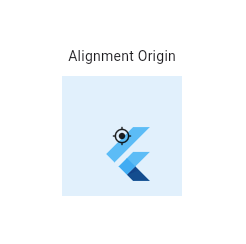
Center(
  child: Container(
    height: 120.0,
    width: 120.0,
    color: Colors.blue[50],
    child: const Align(
      alignment: Alignment(0.2, 0.6),
      child: FlutterLogo(
        size: 60,
      ),
    ),
  ),
)
alignment의 위치 계산식
- (0.2 width of FlutterLogo/2 + width of FlutterLogo/2, 0.6 height of FlutterLogo/2 + height of FlutterLogo/2) = (36.0, 48.0) in the coordinate system of the FlutterLogo.
- (0.2 width of Align/2 + width of Align/2, 0.6 height of Align/2 + height of Align/2) = (72.0, 96.0) in the coordinate system of the Align widget (blue area).
FractionalOffset
FaractionalOffset은 두개의 점을 정의한다.
이 클래스는 Container의 왼쪽위를 기준으로 중앙기준 시스템과 다르다.
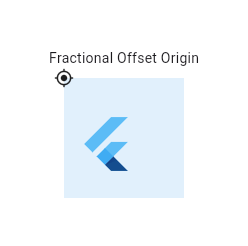
Center(
  child: Container(
    height: 120.0,
    width: 120.0,
    color: Colors.blue[50],
    child: const Align(
      alignment: FractionalOffset(0.2, 0.6),
      child: FlutterLogo(
        size: 60,
      ),
    ),
  ),
)
FractionalOffset의 위치 계산식
- (0.2 width of FlutterLogo, 0.6 height of FlutterLogo) = (12.0, 36.0) in the coordinate system of the FlutterLogo.
- (0.2 width of Align, 0.6 height of Align) = (24.0, 72.0) in the coordinate system of the Align widget (blue area).
Constructors
Align({key? key, AlignmentGeometry alignment = Alignment.center, double? widthFactor, double? heightFactor, Widget? child})
Properties (중요해 보이는 것들만)
- alignment (AlignmentGeometry)
- 어떻게 자식을 정렬할 것인가?
- child (widget?)
- 위젯 트리에서 아래쪽에 배치될 자식들
- heightFactor(double?)
- 만약 null이 아니라면 이 수치는 자식들의 높이 수치의 곱이 된다.
- widthFactor (double?)
- 만약 null이 아니라면 이 수치는 자식들의 너비 수치의 곱이 된다.