사전 작업
- Fastlane으로 자동 배포 설정
- java 경로 지정
-
안드로이드 스튜디오 설치시 java도 다운로드 되기 때문에 스튜디오 유저는 추가로 java를 설치해줄 필요가 없다. 경로만 지정해주기!
% vi .zprofile
export PATH="/Applications/Android Studio.app/Contents/jbr/Contents/Home/bin:$PATH"
export PATH="/Users/mac/projects/android/sdk/platform-tools:$PATH"
% source .zprofile # 변경사항 적용

% which java  # 실행파일 경로 확인
-
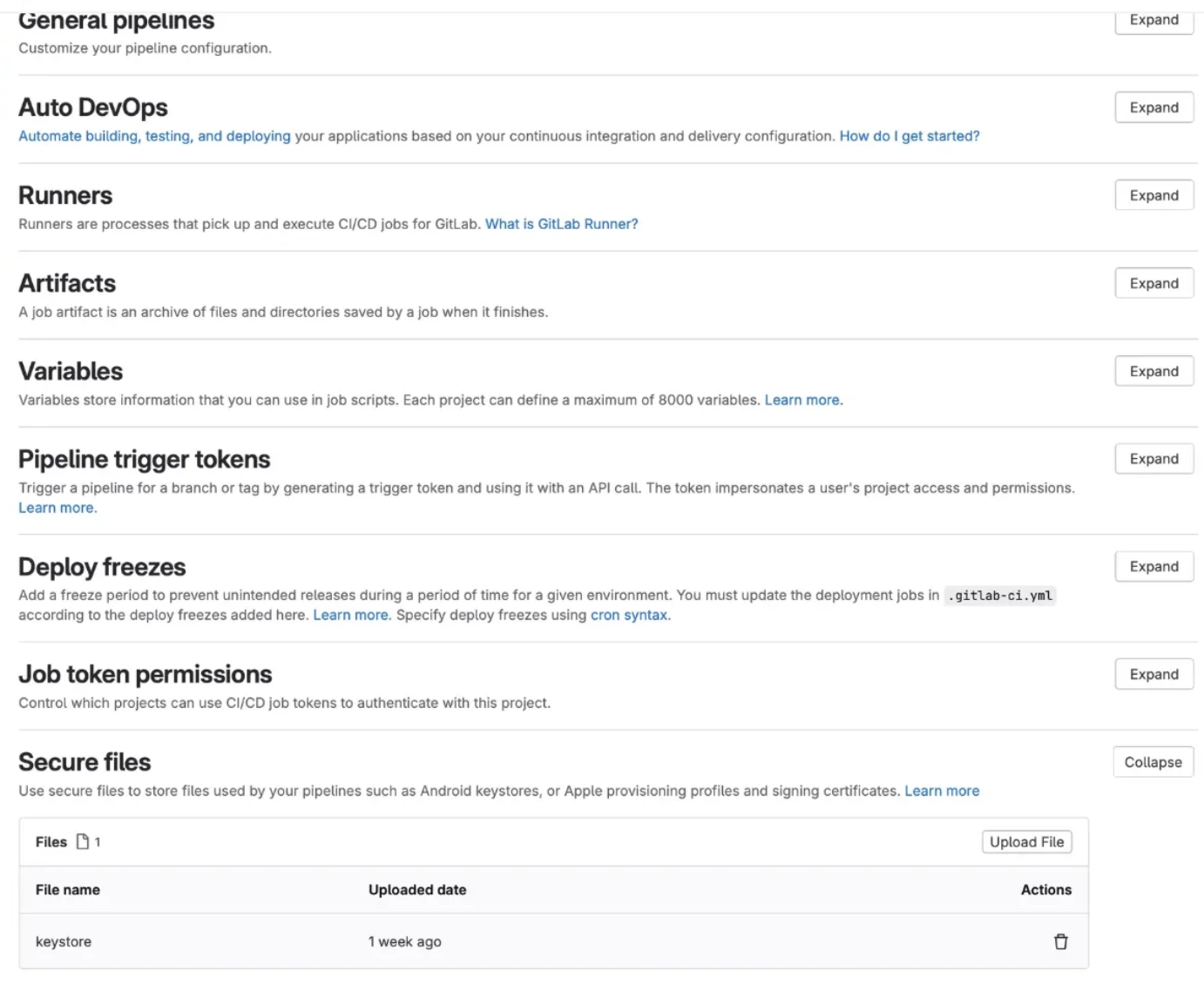
Key store 파일을 gitlab secure files에 업로드
Project > Settings > CI/CD > Secure files > Upload File
https://docs.gitlab.com/ee/ci/secure_files/
환경 변수들 Variables에 업로드
Project > Settings > CI/CD > Variables > Add variable
https://docs.gitlab.com/ee/ci/variables/
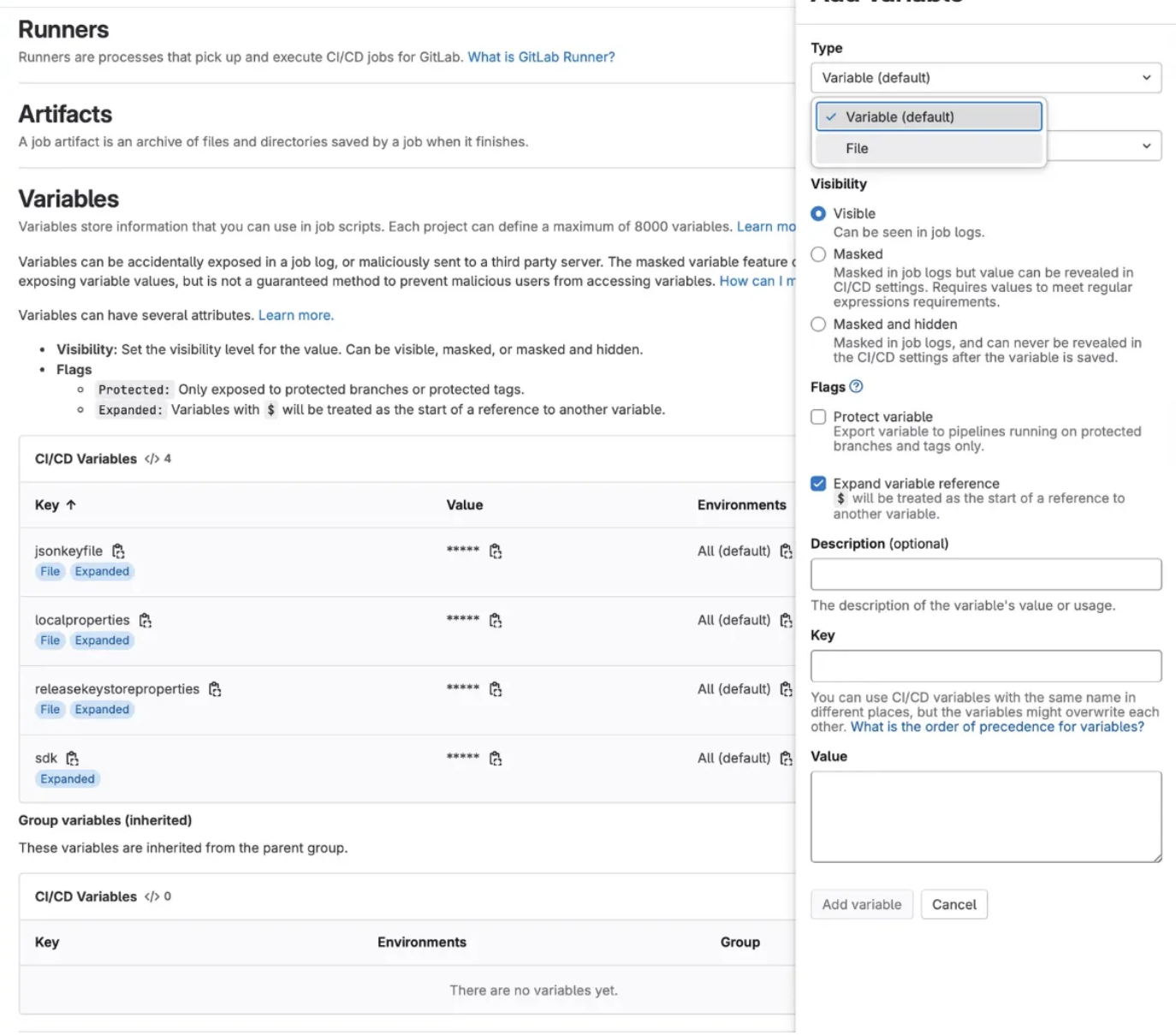
민감한 정보들은 Variables에서 관리하는 것이 안전하다.
변수로 올릴수도 있지만 Type을 파일로 선택하여 통째로 업로드할 수 있다.
local.propertieskeystore.propertieskeyAlias=
keyPassword=
storePassword=
storeFile=json_key_file- 구글 클라우드 플렛폼 접근시 필요한 인증 정보
- Fastlane Appfile 에 추가했던 그 파일
sdk- 파이프라인 동작하는 머신에 설치된 Android sdk 경로
.gitlab-ci.yml 파일 작성
환경변수 참조 방법
- ${변수이름}
Secure files 다운로드 방법
test:
  variables:
    SECURE_FILES_DOWNLOAD_PATH: './where/files/should/go/'
  script:
- curl --silent "https://gitlab.com/gitlab-org/incubation-engineering/mobile-devops/download-secure-files/-/raw/main/installer" | bash- 다운받은 파일은 기본적으로 프로젝트 루트의
.secure_files에 저장된다. - 파일 경로를 수정하고 싶으면 variables에
SECURE_FILES_DOWNLOAD_PATH를 따로 지정해주면 된다.
파일별 경로
json_key_file.jks: 키스토어 파일이므로keystore폴더에 넣는 것이 적합local.properties: 일반적으로 프로젝트 루트release-keystore.properties: 서명 관련 설정 파일이므로 프로젝트 루트나 필요한 위치에 복사
stages:
  - beta

cache:
  key:
    files:
      - Project/Gemfile.lock
  paths:
    - Project/vendor/bundle

variables:
  LANG: "en_US.UTF-8"
  ANDROID_HOME: $sdk

before_script:
  # 앱 경로에 키스토어 디렉토리 생성
  - mkdir -p $CI_PROJECT_DIR/app/keystore

  # 환경변수 파일을 설정된 경로로 복사
  - cp ${jsonkeyfile} $CI_PROJECT_DIR/app/keystore/json_key_file.jks
  - cp ${localproperties} local.properties
  - cp ${releasekeystoreproperties} release-keystore.properties

  # Secure Files에서 파일 다운로드
  - curl --silent "https://gitlab.com/gitlab-org/incubation-engineering/mobile-devops/download-secure-files/-/raw/main/installer" | bash

  # 다운로드된 Secure Files를 앱의 키스토어 디렉토리로 이동
  - mv .secure_files/keystore $CI_PROJECT_DIR/app/keystore

  # 번들러 설치 및 의존성 설치
  - gem install bundler
  - bundle install

beta:
  stage: beta
  script:
    - bundle check --path vendor/bundle || bundle install --path vendor/bundle
    - bundle exec fastlane beta  # Fastlane을 실행하여 beta 빌드 또는 배포 수행
  tags:
    - macos
  only:
    refs:
      - develop