302 Found란?
- HTTP 302는 “요청한 자원은 일시적으로 다른 URI에 있다” 는 의미.
- 서버 응답 헤더에는 보통
Location헤더가 포함됨HTTP/1.1 302 Found Location: testapp://reset
즉, 이 API는 토큰을 검사한 뒤 클라이언트를 testapp::/reset로 이동시키도록 설계
→ 이건 브라우저나 앱이 토큰 인증 후 앱 내부 링크(testapp://reset)로 리디렉션 되도록 하기 위한 로직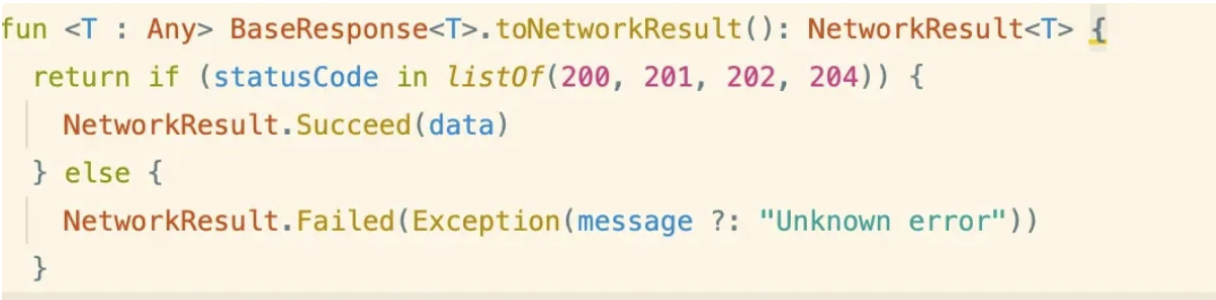
→ 앱에서 이렇게 래핑되어 있어서 Failed, 3XX 응답이 오류로 처리된 것이 문제였음
요약
- 이건 에러가 아니라 정상적인 302 리다이렉트 응답
- 사용 환경이 앱이라면
testapp://reset스킴이 AndroidManifest에 딥링크로 등록되어 있어야 함 - 웹에서는
testapp://같은 URI를 인식할 수 없기 때문에 반드시 앱에서 열려야 함
302 Found는 HTTP 클라이언트가 자동 리다이렉트 하지 못하면 예외(Exception)로 잡힐 수 있음.Retrofit기본 설정에서는followRedirects = true라면 자동으로 리디렉트 따라가지만,testapp://같은 스킴은 지원 안 해서 예외 발생 가능.- 이 경우, Interceptor 또는 커스텀 예외 처리 로직을 넣어
302응답을 성공으로 간주하도록 처리할 수 있음.
처리 방법
OkHttpClient에 Interceptor 추가
302 Found 응답을 수동으로 처리하여 Success로 판단하게 할 수 있음.
val client = OkHttpClient.Builder()
.addInterceptor { chain ->
val response = chain.proceed(chain.request())
**if (response.code == 302) {**
// 리디렉션 응답도 성공으로 처리
Response.Builder()
.request(response.request)
.protocol(Protocol.HTTP_1_1)
**.code(200) // 강제로 200으로 바꿈**
.message("Redirect treated as success")
.body(response.body)
.build()
} else {
response
}
}
.followRedirects(false) // 기본 자동 리다이렉트 막음
.build()
이후 이 클라이언트를 Retrofit에 설정
val retrofit = Retrofit.Builder()
.baseUrl("<http://your.api/>")
.client(client)
.addConverterFactory(GsonConverterFactory.create())
.build()
예외 메시지 내부에서 302 감지 후 성공 처리
fun signInForResetPasswordWithToken(token: String) = flow {
emit(NetworkResult.Loading)
try {
val result = authApiService.signInForResetPasswordWithToken(token)
emit(NetworkResult.Succeed(result))
} catch (e: HttpException) {
if (e.code() == 302) {
// 302라면 성공처럼 처리
emit(NetworkResult.Succeed(Unit)) // 또는 적절한 값
} else {
emit(NetworkResult.Failed(e))
}
} catch (e: Exception) {
Timber.w(e)
emit(NetworkResult.Failed(e))
}
}
일반적인 처리 방식
백엔드: 302 리다이렉트 응답 + Location 헤더
HTTP/1.1 302 Found
Location: testapp://reset?token=abcd...프론트/앱: 302 수신 시, Location 헤더 수동 파싱 후 딥링크 실행
val response = chain.proceed(chain.request())
if (response.code == 302) {
    val location = response.header("Location")
    if (!location.isNullOrBlank()) {
        // 앱 내에서 딥링크 실행
        // 예: context.startActivity(Intent(Intent.ACTION_VIEW, Uri.parse(location)))
    }
}
Location 헤더에 포함된 URI 파싱 관련 처리
testapp://reset?token=abcd1234처럼 쿼리 파라미터가 포함될 수 있기 때문에 다음과 같이 파싱해서 필요한 값을 추출해야 할 수 있음.
val uri = Uri.parse(location)
val token = uri.getQueryParameter("token")
단순히 Intent.ACTION_VIEW로 딥링크만 실행할 게 아니라 파라미터까지 함께 처리하는 구조로 짜야 함.
예외에서 처리
catch (e: Exception) {
    if (e is HttpException && e.code() == 302) {
        val location = e.response()?.headers()?.get("Location")
        if (!location.isNullOrBlank()) {
            emit(NetworkResult.Succeed(location)) // 또는 직접 처리
            return@flow
        }
    }
    emit(NetworkResult.Failed(e))
}
- 장점: 간단하고, 이미 작성한
flow구조 안에서 처리 가능 - 단점: 모든 302 처리 로직이 try-catch에 들어가게 되어 구조화가 덜 깔끔할 수 있음
클라이언트 전역 처리
val client = OkHttpClient.Builder()
    .addInterceptor { chain ->
        val response = chain.proceed(chain.request())
        if (response.code == 302) {
            val location = response.header("Location")
            // 여기에 302 리다이렉션 수동 처리 로직
        }
        response
    }
    .followRedirects(false) // 이거 설정해야 302 응답을 클라이언트가 수신 가능
    .build()
- 장점: 전역으로 302 응답을 핸들링 가능. 특정 API마다 반복할 필요 없음
- 단점: 실제 비즈니스 로직 (
signInForResetPasswordWithToken) 내에서 상태값 전달이 어려울 수 있음
(Interceptor에서 처리하고 emit할 수 없음 → 복잡한 구조 필요)
Custom CallAdapter 또는 Converter로 처리
sealed class ApiResponse<out T> {
    data class Success<T>(val data: T) : ApiResponse<T>()
    data class Redirect(val location: String) : ApiResponse<Nothing>()
    data class Error(val throwable: Throwable) : ApiResponse<Nothing>()
}
이후 CallAdapter 또는 ConverterFactory를 커스터마이징하여 Retrofit의 응답을 ApiResponse로 래핑 처리
class ApiResponseCallAdapterFactory : CallAdapter.Factory() {
    override fun get(
        returnType: Type,
        annotations: Array<Annotation>,
        retrofit: Retrofit
    ): CallAdapter<*, *>? {
        // ApiResponse<T> 타입만 처리
        if (getRawType(returnType) != ApiResponse::class.java) return null
        val innerType = getParameterUpperBound(0, returnType as ParameterizedType)
        return ApiResponseCallAdapter<Any>(innerType)
    }
}

class ApiResponseCallAdapter<T>(
    private val responseType: Type
) : CallAdapter<T, Call<ApiResponse<T>>> {
    override fun responseType() = responseType

    override fun adapt(call: Call<T>): Call<ApiResponse<T>> = object : Call<ApiResponse<T>> {
        override fun enqueue(callback: Callback<ApiResponse<T>>) {
            call.enqueue(object : Callback<T> {
                override fun onResponse(call: Call<T>, response: Response<T>) {
                    val code = response.code()
                    val location = response.headers()["Location"]

                    val result = when {
                        code == 302 && !location.isNullOrBlank() -> ApiResponse.Redirect(location)
                        response.isSuccessful && response.body() != null -> ApiResponse.Success(response.body()!!)
                        else -> ApiResponse.Error(HttpException(response))
                    }
                    callback.onResponse(this@object, Response.success(result))
                }

                override fun onFailure(call: Call<T>, t: Throwable) {
                    callback.onResponse(this@object, Response.success(ApiResponse.Error(t)))
                }
            })
        }

        override fun execute(): Response<ApiResponse<T>> = throw UnsupportedOperationException()
        override fun clone(): Call<ApiResponse<T>> = this
        override fun isExecuted() = call.isExecuted
        override fun cancel() = call.cancel()
        override fun isCanceled() = call.isCanceled
        override fun request(): Request = call.request()
        override fun timeout(): Timeout = call.timeout()
    }
}
Retrofit 초기화 시 .addCallAdapterFactory(ApiResponseCallAdapterFactory())로 추가.
- 장점: 모든 302 응답을 일관된 방식(
ApiResponse.Redirect)으로 처리할 수 있음 →ViewModel이나UI까지 구조적으로 전달 가능 - 단점: 구현이 상대적으로 복잡하고, Retrofit 응답을 모두 커스터마이징해야 함 → 진입 장벽이 있음 (기존 flow 구조나
NetworkResult등과 통합하려면 추가 래핑 필요)
결론
| 방법 | 장점 | 단점 | 일반성 |
|---|---|---|---|
catch에서 HttpException.code == 302처리 | 간단, 흐름 안에서 처리 | 로직이 try-catch에 섞임 | 일반적 |
| Interceptor에서 302 수동 처리 | 전역 처리 가능, 중복 제거 | emit 등 로직 전달 어려움 | 고급/특수 상황 |
| Custom CallAdapter 또는 Converter | 응답 구조를 통합적으로 처리, 계층 분리 용이 | 구현 복잡도 높음, 학습 비용 있음 | 비일반적 (아키텍처 목적일 때 적합) |
- HTTP 응답 상태 코드 표
1xx: 정보 (Informational)
상태 코드 의미 설명 100 Continue 클라이언트가 계속 요청을 보내도 됨 (드물게 사용됨) 101 Switching Protocols 프로토콜 전환 (예: HTTP → WebSocket) 2xx: 성공 (Successful)
상태 코드 의미 설명 200 OK 요청 성공 201 Created 새 리소스 생성됨 (POST 결과) 202 Accepted 요청은 수락되었으나 처리 완료 전 204 No Content 응답 본문 없음 (예: 삭제 성공) 3xx: 리다이렉션 (Redirection)
상태 코드 의미 설명 301 Moved Permanently 영구 이동, Location 헤더에 새 URL 302 Found 임시 이동, 브라우저는 자동 이동함
→ 앱에선 수동 처리 필요303 See Other 다른 URI로 GET 요청하라는 의미 307 Temporary Redirect 302와 유사하지만 요청 메서드 유지 308 Permanent Redirect 301과 유사하지만 요청 메서드 유지 4xx: 클라이언트 오류 (Client Error)
상태 코드 의미 설명 400 Bad Request 잘못된 요청 (파라미터 누락 등) 401 Unauthorized 인증 필요 (로그인 안됨) 403 Forbidden 권한 없음 404 Not Found URL 존재하지 않음 409 Conflict 충돌 발생 (중복 요청 등) 429 Too Many Requests 요청이 너무 많음 (rate limit) 5xx: 서버 오류 (Server Error)
상태 코드 의미 설명 500 Internal Server Error 서버 내부 오류 502 Bad Gateway 게이트웨이 오류 503 Service Unavailable 서버 점검 중 또는 과부하 504 Gateway Timeout 서버 응답 시간 초과