
2-3. 관심사 분리와 폴더구조
얼마 전에 FSD 패턴이라는 걸 알게 되었고.. 꼭 공부해보고 싶다는 생각이 들었는데 딱 마침 이번 과제가 FSD 패턴. 어째 이런 타이밍이!!! 근데 너무 어려워

WIL
✅ FSD 패턴
Feature-Sliced Design - 프론트엔드 애플리케이션 구조를 위한 아키텍처 방법론. 코드를 어떻게 분리하고 구성할지를 명확히 정의하여, 변화하는 비즈니스 요구 속에서도 프로젝트를 이해하기 쉽고 안정적으로 유지할 수 있도록 함.
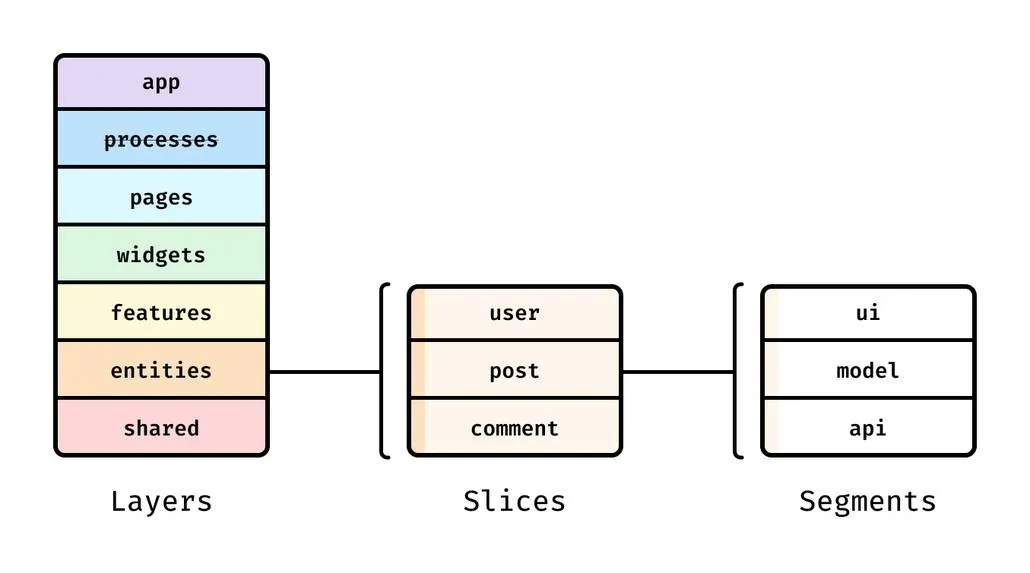
- App - Routing, Entrypoint, Global Styles, Provider 등 앱을 실행하는 모든 요소
- Processes(더 이상 사용되지 않음) - 페이지 간 복합 시나리오
- Pages - 전체 page 또는 중첩 Routing의 핵심 영역
- Widgets - 독립적으로 동작하는 대형 UI·기능 블록
- Features - 제품 전반에서 재사용되는 비즈니스 기능
- Entities - user, product 같은 핵심 도메인 Entity
- Shared - 프로젝트 전반에서 재사용되는 일반 유틸리티
-
Slice는 Layer 내부를 비즈니스 도메인별로 나누고, 같은 Layer 내 다른 Slice를 참조할 수 없다 = 응집도↑ 결합도↓
-
Slice와 App, Shared Layer는 Segment로 세분화되어, 기술적 목적에 따라 코드를 그룹화한다
- ui - UI components, date formatter, styles 등 UI 표현과 직접 관련된 코드
- api - request functions, data types, mappers 등 백엔드 통신 및 데이터
- model - schema, interfaces, store, business logic 등 애플리케이션 도메인 모델
- lib - 해당 Slice에서 여러 모듈이 함께 사용하는 공통 library code
- config - configuration files, feature flags 등 환경·기능 설정
src
├── app
├── entities
│   ├── comment
│   │   ├── api
│   │   ├── config
│   │   ├── model
│   │   └── ui
│   ├── post
│   │   └── ..
│   └── user
│       └── ..
├── features
│   ├── comment
│   │   ├── add-comment
│   │   │   ├── model
│   │   │   └── ui
│   │   ├── delete-comment
│   │   │   └── ..
│   │   ├── like-comment
│   │   │   └── ..
│   │   └── update-comment
│   │   │   └── ..
│   └── post
│       └── ..
├── pages
├── shared
│   ├── hook
│   ├── lib
│   └── ui
├── widgets
│   ├── dialog
│   ├── post-detail-content
│   ├── post-filter
│   ├── post-pagination
│   └── post-table
└── main.tsx
취향껏.. 마음대로 리팩토링을 진행한 결과 위의 폴더 구조가 완성됐다. main.tsx를 app 폴더에 넣었다가 다시 밖으로 뺐는데 그대로 둘걸 하는 생각이..🥲
가장 고민을 많이 한 부분은 widgets인 것 같다. post-filter 내에 검색어, 태그, 정렬 등 게시물 필터와 관련된 ui를 분리하지 않고 두었는데 이를 하나하나 컴포넌트로 따로 분리해야 하는게 나은지, 필터와 관련된 로직은 전부 쿼리 훅 하나로 해결이 되는데 굳이 분리가 필요한지, 아님 게시물의 필터가 바뀌는 것도 하나의 기능으로 보고 features에 두어야 할지 등등.. 아직도 답을 모르겠는 고민들을 엄청 했다. 결국 굳이 세분화하지 않고 하나로 두었지만..!!
이번 과제에서 fsd 못지않게 고민하고 애썼던 부분은 tanstack-query로 낙관적인듯 아닌듯 낙관적 업데이트를 구현하는 거였다..
기존 코드는 더미 데이터와 목 api를 사용하고 탄스택 쿼리를 사용하지 않기에 프론트 내에서 따로 상태로 관리하여 페이지 기능이 처리되도록 되어 있었다. 나는 이를 탄스택 쿼리로 리팩토링해야했다...
// src/entities/commment/model/store.ts

export const commentModel = {
  /**
   * 댓글 추가
   */
  addComment: (commentData: IComments, newComment: IComment): IComments => {
    return {
      ...commentData,
      comments: [newComment, ...commentData.comments],
    };
  },
}
우선 entities에 각 도메인마다 상태 업데이트에 사용될 순수 함수를 작성해주었다. 항해 과제를 하면서 매번 순수 함수를 작성하고 있는데 너무 깔끔하고 좋은 것 같다...
// src/features/commment/add-comment/model/useAddComment.ts

export const useAddComment = (postId: number, onSuccess?: () => void) => {
  const queryClient = useQueryClient();

  const initialComment: IAddComment = { body: '', postId: postId, userId: 1 };
  const [newComment, setNewComment] = useState<IAddComment>(initialComment);

  const mutation = useMutation({
    mutationFn: (comment: IAddComment) => addCommentApi(comment),

    onSuccess: (createdComment) => {
      const newComment = commentModel.addResponseToComment(createdComment);

      queryClient.setQueryData<IComments>(['comments', postId], (prev) => {
        if (!prev) {
          return {
            comments: [newComment],
            total: '1',
            skip: 0,
            limit: 10,
          };
        }

        return commentModel.addComment(prev, newComment);
      });

      onSuccess?.();
      setNewComment(initialComment);
    },
    onError: (error) => {
      console.error('댓글 추가 오류:', error);
    },
  });

  const setBody = (body: string) =>
    setNewComment((prev) => ({ ...prev, body }));

  const addComment = () => {
    mutation.mutate(newComment);
  };

  return { newComment, setBody, addComment };
};
features 내의 model 세그먼트 폴더에 탄스택 쿼리 훅을 작성해주었고, onSuccess에 entities 내에 만들었던 도메인 상태 업데이트 순수 함수를 사용했다.
(기존 코드에서는 api 요청의 응답으로 온 값으로 상태를 업데이트하도록 되어 있어서 onSuccess 내에서 처리하도록 했는데 이제 생각해보니 onMutate에서 처리하는게 맞는 것 같다 😶)
// src/features/commment/add-comment/ui/AddCommentForm.ts

const AddCommentForm = ({ postId }: AddCommentFormProps) => {
  const { setCommentModal } = useDialogStore();
  const { newComment, setBody, addComment } = useAddComment(postId, () => {
    setCommentModal({ show: false, content: null });
  });

  return (
    <DialogContent>
      <DialogHeader>
        <DialogTitle>새 댓글 추가</DialogTitle>
      </DialogHeader>
      <div className="space-y-4">
        <Textarea
          placeholder="댓글 내용"
          value={newComment.body}
          onChange={(e) => setBody(e.target.value)}
        />
        <Button onClick={addComment}>댓글 추가</Button>
      </div>
    </DialogContent>
  );
};
최종 코드는 이런 느낌..
+) 추가적으로 팀원들 덕분에 인터페이스 앞에 I를 붙이는게 좋지 않다는 걸 알게 되었다... 이제부터 안써준다.
KTP
Keep
잘 모르겠는 부분은 팀원에게 (다른 팀이어도) 질문해보는 자세
다같이 의견 나누는게 너무 좋당
Problem
충분히 잘하고 있어... (라고 믿기)
Try
개인 프로젝트에 FSD 구조 사용해보기..!!
사람마다 기준이 너무 달라서 팀 프로젝트에서는 FSD 패턴을 도입하고 싶은 생각이 든다 해도 제안하기엔 무리일 것 같다... 그치만 더 공부해보고 싶음

잘하고 있는 휫짜님~~ 항상 응원해요~ 잘보고갑니당 :)