GPU 클러스터 위의 End-to-End ML 파이프라인
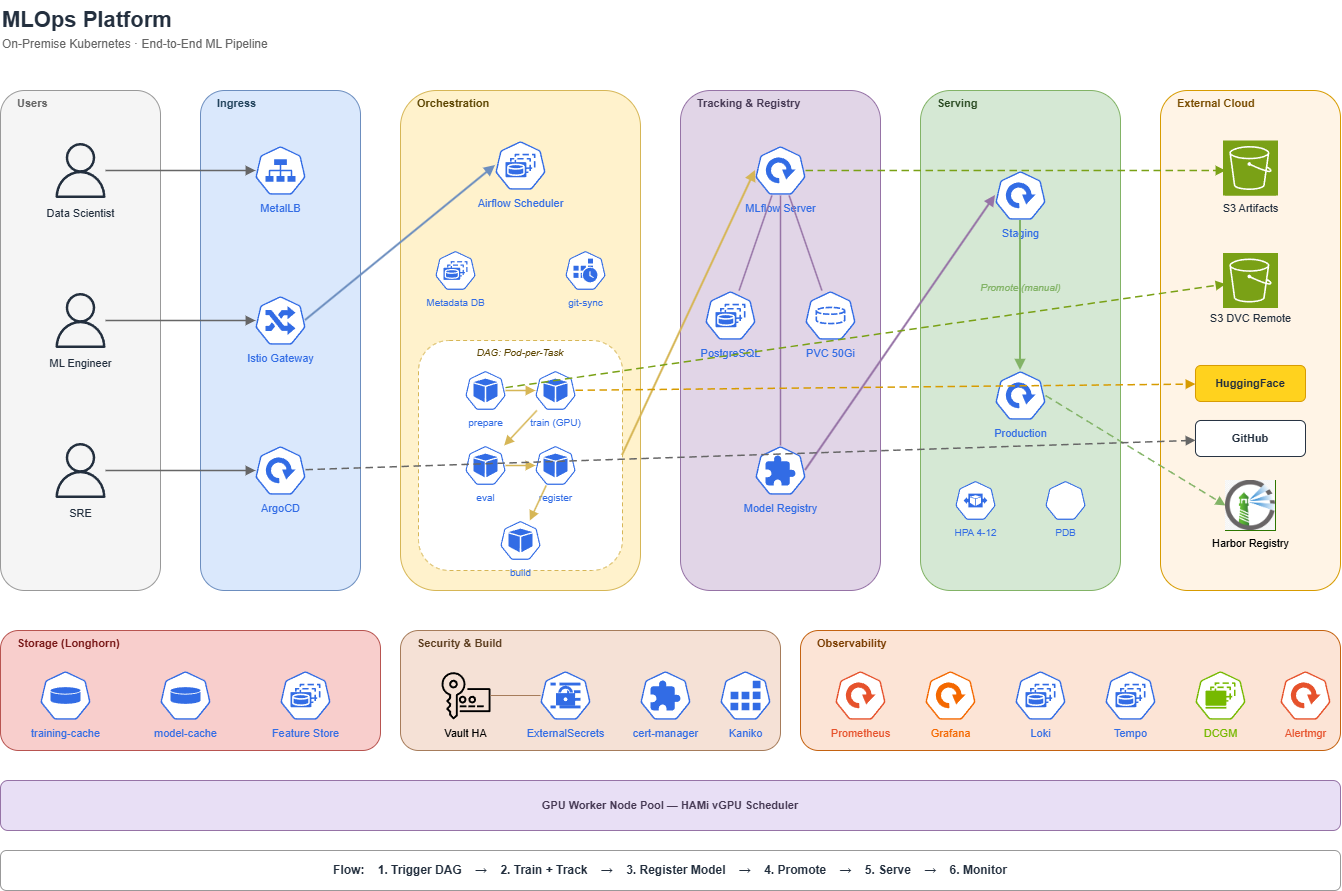
On-Premise MLOps 플랫폼 구축기
7노드 베어메탈 Kubernetes 위에 MLflow + Airflow + BentoML + DVC를 결합한 풀스택 MLOps 플랫폼을 어떻게 설계했는지 공유합니다. 데이터 수집 → 자동 레이블링 → 학습 → 모델 레지스트리 → 추론 서빙까지 전 과정을 GitOps로 자동화했습니다.
1. 왜 On-Premise MLOps인가?
SageMaker, Vertex AI 같은 매니지드 MLOps가 잘 갖춰진 시대에 굳이 직접 구축한 이유는 명확합니다.
핵심 동기:
- GPU 비용: RTX 3090, Titan, T4 같은 물리 GPU가 이미 IDC에 확보되어 있음. 클라우드 GPU(A100 시간당 $3+)로 옮기면 운영비가 폭증.
- 데이터 주권: 학습 데이터(얼굴/결제 이미지)가 외부 클라우드로 나가면 안 되는 규제 환경.
- 온프레미스 K8s 자산 재활용: 이미 운영 중인 베어메탈 클러스터(Istio, ArgoCD, Vault, Prometheus)를 그대로 활용 가능.
- 실험-운영 일체화: 동일 클러스터에서 학습(GPU) + 추론(BentoML) + DB(MariaDB) 통합 운영.
설계 원칙:
- 기존 프로덕션과 완전 분리된 네임스페이스 (
mlflow,training,mlops) - 기존 DB / 시크릿 / 도메인 격리
- GitOps 단일 워크플로우 (ArgoCD)
- GPU 자원은 HAMi vGPU로 분할 사용
2. 전체 아키텍처 한눈에
플랫폼은 6개 레이어로 구성됩니다:
| Layer | 역할 | 핵심 컴포넌트 |
|---|---|---|
| ❶ 데이터 | 원본 + 버전 관리 | S3 + DVC, MinIO |
| ❷ 레이블링 | 자동 라벨 생성 | RT-DETR + Re-ID + Agglomerative Clustering |
| ❸ 오케스트레이션 | 파이프라인 DAG | Apache Airflow (KubernetesExecutor) |
| ❹ 학습 + 추적 | 모델 학습 + 메타데이터 | PyTorch + MLflow (PostgreSQL + S3 artifact) |
| ❺ 레지스트리 | 모델 버전 + 승급 | MLflow Model Registry |
| ❻ 서빙 | 추론 API | BentoML (staging/production) |
2.1 컴포넌트 간 데이터 흐름
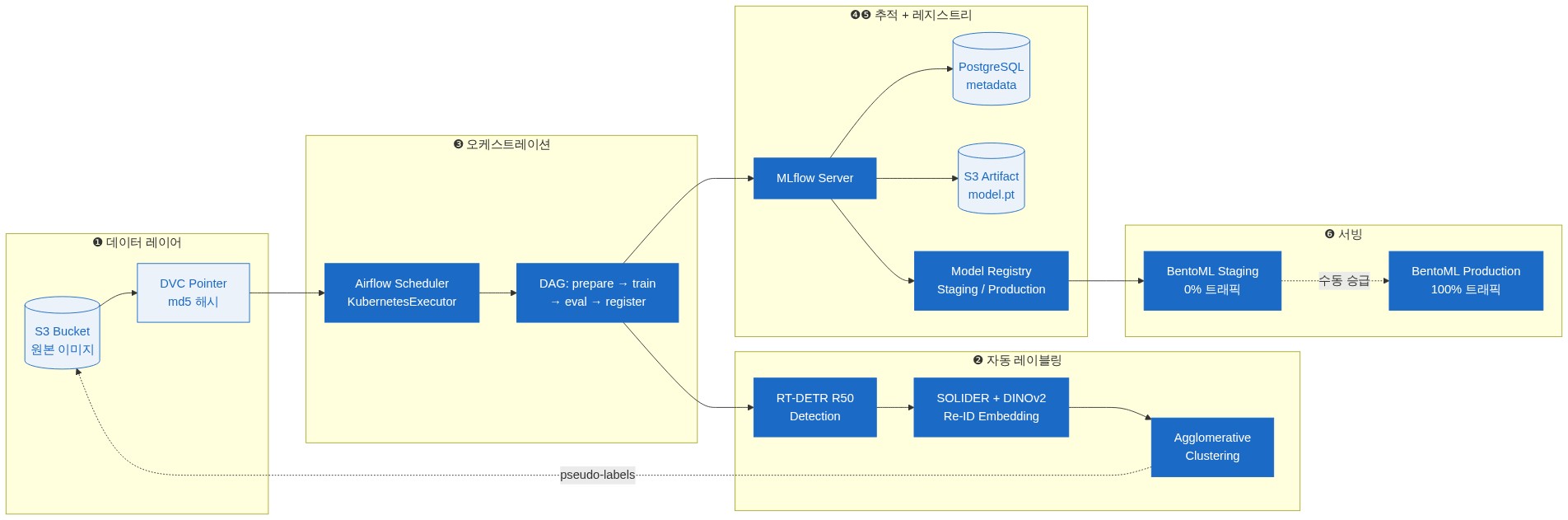
상세 컴포넌트 배치와 zone 구조는 별도 아키텍처 다이어그램(mlops-platform.drawio) 참조.
3. 네임스페이스 분리 전략
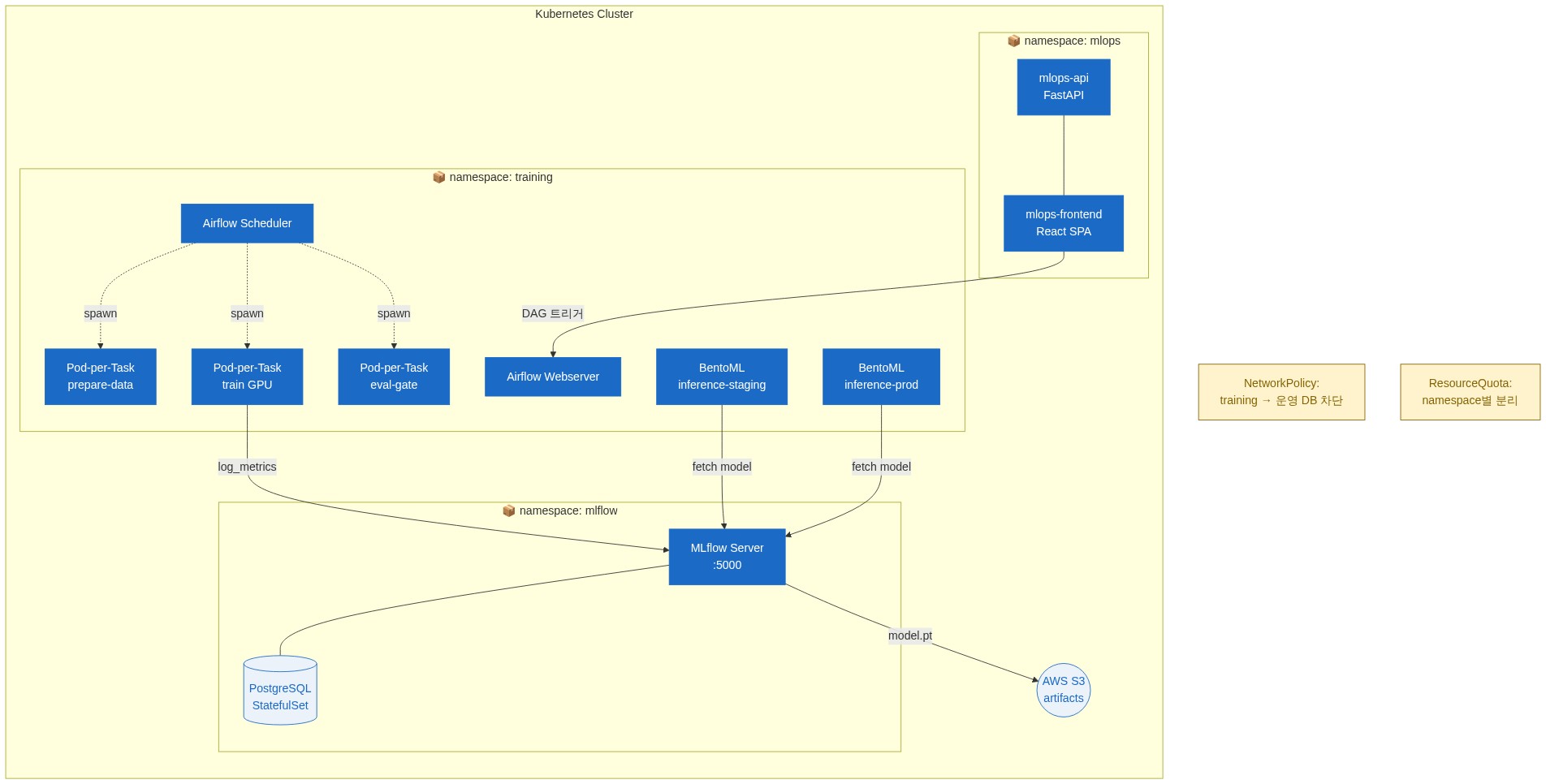
왜 3개 네임스페이스?
- mlflow: 항상 떠있는 추적 서버 (PostgreSQL 영속 데이터).
- training: ephemeral 학습 Pod이 수시로 생성/제거되는 burst 자원 영역.
- mlops: 사용자 대면 UI/API (트래픽 패턴이 위 둘과 다름).
분리 이점:
- ResourceQuota 별도 설정 가능
- NetworkPolicy로 학습 Pod이 기존 운영 DB에 접근 못 하게 차단
- 모니터링 대시보드/알림 분리
4. MLflow: 모델 추적의 중심
4.1 왜 MLflow를 선택했나
| 후보 | 채택 안 한 이유 |
|---|---|
| Weights & Biases | SaaS 의존 → 데이터 주권 위배 |
| Kubeflow Pipelines | 학습 곡선 가파름, Airflow와 중복 |
| ClearML | 오픈소스 좋지만 백엔드 인프라 무거움 |
| MLflow ✅ | 가벼움, 표준 API, K8s 친화적, BentoML/SageMaker 호환 |
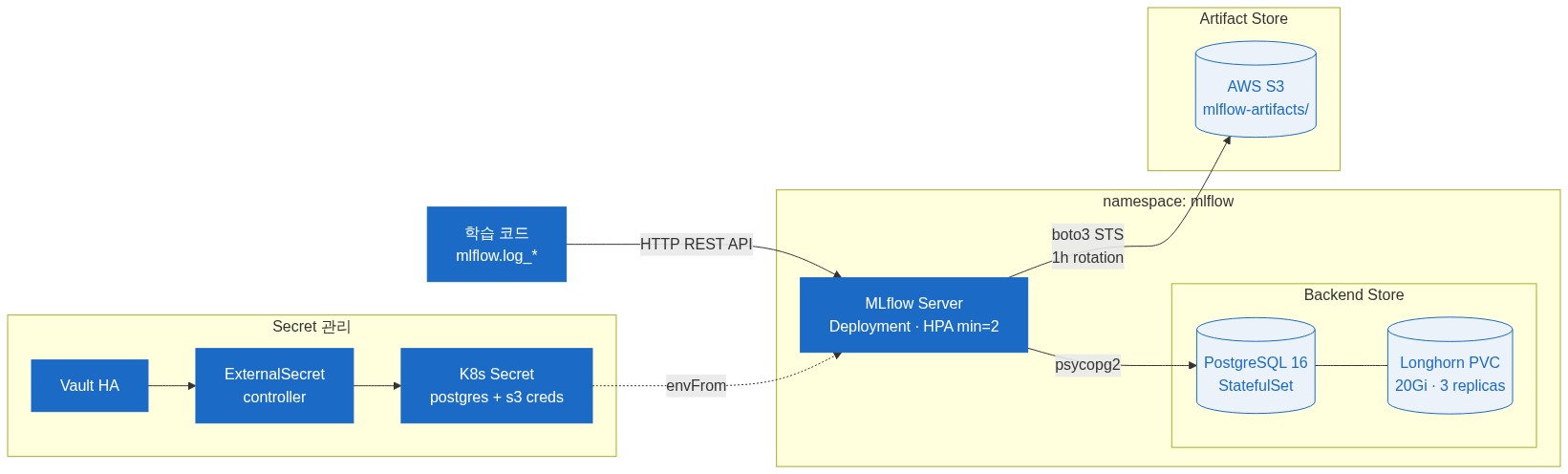
4.2 배포 구성
# MLflow Server Deployment
spec:
  containers:
    - name: mlflow
      image: ghcr.io/mlflow/mlflow:v3.7.0
      command: ["mlflow", "server"]
      args:
        - --host=0.0.0.0
        - --port=5000
        # 메타데이터 DB (PostgreSQL StatefulSet)
        - --backend-store-uri=postgresql://mlflow:$(POSTGRES_PASSWORD)@postgresql.mlflow.svc.cluster.local:5432/mlflow
        # 아티팩트 저장소 (S3)
        - --default-artifact-root=s3://mlops-artifacts-bucket/
      env:
        - name: AWS_ACCESS_KEY_ID
          valueFrom:
            secretKeyRef:
              name: mlflow-s3-credentials
              key: access-key
        - name: POSTGRES_PASSWORD
          valueFrom:
            secretKeyRef:
              name: mlflow-postgres-credentials
              key: password
핵심 설계 결정:
- 메타데이터는 PostgreSQL StatefulSet (Longhorn 20Gi): SQLite로 시작하면 multi-replica 불가, 데이터 손실 위험.
- 아티팩트는 S3 (무제한 용량): 모델 파일은 GB 단위. 로컬 디스크에 두면 노드 가득 참.
- PostgreSQL 패스워드는 Vault → ExternalSecret 동기화: Git 커밋 금지.
4.3 학습 코드에서 사용
import mlflow

mlflow.set_tracking_uri("http://mlflow-server.mlflow.svc.cluster.local:5000")
mlflow.set_experiment("yolo-person-detector")

with mlflow.start_run() as run:
    # 하이퍼파라미터 자동 기록
    mlflow.log_params({"lr": 0.001, "batch_size": 32, "epochs": 100})

    # 학습 진행 (PyTorch / YOLO)
    model = train_yolo(...)

    # 메트릭 기록
    mlflow.log_metrics({
        "mAP@0.5": 0.892,
        "mAP@0.5:0.95": 0.671,
        "loss_box": 0.034,
    })

    # 모델 아티팩트 업로드 (S3로 자동 push)
    mlflow.pytorch.log_model(model, "model",
                              registered_model_name="yolo-person-v2")
자동 push 대상: 모델 weights, optimizer state, requirements.txt, conda.yaml, 학습 코드 snapshot, signature.
5. Airflow KubernetesExecutor: 파이프라인 오케스트레이션
5.1 왜 KubernetesExecutor
| Executor | 단점 |
|---|---|
| LocalExecutor | scheduler 노드만 사용 → 자원 부족 |
| CeleryExecutor | Redis/RabbitMQ 추가 운영 부담 |
| KubernetesExecutor ✅ | task마다 Pod 생성 → 격리 + GPU 동적 할당 |
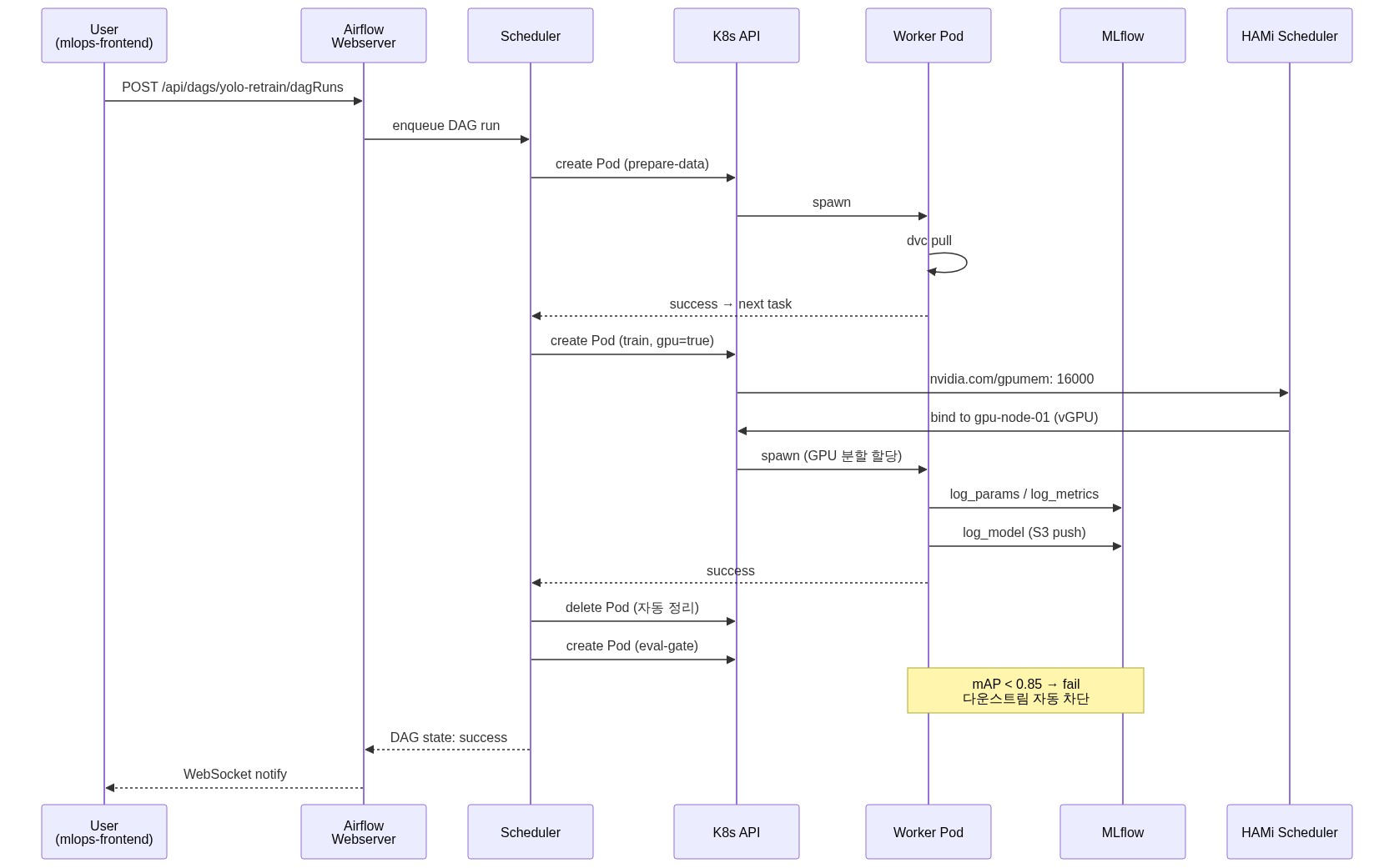
각 DAG task가 독립된 Pod으로 실행됩니다. GPU task는 HAMi vGPU 자원 요청 → 끝나면 해제. burst 워크로드에 최적.
5.2 DAG 자동 배포 (git-sync)

DAG 파일은 Git 레포에 두고, git-sync 사이드카가 30초마다 pull:
# Airflow Helm Values
dags:
  gitSync:
    enabled: true
    repo: https://github.com/org/infrastructure.git
    branch: main
    subPath: airflow/dags
    depth: 1
    wait: 30
    credentialsSecret: airflow-git-sync-secret
→ Airflow Pod 재시작 없이 DAG 추가/수정 자동 반영. 개발자는 Git PR만 올리면 됨.
5.3 KubernetesPodOperator 팩토리 패턴
매 DAG에서 Pod spec을 반복 작성하지 않도록 공통 팩토리 함수:
# airflow/dags/shared/k8s_operators.py
from kubernetes import client as k8s
from airflow.providers.cncf.kubernetes.operators.pod import KubernetesPodOperator

DATA_PVC_NAME = "airflow-data-vol"
DEFAULT_IMAGE = "harbor.internal/mlops/training:latest"

DATA_VOLUME = k8s.V1Volume(
    name="data",
    persistent_volume_claim=k8s.V1PersistentVolumeClaimVolumeSource(
        claim_name=DATA_PVC_NAME))

DATA_VOLUME_MOUNT = k8s.V1VolumeMount(
    name="data", mount_path="/data")

def _gpu_resources(gpumem_mb: int) -> k8s.V1ResourceRequirements:
    return k8s.V1ResourceRequirements(
        limits={
            "nvidia.com/gpu": "1",
            "nvidia.com/gpumem": str(gpumem_mb),  # HAMi vGPU
            "cpu": "4", "memory": "16Gi",
        },
        requests={"cpu": "2", "memory": "8Gi"},
    )

def make_training_op(task_id, script, extra_args=None,
                     gpu=False, gpumem=8000, image=None):
    return KubernetesPodOperator(
        task_id=task_id,
        name=task_id,
        namespace="training",
        image=image or DEFAULT_IMAGE,
        cmds=["python3"],
        arguments=[script] + (extra_args or []),
        resources=_gpu_resources(gpumem) if gpu else None,
        volumes=[DATA_VOLUME],
        volume_mounts=[DATA_VOLUME_MOUNT],
        # PVC가 RWO라 같은 노드에 강제 배치
        node_selector={"kubernetes.io/hostname": "worker-gpu-01"},
        is_delete_operator_pod=True,  # 끝나면 Pod 자동 삭제
        in_cluster=True,
        image_pull_secrets=[k8s.V1LocalObjectReference("harbor-pull-secret")],
    )
5.4 실제 DAG 예시 — YOLO 재학습 파이프라인
# airflow/dags/yolo_retrain_dag.py
from airflow import DAG
from airflow.utils.dates import days_ago
from shared.k8s_operators import make_training_op

with DAG(
    dag_id="yolo-retrain",
    schedule_interval=None,         # 수동 트리거 (또는 cron)
    start_date=days_ago(1),
    catchup=False,
    tags=["ml", "yolo", "retrain"],
) as dag:

    prepare_data = make_training_op(
        task_id="prepare-data",
        script="/data/scripts/prepare_dataset.py",
        extra_args=["--source=s3://datasets/v3/", "--output=/data/train"],
        gpu=False,
    )

    train = make_training_op(
        task_id="train",
        script="/data/scripts/train_yolo.py",
        extra_args=["--epochs=100", "--batch-size=16"],
        gpu=True, gpumem=16000,    # 16GB VRAM
    )

    eval_gate = make_training_op(
        task_id="eval-gate",
        script="/data/scripts/eval_gate.py",
        extra_args=["--min-map=0.85"],  # 기준 미달이면 fail → 등록 안 함
        gpu=True, gpumem=8000,
    )

    convert = make_training_op(
        task_id="convert-onnx",
        script="/data/scripts/convert_to_onnx.py",
        gpu=False,
    )

    register = make_training_op(
        task_id="register-model",
        script="/data/scripts/register_to_mlflow.py",
        extra_args=["--stage=Staging"],
        gpu=False,
    )

    prepare_data >> train >> eval_gate >> convert >> register
핵심 패턴:
- eval-gate: 모델 성능이 기준 미달이면 task fail → 다운스트림 자동 차단. 잘못된 모델이 production에 올라가는 사고 방지.
- stage='Staging': 등록은 항상 Staging부터. Production 승급은 사람이 MLflow UI에서 수동 확인 후.
6. 자동 레이블링 파이프라인 — 라벨러 인력 절감
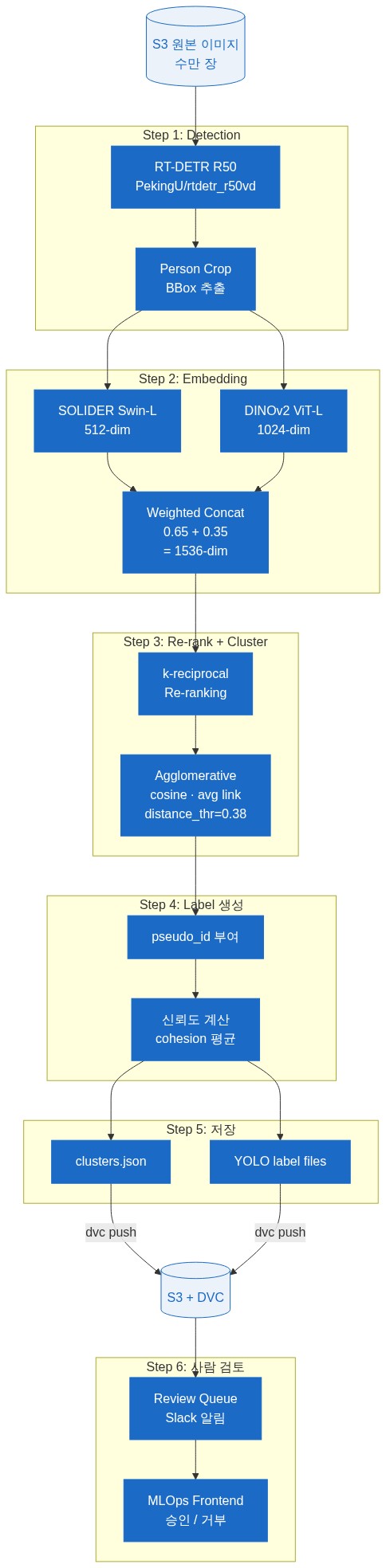
원본 이미지 수만 장에 사람이 직접 박스 그리는 비용을 줄이려고 자동 레이블링 DAG를 만들었습니다.
6.1 단계별 흐름
6.2 핵심 알고리즘 선택
- Detection: RT-DETR R50 (PekingU/rtdetr_r50vd_coco_o365). YOLO보다 정확도 높음, transformer 기반.
- Re-ID embedding: SOLIDER (Swin-L). 동일 인물 인식에 SOTA 수준.
- Cross-domain: DINOv2 ViT-L 추가. SOLIDER + DINOv2 weighted concat (0.65 + 0.35).
- Clustering: Agglomerative (cosine, average linkage, distance_threshold=0.38). HDBSCAN은 sparse Re-ID 데이터에 부적합 (검증 결과 노이즈 과다).
- Re-ranking: k-reciprocal encoding (Zhong et al. CVPR 2017). intra-class similarity 향상.
6.3 효과
기존 수작업 대비:
- 1200장 기준 약 5.5분 (수작업 8시간)
- 평균 cohesion 0.926 (cluster 응집도)
- 542개 클러스터 생성 → 사람은 단순히 "이 클러스터 맞나" 검토만
7. BentoML: 모델 서빙
7.1 왜 BentoML
- PyTorch / ONNX / TensorRT 모델을 동일 API로 wrap
- 자동 OpenAPI 스펙 + Swagger UI
- HTTP / gRPC 동시 지원
- K8s 친화 (Helm chart 또는 manifest 둘 다 가능)
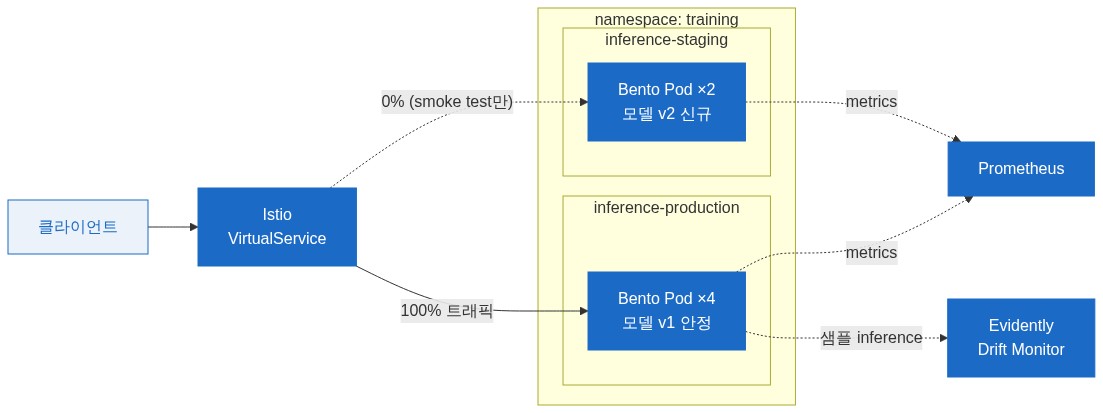
7.2 staging / production 환경 분리
모델 배포 흐름 (deploy-inference DAG):
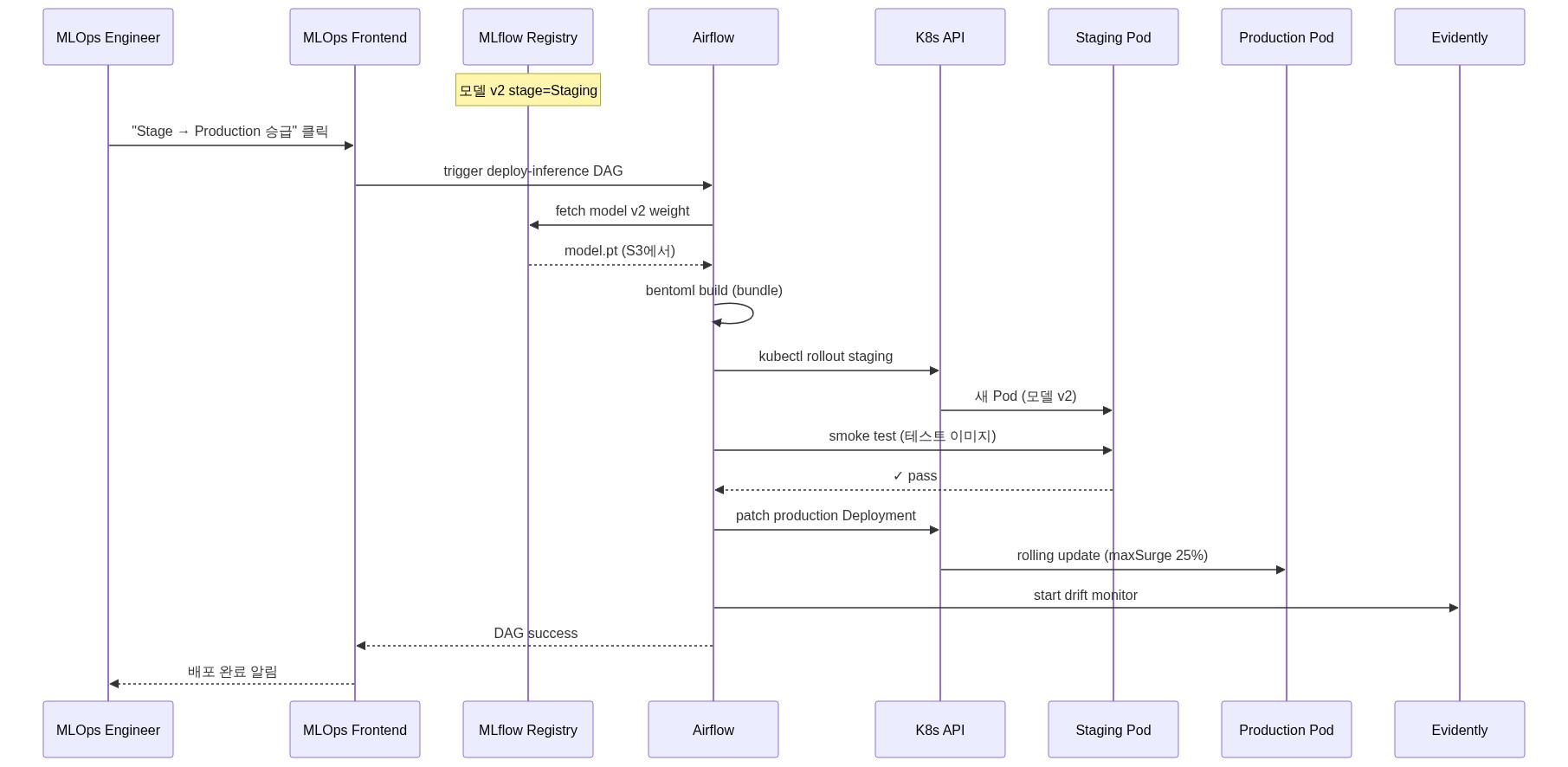
핵심: 모델 배포도 DAG로 표준화 → 누구나 동일한 절차 따름. 수동 SSH/kubectl 금지.
7.3 BentoML Service 예시
# inference_service.py
import bentoml
from bentoml.io import Image, JSON

runner = bentoml.pytorch.get("yolo-person-v2:latest").to_runner()

svc = bentoml.Service("person-detector", runners=[runner])

@svc.api(input=Image(), output=JSON())
async def detect(img):
    result = await runner.async_run(img)
    return {
        "detections": result.tolist(),
        "model_version": runner.tag.version,
        "latency_ms": ...
    }
K8s Service로 노출 → Istio VirtualService로 라우팅 → 외부 클라이언트가 호출.
8. DVC + S3: 데이터셋 버전 관리

코드는 Git, 데이터셋은 DVC. 큰 파일을 Git에 직접 넣지 않고 포인터만 저장:
# 새 데이터셋 추가
dvc add datasets/v3/
git add datasets/v3.dvc .gitignore
git commit -m "data: add v3 dataset (10k images)"
dvc push   # S3로 실제 데이터 업로드

# 다른 환경에서 가져오기
git pull
dvc pull   # S3에서 데이터 다운로드
저장 구조:
s3://mlops-datasets-bucket/files/md5/xx/yyyy...(DVC 자동 hash 기반)- 동일 데이터 중복 저장 안 됨 (content-addressed)
- Airflow DAG의 prepare-data task가 자동으로 dvc pull 실행
9. GPU 분할 사용 — HAMi vGPU
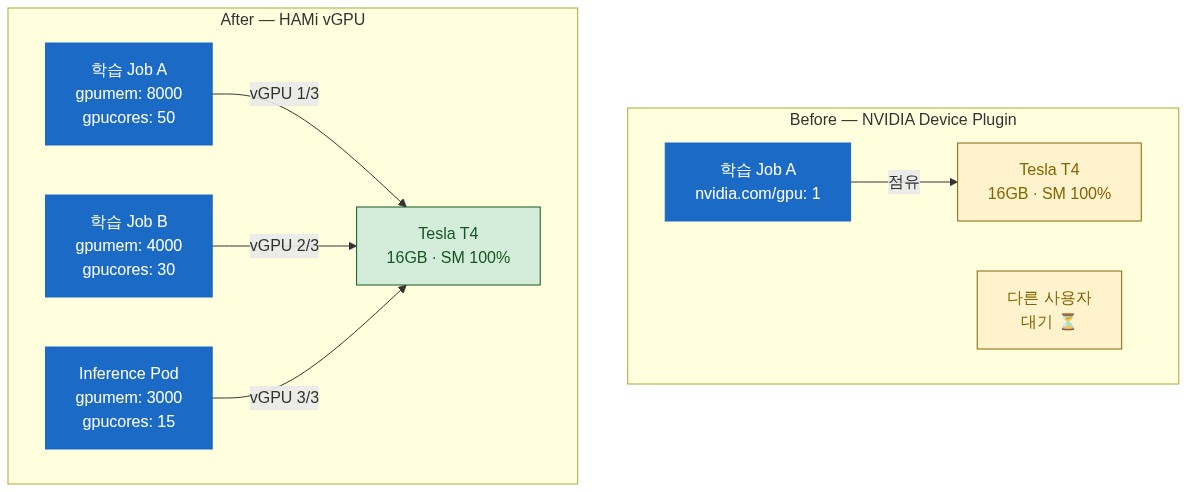
GPU 1장(예: T4 16GB)을 학습 1개에 통째로 주면 다른 사용자 못 씀. HAMi로 분할:
resources:
  limits:
    nvidia.com/gpu: 1            # vGPU 1개
    nvidia.com/gpumem: 8000      # 8GB만 사용 (T4의 절반)
    nvidia.com/gpucores: 50      # SM 코어 50%만
→ T4 1장을 2명이 동시 사용 가능. HAMi MutatingWebhook이 자동으로 schedulerName: hami-scheduler 주입.
(HAMi + KubeRay 상세는 별도 글에서 다룹니다)
10. GitOps 통합 — ArgoCD

MLOps 컴포넌트 5개가 모두 ArgoCD Application으로 관리됩니다:
| App | Path | Sync 정책 |
|---|---|---|
| mlflow | kubernetes/production/platform/mlflow/ | Production: Manual |
| airflow | kubernetes/production/platform/airflow/ | Production: Manual |
| airflow-resources | 동일 path의 PVC/RBAC | Manual |
| mlops-training | training 네임스페이스 (BentoML inference) | Manual |
| mlops-platform | mlops-api + mlops-frontend | Manual + Image Updater 자동 |
ArgoCD Image Updater 활용:
metadata:
  annotations:
    argocd-image-updater.argoproj.io/image-list: >-
      api=harbor.internal/mlops/mlops-api,
      frontend=harbor.internal/mlops/mlops-frontend
    argocd-image-updater.argoproj.io/api.update-strategy: semver
    argocd-image-updater.argoproj.io/api.allow-tags: regexp:^v[0-9]+\.[0-9]+\.[0-9]+$
→ 새 이미지 빌드(Harbor push) → Image Updater가 ArgoCD parameters 자동 갱신 → 자동 sync → 새 Pod 배포. 개발자는 빌드만 하면 자동 배포.
11. 모니터링 / 옵저버빌리티
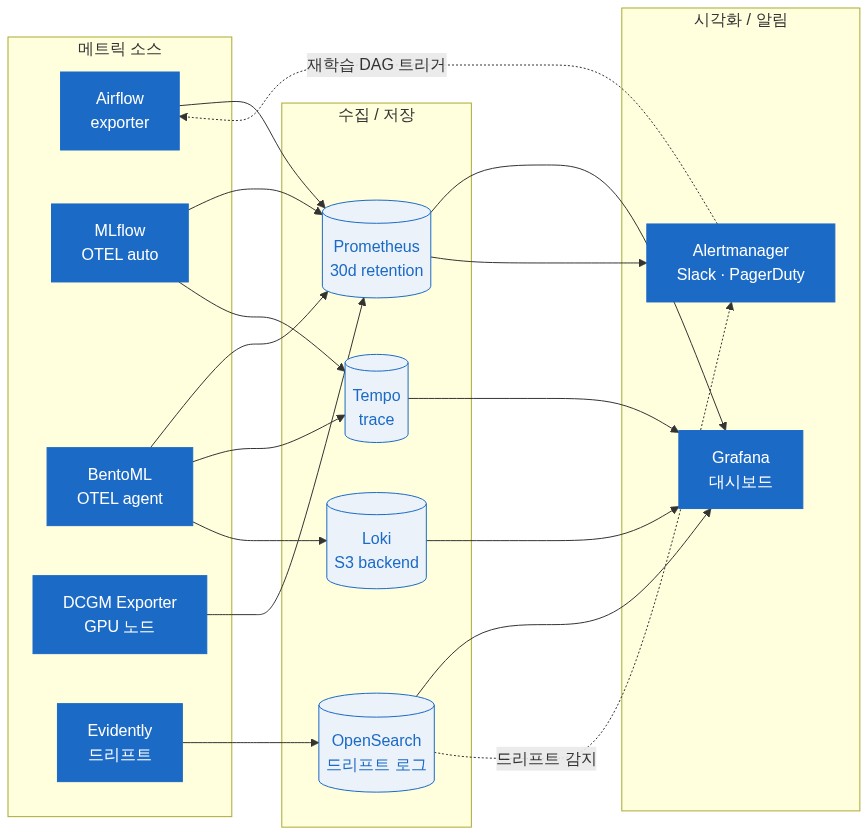
기존 인프라(Prometheus + OpenSearch + Grafana)를 그대로 활용:
| 지표 | 수집 | 시각화 |
|---|---|---|
| Airflow DAG 성공률 | Airflow Prometheus exporter | Grafana dashboard |
| MLflow 추적 서버 latency | OTEL auto-instrumentation | Trace Analytics |
| BentoML 추론 latency / QPS | OTEL agent | Grafana + Prometheus |
| GPU utilization | DCGM Exporter | Grafana (gnetId 12239) |
| 드리프트 감지 | Evidently AI worker | OpenSearch Dashboards |
드리프트 알람: 추론 데이터 분포가 학습 데이터와 크게 다르면 자동 알림 → 재학습 DAG 자동 트리거 가능 (수동 확인 단계 거침).
12. 운영 교훈
12.1 PVC와 KubernetesExecutor의 함정
KubernetesExecutor가 task마다 Pod을 다른 노드에 스케줄링할 수 있는데, 학습 데이터 PVC가 RWO(ReadWriteOnce)면 같은 노드에 강제 배치 필요:
node_selector={"kubernetes.io/hostname": "worker-gpu-01"}또는 RWX(ReadWriteMany) 가능한 StorageClass(NFS, Longhorn-RWX 같은)로 변경.
12.2 학습 이미지 빌드 — Kaniko
학습 환경 의존성 변경 시 이미지 재빌드. Docker daemon 없이 K8s 안에서 빌드:
apiVersion: batch/v1
kind: Job
metadata:
  name: kaniko-training-image
spec:
  template:
    spec:
      containers:
        - name: kaniko
          image: gcr.io/kaniko-project/executor:latest
          args:
            - "--dockerfile=Dockerfile"
            - "--context=git://github.com/org/training-image.git"
            - "--destination=harbor.internal/mlops/training:v2.3.0"
→ CI 없이도 Kaniko Job 한 번 띄우면 끝. Harbor push까지 자동.
12.3 MLflow PostgreSQL 백업
MLflow 메타데이터는 실험 추적의 source of truth. PostgreSQL 백업 필수:
# CronJob으로 매일 pg_dump → S3
schedule: "0 2 * * *"
command:
  - pg_dump
  - -h postgresql.mlflow.svc.cluster.local
  - -U mlflow mlflow
  - | aws s3 cp - s3://backups/mlflow-$(date +%Y%m%d).sql
12.4 BentoML deploy 시 inference-service DNS 문제
초기에 health-check 스크립트가 inference-service.training.svc.cluster.local 하드코딩 → 서비스 이름 변경 후 DNS 조회 실패. 해결: --environment 파라미터로 동적 구성.
service_url = f"http://inference-{args.environment}.training.svc.cluster.local:3000"12.5 Airflow Webserver OOM
DAG 개수 증가 + 동시 사용자 늘면서 webserver가 2Gi 한도 자주 초과. 해결: limit 4Gi로 증설, gunicorn workers 4 → 2로 감소.
12.6 Image Updater write-back-method
Image Updater의 write-back-method: git은 매 갱신마다 ArgoCD Application yaml 변경 + git push 필요 → 권한 부담. 대신 argocd 방식 사용 시 ArgoCD Application의 parameters override만 변경 (Git 변경 0, 빠름).
argocd-image-updater.argoproj.io/write-back-method: argocd13. 비용 / 효과
도입 전후 비교 (대략):
| 항목 | 이전 (수동) | 이후 (MLOps) |
|---|---|---|
| 데이터 레이블링 시간 | 8시간/1k장 | 5.5분/1k장 (90% 절감) |
| 모델 학습 → 배포 시간 | 2~3일 (수동 SSH, kubectl) | 30분 (DAG 트리거 → 자동) |
| 실험 메트릭 추적 | 노트북에 메모 | MLflow 자동 기록 (재현 가능) |
| 데이터셋 버전 관리 | "v3_final_final.zip" | DVC + Git tag |
| 모델 롤백 | 수동 백업 파일 찾기 | MLflow Registry 한 줄 |
| GPU 활용률 | 1명 1장 점유 | HAMi vGPU 2~4명 동시 |
마무리
MLOps는 도구 모음이 아니라 데이터/모델/코드/인프라를 연결하는 워크플로우입니다. 클라우드 매니지드 서비스가 편하긴 하지만, 데이터가 외부에 못 나가거나 GPU 비용이 부담되는 환경이라면 On-Premise 구축이 합리적 선택입니다.
핵심은 각 단계를 독립 컴포넌트로 분리(MLflow / Airflow / BentoML / DVC)하고 GitOps로 묶는 것입니다. 한 컴포넌트 교체가 다른 컴포넌트에 영향 없이 가능하고, 전체 파이프라인은 선언적으로 재현됩니다.
기술 스택 요약: Kubernetes v1.30.4 | MLflow v3.7.0 | Apache Airflow (KubernetesExecutor) + git-sync | BentoML | DVC + AWS S3 | PostgreSQL | RT-DETR + SOLIDER Re-ID + Agglomerative Clustering | PyTorch / ONNX / TensorRT | HAMi vGPU | ArgoCD + Image Updater | Vault + ExternalSecrets | Harbor (Kaniko 빌드) | Prometheus + Grafana | OpenTelemetry | Evidently AI