OCR
결론
(2024.06 ~ 2024.12)
Paddleocr + YOLOv10,v11 사용
wsl2 환경 cuda 12.3 + python 3.10 + tensorRT 10.8
cpu : i5-13600kf
gpu : rtx 4090
ram : 64GB
학습 데이터 양 :
YOLOV10,11(300만장)
MRZ(86만장)
BZ(1200만장)
한글(60만장)
목차
1. pipeline
2. PP-OCRv4 구조
3. Text detection(DB 모델) 구조
4. Text recognition(SVTR_LCNet모델) 구조
5. 학습 이미지 준비
5. 학습
6. 최적화
7. 추론
8. etc
pipeline
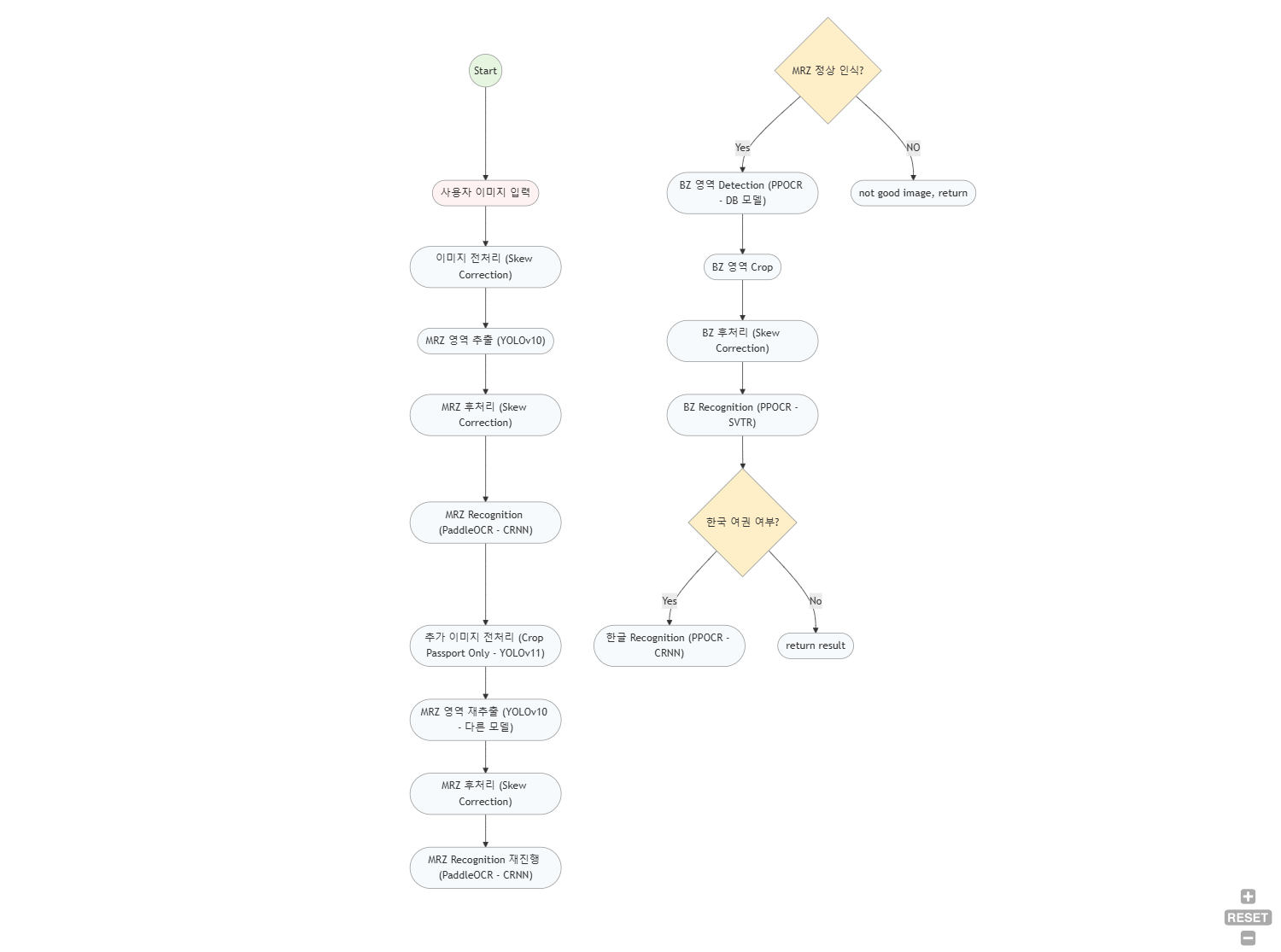
해당 pipeline은 flow chart정도로 보면 된다.
PP-OCRv4 구조
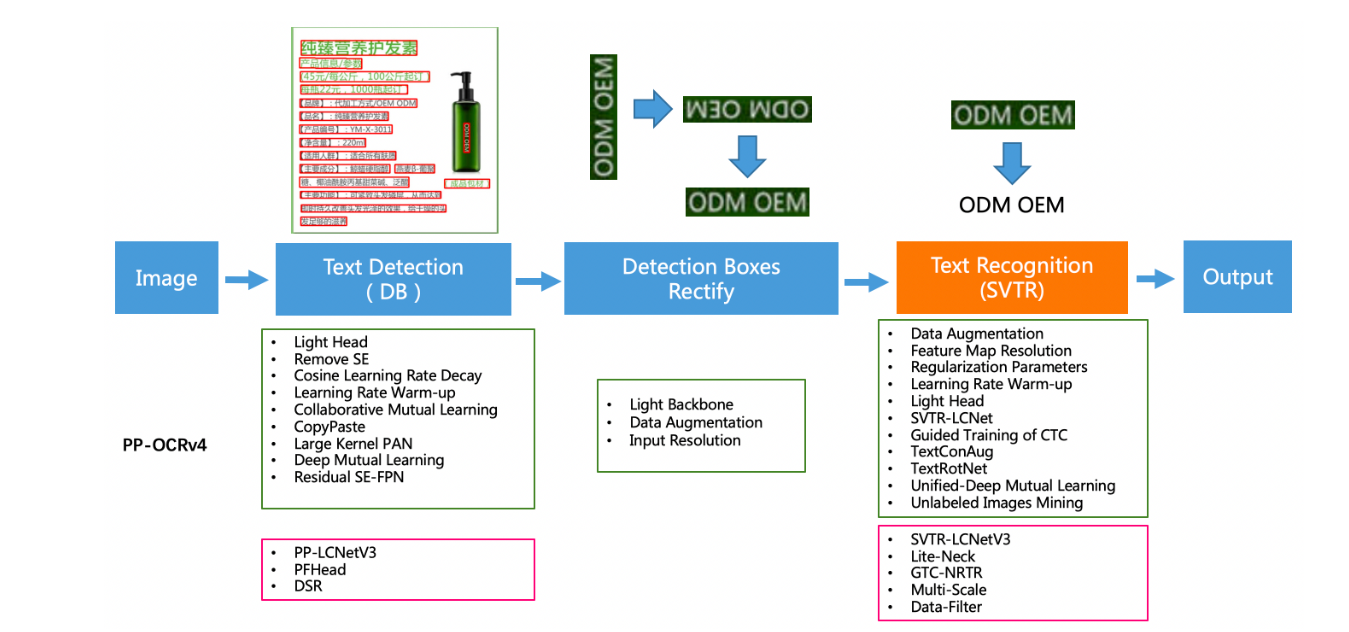
해당 구조에서 나는 text detection 부분과 text recognition 부분만 차용했다.
Text detection
PaddleOCR의 text detection은 기본적으로 DB 모델을 사용한다.
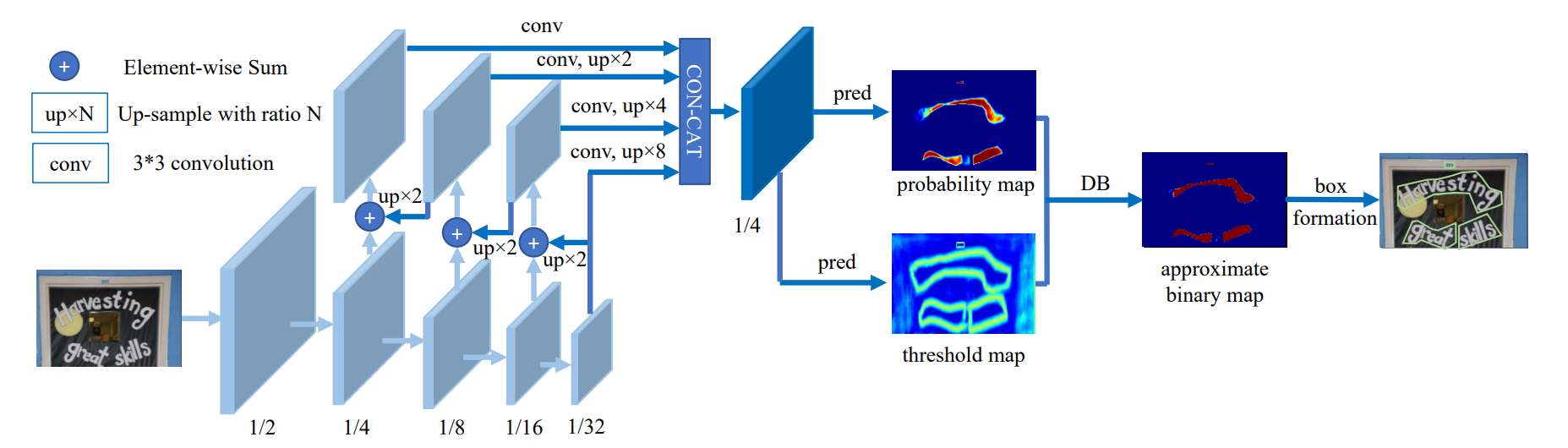
Real-time Scene Text Detection with Differentiable Binarization 논문
모델 구조
Backbone (ResNet-18)
입력 이미지를 여러 단계로 다운샘플링하여 1/2, 1/4, 1/8, 1/16, 1/32 크기의 feature map을 뽑아내는 구간이 Backbone이다.
논문에서는 실제로 ResNet-18을 사용한다.
- 역할
원본 이미지를 입력받아 저수준부터 고수준까지 다양한 스케일의 특징을 추출한다.
여기서 생성된 feature map들은 Neck에서 FPN에 사용된다.
Neck (FPN 구조)
Backbone에서 나온 여러 스케일의 feature map을 up-sample + element-wise sum 방식으로 하나의 feature map으로 합치는 과정이다.
그림에서 가운데 부분, 즉 up×2, up×4, up×8을 통해 스케일을 맞춘 뒤 Element-wise sum으로 합치는 파트가 Neck에 해당된다.
- 역할
다양한 크기의 텍스트에 대응하기 위해 멀티 스케일 특징을 Feature Pyramid Network(FPN)하는 단계이다.
낮은 scale과 높은 scale를 적절히 결합하여 공간적 세밀함 + 추상적 의미를 모두 담은 최종 feature map을 만든다.
이렇게 만들어진 최종 feature map(대개 1/4 해상도)은 Head로 전달된다.
Head (Segmentation + DB)
Neck 결과를 입력받아, 그림에서 pred라 표시된 3×3 conv + deconv 블록을 거쳐 probability map과 threshold map을 출력하는 부분이다.
이어서 DB 모듈을 적용해 approximate binary map을 생성하고, 최종적으로 box formation을 통해 검출 결과를 얻는다.
- 역할
Probability Map: 각 픽셀이 텍스트에 속할 확률을 나타내는 분할(세그멘테이션) 결과.
Threshold Map: 픽셀마다 서로 다른 임계값을 예측하여, DB 모듈에서 텍스트/배경을 이진화할 때 활용.
DB 모듈(Differentiable Binarization):
고정된 임계값이 아닌, 픽셀마다 학습된 임계값을 사용해 미분 가능한 형태로 이진화.
네트워크 전체를 end-to-end로 학습할 수 있게 하며, 복잡한 후처리 없이도 정확한 텍스트 경계를 추출 가능하게 한다.
Box Formation:
최종적으로 approximate binary map에서 Connected Components 분석 등을 통해 텍스트 바운딩 박스(또는 폴리곤)를 얻는 단계.
DB모델의 경우 내가 따로 학습할 필요 없이 매우 좋은 성능을 띄고 있었기 때문에 그대로 pretrained model을 사용했다.
Text recognition
PaddleOCR의 text recognition 모델은 2가지를 차용하는데 하나는 SVTR 구조, 하나는 CRNN 구조이다.
여기선 SVTR 모델의 구조를 설명하고 왜 2가지를 차용했는지 설명하겠다.
SVTR 모델 구조
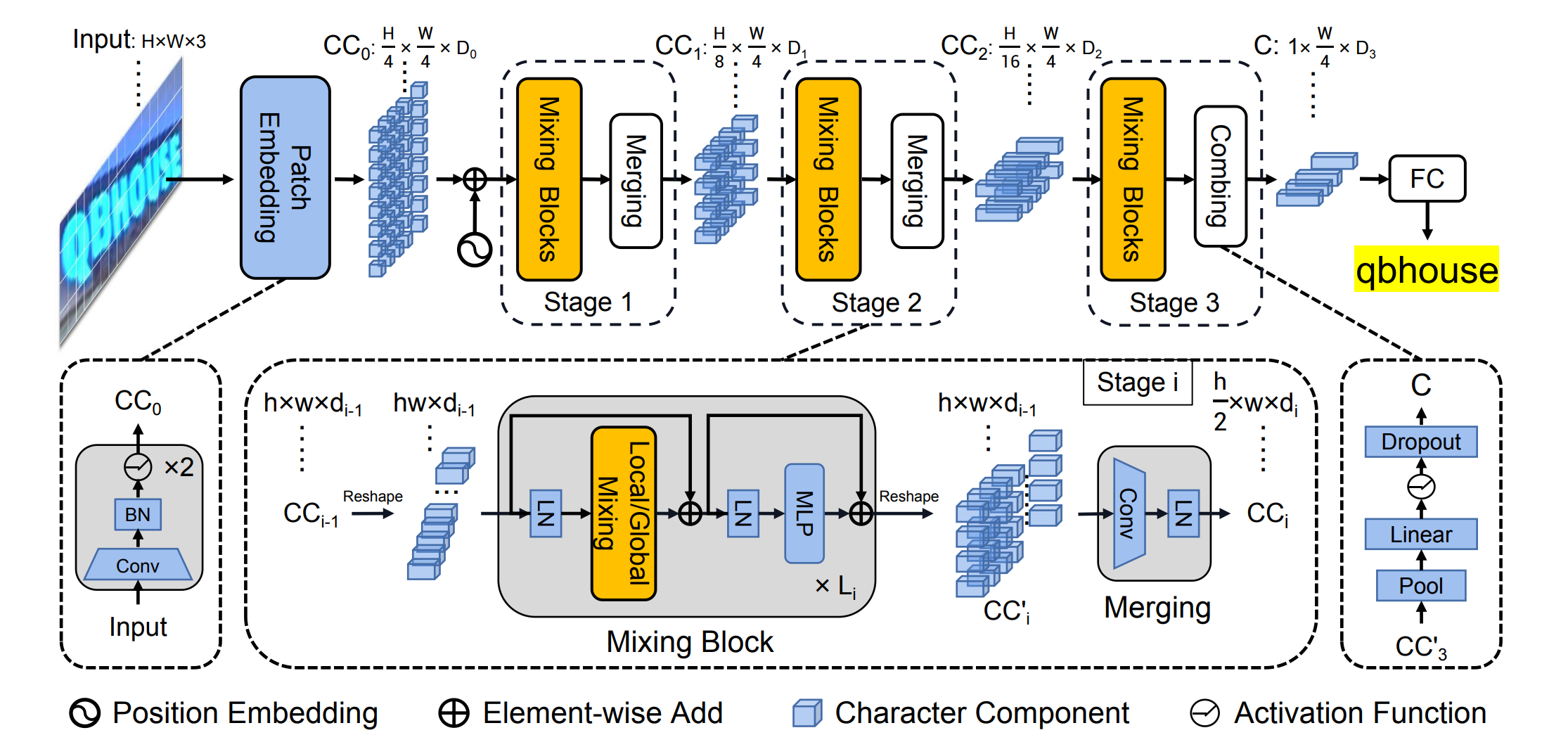
SVTR: Scene Text Recognition with a Single Visual Model 논문
Patch Embedding
-
목적
입력 이미지를 작은 단위의 Character Components로 분할하여, 각 구성 요소가 문자 일부를 표현하도록 만드는 단계이다. -
과정
-
입력:
H×W×3 크기의 컬러 이미지 -
임베딩 방법:
SVTR에서는 두 번의 3×3 Convolution 연산(각각 stride=2)을 적용한다.
첫 번째 3×3 Conv(stride=2)는 이미지의 해상도를 H/2×W/2로 줄이면서, 채널 수를 D₁(예: 64 또는 96 등)로 확장한다.
두 번째 3×3 Conv(stride=2)는 다시 해상도를 H/4×W/4로 줄이면서, 채널 수를 점진적으로 증가시킨다. -
Overlapping Patch:
두 번의 Conv 연산으로 인해 패치들이 완전히 분리되지 않고 약간 겹치게 된다.
이는 인접 패치 간의 경계 정보를 보존하여, 문자 전체를 더 부드럽게 표현하는 데 도움이 된다.
-
-
결과
최종적으로 H/4 × W/4 크기의 패치들이 생성되며, 각 패치는 일정 차원의 벡터(D₀)를 가지게 되어 다음 단계의 입력으로 사용된다.
Stage 1 ~ Stage 3 (Mixing Blocks와 Merging/Combining)
- 목적
각 스테이지에서 문자 구성 요소 간의 관계를 학습하여, 문자 내부의 세밀한 특징과 문자 간의 전역적 문맥 정보를 동시에 추출하는 것이다.
Mixing Block
-
Global Mixing Block:
전체 패치 간의 장기적인 종속성을 모델링하기 위해 Multi-Head Self-Attention을 적용한다. -
Local Mixing Block:
미리 정의된 윈도우 내에서 인접 패치 간의 지역적 관계를 학습한다. -
반복 적용:
각 스테이지에서는 Global과 Local Mixing Block들이 정해진 순서와 반복 횟수로 적용되어, 문자 구성 요소의 다차원적 특징을 점진적으로 풍부하게 만든다.
Merging (Stage 1 및 Stage 2)
-
목적:
각 스테이지가 끝날 때, feature map의 height 해상도를 줄여 계산 효율성을 높이면서 동시에 채널 수를 늘려 정보를 보강한다. -
과정:
Mixing Block 후의 feature map은 원래 해상도를 유지하지만, 3×3 Convolution(주로 height 방향 stride 2)을 적용하여 높이를 절반으로 축소한다.
width 해상도는 그대로 유지하면서, 채널 수는 증가시킨다. -
효과:
공간적 차원을 축소해 연산 비용을 줄이고, 채널 확장을 통해 특징 표현력을 향상시킨다.
Combining (Stage 3)
-
목적:
마지막 스테이지에서는 더 이상 해상도를 낮추지 않고, 최종 특징을 압축해 하나의 시퀀스로 만들어 다음 단계로 전달한다. -
과정:
Height 차원을 1로 Pooling하여 (1 × (W/4) × D₃) 형태의 압축된 feature map을 생성한다.
FC (Prediction Head)
-
목적
압축된 feature 시퀀스에서 각 위치별 문자를 예측하여 최종 텍스트 결과를 도출하는 단계이다. -
과정
Combining을 통해 생성된 (1 × (W/4) × D₃) 형태의 feature 시퀀스에 대해 FC Layer를 적용한다.
각 위치의 출력은 문자 클래스(알파벳, 숫자, 특수문자 등)에 대한 확률로 변환된다.
CTC decoding을 통해 최종 문자 시퀀스를 형성한다.
학습 이미지 준비
학습 이미지를 준비하는 과정에서 고려해야 할 사항은 한가지다.
현실에서 이미지를 찍었을때와 가장 비슷한 이미지들을 생성하면 된다.
나는 그 방법으로 아래의 방법을 사용했다.
import albumentations as A
import cv2
import numpy as np
import os
import torch
from multiprocessing import Pool, cpu_count
from PIL import Image

# Define the pixelation function
def pixelate(image, **kwargs):
    scale_factor = np.random.uniform(0.3, 1)
    h, w = image.shape[:2]
    small_image = cv2.resize(image, (int(w * scale_factor), int(h * scale_factor)), interpolation=cv2.INTER_LINEAR)
    pixelated_image = cv2.resize(small_image, (w, h), interpolation=cv2.INTER_NEAREST)
    return pixelated_image

def create_strong_transform():
    return A.Compose([
        A.Rotate(limit=(-3, 3), p=1.0, border_mode=cv2.BORDER_REPLICATE),
        A.RandomBrightnessContrast(brightness_limit=0.2, contrast_limit=0.2, p=0.7),
        A.GaussNoise(var_limit=(50.0, 70.0), p=0.6),
        A.MotionBlur(blur_limit=(5, 7), p=1),
        A.Lambda(image=pixelate)
    ])

def create_weak_transform():
    return A.Compose([
        A.Rotate(limit=(-1, 1), p=1.0, border_mode=cv2.BORDER_REPLICATE),
        A.RandomBrightnessContrast(brightness_limit=0.1, contrast_limit=0.1, p=0.6),
        A.GaussNoise(var_limit=(10.0, 30.0), p=0.3),
        A.MotionBlur(blur_limit=(3, 5), p=0.8),
        A.Lambda(image=pixelate)
    ])

def apply_cylindrical_warp(image, scale_factor):
    image_height, image_width = image.shape[:2]
    radius = image_height / (2 * np.pi) * scale_factor  # 반지름 설정

    map_x = np.zeros((image_height, image_width), dtype=np.float32)
    map_y = np.zeros((image_height, image_width), dtype=np.float32)

    for y in range(image_height):
        for x in range(image_width):
            offset = radius**2 - (y - image_height / 2)**2

            if offset >= 0:
                map_x[y, x] = x - (radius - np.sqrt(offset))
            else:
                map_x[y, x] = x

            map_y[y, x] = y

    warped_image = cv2.remap(image, map_x, map_y, interpolation=cv2.INTER_LINEAR)
    return warped_image

# Initialize the device
device = torch.device('cuda' if torch.cuda.is_available() else 'cpu')
print("Using device:", device)

# Load data from file into a dictionary
data_dict = {}
with open('last_labels2.txt', 'r', encoding="UTF-8") as f:
    lines = f.readlines()
    for line in lines:
        parts = line.strip().split(maxsplit=1)
        if len(parts) == 2:
            full_path, value = parts
            key = os.path.basename(full_path)
            data_dict[key] = value
        else:
            key = os.path.basename(parts[0])
            data_dict[key] = ""

path = "C:/Users/Desktop/bz_images/images_validation/"
file_list = sorted(os.listdir(path), key=lambda x: int(os.path.splitext(x)[0]))

# Define output paths and constants
output_base = 'C:/Users/Desktop/bz_images/images_train_'
max_images_per_folder = 500000

# Helper function for processing images
def process_image(params):
    file, image, value, folder_index, start_index, transform_func, num_augments, scale_range = params
    results = []

    for i in range(start_index, start_index + num_augments):
        transformed_image = image.copy()

        if i == start_index:
            # 첫 번째 이미지에만 warp 적용
            scale_factor = np.random.uniform(scale_range[0], scale_range[1])
            transformed_image = apply_cylindrical_warp(transformed_image, scale_factor)

        transformed = transform_func(image=transformed_image)
        transformed_image = transformed['image']

        # 빛 번짐 효과 - 섹션 단위 적용 (horizontal=5, vertical=2)
        height, width = transformed_image.shape[:2]
        num_horizontal_sections = 5
        num_vertical_sections = 2
        section_width = width // num_horizontal_sections
        section_height = height // num_vertical_sections

        # 반복 인덱스 i를 이용해 섹션 선택
        section_index = i % (num_horizontal_sections * num_vertical_sections)
        vertical_index = section_index // num_horizontal_sections
        horizontal_index = section_index % num_horizontal_sections

        startX_section = horizontal_index * section_width
        endX_section = (horizontal_index + 1) * section_width if horizontal_index < num_horizontal_sections - 1 else width

        startY_section = vertical_index * section_height
        endY_section = (vertical_index + 1) * section_height if vertical_index < num_vertical_sections - 1 else height

        # 해당 섹션 전체에 빛 번짐 효과 적용
        startX = startX_section
        startY = startY_section
        endX = startX + section_width
        endY = startY + section_height

        light_reflection = np.zeros_like(transformed_image)
        cv2.rectangle(light_reflection, (startX, startY), (endX, endY), (255, 255, 255), -1)
        blurred_reflection = cv2.GaussianBlur(light_reflection, (51, 51), 0)

        alpha = np.random.uniform(0.5, 0.7)
        augmented_image = cv2.addWeighted(transformed_image, 1, blurred_reflection, alpha, 0)

        output_folder = f'{output_base}{folder_index}'
        os.makedirs(output_folder, exist_ok=True)
        output_path = f'{output_folder}/aug_{file.replace(".jpg", "")}_{i + 1}.jpg'
        cv2.imwrite(output_path, augmented_image)
        results.append(f'aug_{file.replace(".jpg", "")}_{i + 1}.jpg {value}')

    return results

def main():
    f_write = open("aug_labels.txt", 'w')

    # Parallel processing setup
    num_workers = cpu_count() // 2  # Adjust based on your system
    pool = Pool(num_workers)

    folder_index = 1
    image_count = 0
    tasks = []

    for file in file_list:
        value = data_dict[file]

        image_path = os.path.join(path, file)
        image = cv2.imread(image_path, cv2.IMREAD_COLOR)

        # 강한 변형 (7개 이미지, 첫 번째만 warp 적용, scale_factor 범위: 3~4)
        tasks.append((file, image, value, folder_index, 0, create_strong_transform(), 7, (3, 4)))

        # 약한 변형 (3개 이미지, warp 적용 안 함, scale_factor 범위: 4~7)
        tasks.append((file, image, value, folder_index, 7, create_weak_transform(), 3, (4, 7)))

        # Update image and folder counts
        image_count += 10  # Total of 10 augmentations
        if image_count >= max_images_per_folder:
            folder_index += 1
            image_count = 0

    # Process tasks in parallel
    for result in pool.imap_unordered(process_image, tasks):
        for line in result:
            f_write.write(line + '\n')

    pool.close()
    pool.join()
    f_write.close()

if __name__ == "__main__":
    main()
aug로 사용된 기법들을 정리해보면,
Rotate :
- strong : ±3°
- weak : ±1°
RandomBrightnessContrast :
- strong : ±20%
- weak : ±10%
GaussNoise :
- strong : varience 50 ~ 70
- weak : varience 10 ~ 30
MotionBlur :
- strong : blur strength : 5 ~ 7
- weak : blur strength : 3 ~ 5
Pixelate(Custom Transform)
- 해상도를 낮췄다가 원본 크기로 복원하여 픽셀 효과 적용
Cylindrical Warp 변환
- 첫 번째 증강 이미지에 원통형 왜곡 적용
→ 랜덤 스케일 팩터로 왜곡 강도 조절
빛 번짐 (Light Reflection) 효과
- 이미지 전체를 가로 5개, 세로 2개의 섹션으로 분할
→ 각 증강 인덱스에 따라 특정 섹션 선택 후 흰색 사각형 그리기
→ 선택 영역에 가우시안 블러 적용 후 원본 이미지와 혼합
예시 :




학습
2가지 모델 사용 이유


위 사진들을 보면 알 수 있다시피, 여권의 BZ영역의 경우 매우 가변적인 width의 이미지들이 포함되어 있다.
따라서 모델 자체적으로도 유연하게 대응할 수 있어야한다.
나의 경우 MRZ과 한글은 비교적 고정적인 ratio를 지닌 반면 BZ영역의 경우 가변적인 ratio로 인해 BZ영역은 SVTR 모델을, MRZ 영역과 한글은 CRNN 모델을 선택했다.
SVTR 모델과 CRNN 모델의 장단점을 비교하면 아래와 같은 표로 나타낼 수 있다.

사실 표만 보자면 SVTR대신 CRNN을 쓸 이유가 전혀 없어보인다.
연산 코스트를 제외한 다른 부분들에서 SVTR이 훨씬 좋기 때문이다.
하지만 내가 MRZ을 SVTR로 학습시켰을 때와 CRNN으로 학습시켰을 때 CRNN에서 정확도가 더 높게 나오는 것을 확인했다.
이에 대하여 명확하게 어떠한 이유 때문에 정확도가 더 높게 나온 것인지 파악하진 못했다.
하지만 예상하기론,
첫번째로 SVTR의 patch embedding에서 충분히 feature를 뽑아내지 못했고,
두번째로 mixing blocks에서 지역적이나 전역적으로 뽑아낼 feature가 충분하지 않았을 수 있을 것 같다.
왜냐하면 MRZ엔 문자간 순차적 관계나 문맥 패턴이 뚜렷하지 않기 때문이다.
마지막은 아래에 후술하겠다.
하지만 CRNN의 경우 resnet(18 or 50)기반으로 오히려 문자의 feature를 잘 뽑아내기엔 충분했을 것이라고 본다.
결과적으로 나는 MRZ,한글 이름은 CRNN으로, BZ는 SVTR로 학습시키기로 한다.
PP-OCR rec model 학습 방법
PP-OCR의 경우 다양한 학습 프로파일을 제공한다.
그중 자신에게 맞는 프로파일을 찾아서 학습 시키면 된다.
나는 BZ 영역을 학습시킬 땐 아래와 같은 config를 사용했다.
BZ 영역 config
Global:
  debug: false
  use_gpu: true
  epoch_num: 2
  log_smooth_window: 20
  print_batch_step: 10
  save_model_dir: ./output/rec_ppocr_v4
  save_epoch_step: 10
  eval_batch_step:
  - 0
  - 6000
  cal_metric_during_train: true
  pretrained_model: en_PP-OCRv4_rec_train/best_accuracy
  checkpoints: null
  save_inference_dir: null
  use_visualdl: false
  infer_img: doc/imgs_words/ch/word_1.jpg
  character_dict_path: ppocr/utils/en_dict.txt
  max_text_length: 20
  infer_mode: false
  use_space_char: true
  distributed: true
  save_res_path: ./output/rec/predicts_ppocrv4.txt
Optimizer:
  name: Adam
  beta1: 0.9
  beta2: 0.999
  lr:
    name: Cosine
    learning_rate: 0.0005
    warmup_epoch: 1
  regularizer:
    name: L2
    factor: 3.0e-05
Architecture:
  model_type: rec
  algorithm: SVTR_LCNet
  Transform: null
  Backbone:
    name: PPLCNetV3
    scale: 0.95
  Head:
    name: MultiHead
    head_list:
    - CTCHead:
        Neck:
          name: svtr
          dims: 120
          depth: 2
          hidden_dims: 120
          kernel_size:
          - 1
          - 3
          use_guide: true
        Head:
          fc_decay: 1.0e-05
    - NRTRHead:
        nrtr_dim: 384
        max_text_length: 20
Loss:
  name: MultiLoss
  loss_config_list:
  - CTCLoss: null
  - NRTRLoss: null
PostProcess:
  name: CTCLabelDecode
Metric:
  name: RecMetric
  main_indicator: acc
  ignore_space: false
Train:
  dataset:
    name: MultiScaleDataSet
    ds_width: false
    data_dir: ../../../mnt/c/Users/Desktop/images/bz_images
    ext_op_transform_idx: 1
    label_file_list:
    - ../../../mnt/c/Users/Desktop/images/bz_images/gt_train.txt
    transforms:
    - DecodeImage:
        img_mode: BGR
        channel_first: false
    - RecConAug:
        prob: 0.5
        ext_data_num: 2
        image_shape:
        - 48
        - 320
        - 3
        max_text_length: 20
    - RecAug: null
    - MultiLabelEncode:
        gtc_encode: NRTRLabelEncode
    - KeepKeys:
        keep_keys:
        - image
        - label_ctc
        - label_gtc
        - length
        - valid_ratio
  sampler:
    name: MultiScaleSampler
    scales:
    - - 320
      - 32
    - - 320
      - 48
    - - 320
      - 64
    first_bs: 100
    fix_bs: false
    divided_factor:
    - 8
    - 16
    is_training: true
  loader:
    shuffle: true
    batch_size_per_card: 100
    drop_last: true
    num_workers: 10
Eval:
  dataset:
    name: SimpleDataSet
    data_dir: ../../../mnt/c/Users/Desktop/images/bz_images
    label_file_list:
    - ../../../mnt/c/Users/Desktop/images/bz_images/gt_validation.txt
    transforms:
    - DecodeImage:
        img_mode: BGR
        channel_first: false
    - MultiLabelEncode:
        gtc_encode: NRTRLabelEncode
    - RecResizeImg:
        image_shape:
        - 3
        - 48
        - 320
    - KeepKeys:
        keep_keys:
        - image
        - label_ctc
        - label_gtc
        - length
        - valid_ratio
  loader:
    shuffle: false
    drop_last: false
    batch_size_per_card: 100
    num_workers: 10
profiler_options: null
config를 살펴보면 여러가지 세팅이 가능하다.
config 구조를 살펴보면
- Backbone (PPLCNetV3): 입력 이미지에서 다양한 스케일의 feature map을 추출.
- Head (MultiHead):
- CTCHead: SVTR 방식의 Neck을 통해 추출된 feature들을 기반으로 CTC 디코딩을 위한 예측 수행.
- NRTRHead: NRTR 방식을 활용해 Transformer 기반의 예측을 수행.
- Loss 및 후처리: CTCLoss와 NRTRLoss를 결합해 학습하고, CTCLabelDecode를 통해 최종 예측 결과를 도출.
등이 정의되어있다.
여기서 내가 파악한건 PPLCNetV3,CTCHead,CTCLoss정도인데 NRTRHead,NRTRLoss는 아직 정확하게 파악하지 못했다.
그리고 세팅해야될 것이 이미지 사이즈이다.
config를 보면 train에 총 4군데 이미지 사이즈를 입력할 수 있다.
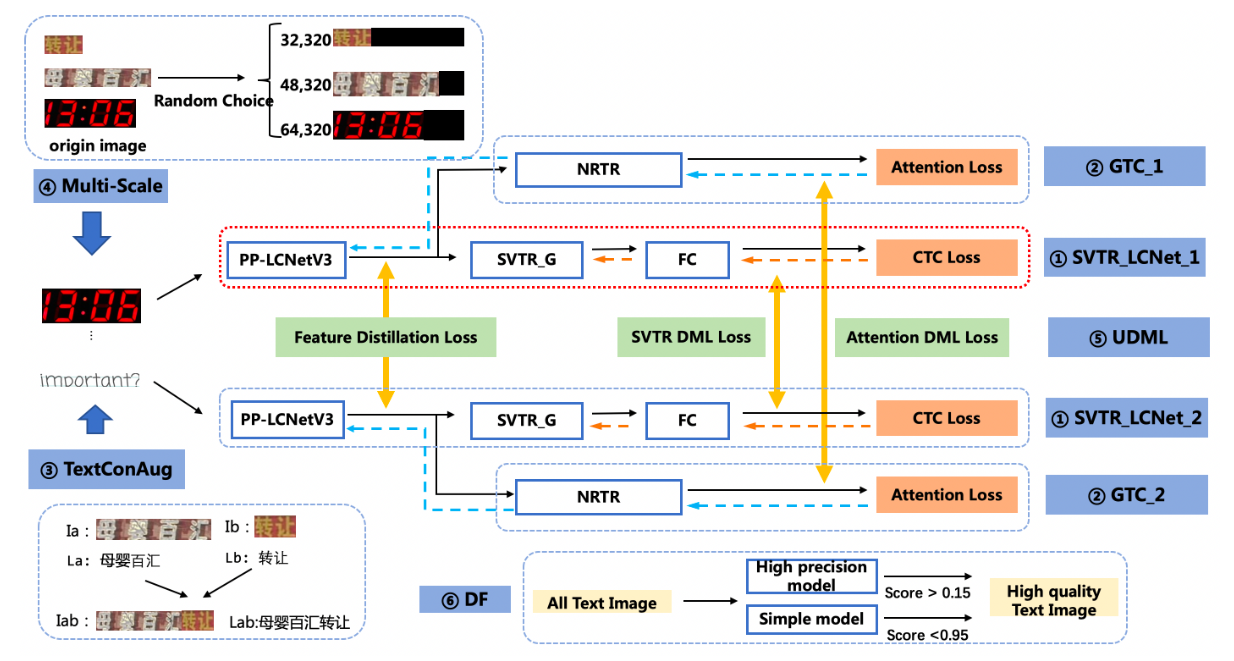
아래 이미지를 보면 Multi-Scale과 TextConAug가 존재하는데 Multi-Scale의 경우 32,48,64의 height을 고정적으로 받고 width는 본인에 맞게 수정하면 된다.
Text ConAug의 경우 마찬가지로 본인에 맞게 수정하면 된다.
Multi-Scale의 경우 오른쪽으로 이미지를 패딩하는것을 확인 할 수 있다.
나는 이 부분에서 고민이 많았는데, 모든 이미지가 비슷한 비율로 패딩이 된다면 상관없겠지만, 어떤 이미지는 패딩이 되고 어떤 이미지는 패딩이 안된다면 학습 퀄리티에 영향을 줄 것이라고 판단했다.
또한 이러한 특성이 MRZ에서도 나타날 수 있을 것이라고 판단했는데, MRZ의 경우 거의 동일한 width와 height를 가지고 있기 때문에 오히려 패딩을 하면서 feature 손실 혹은 혼동이 올 수 있을 것이라고 판단했다.
이 부분은 사용자가 선택해야 되는 부분 같다. 패딩을 시키는 것과 안시키는 것 사이에 성능 차이는 본인의 학습 이미지들의 특성을 잘 파악하고 결정하면 될 것 같다. 나의 경우 그래도 BZ 영역은 크게 가변적이기 때문에 아래와 같은 방법을 택했다.
MRZ,한글 이름 config (공통 부분)
Global:
use_gpu: True
epoch_num: 15
log_smooth_window: 20
print_batch_step: 10
save_model_dir: ./output/korean_model_real
save_epoch_step: 3
#evaluation is run every 5000 iterations after the 4000th iteration
eval_batch_step: [0, 2000]
#if pretrained_model is saved in static mode, load_static_weights must set to True
cal_metric_during_train: True
pretrained_model:
checkpoints:
save_inference_dir:
use_visualdl: False
infer_img:
#for data or label process
character_dict_path: ppocr/utils/dict/korean_dict.txt
max_text_length: 6
infer_mode: False
use_space_char: False
Optimizer:
name: Adam
beta1: 0.9
beta2: 0.999
lr:
name: Cosine
learning_rate: 0.0005
regularizer:
name: 'L2'
factor: 0.00001
Architecture:
model_type: rec
algorithm: CRNN
Transform:
Backbone:
name: MobileNetV3
scale: 0.5
model_name: small
small_stride: [1, 2, 2, 2]
Neck:
name: SequenceEncoder
encoder_type: rnn
hidden_size: 48
Head:
name: CTCHead
fc_decay: 0.00001
Loss:
name: CTCLoss
PostProcess:
name: CTCLabelDecode
Metric:
name: RecMetric
main_indicator: acc
Train:
dataset:
name: SimpleDataSet
data_dir: ../../../mnt/c/Users/Desktop/kor_images
label_file_list: ["../../../mnt/c/Users/Desktop/kor_images/gt_train.txt"]
transforms:
- DecodeImage: # load image
img_mode: BGR
channel_first: False
- RecAug:
- CTCLabelEncode: # Class handling label
- RecResizeImg:
image_shape: [3, 48, 113]
- KeepKeys:
keep_keys: ['image', 'label', 'length'] # dataloader will return list in this order
loader:
shuffle: True
batch_size_per_card: 512
drop_last: True
num_workers: 10
Eval:
dataset:
name: SimpleDataSet
data_dir: ../../../mnt/c/Users/Desktop/kor_images
label_file_list: ["../../../mnt/c/Users/Desktop/kor_images/gt_validation.txt"]
transforms:
- DecodeImage: # load image
img_mode: BGR
channel_first: False
- CTCLabelEncode: # Class handling label
- RecResizeImg:
image_shape: [3, 48, 113]
- KeepKeys:
keep_keys: ['image', 'label', 'length'] # dataloader will return list in this order
loader:
shuffle: False
drop_last: False
batch_size_per_card: 512
num_workers: 10
최적화
모델 타입 변경 및 tensorRT 변환
모델 타입 변경
Yolov10,11
학습이 끝난 yolo 모델의 경우 pytorch 모델이다.
모델의 플랫폼을 변경하는 방법은 다양하지만 나는 yolo에서 제공하는 방법을 사용했다.
onnx모델로 쉽게 변경가능한데,
from ultralytics import YOLO

# Load the YOLO11 model
model = YOLO("yolo11n.pt")

# Export the model to ONNX format
model.export(format="onnx",dynamic = True,half = True or False)  # creates 'yolo11n.onnx'
위 코드에서 보면 알다시피, 그냥 model.export를 통해 쉽게 onnx 모델로 변환이 가능하다.
변환시킬 때 사용할 수 있는 파라미터는 다양하다.
나는 기본적으로 batch 입력을 위해 dynamic을 사용하였다.
half의 경우 fp32 -> fp16을 지원하는데 이는 사용자의 조건에 맞게 수정하면 된다.
파라미터
https://docs.ultralytics.com/ko/integrations/onnx/#installation
paddle ocr
paddle ocr의 경우 학습이 끝나고 inference model로 추출하면 2개의 파일이 나온다.
inference.pdmodel , inference.pdiparams
pdiparams는 wight 정보를, pdmodel의 경우 모델 구조이다.
이제 이걸 가지고 onnx 모델로 만들어야 된다.
우선 paddleocr,Paddle2ONNX,onnxruntime이 있어야 한다.
PaddleOCR
git clone -b main https://github.com/PaddlePaddle/PaddleOCR.git
cd PaddleOCR && python3 pip install -e .
Paddle2ONNX
python3 -m pip install paddle2onnx
onnxruntime
python3 -m pip install onnxruntime-gpu
나는 onnxruntime-gpu 버젼으로 설치하였다.
cpu 버젼은 -gpu 때고 설치하면 된다.
paddle2onnx --model_dir ./inference/en_PP-OCRv3_det_infer \
--model_filename inference.pdmodel \
--params_filename inference.pdiparams \
--save_file ./inference/det_onnx/model.onnx \
--opset_version 11 \
--enable_onnx_checker True
위 커맨드를 실행하면 onnx 모델이 나온다.
추후 설명하겠지만, tensorrt 모델로 변경할때 fp32->fp16으로 바꾸려면 opset_version이 17이상 이어야 한다.
또한 Paddle2ONNX v1.2.3 이상부턴 dynamic이 자동이기 때문에 따로 dynamic으로 만들어줄 필요 없다.
tensorRT 변환
모든 모델을 onnx 형식으로 변경했다면 이제 tensorRT로 변경 해야된다.
onnx 모델만으로도 성능은 나쁘지않지만 nvidia gpu를 사용한다면 tensorRT로 변경하는것을 적극 추천한다.
어떤 블로그에서 분석한 내용을 보면 tensorRT fp16 모델이 어떤 상황에서도 최고의 성능을 보이는것을 알 수 있다.
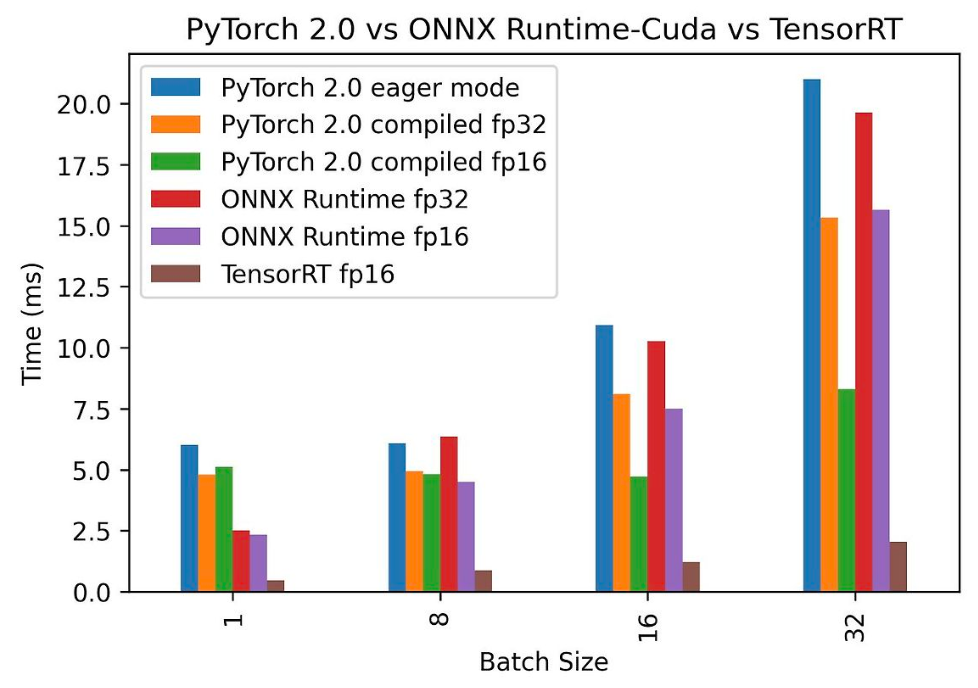
실제 나도 onnx fp16과 tensorRT의 성능을 비교했을 때 tensorRT가 최대 3배의 성능을 냈다.
tensorRT로 변환하기 위해선 우선 tensorRT를 설치해야된다.
https://developer.nvidia.com/tensorrt/download/10x
위 링크에 들어가서 본인의 cuda 맞게 설치하면 된다.
내가 알기론 10.0 버젼에 몇몇 issue가 있어서 나는 제일 최신 버젼인 10.8로 설치했다.
https://velog.io/@paradeigma/WSL-nvidia-driver-computer-compatibility-cuda-cudnn-%EB%B2%84%EC%A0%84-%ED%99%95%EC%9D%B8
설치 과정은 위 링크에 들어가서 보면 된다.
설치가 완료 됐다면 터미널에
/usr/src/tensorrt/bin/trtexec 이걸 쳐보자.
필자는 ubuntu에서 돌리고 있어서 저렇게 치면 나오지만 window에선 어떻게 해야될지는 잘 모르겠다.
만약 정상적으로 커맨드가 입력된다면
/usr/src/tensorrt/bin/trtexec --onnx=best.onnx --saveEngine=model_fp16.trt --fp16 --minShapes=images:8x3x640x640 --optShapes=images:8x3x640x640 --maxShapes=images:8x3x640x640
위와 같이 입력 할 수 있다.
--onnx의 경우 onnx 모델을 입력받는 곳, saveEngine은 output 경로 및 이름, --fp16의 경우 fp32 -> fp16으로 변환해주는 작업이다. 물론 모든 구조를 fp32 -> fp16으로 변환할 수 있는건 아니다.
https://github.com/onnx/onnx-tensorrt/blob/main/docs/operators.md
위 링크를 타고 들어가면 fp32->fp16으로 변환 가능한 operation들을 확인 할 수 있다.
물론 그런거 고려 안하고 fp16 해도 fp32로 해야될건 fp32로 하고 fp16으로 변환가능한건 fp16으로 변환해준다.
그래도 혹시 오류가 나거나 특정 operation을 fp16,32,int16 등으로 특정짓고 싶다면 확인하는것을 추천한다.
minShapes=images: 에서 images: 는 onnx 모델이 받는 텐서의 이름이다. 이는 모델마다 다르기 때문에 확인하고 넣어주면 된다. 기본적으로 yolo는 images, paddleocr은 x로 받아준다.
마지막으로 minShapes,optShapes,maxShapes를 설정해주면 된다. min에는 예를 들어 1x3x320x320 이라한다면 최소 1개의 배치와 3 채널 320,320 이미지는 입력으로 해줘야한다는 말이다.
opt의 경우 최적의 이미지 형태이며 max의 경우 최대 이미지의 값을 넣어주면 된다.
그렇다면 드는 의문은 그냥 max에 batch를 100~200이렇게 넣어주면 되는거 아니냐 할 수 있지만 그렇게 되면 나중에 pin memory에 모델을 올릴때 문제가 생긴다.
따라서 본인이 사용하는 솔루션에서 제공하는 배치사이즈에 맞추는게 좋다.
실제 결과는 아래와 같이 나온다.
[08/09/2024-23:19:08] [I] === Model Options ===
[08/09/2024-23:19:08] [I] Format: ONNX
[08/09/2024-23:19:08] [I] Model: resnet50_pytorch.onnx
[08/09/2024-23:19:08] [I] Output:
[08/09/2024-23:19:08] [I] === Build Options ===
[08/09/2024-23:19:08] [I] Memory Pools: workspace: default, dlaSRAM: default, dlaLocalDRAM: default, dlaGlobalDRAM: default, tacticSharedMem: default
[08/09/2024-23:19:08] [I] avgTiming: 8
[08/09/2024-23:19:08] [I] Precision: FP32+FP16
[08/09/2024-23:19:08] [I] LayerPrecisions:
[08/09/2024-23:19:08] [I] Layer Device Types:
[08/09/2024-23:19:08] [I] Calibration:
[08/09/2024-23:19:08] [I] Refit: Disabled
[08/09/2024-23:19:08] [I] Strip weights: Disabled
[08/09/2024-23:19:08] [I] Version Compatible: Disabled
[08/09/2024-23:19:08] [I] ONNX Plugin InstanceNorm: Disabled
[08/09/2024-23:19:08] [I] TensorRT runtime: full
[08/09/2024-23:19:08] [I] Lean DLL Path:
[08/09/2024-23:19:08] [I] Tempfile Controls: { in_memory: allow, temporary: allow }
[08/09/2024-23:19:08] [I] Exclude Lean Runtime: Disabled
[08/09/2024-23:19:08] [I] Sparsity: Disabled
[08/09/2024-23:19:08] [I] Safe mode: Disabled
[08/09/2024-23:19:08] [I] Build DLA standalone loadable: Disabled
[08/09/2024-23:19:08] [I] Allow GPU fallback for DLA: Disabled
[08/09/2024-23:19:08] [I] DirectIO mode: Disabled
[08/09/2024-23:19:08] [I] Restricted mode: Disabled
[08/09/2024-23:19:08] [I] Skip inference: Disabled
[08/09/2024-23:19:08] [I] Save engine: resnet_engine_pytorch.trt
[08/09/2024-23:19:08] [I] Load engine:
[08/09/2024-23:19:08] [I] Profiling verbosity: 0
[08/09/2024-23:19:08] [I] Tactic sources: Using default tactic sources
[08/09/2024-23:19:08] [I] timingCacheMode: local
[08/09/2024-23:19:08] [I] timingCacheFile:
[08/09/2024-23:19:08] [I] Enable Compilation Cache: Enabled
[08/09/2024-23:19:08] [I] errorOnTimingCacheMiss: Disabled
[08/09/2024-23:19:08] [I] Preview Features: Use default preview flags.
[08/09/2024-23:19:08] [I] MaxAuxStreams: -1
[08/09/2024-23:19:08] [I] BuilderOptimizationLevel: -1
[08/09/2024-23:19:08] [I] Calibration Profile Index: 0
[08/09/2024-23:19:08] [I] Weight Streaming: Disabled
[08/09/2024-23:19:08] [I] Runtime Platform: Same As Build
[08/09/2024-23:19:08] [I] Debug Tensors:
[08/09/2024-23:19:08] [I] Input(s): fp16:chw
[08/09/2024-23:19:08] [I] Output(s): fp16:chw
[08/09/2024-23:19:08] [I] Input build shapes: model
[08/09/2024-23:19:08] [I] Input calibration shapes: model
[08/09/2024-23:19:08] [I] === System Options ===
[08/09/2024-23:19:08] [I] Device: 0
[08/09/2024-23:19:08] [I] DLACore:
[08/09/2024-23:19:08] [I] Plugins:
[08/09/2024-23:19:08] [I] setPluginsToSerialize:
[08/09/2024-23:19:08] [I] dynamicPlugins:
[08/09/2024-23:19:08] [I] ignoreParsedPluginLibs: 0
[08/09/2024-23:19:08] [I]
[08/09/2024-23:19:08] [I] === Inference Options ===
[08/09/2024-23:19:08] [I] Batch: Explicit
[08/09/2024-23:19:08] [I] Input inference shapes: model
[08/09/2024-23:19:08] [I] Iterations: 10
[08/09/2024-23:19:08] [I] Duration: 3s (+ 200ms warm up)
[08/09/2024-23:19:08] [I] Sleep time: 0ms
[08/09/2024-23:19:08] [I] Idle time: 0ms
[08/09/2024-23:19:08] [I] Inference Streams: 1
[08/09/2024-23:19:08] [I] ExposeDMA: Disabled
[08/09/2024-23:19:08] [I] Data transfers: Enabled
[08/09/2024-23:19:08] [I] Spin-wait: Disabled
[08/09/2024-23:19:08] [I] Multithreading: Disabled
[08/09/2024-23:19:08] [I] CUDA Graph: Disabled
[08/09/2024-23:19:08] [I] Separate profiling: Disabled
[08/09/2024-23:19:08] [I] Time Deserialize: Disabled
[08/09/2024-23:19:08] [I] Time Refit: Disabled
[08/09/2024-23:19:08] [I] NVTX verbosity: 0
[08/09/2024-23:19:08] [I] Persistent Cache Ratio: 0
[08/09/2024-23:19:08] [I] Optimization Profile Index: 0
[08/09/2024-23:19:08] [I] Weight Streaming Budget: 100.000000%
[08/09/2024-23:19:08] [I] Inputs:
[08/09/2024-23:19:08] [I] Debug Tensor Save Destinations:
[08/09/2024-23:19:08] [I] === Reporting Options ===
[08/09/2024-23:19:08] [I] Verbose: Disabled
[08/09/2024-23:19:08] [I] Averages: 10 inferences
[08/09/2024-23:19:08] [I] Percentiles: 90,95,99
[08/09/2024-23:19:08] [I] Dump refittable layers:Disabled
[08/09/2024-23:19:08] [I] Dump output: Disabled
[08/09/2024-23:19:08] [I] Profile: Disabled
[08/09/2024-23:19:08] [I] Export timing to JSON file:
[08/09/2024-23:19:08] [I] Export output to JSON file:
[08/09/2024-23:19:08] [I] Export profile to JSON file:
[08/09/2024-23:19:08] [I]
[08/09/2024-23:19:08] [I] === Device Information ===
[08/09/2024-23:19:08] [I] Available Devices:
[08/09/2024-23:19:08] [I]   Device 0: "NVIDIA RTX A5000" UUID: GPU-bd38339f-9e6e-7f34-17ad-c1123627120b
[08/09/2024-23:19:08] [I] Selected Device: NVIDIA RTX A5000
[08/09/2024-23:19:08] [I] Selected Device ID: 0
[08/09/2024-23:19:08] [I] Selected Device UUID: GPU-bd38339f-9e6e-7f34-17ad-c1123627120b
[08/09/2024-23:19:08] [I] Compute Capability: 8.6
[08/09/2024-23:19:08] [I] SMs: 64
[08/09/2024-23:19:08] [I] Device Global Memory: 24238 MiB
[08/09/2024-23:19:08] [I] Shared Memory per SM: 100 KiB
[08/09/2024-23:19:08] [I] Memory Bus Width: 384 bits (ECC disabled)
[08/09/2024-23:19:08] [I] Application Compute Clock Rate: 1.695 GHz
[08/09/2024-23:19:08] [I] Application Memory Clock Rate: 8.001 GHz
[08/09/2024-23:19:08] [I]
[08/09/2024-23:19:08] [I] Note: The application clock rates do not reflect the actual clock rates that the GPU is currently running at.
[08/09/2024-23:19:08] [I]
[08/09/2024-23:19:08] [I] TensorRT version: 10.3.0
[08/09/2024-23:19:08] [I] Loading standard plugins
[08/09/2024-23:19:08] [I] [TRT] [MemUsageChange] Init CUDA: CPU +1, GPU +0, now: CPU 19, GPU 1578 (MiB)
[08/09/2024-23:19:10] [I] [TRT] [MemUsageChange] Init builder kernel library: CPU +2087, GPU +386, now: CPU 2262, GPU 1964 (MiB)
[08/09/2024-23:19:10] [I] Start parsing network model.
[08/09/2024-23:19:10] [I] [TRT] ----------------------------------------------------------------
[08/09/2024-23:19:10] [I] [TRT] Input filename:   resnet50_pytorch.onnx
[08/09/2024-23:19:10] [I] [TRT] ONNX IR version:  0.0.8
[08/09/2024-23:19:10] [I] [TRT] Opset version:    17
[08/09/2024-23:19:10] [I] [TRT] Producer name:    pytorch
[08/09/2024-23:19:10] [I] [TRT] Producer version: 2.4.0
[08/09/2024-23:19:10] [I] [TRT] Domain:
[08/09/2024-23:19:10] [I] [TRT] Model version:    0
[08/09/2024-23:19:10] [I] [TRT] Doc string:
[08/09/2024-23:19:10] [I] [TRT] ----------------------------------------------------------------
[08/09/2024-23:19:10] [I] Finished parsing network model. Parse time: 0.0944174
[08/09/2024-23:19:10] [I] [TRT] Local timing cache in use. Profiling results in this builder pass will not be stored.
[08/09/2024-23:19:56] [I] [TRT] Detected 1 inputs and 1 output network tensors.
[08/09/2024-23:19:58] [I] [TRT] Total Host Persistent Memory: 330496
[08/09/2024-23:19:58] [I] [TRT] Total Device Persistent Memory: 0
[08/09/2024-23:19:58] [I] [TRT] Total Scratch Memory: 0
[08/09/2024-23:19:58] [I] [TRT] [BlockAssignment] Started assigning block shifts. This will take 57 steps to complete.
[08/09/2024-23:19:58] [I] [TRT] [BlockAssignment] Algorithm ShiftNTopDown took 0.495652ms to assign 4 blocks to 57 nodes requiring 131661824 bytes.
[08/09/2024-23:19:58] [I] [TRT] Total Activation Memory: 131661824
[08/09/2024-23:19:58] [I] [TRT] Total Weights Memory: 51088640
[08/09/2024-23:19:58] [I] [TRT] Engine generation completed in 47.9778 seconds.
[08/09/2024-23:19:58] [I] [TRT] [MemUsageStats] Peak memory usage of TRT CPU/GPU memory allocators: CPU 8 MiB, GPU 221 MiB
[08/09/2024-23:19:58] [I] [TRT] [MemUsageStats] Peak memory usage during Engine building and serialization: CPU: 3494 MiB
[08/09/2024-23:19:58] [I] Engine built in 48.0138 sec.
[08/09/2024-23:19:58] [I] Created engine with size: 51.3226 MiB
[08/09/2024-23:19:58] [I] [TRT] Loaded engine size: 51 MiB
[08/09/2024-23:19:58] [I] Engine deserialized in 0.040731 sec.
[08/09/2024-23:19:58] [I] [TRT] [MemUsageChange] TensorRT-managed allocation in IExecutionContext creation: CPU +0, GPU +126, now: CPU 0, GPU 174 (MiB)
[08/09/2024-23:19:58] [I] Setting persistentCacheLimit to 0 bytes.
[08/09/2024-23:19:58] [I] Created execution context with device memory size: 125.562 MiB
[08/09/2024-23:19:58] [I] Using random values for input input.1
[08/09/2024-23:19:58] [I] Input binding for input.1 with dimensions 32x3x224x224 is created.
[08/09/2024-23:19:58] [I] Output binding for 495 with dimensions 32x1000 is created.
[08/09/2024-23:19:58] [I] Starting inference
[08/09/2024-23:20:01] [I] Warmup completed 40 queries over 200 ms
[08/09/2024-23:20:01] [I] Timing trace has 577 queries over 3.01593 s
[08/09/2024-23:20:01] [I]
[08/09/2024-23:20:01] [I] === Trace details ===
[08/09/2024-23:20:01] [I] Trace averages of 10 runs:
[08/09/2024-23:20:01] [I] Average on 10 runs - GPU latency: 5.15379 ms - Host latency: 5.96491 ms (enqueue 0.601962 ms)
[08/09/2024-23:20:01] [I] Average on 10 runs - GPU latency: 5.15573 ms - Host latency: 5.96678 ms (enqueue 0.614818 ms)
[08/09/2024-23:20:01] [I] Average on 10 runs - GPU latency: 5.14959 ms - Host latency: 5.9606 ms (enqueue 0.619507 ms)
[08/09/2024-23:20:01] [I] Average on 10 runs - GPU latency: 5.15471 ms - Host latency: 5.96739 ms (enqueue 0.596365 ms)
[08/09/2024-23:20:01] [I] Average on 10 runs - GPU latency: 5.15789 ms - Host latency: 5.96873 ms (enqueue 0.60484 ms)
[08/09/2024-23:20:01] [I] Average on 10 runs - GPU latency: 5.15574 ms - Host latency: 5.96605 ms (enqueue 0.615045 ms)
[08/09/2024-23:20:01] [I] Average on 10 runs - GPU latency: 5.16485 ms - Host latency: 5.97597 ms (enqueue 0.606131 ms)
[08/09/2024-23:20:01] [I] Average on 10 runs - GPU latency: 5.16719 ms - Host latency: 5.9787 ms (enqueue 0.606793 ms)
[08/09/2024-23:20:01] [I] Average on 10 runs - GPU latency: 5.15942 ms - Host latency: 5.9703 ms (enqueue 0.608478 ms)
[08/09/2024-23:20:01] [I] Average on 10 runs - GPU latency: 5.158 ms - Host latency: 5.96863 ms (enqueue 0.618744 ms)
[08/09/2024-23:20:01] [I] Average on 10 runs - GPU latency: 5.16301 ms - Host latency: 5.97296 ms (enqueue 0.605475 ms)
[08/09/2024-23:20:01] [I] Average on 10 runs - GPU latency: 5.15902 ms - Host latency: 5.96936 ms (enqueue 0.606885 ms)
[08/09/2024-23:20:01] [I] Average on 10 runs - GPU latency: 5.48464 ms - Host latency: 6.29867 ms (enqueue 0.610254 ms)
[08/09/2024-23:20:01] [I] Average on 10 runs - GPU latency: 5.52335 ms - Host latency: 6.33522 ms (enqueue 0.611707 ms)
[08/09/2024-23:20:01] [I] Average on 10 runs - GPU latency: 5.29356 ms - Host latency: 6.10337 ms (enqueue 0.600226 ms)
[08/09/2024-23:20:01] [I] Average on 10 runs - GPU latency: 5.21546 ms - Host latency: 6.02838 ms (enqueue 0.604974 ms)
[08/09/2024-23:20:01] [I] Average on 10 runs - GPU latency: 5.19424 ms - Host latency: 6.00571 ms (enqueue 0.606787 ms)
[08/09/2024-23:20:01] [I] Average on 10 runs - GPU latency: 5.19053 ms - Host latency: 6.00176 ms (enqueue 0.603711 ms)
[08/09/2024-23:20:01] [I] Average on 10 runs - GPU latency: 5.19945 ms - Host latency: 6.01036 ms (enqueue 0.608167 ms)
[08/09/2024-23:20:01] [I] Average on 10 runs - GPU latency: 5.19435 ms - Host latency: 6.00419 ms (enqueue 0.60293 ms)
[08/09/2024-23:20:01] [I] Average on 10 runs - GPU latency: 5.18092 ms - Host latency: 5.99093 ms (enqueue 0.607703 ms)
[08/09/2024-23:20:01] [I] Average on 10 runs - GPU latency: 5.15225 ms - Host latency: 5.96377 ms (enqueue 0.60929 ms)
[08/09/2024-23:20:01] [I] Average on 10 runs - GPU latency: 5.15585 ms - Host latency: 5.96615 ms (enqueue 0.608423 ms)
[08/09/2024-23:20:01] [I] Average on 10 runs - GPU latency: 5.16517 ms - Host latency: 5.97937 ms (enqueue 0.604126 ms)
[08/09/2024-23:20:01] [I] Average on 10 runs - GPU latency: 5.15837 ms - Host latency: 5.96953 ms (enqueue 0.608276 ms)
[08/09/2024-23:20:01] [I] Average on 10 runs - GPU latency: 5.22946 ms - Host latency: 6.04004 ms (enqueue 0.608459 ms)
[08/09/2024-23:20:01] [I] Average on 10 runs - GPU latency: 5.18505 ms - Host latency: 5.99532 ms (enqueue 0.605957 ms)
[08/09/2024-23:20:01] [I] Average on 10 runs - GPU latency: 5.17819 ms - Host latency: 5.9891 ms (enqueue 0.609656 ms)
[08/09/2024-23:20:01] [I] Average on 10 runs - GPU latency: 5.21862 ms - Host latency: 6.02983 ms (enqueue 0.608874 ms)
[08/09/2024-23:20:01] [I] Average on 10 runs - GPU latency: 5.21357 ms - Host latency: 6.025 ms (enqueue 0.606592 ms)
[08/09/2024-23:20:01] [I] Average on 10 runs - GPU latency: 5.31761 ms - Host latency: 6.12921 ms (enqueue 0.607971 ms)
[08/09/2024-23:20:01] [I] Average on 10 runs - GPU latency: 5.33801 ms - Host latency: 6.14896 ms (enqueue 0.603137 ms)
[08/09/2024-23:20:01] [I] Average on 10 runs - GPU latency: 5.3157 ms - Host latency: 6.12772 ms (enqueue 0.606689 ms)
[08/09/2024-23:20:01] [I] Average on 10 runs - GPU latency: 5.28331 ms - Host latency: 6.09431 ms (enqueue 0.608887 ms)
[08/09/2024-23:20:01] [I] Average on 10 runs - GPU latency: 5.22885 ms - Host latency: 6.03916 ms (enqueue 0.603479 ms)
[08/09/2024-23:20:01] [I] Average on 10 runs - GPU latency: 5.22043 ms - Host latency: 6.03131 ms (enqueue 0.608521 ms)
[08/09/2024-23:20:01] [I] Average on 10 runs - GPU latency: 5.22188 ms - Host latency: 6.03206 ms (enqueue 0.607861 ms)
[08/09/2024-23:20:01] [I] Average on 10 runs - GPU latency: 5.21018 ms - Host latency: 6.0208 ms (enqueue 0.605029 ms)
[08/09/2024-23:20:01] [I] Average on 10 runs - GPU latency: 5.19058 ms - Host latency: 6.00125 ms (enqueue 0.603784 ms)
[08/09/2024-23:20:01] [I] Average on 10 runs - GPU latency: 5.19673 ms - Host latency: 6.00825 ms (enqueue 0.604175 ms)
[08/09/2024-23:20:01] [I] Average on 10 runs - GPU latency: 5.19771 ms - Host latency: 6.00811 ms (enqueue 0.603662 ms)
[08/09/2024-23:20:01] [I] Average on 10 runs - GPU latency: 5.19678 ms - Host latency: 6.00706 ms (enqueue 0.604907 ms)
[08/09/2024-23:20:01] [I] Average on 10 runs - GPU latency: 5.18628 ms - Host latency: 5.99937 ms (enqueue 0.60459 ms)
[08/09/2024-23:20:01] [I] Average on 10 runs - GPU latency: 5.16621 ms - Host latency: 5.97705 ms (enqueue 0.606909 ms)
[08/09/2024-23:20:01] [I] Average on 10 runs - GPU latency: 5.15674 ms - Host latency: 5.96704 ms (enqueue 0.605737 ms)
[08/09/2024-23:20:01] [I] Average on 10 runs - GPU latency: 5.17947 ms - Host latency: 5.99036 ms (enqueue 0.61001 ms)
[08/09/2024-23:20:01] [I] Average on 10 runs - GPU latency: 5.1947 ms - Host latency: 6.00486 ms (enqueue 0.607153 ms)
[08/09/2024-23:20:01] [I] Average on 10 runs - GPU latency: 5.20366 ms - Host latency: 6.01467 ms (enqueue 0.608594 ms)
[08/09/2024-23:20:01] [I] Average on 10 runs - GPU latency: 5.24043 ms - Host latency: 6.05107 ms (enqueue 0.609766 ms)
[08/09/2024-23:20:01] [I] Average on 10 runs - GPU latency: 5.29194 ms - Host latency: 6.10222 ms (enqueue 0.612354 ms)
[08/09/2024-23:20:01] [I] Average on 10 runs - GPU latency: 5.29412 ms - Host latency: 6.1072 ms (enqueue 0.605859 ms)
[08/09/2024-23:20:01] [I] Average on 10 runs - GPU latency: 5.29851 ms - Host latency: 6.10952 ms (enqueue 0.60459 ms)
[08/09/2024-23:20:01] [I] Average on 10 runs - GPU latency: 5.2551 ms - Host latency: 6.06633 ms (enqueue 0.610669 ms)
[08/09/2024-23:20:01] [I] Average on 10 runs - GPU latency: 5.26223 ms - Host latency: 6.07361 ms (enqueue 0.603735 ms)
[08/09/2024-23:20:01] [I] Average on 10 runs - GPU latency: 5.22039 ms - Host latency: 6.03188 ms (enqueue 0.607324 ms)
[08/09/2024-23:20:01] [I] Average on 10 runs - GPU latency: 5.22549 ms - Host latency: 6.03557 ms (enqueue 0.614111 ms)
[08/09/2024-23:20:01] [I] Average on 10 runs - GPU latency: 5.21543 ms - Host latency: 6.02625 ms (enqueue 0.607227 ms)
[08/09/2024-23:20:01] [I]
[08/09/2024-23:20:01] [I] === Performance summary ===
[08/09/2024-23:20:01] [I] Throughput: 191.317 qps
[08/09/2024-23:20:01] [I] Latency: min = 5.94817 ms, max = 6.54626 ms, mean = 6.02724 ms, median = 6.0061 ms, percentile(90%) = 6.11475 ms, percentile(95%) = 6.14783 ms, percentile(99%) = 6.44324 ms
[08/09/2024-23:20:01] [I] Enqueue Time: min = 0.525635 ms, max = 0.730743 ms, mean = 0.607313 ms, median = 0.602783 ms, percentile(90%) = 0.625977 ms, percentile(95%) = 0.630676 ms, percentile(99%) = 0.64917 ms
[08/09/2024-23:20:01] [I] H2D Latency: min = 0.79187 ms, max = 0.833099 ms, mean = 0.80143 ms, median = 0.800537 ms, percentile(90%) = 0.802734 ms, percentile(95%) = 0.809082 ms, percentile(99%) = 0.815674 ms
[08/09/2024-23:20:01] [I] GPU Compute Time: min = 5.13742 ms, max = 5.73645 ms, mean = 5.21617 ms, median = 5.1947 ms, percentile(90%) = 5.30127 ms, percentile(95%) = 5.33813 ms, percentile(99%) = 5.63098 ms
[08/09/2024-23:20:01] [I] D2H Latency: min = 0.00830078 ms, max = 0.0117798 ms, mean = 0.00964316 ms, median = 0.00958252 ms, percentile(90%) = 0.0101929 ms, percentile(95%) = 0.010498 ms, percentile(99%) = 0.0111694 ms
[08/09/2024-23:20:01] [I] Total Host Walltime: 3.01593 s
[08/09/2024-23:20:01] [I] Total GPU Compute Time: 3.00973 s
[08/09/2024-23:20:01] [W] * GPU compute time is unstable, with coefficient of variance = 1.57058%.
[08/09/2024-23:20:01] [W]   If not already in use, locking GPU clock frequency or adding --useSpinWait may improve the stability.
[08/09/2024-23:20:01] [I] Explanations of the performance metrics are printed in the verbose logs.
[08/09/2024-23:20:01] [I]
&&&& PASSED TensorRT.trtexec [TensorRT v100300] # /workspace/TensorRT/build/out/trtexec --onnx=resnet50_pytorch.onnx --saveEngine=resnet_engine_pytorch.trt --inputIOFormats=fp16:chw --outputIOFormats=fp16:chw --fp16
마지막에 passed가 뜨면 잘 된거고 failed가 뜨면 오류 로그를 보고 수정해주면 된다.
fail이 뜰 수 있는 여러가지 경우가 있는데, 내 경험상 opset 지정이 잘 안됐거나, 텐서 이름을 잘못 설정했다거나 였다.
아 그리고 onnx 모델에서 dynamic을 지원안하면 tensorRT로 변경할 때 shape이 고정된다. 따라서 onnx 모델을 우선 dynamic 모델로 변경하는게 필요하다.
이렇게 모든 모델을 tensorRT로 변환했다.
이제 실제 tensorRT 모델을 가지고 추론을 해보자.
추론
tensorRT class 생성
tensorRT의 경우 따로 class를 만들어줘야 한다.
왜냐하면 아직 tensorRT의 경우 high-level api를 제공하지 않고 있다.
따라서 직접 버퍼도 할당해야되고 텐서도 계산해야되고 이것저것 할게 많다.
또 문제는 버젼마다 용어가 바뀌어서 구글링을 통해서 구현하기 매우 어렵다.
결론적으로 그냥 tensorRT가 제공하는 문서를 보고 구현하는게 제일 편하다.
다음 코드는 tensorRT 10.8 버젼에서 구현한 tensorRT class이다.
class TensorRTInference:
    def __init__(self, engine_path, max_shape_override=None):

        self.logger = trt.Logger(trt.Logger.ERROR)
        self.runtime = trt.Runtime(self.logger)
        self.engine = self.load_engine(engine_path)
        self.context = self.engine.create_execution_context()
        # 버퍼 할당 시 동적 입력의 최대 shape override 전달
        self.inputs, self.outputs, self.bindings, self.stream = self.allocate_buffers(
            self.engine, max_shape_override=max_shape_override
        )

    def load_engine(self, engine_path):
        with open(engine_path, "rb") as f:
            engine = self.runtime.deserialize_cuda_engine(f.read())
        return engine

    class HostDeviceMem:
        def __init__(self, host_mem, device_mem, shape):
            self.host = host_mem      # Host 메모리 (pinned 또는 일반)
            self.device = device_mem  # Device 메모리
            self.shape = shape        # 텐서의 shape

    def allocate_buffers(self, engine, max_shape_override=None):
        inputs, outputs, bindings = [], [], []
        stream = cuda.Stream()

        nb_tensors = engine.num_io_tensors  # 전체 IO 텐서 수

        # 입력 텐서 수를 직접 계산하여 self.num_inputs에 저장
        num_inputs = sum(
            1 for i in range(nb_tensors)
            if engine.get_tensor_mode(engine.get_tensor_name(i)) == trt.TensorIOMode.INPUT
        )
        self.num_inputs = num_inputs

        for i in range(nb_tensors):
            tensor_name = engine.get_tensor_name(i)
            shape = engine.get_tensor_shape(tensor_name)
            if max_shape_override is not None and tensor_name in max_shape_override:
                shape = max_shape_override[tensor_name]
                print(f"Overriding tensor '{tensor_name}' shape with: {shape}")
                if engine.get_tensor_mode(tensor_name) == trt.TensorIOMode.INPUT:
                    self.context.set_input_shape(tensor_name, shape)
            size = trt.volume(shape)
            if size < 0:
                raise ValueError(f"Calculated volume for tensor '{tensor_name}' is negative. Shape: {shape}")
            dtype = trt.nptype(engine.get_tensor_dtype(tensor_name))
            try:
                host_mem = cuda.pagelocked_empty(size, dtype)
            except cuda.MemoryError:
                print(f"[WARNING] Pinned memory allocation failed for tensor {tensor_name}, using normal memory.")
                host_mem = np.empty(size, dtype)
            print(f"Allocating tensor '{tensor_name}' with {host_mem.nbytes} bytes")
            device_mem = cuda.mem_alloc(host_mem.nbytes)
            bindings.append(int(device_mem))
            if engine.get_tensor_mode(tensor_name) == trt.TensorIOMode.INPUT:
                inputs.append(self.HostDeviceMem(host_mem, device_mem, shape))
            else:
                outputs.append(self.HostDeviceMem(host_mem, device_mem, shape))
        return inputs, outputs, bindings, stream


    def infer(self, input_data):
        expected_channels = self.inputs[0].shape[1]

        if input_data.ndim != 4:
            raise ValueError("Input data must be a 4D numpy array.")

        if input_data.shape[-1] == expected_channels:
            data = input_data.transpose(0, 3, 1, 2)  # NHWC -> NCHW
            data = np.ascontiguousarray(data)
        elif input_data.shape[1] == expected_channels:
            data = np.ascontiguousarray(input_data)
        elif input_data.shape[2] == expected_channels:
            data = input_data.transpose(0, 2, 1, 3)
            data = np.ascontiguousarray(data)
        else:
            raise ValueError(f"Input data shape {input_data.shape} is not recognized.")

        allocated_shape = self.inputs[0].shape
        actual_batch = data.shape[0]

        # 만약 실제 입력 배치가 할당된 최대 배치보다 작으면 0 패딩 적용
        if actual_batch < allocated_shape[0]:
            padded_data = np.zeros(allocated_shape, dtype=data.dtype)
            padded_data[:actual_batch] = data
            data = padded_data
        elif actual_batch > allocated_shape[0]:
            raise ValueError(f"Input batch size {actual_batch} exceeds allocated maximum batch size {allocated_shape[0]}")

        np.copyto(self.inputs[0].host, data.ravel())
        cuda.memcpy_htod_async(self.inputs[0].device, self.inputs[0].host, self.stream)

        # 모든 IO 텐서에 대해 바인딩 주소 설정
        for i in range(self.engine.num_io_tensors):
            tensor_name = self.engine.get_tensor_name(i)
            self.context.set_tensor_address(tensor_name, self.bindings[i])

        self.context.execute_async_v3(stream_handle=self.stream.handle)

        for out in self.outputs:
            cuda.memcpy_dtoh_async(out.host, out.device, self.stream)
        self.stream.synchronize()

        outputs = []
        for i, out in enumerate(self.outputs):
            tensor_name = self.engine.get_tensor_name(self.num_inputs + i)
            out_shape = tuple(self.context.get_tensor_shape(tensor_name))
            reshaped_output = out.host.reshape(out_shape)
            trimmed_output = reshaped_output[:actual_batch]
            outputs.append(trimmed_output)
        return outputs
class 내부에서는 생성자에서 logger와 runtime 객체를 만들고, 지정된 엔진 파일을 읽어 deserialize로 engine 객체를 생성한다. 그리고, engine으로부터 execution context를 만들고, allocate_buffers 메서드를 호출해 입력과 출력 텐서에 필요한 호스트 및 디바이스 메모리를 할당한다.
allocate_buffers
allocate_buffers에서는 엔진이 가지고 있는 전체 IO 텐서를 순회하면서 tensor의 이름과 기본 shape을 engine에서 가져오고, max_shape_override를 적용해 최대 shape로 덮어쓴다.
max_shape_override를 하는 이유는 내가 지정한 배치사이즈만큼 입력으로 받겠다는 말이다. 위에서 tensorRT에서 지정한 max의 크기가 이 max_shape_override의 기준이 된다.
이 과정에서 각 tensor의 메모리 용량을 계산하고, pinned memory 할당을 시도한 뒤 문제가 생기면 일반 메모리로 대체한다. 이렇게 생성된 메모리 버퍼는 HostDeviceMem이라는 내부 클래스로 관리되며, 이 클래스는 호스트 메모리, 디바이스 메모리, 그리고 tensor의 shape 정보를 함께 저장한다.
배치 사이즈가 중요한 이유는 pinned memory 부족도 있지만 gpu에 직렬화되는 블럭단위 메모리또한 커지기 때문에 해당 배치사이즈를 잘 조절해야된다.
Infer
infer 메서드에서는 먼저 입력 데이터의 차원과 채널 순서를 확인하여 engine이 기대하는 NCHW 형태로 변환한다. 입력 데이터의 실제 배치 크기가 할당된 최대 배치 크기보다 작으면 0 패딩으로 부족한 부분을 채워준다. 준비된 입력 데이터를 호스트 메모리에서 디바이스 메모리로 비동기 복사한 뒤, engine의 모든 IO 텐서에 대해 할당된 디바이스 메모리 주소를 실행 컨텍스트에 설정한다.
그 다음, execute_async_v3 메서드를 호출해 추론을 수행하고, 결과는 디바이스에서 호스트로 비동기 복사된다. CUDA 스트림을 동기화한 후, 출력 텐서를 원래의 tensor shape으로 재구성하고 실제 입력 배치 크기만큼 잘라서 반환한다.
이렇게 class로 구성하면 tensorRT의 복잡한 리소스 관리와 추론 과정을 하나의 모듈로 깔끔하게 캡슐화할 수 있다.
또다른 이유는 tensorRT 모델을 하나만 로드할게 아니라면 클래스로 구현하는게 맞다.. 다 따로 이름 다르게 구현하는건 미련한 짓이라고 본다.
아래는 실제 내가 초기화한 tensorRT이다.
 max_shape_override_batch_mrz_best = {
        "images": (4, 3, 640, 640),"output0": (4, 5, 8400)
    }

    max_shape_override_batch_crop_v11 = {
        "images": (4, 3, 640, 640),"output0": (4, 5, 8400)
    }

    max_shape_override_batch_yolov10_mrz = {
        "images": (4, 3, 640, 640),"output0": (4, 300, 6)
    }

yolo_mrz_model = TensorRTInference("fp_16_models/best_fp16.trt",max_shape_override=max_shape_override_batch_mrz_best)
    crop_passport_yolov11 = TensorRTInference("fp_16_models/yolov11_affine_fp16.trt",max_shape_override=max_shape_override_batch_crop_v11)
    model_yolo_10 = TensorRTInference("fp_16_models/yolov10_mrz_fp16.trt",max_shape_override=max_shape_override_batch_yolov10_mrz)

max_shape_override_batch_225 = {

        "x": (8, 3, 48, 225),"save_infer_model/scale_0.tmp_0" : (8,28,97)
    }
    max_shape_override_batch_300 = {
        "x": (8, 3, 48, 300),"save_infer_model/scale_0.tmp_0" : (8,37,97)
    }

    max_shape_override_batch_480 = {
        "x": (8, 3, 48, 480),"save_infer_model/scale_0.tmp_0" : (8,60,97)
    }

    max_shape_override_batch_DB = {
        "x": (1, 3, 1280, 1280),"sigmoid_0.tmp_0": (1,1,1280, 1280)
    }

    max_shape_override_batch_kr = {
        "x": (8, 3, 48, 200),"save_infer_model/scale_0.tmp_0": (8, 25, 1759)
    }

    max_shape_override_batch_mrz = {
        "x": (8, 3, 48, 630),"save_infer_model/scale_0.tmp_0": (8, 157, 38)
    }

    ocr_det = TensorRT_DBdetModel(
        model_path = "fp_16_models/det_model_fp16.trt",
        use_cuda=True,
        max_shape_override_batch=max_shape_override_batch_DB
    )

    ocr_en_225 = TensorRT_RecModel(
        model_path="fp_16_models/eng_model_fp16.trt",
        char_dict_path="en_dict.txt",
        use_cuda=True,
        use_space_char=True,
        max_shape_override_batch = max_shape_override_batch_225
    )

    ocr_en_300 = TensorRT_RecModel(
        model_path="fp_16_models/eng_model_fp16.trt",
        char_dict_path="en_dict.txt",
        use_cuda=True,
        use_space_char=True,
        max_shape_override_batch= max_shape_override_batch_300
    )

    ocr_en_480 = TensorRT_RecModel(
        model_path="fp_16_models/eng_model_fp16.trt",
        char_dict_path="en_dict.txt",
        use_cuda=True,
        use_space_char=True,
        max_shape_override_batch = max_shape_override_batch_480
    )

    ocr_kr = TensorRT_RecModel(
        model_path="fp_16_models/kor_model_fp16.trt",
        char_dict_path="korean_dict.txt",
        use_cuda=True,
        use_space_char=False,
        lower=False,
        max_shape_override_batch=max_shape_override_batch_kr
    )

    ocr_mrz = TensorRT_RecModel(
        model_path="fp_16_models/mrz_model_fp16.trt",
        char_dict_path="mrz_dict.txt",
        use_cuda=True,
        use_space_char=False,
        lower=False,
        max_shape_override_batch=max_shape_override_batch_mrz
    )
참고로 tensorRT 모델 만들때 min,opt,max를 다 다르게 했다고 해도 모델 하나당 받는 이미지의 shape은 동일해야된다. 왜냐하면 버퍼에 메모리를 할당할때 고정된 크기로 할당하기 때문이다. 만약 하나의 모델에서 여러 입력을 받으려면 다른 이미지 shape이 들어올때마다 새로 메모리를 할당해야된다. 이건 오히려 시간 소요가 크다고 생각하기 때문에 나의 경우 min,opt,max를 따로 선언했다.
마지막으로 실제 메모리 할당 및 추론 속도 및 결과를 보여주겠다.
Overriding tensor 'images' shape with: (4, 3, 640, 640)
Allocating tensor 'images' with 19660800 bytes
Overriding tensor 'output0' shape with: (4, 5, 8400)
Allocating tensor 'output0' with 672000 bytes
Overriding tensor 'images' shape with: (4, 3, 640, 640)
Allocating tensor 'images' with 19660800 bytes
Overriding tensor 'output0' shape with: (4, 5, 8400)
Allocating tensor 'output0' with 672000 bytes
Overriding tensor 'images' shape with: (4, 3, 640, 640)
Allocating tensor 'images' with 19660800 bytes
Overriding tensor 'output0' shape with: (4, 300, 6)
Allocating tensor 'output0' with 28800 bytes
[PID 15002] YOLO models loaded.
Overriding tensor 'x' shape with: (1, 3, 1280, 1280)
Allocating tensor 'x' with 19660800 bytes
Overriding tensor 'sigmoid_0.tmp_0' shape with: (1, 1, 1280, 1280)
Allocating tensor 'sigmoid_0.tmp_0' with 6553600 bytes
Overriding tensor 'x' shape with: (8, 3, 48, 225)
Allocating tensor 'x' with 1036800 bytes
Overriding tensor 'save_infer_model/scale_0.tmp_0' shape with: (8, 28, 97)
Allocating tensor 'save_infer_model/scale_0.tmp_0' with 86912 bytes
Overriding tensor 'x' shape with: (8, 3, 48, 300)
Allocating tensor 'x' with 1382400 bytes
Overriding tensor 'save_infer_model/scale_0.tmp_0' shape with: (8, 37, 97)
Allocating tensor 'save_infer_model/scale_0.tmp_0' with 114848 bytes
Overriding tensor 'x' shape with: (8, 3, 48, 480)
Allocating tensor 'x' with 2211840 bytes
Overriding tensor 'save_infer_model/scale_0.tmp_0' shape with: (8, 60, 97)
Allocating tensor 'save_infer_model/scale_0.tmp_0' with 186240 bytes
Overriding tensor 'x' shape with: (8, 3, 48, 200)
Allocating tensor 'x' with 921600 bytes
Overriding tensor 'save_infer_model/scale_0.tmp_0' shape with: (8, 25, 1759)
Allocating tensor 'save_infer_model/scale_0.tmp_0' with 1407200 bytes
Overriding tensor 'x' shape with: (8, 3, 48, 630)
Allocating tensor 'x' with 2903040 bytes
Overriding tensor 'save_infer_model/scale_0.tmp_0' shape with: (8, 157, 38)
Allocating tensor 'save_infer_model/scale_0.tmp_0' with 190912 bytes
[Worker PID=15002] PaddleOCR models loaded.
[Worker PID=15002] Started worker.
[Worker PID=15002] Warm-up started.
[Worker PID=15002] Warm-up completed.
input image(3 x 1276 x 812)
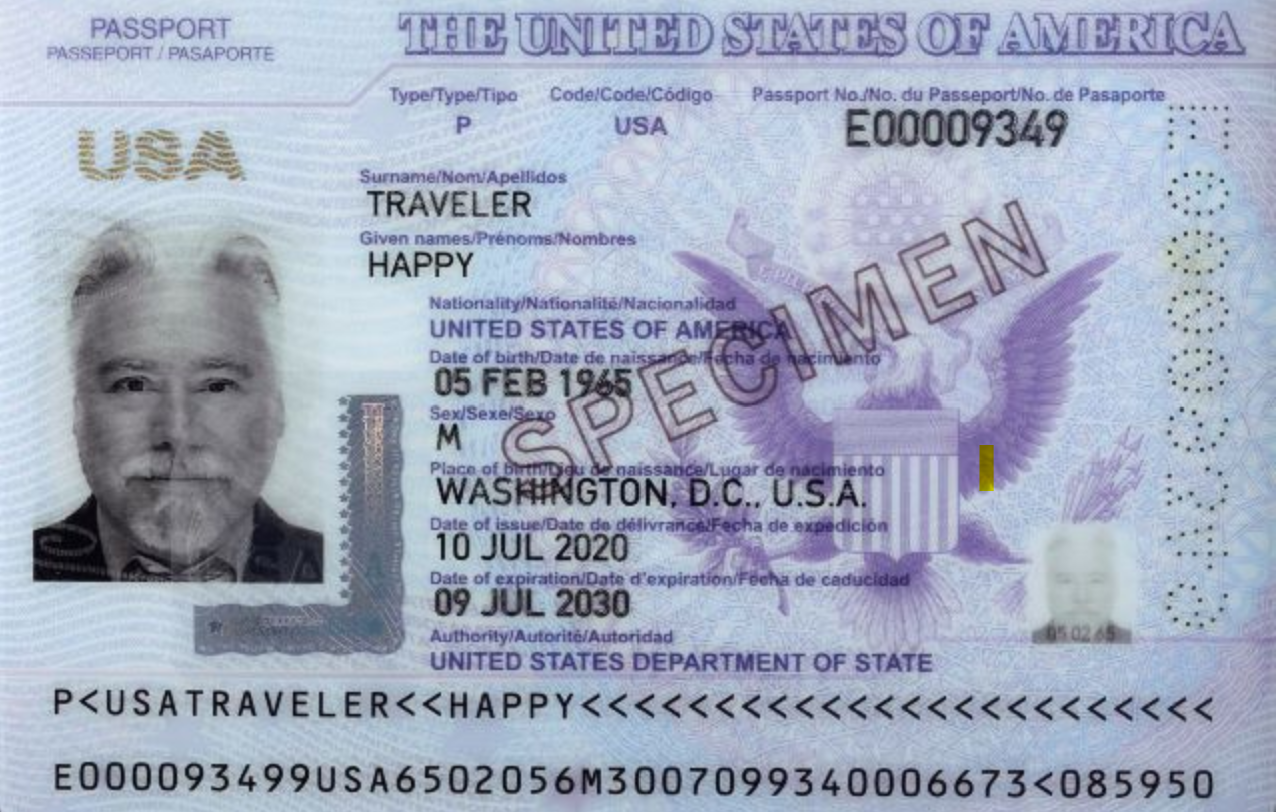
output result
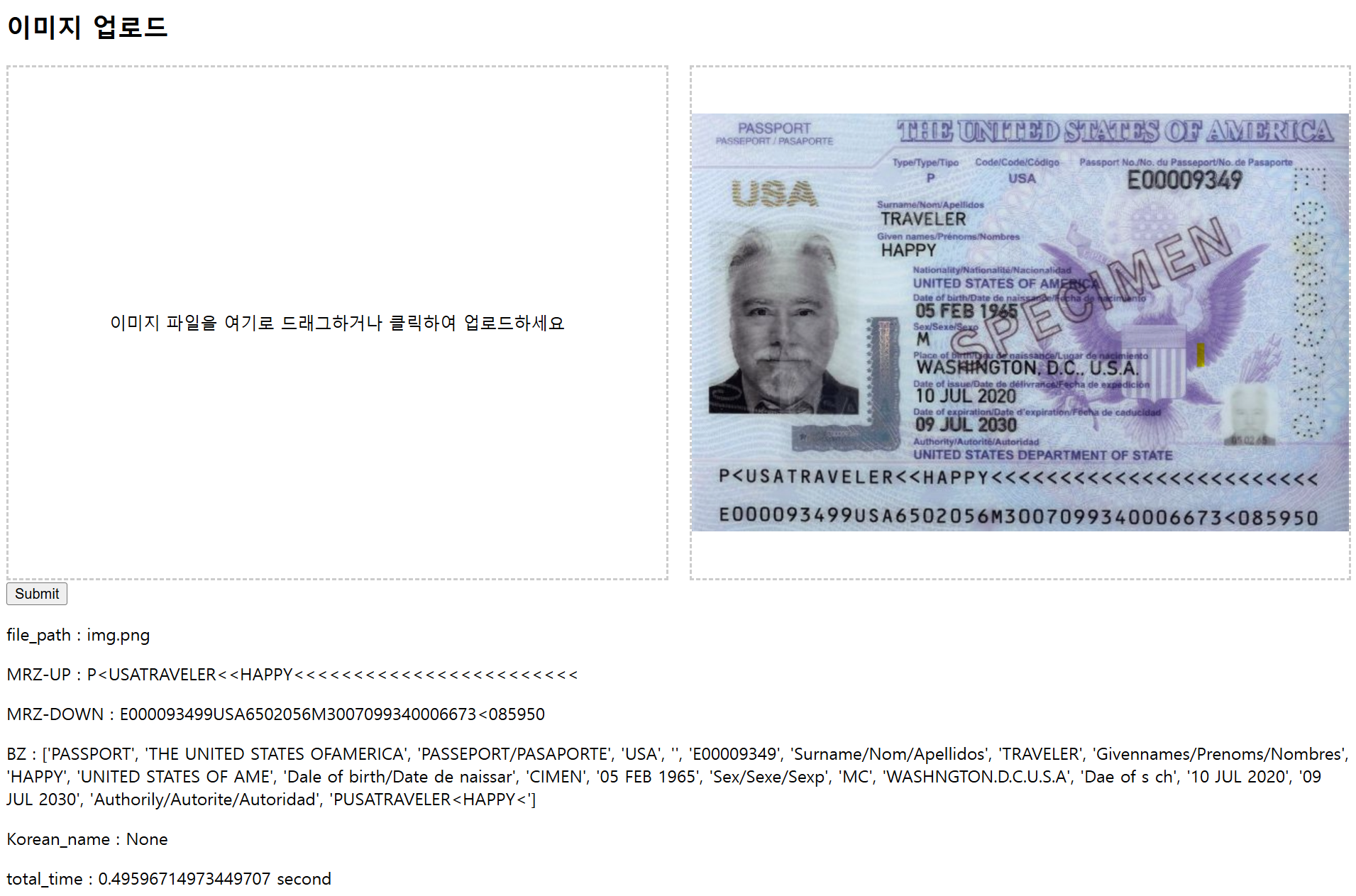
전체 추론 시간 0.49초 가량 소요됐다.
imput image2(3 x 1201 x 561)
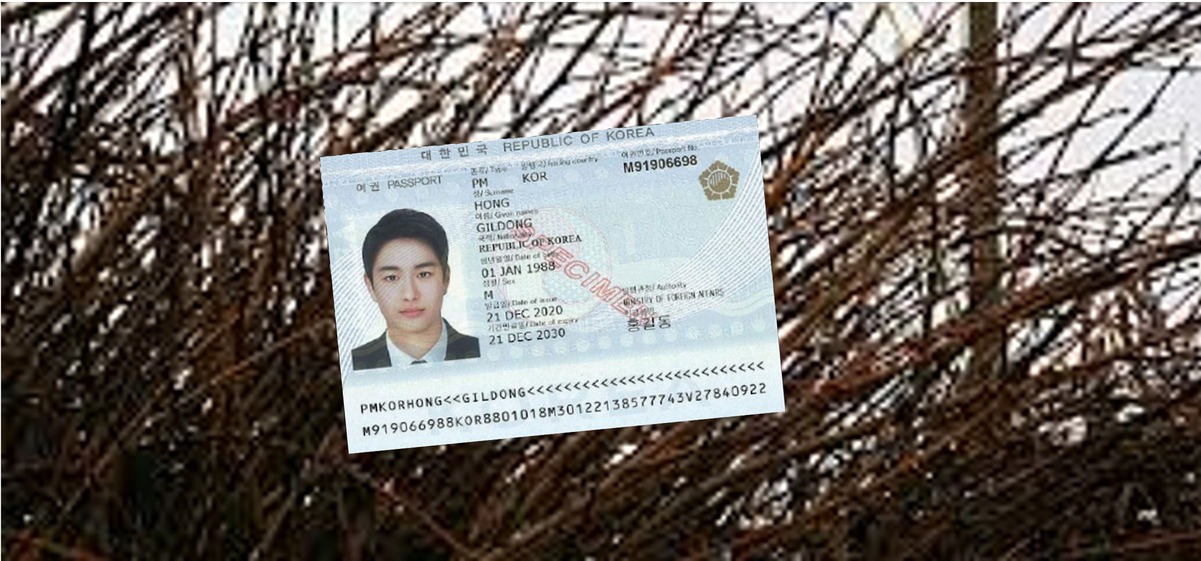
output result
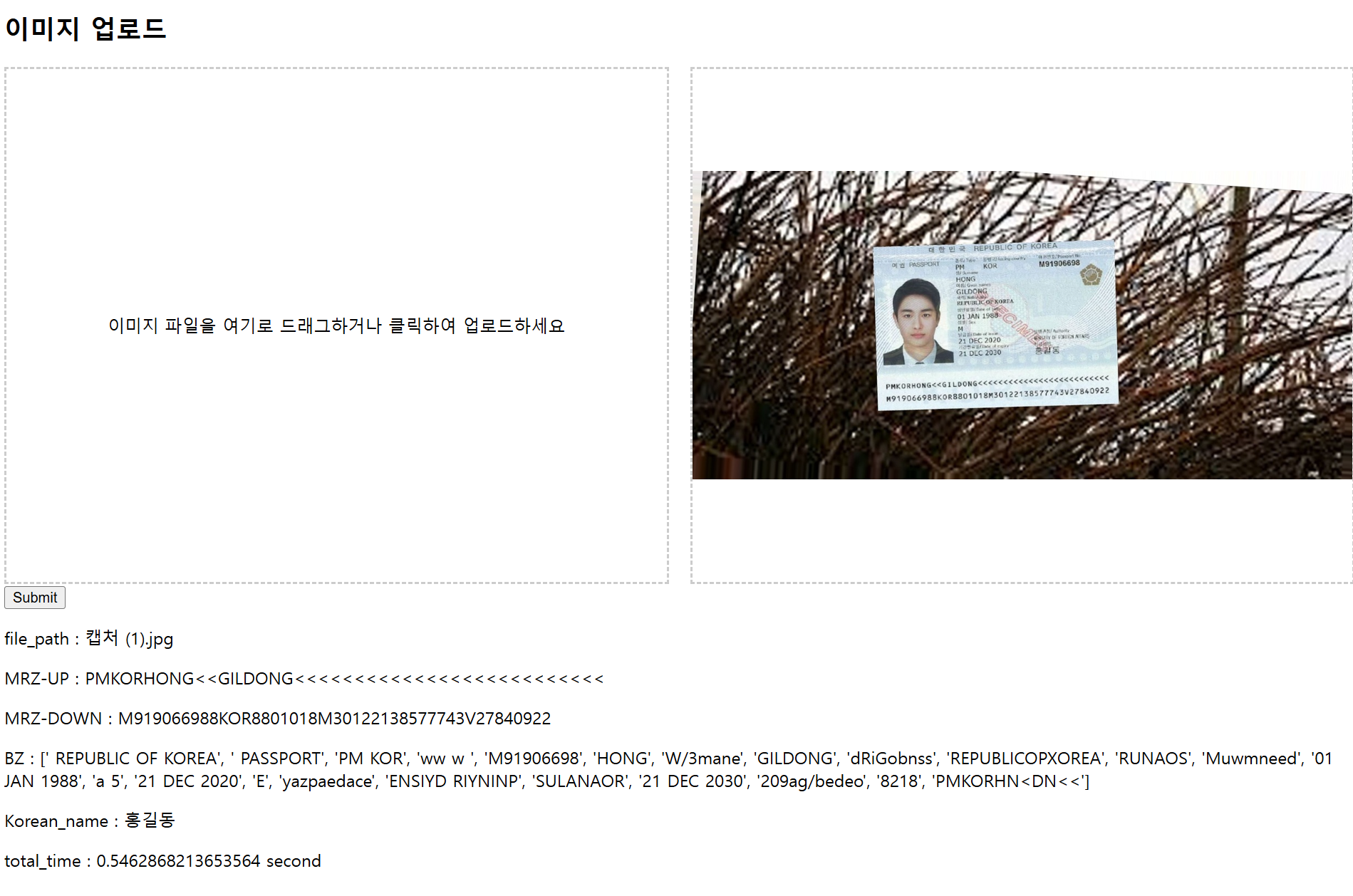
실제 여권 이미지로 하고 싶은데 신상정보 때문에 불가능하여 외교부에서 제공한 이미지로 했다..
현재 내가 tensorRT 모델로 구축한 서버에서 초당 20장의 이미지가 처리된다. 단순 모델 추론만 한다면 이미지 개당 0.1~0.3초도 안걸리지만 전처리 후처리단에서도 시간이 걸리기 때문에 0.4초 0.5초가량이 소요된다.
현재 내가 적용하고 있는 전/후처리는, 여권 skew correction, 여권에서 MRZ영역을 crop한 후 MRZ skew correction, MRZ checksum 등 여러가지가 있다.
따라서 전/후처리로 0.3초갸랑이 소요된다.
전처리 로직또한 파이썬으로 처음 구현했을 땐 1초가량 걸렸지만 c++로 이식하면서 성능이 많이 좋아졌다.
전/후처리도 방법도 쓰면 좋은데 쓰다보니 힘들어서 상세히 못적은게 많다!!
하지만 이만하면 대충의 가이드라인정돈 될 수 있을 것 같다.
끝!!