- nestjs의 cache-manager을 사용하기 위해 저장소로 redis를 사용하였다.
- 내장된 in-memory 저장소가 있었으나 데이터 사용량을 확인하고 싶어 redis-cloud를 사용하였다.
- MemCached에 비해 참고할 정보가 많기 때문에 빠르게 적용하기 위해서 정보가 많은 redis 사용하였다.
라이브러리 설치
npm install cache-manager
npm install --dev @types/cache-manager
npm install cache-manager-ioredis --save
npm install -g redis-cli
redis cloud 가입
https://redis.com/redis-enterprise-cloud/overview/
REDIS_HOST=
REDIS_PORT=
REDIS_USERNAME=
REDIS_PASSWORD=
REDIS_TTL=100
를 채웠다.
환경변수(env)를 사용하기 위해서 config 패키지를 설치
configModule, cacheModule 설정
- isGlobal: true 는 글로벌 Module 로 설정되어 어떤 모듈에서든지 ConfigService 를 inject 가능
다른 파일에서 환경 변수 로드하기
//app.module.ts
import { CacheModule } from '@nestjs/common';
import { ConfigModule, ConfigService } from '@nestjs/config';
import { CacheConfigService } from './config/cache.config.service';
...

@Module({
  imports: [
  	...
    ConfigModule.forRoot({ isGlobal: true }),
    CacheModule.registerAsync({
      isGlobal: true,
      imports: [ConfigModule],
      inject: [ConfigService],
      useClass: CacheConfigService,
    }),

	...
  ],
 ...
})
//cache.config.service.ts
import {
CacheModuleOptions,
CacheOptionsFactory,
Injectable,
} from '@nestjs/common';
import * as redisStore from 'cache-manager-ioredis';
import { ConfigService } from '@nestjs/config';
@Injectable()
export class CacheConfigService implements CacheOptionsFactory {
constructor(private readonly configService: ConfigService) {}
createCacheOptions(): CacheModuleOptions<Record<string, any>> {
return {
store: redisStore,
host: this.configService.get<string>('REDIS_HOST'),
port: this.configService.get<number>('REDIS_PORT'),
password: this.configService.get<string>('REDIS_PASSWORD'),
username: this.configService.get<string>('REDIS_USERNAME'),
ttl: this.configService.get<number>('REDIS_TTL'),
};
}
}캐시 전략
캐시되지 않은 데이터에 대한 요청
1 요청이 캐시 가능한 요청인지 확인
2 요청에 대해 캐시된 데이터를 확인 , 캐시된 데이터가 없으므로 컨트롤러/서비스 등 비즈니스 로직을 실행
3 비즈니스 로직 실행 이후, 응답할 데이터를 요청된 endpoint를 기준으로 캐싱 처리
캐시된 데이터에 대한 요청
1 요청이 캐시 가능한 요청인지 확인
2 요청 엔드포인트로 캐시된 데이터를 확인,미리 캐시된 데이터가 있는 경우 비즈니스 로직을 실행하지 않고 캐시된 데이터를 곧바로 응답
캐시 가져오기 - this.cacheManager.get(key);
캐시 생성 - his.cacheManager.set(key, value);
key값 지우기- this.cacheManager.del(key);
//share-products.service.ts
import { CACHE_MANAGER } from '@nestjs/common';
import { Repository } from 'typeorm';
import { Products } from './entities/share-products.entity';
import { Cache } from 'cache-manager';

@Injectable()
export class ProductsService {
  constructor(
    private readonly productsRepository: Repository<Products>,
    @Inject(CACHE_MANAGER) private readonly cacheManager: Cache
  ) {}

    async findAll() {
      const value = await this.cacheManager.get(`all-share-products`);

      if (!value) {
        const allProducts = await this.productsRepository.find({
          relations: ['productsTradeLocation', 'productsCategory'],
        });
        await this.cacheManager.set(`all-share-products`, allProducts);

        return allProducts;
      }
      return value;
    }

    async delete(id) {
      const result = await this.productsRepository.delete(id);
      await this.cacheManager.del(`all-share-products`);
      return result.affected > 0;
 	 }
   }
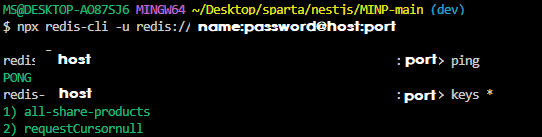
vscode 터미널에서 redis 연결하고 확인
redis-cli -u redis://name:password@host:port
Reference

개발자